


A professional-grade YouTube video and audio downloader with a beautiful interactive terminal interface.
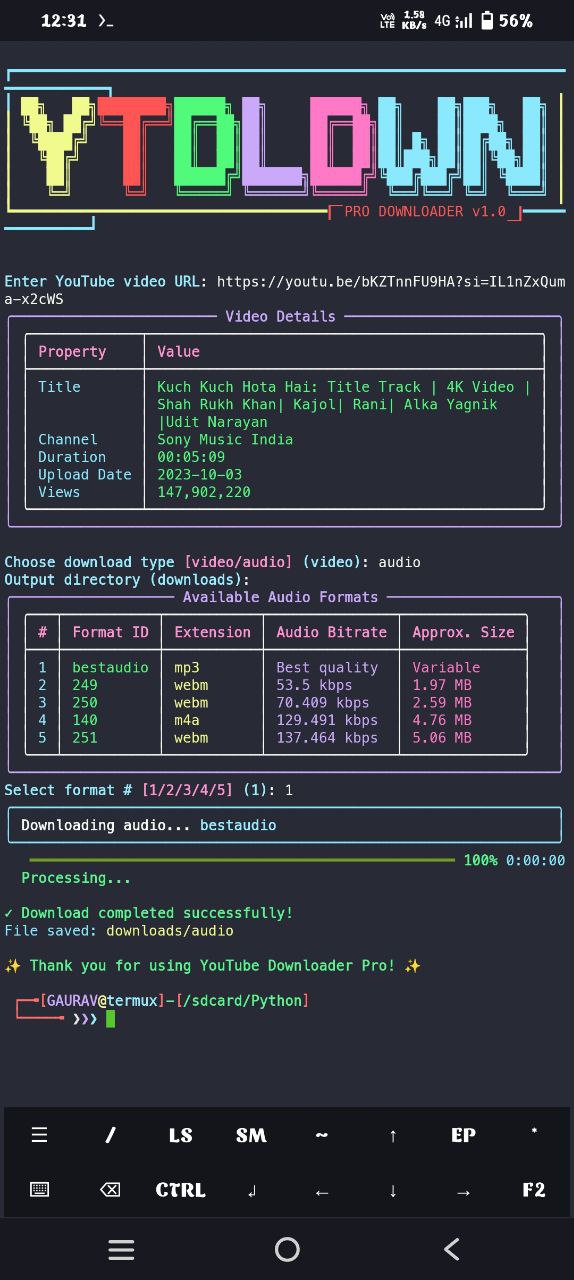
- Stunning Terminal UI - Colorful ASCII art banner and professional design
- High-Quality Downloads - Download videos in the best available quality
- Audio Extraction - Extract MP3 audio with embedded thumbnails and metadata
- Real-time Progress Tracking - Beautiful progress bars with time estimates
- Streamlined Experience - Simple interface with intuitive operation
- Multi-platform Support - Works on Windows, macOS, Linux, and Android (Termux)
- Continuous Operation - Download multiple videos in a single session
- Python 3.6 or higher
- FFmpeg (required for media conversion)
- Internet connection
The script requires the following Python libraries:
- yt-dlp
- rich
- colorama
-
Clone this repository:
git clone https://github.com/FakeScoutBot/TermuxYTDownloader.git cd TermuxYTDownloader -
Install required Python packages:
pip install yt-dlp rich colorama
-
Install FFmpeg:
- Windows: Download from ffmpeg.org and add to PATH
- macOS:
brew install ffmpeg - Ubuntu/Debian:
sudo apt install ffmpeg - Fedora:
sudo dnf install ffmpeg
-
Run the script:
python3 yt.py
-
Update packages and install Python:
pkg update
pkg upgrade
pkg install python
-
Install FFmpeg:
pkg install ffmpeg
-
Install required Python libraries:
pip install yt-dlp rich colorama
-
Download the script:
curl -o yt.py https://raw.githubusercontent.com/FakeScoutBot/TermuxYTDownloader/main/yt.py
-
Run the script:
python yt.py
Copy and paste this single command to get everything set up:
pkg update && pkg upgrade -y && pkg install python ffmpeg -y && pip install yt-dlp rich colorama && curl -o yt.py https://raw.githubusercontent.com/FakeScoutBot/TermuxYTDownloader/main/yt.py && python yt.py-
Run the script:
python yt.py
-
Enter a valid YouTube URL when prompted.
-
Choose to download video or audio:
- video: Downloads full video in best quality
- audio: Extracts audio in MP3 format with embedded thumbnail
-
Specify an output directory (defaults to "downloads").
-
After download completes, choose whether to download another file or exit.
-
"FFmpeg not found" error:
- Make sure FFmpeg is properly installed and available in your system PATH
-
Permission denied errors:
- Run the command with appropriate permissions
- For Termux, make sure storage permission is granted:
termux-setup-storage
-
SSL Certificate errors:
- Update your Python installation or install certificates package
-
Output directory issues:
- Make sure the specified output directory exists or can be created
- Check if you have write permissions for that location
This tool is for personal use only. Downloading copyrighted content might be illegal in your country. Users are responsible for their own actions and compliance with local laws.
This project is licensed under the MIT License - see the LICENSE file for details.