This is a simple convolutional neural network to classify images with PyTorch. The model has been designed to classify images using the Intel Image Classification dataset, which can be found in Kaggle here. This dataset contains around 25k images (around 14k images in the Training Set, 3k in Test Set and 7k in the Prediction Set) of size 150x150 distributed under 6 categories:
- Buildings → 0,
- Forest → 1,
- Glacier → 2,
- Mountain → 3,
- Sea → 4,
- Street → 5
To download the dataset you need to be registered on the Kaggle website. Once registered, you can download the dataset. Then download this repository and unzip the dataset file downloaded to the repository folder. At the end, in the repository folder you should have the next files and folders

When this is all done, just run the file train.py. You can change the hyperparameters modifying them in the code. After training the model, a new folder with the name set in the parameters will have been created.
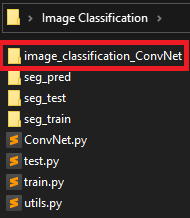
In this folder you will find the checkpoints (saved every 10 epochs), the images showing the loss and accuracy curves along the epochs, and the text files with the values of accuracy and loss at each epoch. In addition, the checkpoint with the highest accuracy is also saved. Take a look at the example folder in the repository to see the files.
IMPORTANT: the checkpoint files are not actually checkpoints, they are just empty files as an example of what you will find after training a model.

To test the model, just run the file test.py. You can select the checkpoint you want to make predictions setting the name in the parameters. After running this script, a new json file will have been created in which you can find the name of the images to be predicted along with the class predicted for each image.
