Written in Python
Why? Have you ever tried keeping track of household expenses in a shared spreadsheet? You walk out of the store, arms full of groceries, and while you’re loading everything up you’re supposed to type the expense into a cell…
That’s why.
- Share it with any Telegram user you want
- Categorize expenses easily
- Generate expenses reports easily too (They’re not the prettiest reports, but they get the job done)
- Save the expenses in a Google Sheet too (If you want to. Most likely you’ll open it the first time the report is created and then never look at it again. Totally up to you.)
- Telegram: As the interface
- Python: For the logic
- SQlite: For the DB
- Create a Telegram bot and export the Token
export TG_BOT_HOUSEHOLD_EXPENSES_TOKEN="your_telegram_token"- Set the values in the config file (more info in the Config Readme)
- Install Python dependencies (use of virtualenvs is highly recommended)
$ pip install -r requirements.txt- Run it
$ python household_expenses_bot.pyThe basic Telegram Commands are:
/start   #Start process
/cancel  #Cancel process
flowchart TD
    A -->|user is NOT allowed| A
    A[start] -->|user is allowed| B[Select Action]
    B --> C{ADD EXPENSE}
    B --> D{DELETE EXPENSE}
    B --> E{CREATE REPORT}
    E --> F[Report generated]
    D --> G{Select which ones to delete}
    G --> H[Expenses deleted]
    C --> I{Select Expense Type}
    I --> J{Input Expense Description}
    J --> K{Input Expense Amount}
    K --> L{Confirm Expense Info}
    L --> |No| A
    L --> |Yes|M[Expense inserted in DB]
    M --> |GDrive NOT Configured|A
    M --> |GDrive Configured|N[Expense inserted in Google Sheet]
    N --> A
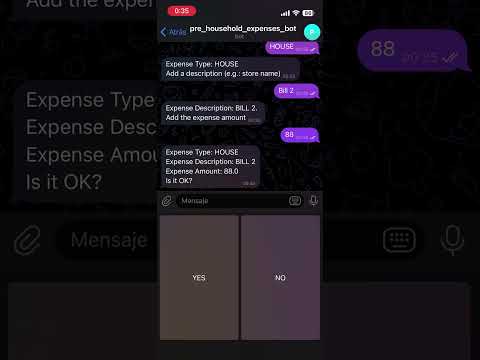
Yes, please!
Starting with report generation might be a good idea, since I’ve got the artistic sense of a chickpea. If it were up to me, CSS wouldn’t even exist, but I get that the generated report is uglier than the back of a fridge.
If you wouldn’t touch the report generation with someone else’s finger, or you want to suggest changes or fix a bug, same old story: fork it and PR.