Web Stack
Note: this page will be continuously changing as I discover new ways of doing things. Check my notes for a "changelog" on this page.
See my progress: SEADS Website
The goal of the web stack in this project is to be better than SHEMP. I learned a lot about what should be done and what should not be done from SHEMP. Specifically, I aimed to address several pitfalls from the beginning so they don't come back to hurt us later. I came up with a small list of specifications that should provide better expandability and less maintenance:
- Take advantage of Amazon's EC2 scalable compute capacity
- Use Django as the REST and web framework for fast development
- No PHP!
With these specifications, I narrowed down the remaining services to come up with a complete web server:

This stack relies heavily upon the tutorial by [Scott Rogowski]https://web.archive.org/web/20150219061607/http://scottrogowski.com/basic-nginx-django-server-setup/).
Why nginx? Simply put, Nginx is faster, newer, and more stable than Apache. Nginx was chosen to take care of the web traffic because of its high concurrency, high performance, and low memory usage. In addition, Nginx has the ability to handle static files, load balancing, and uWSGI support. All of these strengths will be used to make our web server expandable in the future if need be.
SHEMP settled on Apache to host its web server, which resulted in complications arising when only a couple users would want to connect at a time. With nginx, this issue is nonexistent.
More information about nginx is found here, where I was able to make the distinction between nginx and apache.
nginx requires a full stack hosting service. Two popular hosting services exist, gunicorn and uWSGI. I settled on uWSGI because it is faster than gunicorn, has immense configurations, and can communicate with nginx.
The website for uWSGI has stacks and stacks of information for the service.
Everything up to this point has been pure web server configuration and architecture. Now that the groundwork has been laid, it's time to choose a web application framework. Many frameworks exist, however I chose to use Django because of its fast development cycle and personal language bias. What Django will allow is abstracted "apps" that are plug-and-play modules for a website.
With all of these services combined, we have the beginnings of a full web stack. Here is what's happening at the highest level:
- Amazon hosts the EC2 server
- The EC2 server runs the Ubuntu OS
- Ubuntu runs the nginx web server
- nginx serves static files and relies on uWSGI to generate dynamic files
- uWSGI runs Django
One of the first addons I installed on our base Django installation was the Django REST Framework. This is a powerful tool that allows the creation of web APIs that are necessary to get the web server talking to devices and users. One of the best features of this framework is the ability to browse the API online and have most of the documentation created automatically. This lets the users of this API easy access to all the API information provided.
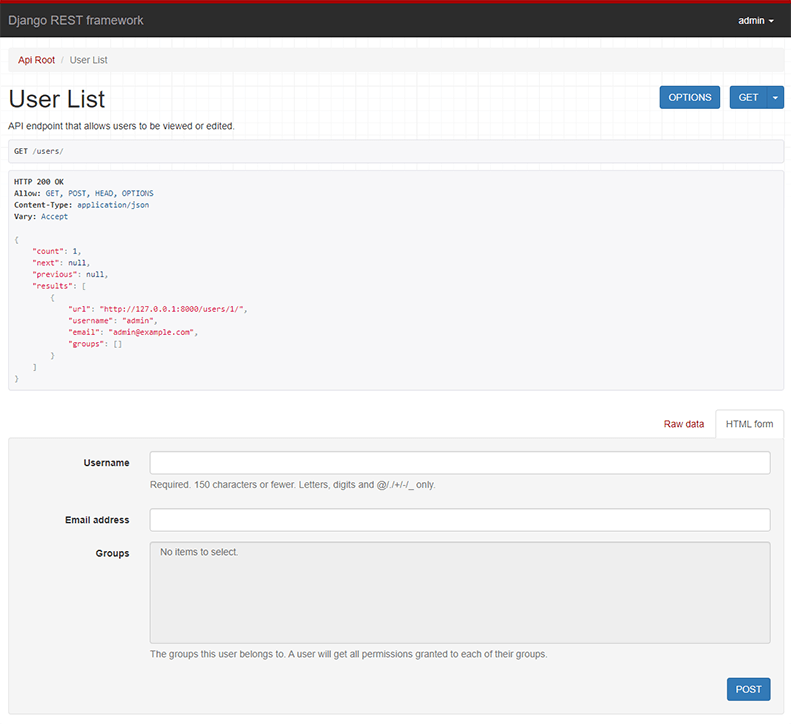
Another addon being used is Swagger UI which is a wrapper for the Django browsable API that gives better access and cleans up the interface. With this installed, end users can try out the API to see what kind of responses are generated and which endpoints should be used with what parameters.
The webserver is set up to automatically pull from the repository whenever code is pushed. This way the coding can be done from anywhere (including from the webserver) and changes will reflect instantly on the webserver.
However, if changes are made to the framework that require a reboot of uWSGI, then that command must be run manually. I'll look into automating that in the future.
This is configured by setting up a webhook with GitHub that will send a POST request to an endpoint configured on our server, /gitupdate/. With this in place, a POST request will be sent whenever the repository gets a push. Specific information as to how this is done is documented in Bryan's Notes.
Sometimes we need to clear our events in the database, and we want to do so without having to demolish the entire database file. I've an HTTP interface for doing this on the fly at seads.brabsmit.com/influxdel which will safely remove all events from the InfluxDB pertaining to the device specified.
Sometimes we want to avoid the API and add events directly to the database. I've set up an HTTP interface at seads.brabsmit.com/influxgen which will create random data pertaining to the configuration entered into the form.