
A native OPC UA browser/inspector in Rust. Connect to a server, browse the address space, inspect node attributes and references, and call methods.
Ships two front-ends sharing the same MVU core:
ua-tui— terminal UI built oncursive. Built by default. Currently the focus of development.ua-client— egui/eframe desktop GUI. Opt-in via theeguifeature; lagging behind the TUI feature-wise.
Both are built on async-opcua.
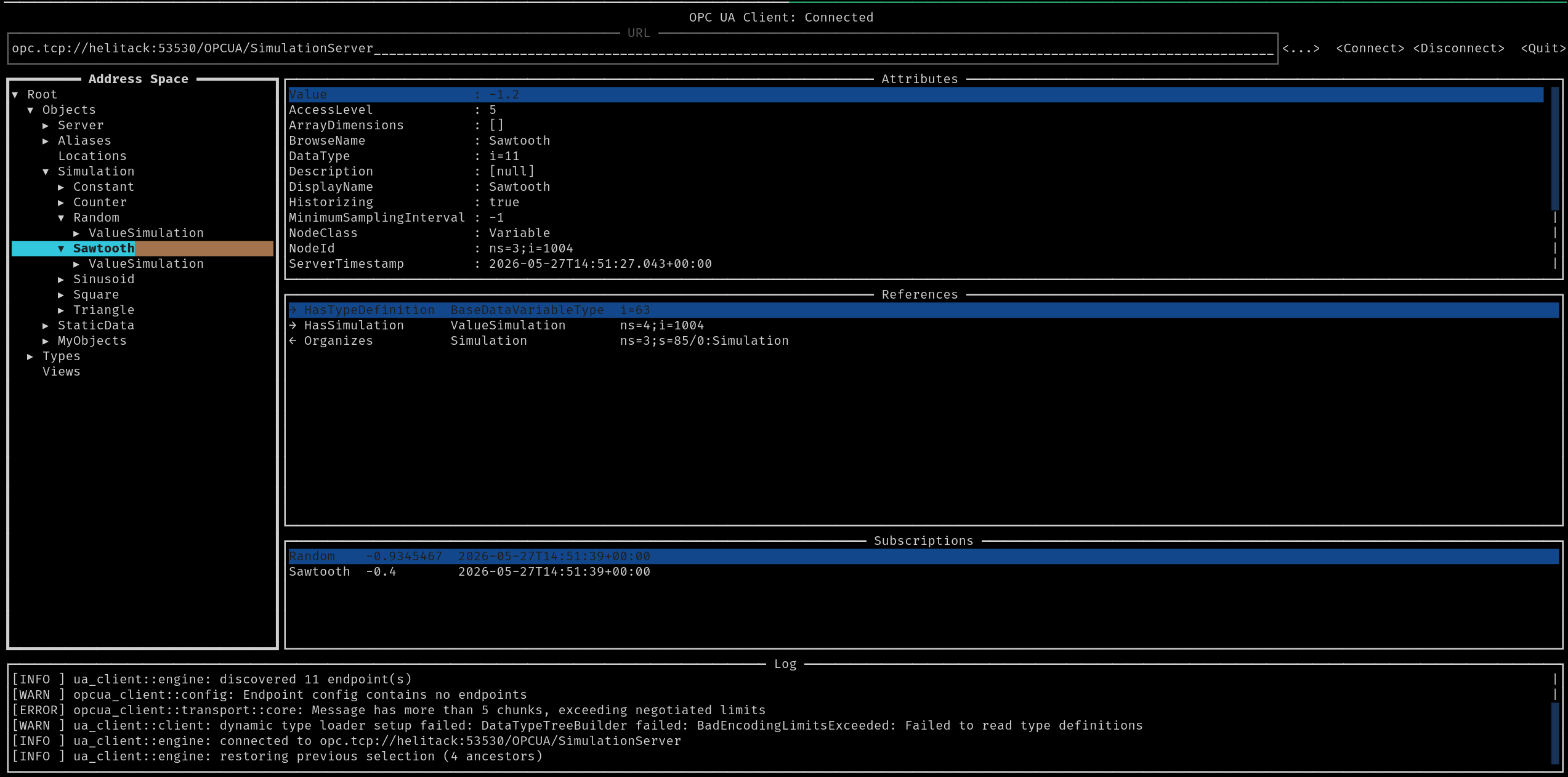
- Endpoint URL bar with Connect/Disconnect, history dropdown of past successful connections (persisted across restarts).
- Server endpoint picker (Connect → discovery dialog showing every advertised security policy / mode and supported identity tokens).
- Authentication: Anonymous, Username/Password, X.509 Certificate. Username and certificate/key paths are persisted per URL; passwords are not.
- Per-URL persistence of the last-used auth mode, security mode and credentials so each saved server reopens with its own settings.
- Address-space tree on the left with lazy-load expansion. Root is expanded automatically on connect; the last selected node per URL is restored on reconnect.
- Selected-node panels: identity (NodeId, BrowseName, DisplayName, NodeClass, Description), all attributes one-per-line with aligned
Name : valuecolumns, plus a References panel (forward + inverse, all reference types, aligned columns). - Method calls: press
con a Method node, the dialog readsInputArguments/OutputArguments, lets you fill scalar or comma-separated array inputs typed against the OPC UA data type, then renders the output values with their types. - Bottom log panel fed by
tracing.
The TUI is the only front-end built by default. The egui GUI is gated behind the egui feature so the default build stays lean.
# TUI (default)
cargo run --bin ua-tui

# egui GUI (opt-in)
cargo run --features egui --bin ua-client
Set RUST_LOG to control verbosity; the default is info,opcua=info,ua_client=debug.
To exercise it end-to-end, start the simple-server sample from async-opcua in another terminal and connect to opc.tcp://localhost:4855:
git clone https://github.com/freeopcua/async-opcua
cd async-opcua && cargo run -p async-opcua-simple-server
ua-tui [--url <URL>] [--path <PATH>]
--url opc.tcp://host:port— auto-connect on startup.--path /Objects/Server/ServerStatus— after connecting, navigate to this path. Segments may usens=N:Namefor non-default namespaces. Implies auto-connect. When combined with--url, overrides the URL's saved last-selected node.
Navigation:
| Key | Action |
|---|---|
Tab / Shift+Tab |
Move focus between widgets |
Arrows / j / k |
Move within the focused widget |
Enter |
Select node (and expand/collapse if it has children) |
Esc |
Clear current selection / close dialog |
r |
Refresh selected node |
q / Ctrl+C |
Quit (disconnects cleanly first) |
? |
In-app help |
Copy to clipboard (acts on the selected node):
| Key | Copies |
|---|---|
p |
Browse path (/Objects/Server) |
n |
NodeId (ns=1;i=1234) |
v |
Value attribute |
Method:
| Key | Action |
|---|---|
c |
Call selected Method (opens input dialog) |
Subscriptions (acts on the selected tree node):
| Key | Action |
|---|---|
s |
Subscribe — live value appears in the Subscriptions pane |
Shift+s |
Unsubscribe |
Attribute editing (acts on the row under the Attributes pane cursor):
| Key | Action |
|---|---|
e |
Open the edit dialog. Writable: Value, DisplayName, Description, BrowseName, Historizing, Executable, UserExecutable, IsAbstract, Symmetric, ContainsNoLoops, WriteMask, UserWriteMask, AccessLevelEx, AccessLevel, UserAccessLevel, EventNotifier, MinimumSamplingInterval, ValueRank. |
Resize (focus-dependent — moves the boundary of the focused pane):
| Key | Effect |
|---|---|
Alt+Left / Alt+Right |
Tree pane width |
Alt+Up / Alt+Down |
Attributes/References split (when attrs or refs is focused) |
Alt+Up / Alt+Down |
Log height (when log is focused) |
For any security policy other than None, the first connection attempt typically fails with BadSecurityChecksFailed / BadCertificateUntrusted. This is expected: the server has no reason to trust the freshly generated client certificate yet.
- Run the client once. A self-signed client keypair is created at
pki/own/cert.der+pki/private/private.pemnext to the working directory. - Try Connect with the desired encrypted endpoint. It will fail.
- Find your client cert in the server's "rejected certificates" folder (server-specific path — e.g. for Prosys UA Simulation Server it's
<server>/USERS_PKI/rejected/certs/) and move it into the corresponding "trusted certs" folder. - Connect again — it should succeed.
The log panel prints the cert path on every encrypted connection attempt and a hint when the server rejects it.
Insecure default: server-certificate checks (time validity, hostname, application-URI) are disabled by default so that real-world certificates (Beckhoff TwinCAT, NAT'd deployments, etc.) connect on first try. A warning is logged on startup. Acceptable on trusted networks only.
Working in ua-tui: browse, read attributes / references, Anonymous / Username / X.509 identity tokens, Method.Call, encrypted (Sign and SignAndEncrypt) endpoints, data-change subscriptions (live Subscriptions pane), attribute writes for the built-in primitive types.
Not yet implemented: event subscriptions, ArrayDimensions / role-permission edits, custom-type editing for method inputs and Value writes that aren't built-in primitives.
The ua-client (egui) front-end is lagging behind the TUI; build it with --features egui if you want to try it.
MIT — see LICENSE.