
Write an ATS-friendly Resume in Markdown. Available for anyone, Optimized for Dev.
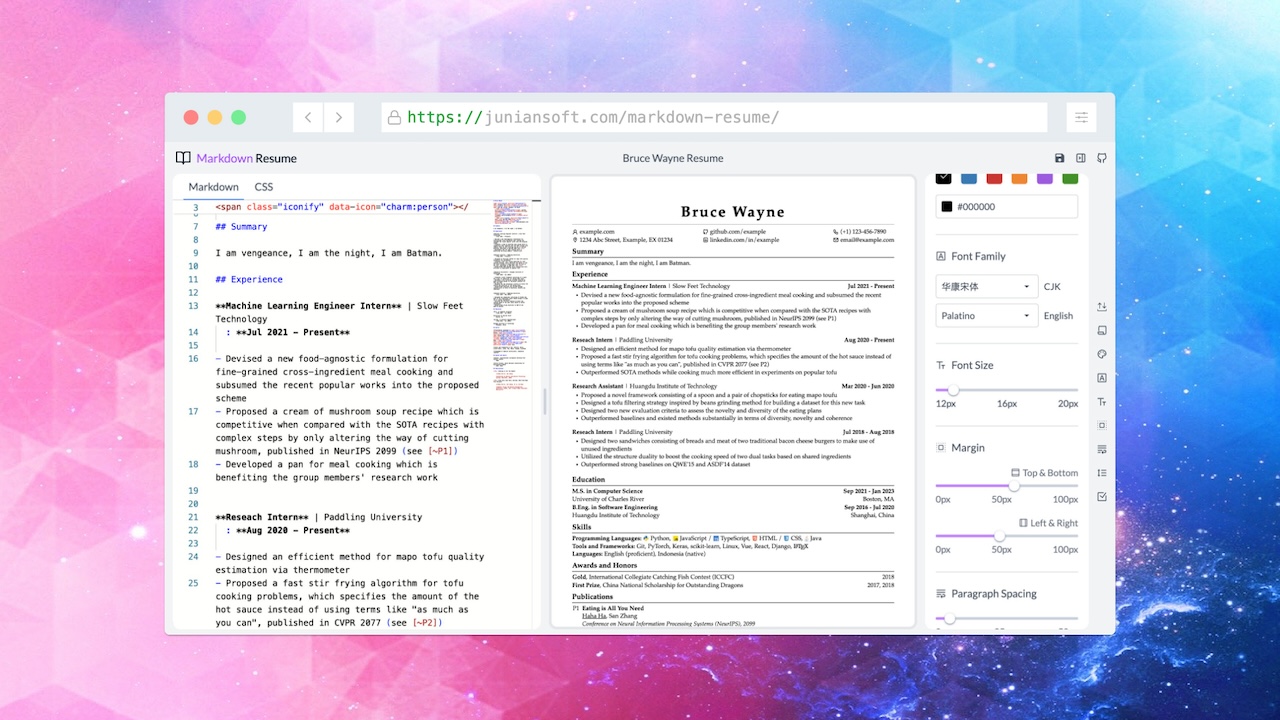
A fork of "Markdown-Resume". See the original work: junian/markdown-resume. Markdown-Resume is in turn a fork of "Oh My CV!": ohmycv.app.
This edition is tuned for self-hosting with Docker (and Dokploy) instead of GitHub Pages. It adds:
- ✅ Dockerfile + Nginx SPA routing (client routes work on refresh)
- ✅ Optional env vars for custom domains / subpaths
- ✅ Dokploy-friendly deploy flow
- ✅ README docs for self-hosting
The image builds to a static site and serves with Nginx. Defaults work with zero config.
# defaults: base=/ , site url=http://localhost:3000 , name="Markdown Resume"
docker build -t markdown-resume .
docker run -d -p 80:80 markdown-resume

# optional: set your domain or subpath
docker build -t markdown-resume \
  --build-arg NUXT_PUBLIC_SITE_URL=https://resume.example.com \
  --build-arg NUXT_PUBLIC_BASE_URL=/ \
--build-arg NUXT_PUBLIC_SITE_NAME="Your Name" .- In Dokploy UI: Applications → New Application
- Provider: GitHub → Select your fork/repo
- Branch:
master - Build Type: Dockerfile
- Dockerfile path:
./Dockerfile
- Do NOT add any port mappings — Traefik routes internally via Docker overlay network
NUXT_PUBLIC_SITE_URL=https://yourdomain.com
NUXT_PUBLIC_BASE_URL=/
NUXT_PUBLIC_SITE_NAME=Markdown Resume- Go to Domains tab → Add your domain
- Enable HTTPS (Let's Encrypt)
- Critical: In Advanced Traefik config, update the service URL:
http:
  services:
    your-service-name:
      loadBalancer:
        servers:
          - url: http://tasks.your-service-name:80
Note the tasks. prefix—required for Docker Swarm service discovery when Traefik uses dnsrr endpoint mode.
504 Gateway Timeout:
- Ensure no published ports configured (Traefik routes internally)
- Verify Traefik config uses
tasks.prefix in service URL - Check both services on
dokploy-network:docker service inspect your-service-name --format '{{json .Spec.TaskTemplate.Networks}}'
DNS Resolution Issues:
- Use
tasks.DNS prefix in Traefik config (see Domain Setup above)
📖 Full Deployment Guide with step-by-step instructions and troubleshooting.
Highly recommend using Chromium-based browsers, e.g., Chrome and Microsoft Edge.
- Write your resume in Markdown and preview it in real-time, it's smooth!
- It works offline (PWA)
- Export to A4 and US Letter size PDFs
- Customize page margins, theme colors, line heights, fonts, etc.
- Pick any fonts from Google Fonts
- Add icons easily via Iconify (search for icons on Icônes)
- Tex support (KaTeX)
- Cross-reference (would be useful for an academic CV)
- Case correction (e.g.
Github->GitHub) - Add line breaks (
\\[10px]) or start a new page (\newpage) just like in LaTeX - Break pages automatically
- Customize CSS
- Manage multiple resumes
- Your data in your hands:
- Data are saved locally within your browser, see the localForage docs for details
- Open-source static website hosted on Github Pages, which doesn't (have the ability to) collect your data
- No user tracking, no ads
- Dark mode
This app is designed to work behind any HTTP reverse proxy (Traefik, Nginx Proxy Manager, Caddy, HAProxy, etc.).
Container Design:
- Listens on port 80 (HTTP only—reverse proxy handles HTTPS termination)
- Serves static SPA files with service worker
- Trusts
X-Forwarded-ForandX-Forwarded-Protoheaders from proxies - No forced redirects—safe for any deployment architecture
How to Deploy:
- Configure your reverse proxy to:
- Terminate HTTPS at the proxy layer
- Forward HTTP traffic to container port 80
- Pass
X-Forwarded-Proto: httpsheader (standard for all major proxies)
- Set environment variables if using a custom domain or subpath:
NUXT_PUBLIC_SITE_URL=https://yourdomain.comNUXT_PUBLIC_BASE_URL=/(or/resume/for subpaths)
Example with Dokploy:
- Create a new application and select this GitHub repo
- Choose Dockerfile as the build method
- In the domain settings, enable HTTPS (Dokploy's Traefik will handle it automatically)
- Deploy—no additional configuration needed
Example with Docker Compose + Traefik:
services:
  markdown-resume:
    image: your-registry/markdown-resume:latest
    environment:
      NUXT_PUBLIC_SITE_URL: https://resume.example.com
      NUXT_PUBLIC_BASE_URL: /
    networks:
      - traefik
    labels:
      - traefik.enable=true
      - traefik.http.routers.resume.rule=Host(`resume.example.com`)
      - traefik.http.routers.resume.entrypoints=websecure
      - traefik.http.routers.resume.tls.certresolver=letsencrypt
      - traefik.http.services.resume.loadbalancer.server.port=80

networks:
  traefik:
external: trueIt's built on Nuxt 3, with the power of Vue 3, Vite, Zag, and UnoCSS.
Clone the repo and install dependencies:
pnpm installBuild some packages:
pnpm build:pkgTo enable picking fonts from Google Fonts (optional), generate a Google Fonts Developer API Key. Then, copy site/.env.example to site/.env and set:
NUXT_PUBLIC_GOOGLE_FONTS_KEY="YOUR_API_KEY"Start developing / building the site:
pnpm dev
pnpm buildIf this project saved you time, consider supporting it:
- Ko-fi
- GitHub Sponsors (button on the repo)
- The original work: Renovamen/oh-my-cv
- billryan/resume
- junian/markdown-resume
This project is licensed under MIT license.
Made with ☕ by Junian.dev.