openHistorian v2.6

345865f 
Note: This is not the latest version.
Official stable release of version 2.6 of the openHistorian (v2.6.30).
NOTE: if you are upgrading from a prior version of the openHistorian, you must migrate your existing configuration to use the latest database schema when the Configuration Setup Utility is run after the installation completes - this version includes schema updates.
New Synchrophasor Input Wizard with Automated Device Calculations
This new version of the openHistorian includes a new web-based synchrophasor device wizard that provides the ability to create custom calculations from a template:

User defined calculations can be added to a .TagTemplate file and be applied to new or existing devices and can be reapplied if the template is updated. See included Full Checkout Calculations for an example.
New Cloud Data Push Adapter
As a new feature, this release includes an adapter (the first of many) to enable the openHistorian to push JSON-formatted data directly to the cloud. This first adapter, called AzureEventHubOutputAdapter, will push streaming time-series data (like synchrophasor data) to an Azure Event Hub.
Updated Grafana with Included SCADAvis Synoptic Panel
Also updated in version 2.6 of the openHistorian is the included instance of Grafana, now at version 6.2.5. The frequently used piechart and clock plugin panels are now automatically included as part of the openHistorian install. Additionally, the SCADAvis Synoptic Panel has been included to allow animated advanced Scalable Vector Graphics (svg) screens to be created in Grafana -- such as seen in the example below:
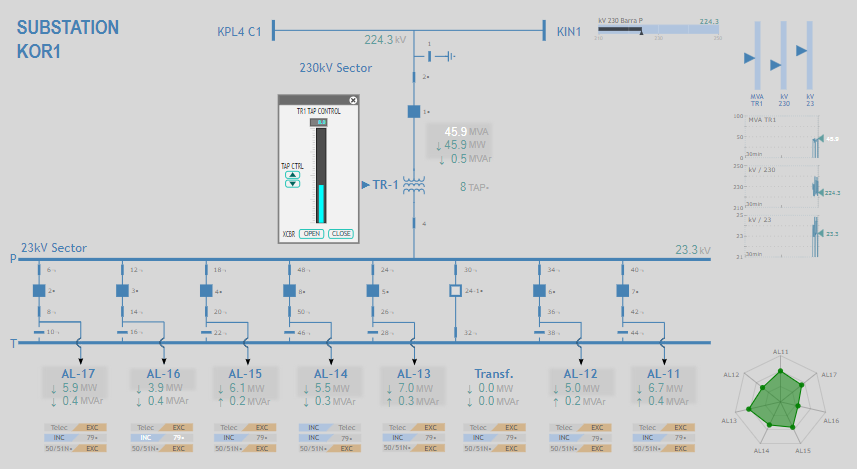
To create new screens for this panel, see the HTML5 Synoptic Toolkit. This tool can create new svg screens that can be integrated into Grafana with data queried from the openHistorian and other sources.
Deployments of the openHistorian with hosted Grafana integration include pre-configured data sources for the primary data and statistics archives named OHDATA and OHSTAT respectively. The latest versions of the openHistorian and OSIsoft-PI Grafana data source are included, as well as a default System Status dashboard.
Enhanced Point Tag Naming Convention
This version of the openHistorian includes an updated default tag naming convention for new measurements. If you are upgrading from a prior version, you can manually update your PointTagNameExpression in the systemSettings sections of the openHistorian.exe.config and openHistorianManager.exe.config files using the included XML Configuration Editor tool.
The new expression is as follows:
[?{CompanyAcronym}!=[{CompanyAcronym}_]]{DeviceAcronym}[?{SignalType.Source}=Phasor[-eval{'{PhasorLabel}'.ToUpper().Replace(' ','_')}[?{BaseKV}>0[_{BaseKV}]][?{SignalType.Suffix}=PA[:ANG]][?{SignalType.Suffix}=PM[:MAG]]]][?{SignalType.Source}!=Phasor[:{SignalType.Acronym}[?{SignalIndex}!=-1[{SignalIndex}]]]]
This new expression will create tag names like the following:
- TESTDEVICE-500_KV_BUS1:ANG
- TESTDEVICE-500_KV_BUS1:MAG
- TESTDEVICE-LAGOON_CREEK:ANG
- TESTDEVICE-LAGOON_CREEK:MAG
- TESTDEVICE:FREQ
You can force all tag names to be updated using the new expression by setting the
Argumentsfield of thePhasorDataSourceValidationrecord of theDataOperationtable torenameAllPointTags=trueand issuing aReloadConfigcommand from the openHistorian console.
Note: PMU Connection Tester is installed separately:
https://github.com/GridProtectionAlliance/PMUConnectionTester/releases
Installation: The following YouTube video walks through the process of installing and configuring the openHistorian and covers the process of building custom displays from openHistorian data using Grafana visualizations.
New Updates and Improvements
- This version includes the BETA version of STTP: https://github.com/sttp
- Added Modbus Protocol to SQL scripts.
- Fixed up protocols in initial data set scripts.
- Fixed race condition between HandleConnectOnDemandAdapters and adapter initialization.
- Fix DataPublisher subscribe requests to propagate input measurement changes to the routing tables.
- Fixed event wiring in AllAdaptersCollection.
- Fixed casing on protocol definition for DNP3.
- Fixed protocol ID of the test device in the sample data set.
- Fixed NULL comparisons in SQL trigger for tracking changes to Device records.
- Updated the schema version of the databases to reflect the change to the device update trigger.
- Modified order of operations in DataPublisher.HandleSubscribeRequest to fix the issue of subscribers not receiving cached measurements upon subscription.
- Added ManageCertificate command to ServiceHostBase.
- Updated SerializedSchema.bin using refactored Schema class.
- Added code to detach from the StatisticsEngine.Calculated event in DataSubscriber.cs.
- Fixed parameter parsing for PublishInterval in unsynchronized data subscriber
- Added ping console command to servicehostbase.
- Updated ping command to split server setting to remove the port.
- Added code to handle connect on demand scenarios for DataSubscriber.
- Fixed temporal support in DataSubscriber.
- Updated gateway style statistics to fall-back on reflection in source object in case properties are available.
- Modified the sentinel value of objects derived from the AnalogValueBase and DigitalValueBase classes.
- Added validation to the routine that updates the connection string after the user updates a connection string parameter.
- Fixed design-time errors in PagedViewModelBase.
- Updated the status flag reference in the RealTimeMeasurementUserControl to match the status flag reference in InputStatusMonitorUserControl.
- Added IEEE C37.118.2 tab to the status flag reference.
- Fixed input wizard to apply the selected PDC vendor device ID to the concentrator on save.
- Added validation for the chart refresh interval to ensure that the Manger doesn't crash when the value is misconfigured.
- Fixed Latitude and Longitude fields so that trailing zeros don't cause validation errors on the Device page.
- Added line-to-line option under Phase to the Manage Phasor page of the Manager.
- Fixed up startup operation that fills in missing protocols.
- Removed stats from device outputs - although statistics may be associated with device, it will not be the adapter producing them...
- Added more messaging around ToogleBadData testing function and restricted command to admins and editors.
- Updated automated output measurement creation for power calculations to use HistorianID from associated voltage.
- Updated default lag-time of PowerMultiCalculatorAdapter to 5 seconds.
- Fixed the metadata import adapter to use the parent acronym when using source prefix to name child devices.