这个仓库用于提供Sublime Text SSH-Panel包的必要依赖文件以及详细说明
可使用在Windows x86、Windows amd64、Linux amd64、MacOS amd64、MacOS arm64,对于其他OS或平台你可能需要自行寻找或编译相关文件
├── py38_linux_x64 (sublime text 4+)
│	 └── dist-packages
│		├── bcrypt (3.2.0)
│		├── cffi (1.15.0)
│		├── six (1.16.0)
│		├── cryptography (36.0.1)
│		├── nacl (1.5.0)
│		└── paramiko (3.5.0)
├── py38_windows_x64 (sublime text 4+)
|	├── dist-packages
|	│	 ├── bcrypt (4.2.0)
|	│	 ├── cffi (1.17.0)
|	│	 ├── cryptography (43.0.0)
|	│	 ├── nacl (1.5.0)
|	│	 ├── paramiko (3.5.0)
|	│	 └── pycparser (2.22)
|	└── python3.dll (python3.8.6/[MSC v.1927 64 bit (AMD64)] on win32)
├─── py38_osx_x64 (sublime tet 4+)
|	 └── dist-packages
|		 ├── bcrypt (4.2.0)
|		 ├── cryptography (43.0.0)
|		 ├── cffi (1.17.0)
|		 ├── nacl (1.5.0)
|		 ├── paramiko (3.5.0)
|		 └── pycparser (2.22)
├─── py38_osx_arm64 (sublime tet 4+)
|	 └── dist-packages
|		 ├── bcrypt (4.2.0)
|		 ├── cryptography (43.0.0)
|		 ├── cffi (1.17.0)
|		 ├── nacl (1.5.0)
|		 ├── paramiko (3.5.0)
|		 └── pycparser (2.22)
├── py33_windows_x64 (sublime text 3211)
│	 └── dist-packages
│		├── asn1crypto (1.5.1)
│		├── bcrypt (3.1.3)
│		├── cffi (1.11.5)
│		├── Crypto (2.6.1)
│		├── ecdsa (0.18.0)
│		├── nacl (1.1.2)
│		├── enum (0.4.7)
│		├── six (1.16.0)
│		└── paramiko (1.18.5)
└── py33_windows_x32 (sublime text 3211)
	 └── dist-packages
		├── ecdsa (0.18.0)
		├── paramiko (0.18.5)
		├── six (0.16.0)
		└── Crypto (2.6.1)
- 安装libffi
# if Debian / Ubuntu
apt-get install libffi-dev
# if Fedora / CentOS / RHEL
sudo yum install libffi-devel
# if Arch / Manjaro `untest`
sudo pacman -S libffi
# if Opensuse `untest`
sudo zypper install libffi-devel# you can install from Homebrew
brew install libffi
# Since brew does not add a default search path for downloaded files, a link is required
# link libffi.dylib to /usr/local/lib/
sudo ln -s $(brew --prefix libffi)/lib/libffi.dylib /usr/local/lib/libffi.dylib
# or link to ~/lib
# mkdir -p ~/lib
# ln -s $(brew --prefix libffi)/lib/libffi.dylib ~/lib/libffi.dylib由于受到
MacOS SIP机制的影响,可能无法在诸如/usr/lib这样的路径创建连接,为了让libffi.dylib能够正确被sublime text加载,还可以使用install_name_tool对@rapth进行替换,如果上述方法无效,请使用如下方法:
# step 1
# install libffi from Homebrew
brew install libffi
ls -al $(brew --prefix libffi)/lib/libffi.8.dylib # check install
# install Xcode Command Line Tools
xcode-select --install
xcode-select -p # check install
install_name_tool -help

# step 2
# running ssh_panel_install_dependencies command in sublime_text console

# step 3
# Locate the directory where _cffi_backend.cpython-38-darwin.so is located and enter it
cd "~/Library/Application Support/Sublime Text"
cd $(dirname $(find . -name "_cffi_backend.cpython-38-darwin.so" | head -1))

# step 4
cp $(brew --prefix libffi)/lib/libffi.8.dylib .
install_name_tool -change @rpath/libffi.8.dylib @loader_path/libffi.8.dylib ./_cffi_backend.cpython-38-darwin.so

# step 5
# restart sublime text- 在安装完
SSH-Panel后在console中使用window.run_command('ssh_panel_install_dependencies')命令进行自动安装 - 重启sublime text
- 将项目下载到本地
- 根据您的系统平台和sublime text版本选择需要的文件复制到sublime text的相应加载路径中
- 重启sublime text
- 将python3.dll复制到sublime text安装目录下 (only sublime text 4+)
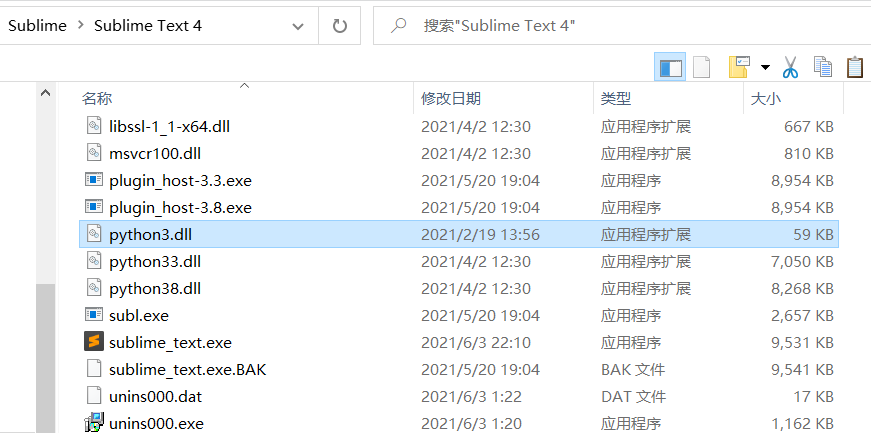
- 将python依赖库放入sublime text用户的*Lib\python38(or python3.3)*路径下


- 将python依赖库放入sublime text用户的*Lib\python38(or python3.3)*路径下

