This repositories is used to provide necessary dependency files and detailed descriptions of sublime text SSH panel package
It can be used in Windows x86 Windows amd64 Linux amd64 MacOS amd64 MacOS arm64. For other OS or platforms, you may need to find or compile relevant files by yourself
此处中文文档
├── py38_linux_x64 (sublime text 4+)
│	 └── dist-packages
│		├── bcrypt (3.2.0)
│		├── cffi (1.15.0)
│		├── six (1.16.0)
│		├── cryptography (36.0.1)
│		├── nacl (1.5.0)
│		└── paramiko (3.5.0)
├── py38_windows_x64 (sublime text 4+)
|	├── dist-packages
|	│	 ├── bcrypt (4.2.0)
|	│	 ├── cffi (1.17.0)
|	│	 ├── cryptography (43.0.0)
|	│	 ├── nacl (1.5.0)
|	│	 ├── paramiko (3.5.0)
|	│	 └── pycparser (2.22)
|	└── python3.dll (python3.8.6/[MSC v.1927 64 bit (AMD64)] on win32)
├─── py38_osx_x64 (sublime tet 4+)
|	 └── dist-packages
|		 ├── bcrypt (4.2.0)
|		 ├── cryptography (43.0.0)
|		 ├── cffi (1.17.0)
|		 ├── nacl (1.5.0)
|		 ├── paramiko (3.5.0)
|		 └── pycparser (2.22)
├─── py38_osx_arm64 (sublime tet 4+)
|	 └── dist-packages
|		 ├── bcrypt (4.2.0)
|		 ├── cryptography (43.0.0)
|		 ├── cffi (1.17.0)
|		 ├── nacl (1.5.0)
|		 ├── paramiko (3.5.0)
|		 └── pycparser (2.22)
├── py33_windows_x64 (sublime text 3211)
│	 └── dist-packages
│		├── asn1crypto (1.5.1)
│		├── bcrypt (3.1.3)
│		├── cffi (1.11.5)
│		├── Crypto (2.6.1)
│		├── ecdsa (0.18.0)
│		├── nacl (1.1.2)
│		├── enum (0.4.7)
│		├── six (1.16.0)
│		└── paramiko (1.18.5)
└── py33_windows_x32 (sublime text 3211)
	 └── dist-packages
		├── ecdsa (0.18.0)
		├── paramiko (0.18.5)
		├── six (0.16.0)
		└── Crypto (2.6.1)
- install libffi
# if Debian / Ubuntu
apt-get install libffi-dev
# if Fedora / CentOS / RHEL
sudo yum install libffi-devel
# if Arch / Manjaro `untest`
sudo pacman -S libffi
# if Opensuse `untest`
sudo zypper install libffi-devel# you can install from Homebrew
brew install libffi
# Since brew does not add a default search path for downloaded files, a link is required
# link libffi.dylib to /usr/local/lib/
sudo ln -s $(brew --prefix libffi)/lib/libffi.dylib /usr/local/lib/libffi.dylib
# or link to ~/lib
# mkdir -p ~/lib
# ln -s $(brew --prefix libffi)/lib/libffi.dylib ~/lib/libffi.dylibDue to the influence of the
MacOS SIPmechanism, it may not be possible to create a link in paths such as/usr/lib. In order to enable libffi.dylib to be loaded correctly by Sublime Text, you can also useinstall_name_toolto replace@rapth, if the above methods fail to work ,please try the following method:
# step 1
# install libffi from Homebrew
brew install libffi
ls -al $(brew --prefix libffi)/lib/libffi.8.dylib # check install
# install Xcode Command Line Tools
xcode-select --install
xcode-select -p # check install
install_name_tool -help

# step 2
# running ssh_panel_install_dependencies command in sublime_text console

# step 3
# Locate the directory where _cffi_backend.cpython-38-darwin.so is located and enter it
cd "~/Library/Application Support/Sublime Text"
cd $(dirname $(find . -name "_cffi_backend.cpython-38-darwin.so" | head -1))

# step 4
cp $(brew --prefix libffi)/lib/libffi.8.dylib .
install_name_tool -change @rpath/libffi.8.dylib @loader_path/libffi.8.dylib ./_cffi_backend.cpython-38-darwin.so

# step 5
# restart sublime text- After install
SSH-Panel,usewindow.run_command('ssh_panel_install_dependencies')in console - Restart sublime text
- Download the project to local
- Select the required file and copy it to the corresponding loading path of sublime text based on your system platform and sublime text version
- Restart sublime text
- copy python3.dll to sublime text installation directory (only sublime text 4+)
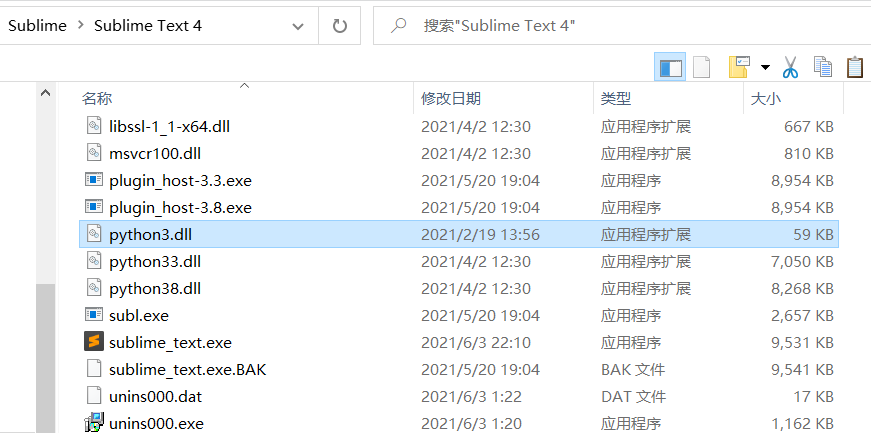
- copy python dependency library to Lib\python38 of user of sublime text


- copy python dependency library to Lib\python38 of user of sublime text


