Issue of lighting in VR only #5395


-
|
I loaded a photogrammetry environment in Spoke which really needs to be shadeless to look good. For this reason, I remove the default lights and the skybox. What is weird is that after when entering a room in Desktop mode, it works well, but in VR it has some strong lighting like the ones caused by the default light skybox even though I removed them. I even tried multiple participants, and on the desktop it is unlit and on VR it is lit which really shows that the issue is related to VR. Do you know how this can be fixed? I would like to have a meeting with a client to show them the photogrammetry model in VR To Reproduce
Expected behavior Screenshots The wrong brightness I see in VR (even the guest B is lit in there) Hardware
┆Issue is synchronized with this Jira Task |
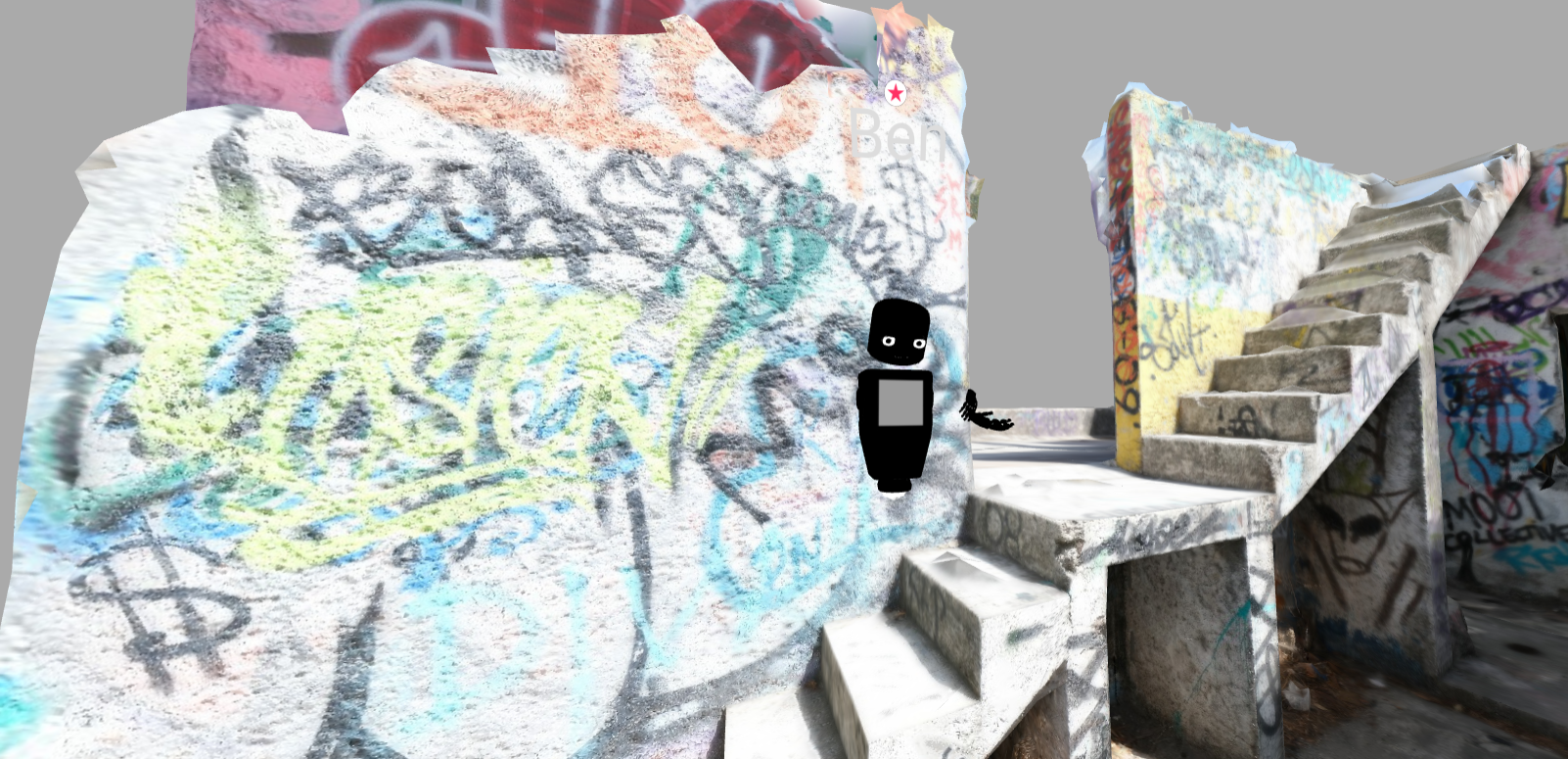
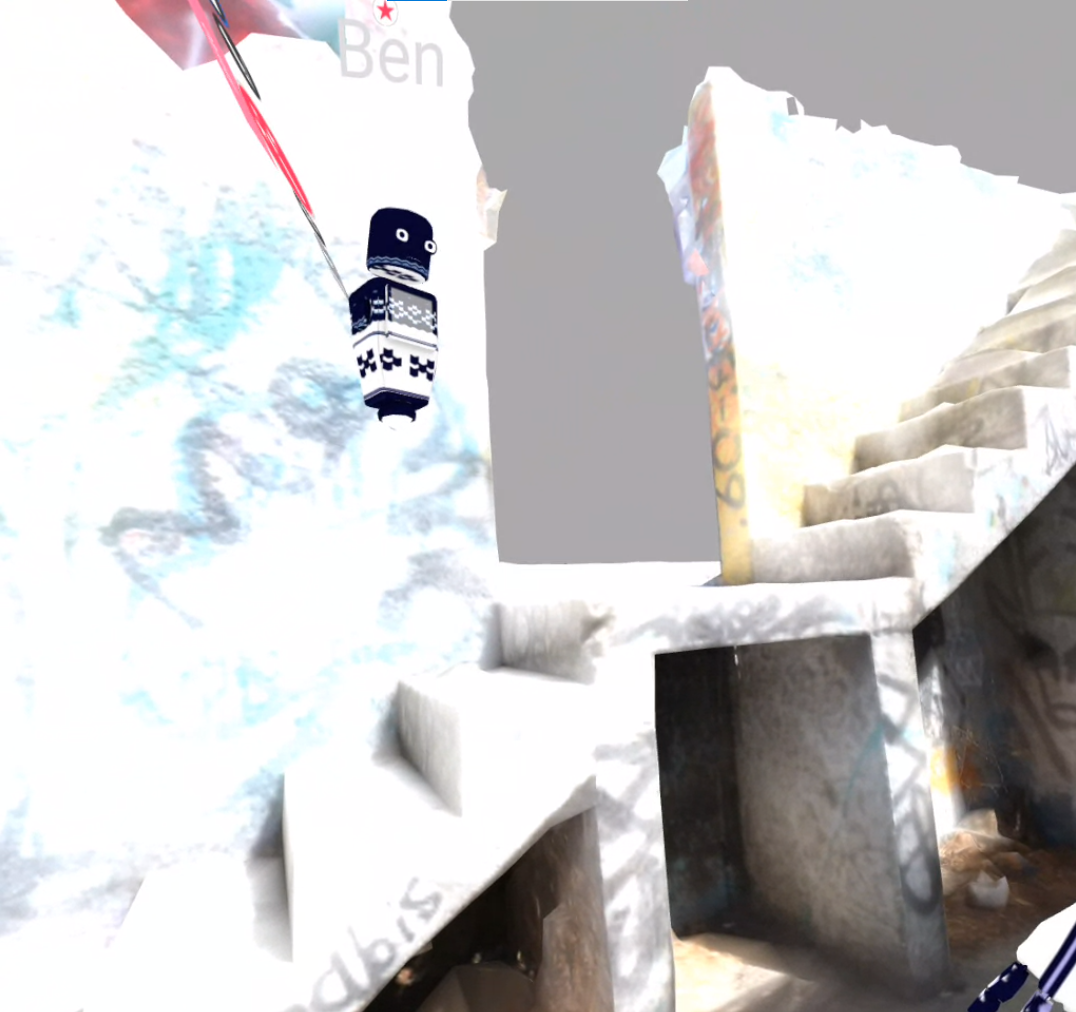
Beta Was this translation helpful? Give feedback.
Replies: 12 comments

-
|
This is the opposite way around to what I would have expected. Typically photogrammetry models are rendered "unlit", which specifically means they use the actually colour of the texture pixels with no modulation for lights. You can make this adjustment in the model material definition or you can do it for everything in the renderer. In Hubs this is know as "low" quality mode, whereas in "high" quality mode things will be lit. Desktop defaults to " high" and mobile (including standalone VR) defaults to "low" so you can understand my confusion. Try switching modes on the desktop version (in preferences) to see if you can narrow it down. |
Beta Was this translation helpful? Give feedback.
-
|
Thank you! Desktop does default to High and Mobile to low. I changed the Quality mode to high in VR, and it fixed it (it removing the lighting and my avatar hands were indeed black and unlit). And there is some other logic that I don't understand. In Spoke, whether I put the renderer lit or unlit, it doesn't seem to make any difference when I have lights in the scene (this is why I had to delete them). If it can provide some more info, the first time I tried to import the photogrammetry model to spoke I had exported it from Metashape as .glb, but it looked very weirdly lit and dark in Spoke and there was no way to unlit it to get the shadeless textures. So what I did was to modify the model in Blender to "force" the texture to appear as shadeless using this tutorial: https://www.youtube.com/watch?v=OYPKXI3dFr4 What I also don't understand is that in another Spoke project I used the same model but imported it from Sketchfab and it worked better and was shadeless whether the scene was lit or unlit without having to remove the lights and skybox. Does that mean the material properties are indeed set the shadeless when it comes from Sketchfab but aren't when it comes straight out of Metashape, and that even the fix I did in Blender didn't actually make the model completely shadeless? I am a bit lost there... And one last question, can I change the default quality mode so I don't need to ask my clients to change it in preferences? Thanks so much! |
Beta Was this translation helpful? Give feedback.
-
|
If you are familiar with Blender I would recommend skipping Spoke completely. You can export as a GLB file and upload that; it's still done via the Spoke page, but you make a new project and use the file directly. To add things like nav meshes and spawn points you need the Hubs exporter Blender add on. Regardless, the correct way to enforce unlit behaviour is the unlit extension, which is slightly fiddly to get working in Blender. KhronosGroup/glTF-Blender-Exporter#315 (comment) You can't force clients to use a particular quality mode unless you have your own hubs cloud, but it shouldn't be necessary in this case anyway. There are a few good online GLTF viewers, like the babylon.js one, that will let you check your GLB file and inspect the material properties. |
Beta Was this translation helpful? Give feedback.
-
|
Thanks a lot for all this Rubert! I actually am more familiar with Unity. I almost never used Blender. And I love Spoke for its simplicity yet completeness! This also sounds very interesting for the nav meshes, which I believe are generate automatically in Spoke and could be adjusted but overall still works great. Does this mean you can also create new tools in Blender like virtual cameras? I saw that on the Hub YouTube channel and got really interested to get such tools that you could hold in VR. Do you think that would be possible? it would be a game changer. |
Beta Was this translation helpful? Give feedback.

-
|
Hi BenoitEncounters, If you have the materials set up correctly as unlit, then lights in the scene won't affect them at all and you can leave them in (as well as the skybox) to light the avatars without affecting the photogrammetry. I highly suggest getting the Hubs Blender Exporter add-on (for Blender) from here: https://github.com/MozillaReality/hubs-blender-exporter as this will let you add all kinds of Hubs specific effects to your 3D models. |
Beta Was this translation helpful? Give feedback.
-
|
Thank you for the resources, I am going to deep dive into all this Blender workflow. I made some more research and it seems that by getting our own Hub Cloud we would be able to add new functionalities such as virtual cameras as well as having a pointer and a system to cast what the main hosts is seeing to the other participants (would be a better ''spectate" feature) |
Beta Was this translation helpful? Give feedback.
-
|
Sure, a Hubs Cloud is great for custom modifications, but just so you know, you can already stream what a moderator/room owner sees to the lobby in stock Mozilla Hubs ('Enter Streamer Mode' found in the 'More' menu), and the pen tool can be used as a laser pointer (Hotkey is P). Not exactly sure what you mean by virtual cameras, but if you mean cameras in Hubs that send what they see to a screen in Hubs then that's already there too. Here's a good video that showcases a variety of Hubs features :) |
Beta Was this translation helpful? Give feedback.
-
|
Thank you again for all this info! This is very valuable. I will try the stream feature! Regarding the pen tool, we tried it but the only problem is that it draws on the model, and also I couldn't figure out how to use it as a pointer in the Quest, because in the Quest it draws into the air. And yes I mean this by virtual cameras. But it would be great if possible to hold the screen as an object in VR, as if you were holding your phone and filming the virtual environment with it (without necessarily recording). I took a look at the video, this is what we need. So you are saying that such a virtual camera can be made inside Blender and then be exported to Hub through the Exporter Add-on? |
Beta Was this translation helpful? Give feedback.
-
|
You're welcome! :) Yes, you can make a virtual camera and screen in Blender with the Exporter Add-on. The only caveat with it at the moment is that you can't have the camera stationary, but take the screen with you (or vice versa). You can create a camera like a phone with the screen on the back (can be useful to achieve different effects like e.g. a magnifying glass), you can make stationary video walls/floors with various effects, and you can have a camera pointing at a stage and screens at different (fixed) places in the scene, and you can even animate the screens/cameras to move in a predefined loop, but the camera and screen currently have to be one object and can't be moved independently of one another by people (I think this is planned for the future, though). Also, I don't think there's any way of recording what the virtual camera sees or streaming it to some other website (aside from looking at it and recording your own screen of course). Here's a link to the Hubs YouTube channel where you can find lots of good info on how to make stuff :) And here's a link to their video on virtual cameras: |
Beta Was this translation helpful? Give feedback.
-
|
Ok I think I could explore several features and understand better everything that can be done. I still need to try creating a virtual camera and screen. It is actually perfect for now for me to have them linked. So looking forward to making those. Regarding the streamer mode mentioned above. It works on my desktop, but it seems it is not available on phones which is ok, but the streamer mode is not available either on the Quest, which is a pity. Is there another way to do it? Do you think such a feature will be available in the future? |
Beta Was this translation helpful? Give feedback.
-
|
Nice, unfortunately there's been a little trouble with the virtual screens recently, but I'm sure that'll get fixed soon. Here's a link to a Discord post explaining both audio mics/speakers and video cameras/screens (they're actually pretty similar the way they work) as well. (it's a bit shorter and to the point than the video is) For the streamer mode, it is only available to room owners and moderators, but if you're logged in on an account that is either the owner or a moderator and 'Enter Streamer Mode' still doesn't show up in the ui, then I think that's a bug and you may want to report that. (I'm assuming you don't mean viewing from the lobby because that should always work if someone is streaming from the room. Definitely report a bug if that's what's happening.) |
Beta Was this translation helpful? Give feedback.

-
|
Looks like this wasn't a bug after all, just a result of our render quality mechanism. It was a good discussion though, so I think I will convert it into a GitHub Discussion and mark it as "answered" |
Beta Was this translation helpful? Give feedback.


If you are familiar with Blender I would recommend skipping Spoke completely. You can export as a GLB file and upload that; it's still done via the Spoke page, but you make a new project and use the file directly. To add things like nav meshes and spawn points you need the Hubs exporter Blender add on.
Regardless, the correct way to enforce unlit behaviour is the unlit extension, which is slightly fiddly to get working in Blender. KhronosGroup/glTF-Blender-Exporter#315 (comment)
You can't force clients to use a particular quality mode unless you have your own hubs cloud, but it shouldn't be necessary in this case anyway.
There are a few good online GLTF viewers, like the babylon.js one, t…