
Send personalized bulk emails from your own machine, using your own SMTP account. No subscriptions, no third-party servers, no data leaving your computer.
Most bulk email tools are SaaS platforms, where you upload your recipient list to someone else's server and pay a monthly fee for the privilege. bit-by-mail flips that: it's a lightweight local app that runs on your machine and sends through your own email provider. Your data stays yours, and there's nothing to pay for.
- Local and private — runs entirely on your machine; nothing is uploaded anywhere
- Bring your own SMTP — works with Gmail, Outlook, Yahoo, or a custom domain; supports multiple accounts with a default sender fallback
- Dynamic personalization — one template, personalized per recipient using variables from your CSV (
{{FirstName}},{{InvoiceAmount}}, etc.) - Personalized attachments — send different files to different recipients in the same campaign (certificates, invoices, reports)
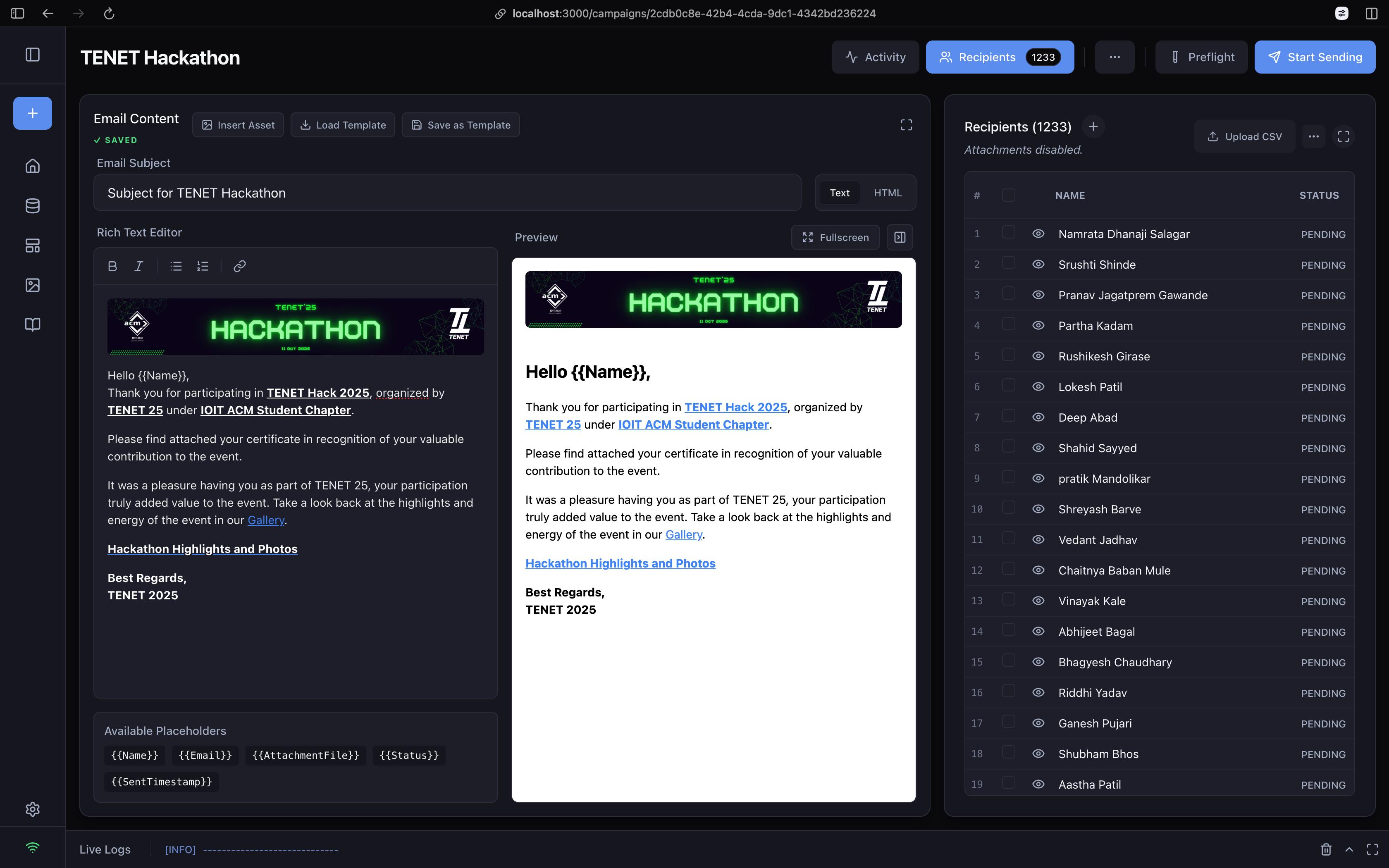
- Rich text or raw HTML — use the WYSIWYG editor, or drop into a Monaco-based HTML editor for full control
- Preflight checks — simulates the send beforehand to catch missing variables, missing attachments, or invalid addresses
- Reusable libraries — save recipient databases and templates so you're not rebuilding them every time
- Live analytics — real-time dispatch logs, success/failure tracking, and exportable CSV delivery reports
pip install bit-by-mailRequires Python 3.9 or later.
bit-by-mail
# or, for short:
bbm
The app opens automatically in your browser at http://localhost:8888.
- Go to Settings in the sidebar.
- Click Add Account and enter your SMTP details (e.g.
smtp.gmail.com, port587). - Enter your email and password.
Using Gmail? Google blocks sign-ins with your regular password. Generate an App Password instead and use that.
Recipients are loaded from a CSV file with a header row.
| Column | Required | Notes |
|---|---|---|
Name |
Yes | Used for personalization |
Email |
Yes | Recipient address |
AttachmentFile |
No | Separate multiple files with ; |
| anything else | No | Any extra column becomes a placeholder automatically |
Example:
| Name | AttachmentFile | TicketType | |
|---|---|---|---|
| John Doe | john@example.com | john_pass.pdf | VIP |
| Jane Smith | jane@example.com | jane_pass.pdf; map.png | Standard |
- Campaigns → New Campaign
- Upload your CSV, or import a saved database
- Write your subject and body, using placeholders like
{{Name}}or{{TicketType}} - Check the Preview panel to confirm placeholders render correctly
- Run Preflight to catch problems before sending
- Click Start Sending
Asset Library — store image URLs (including Google Drive links) and drop them into your templates without re-uploading each time.
Throttling — add a delay (in seconds) between sends in Campaign Settings to stay under provider rate limits and avoid spam filters.
Resume on failure — if a campaign is interrupted, bit-by-mail remembers who's already been sent to. Hit send again and it only processes the recipients still marked PENDING.
- Emails aren't sending — double-check your SMTP host and port, and confirm you're using an app password rather than your account password if your provider requires one.
- Placeholder shows up literally in the email (e.g.
{{FirstName}}) — the column name in your CSV doesn't match the placeholder exactly; names are case-sensitive. - Attachment not found errors during Preflight — check that file paths in
AttachmentFileare correct relative to where you're running the app, and that multiple files are separated by;with no typos.
Rich Text/HTML Editor with Live Preview & Placeholders
Issues and pull requests are welcome. If you run into a bug or have an idea for a feature, open an issue on GitHub.
See the LICENSE file for details.