

Share one serial port with multiple people over TCP — pure Python, zero config.
A serial device can only be opened by one process at a time, which makes collaborative debugging
awkward: whoever grabbed the port first owns it, and everyone else waits. uarthub solves this
by owning the device once and bridging it to any number of TCP clients. Everyone sees the same
serial output, anyone can type commands, and clients join
and leave freely without disturbing each other.
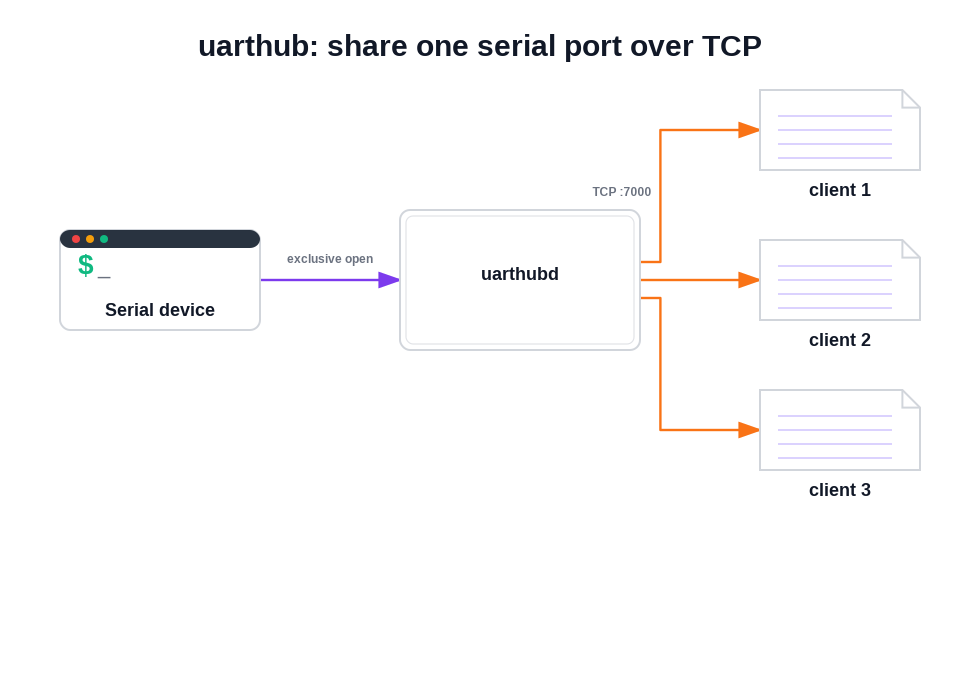
Cross-platform: Linux, Windows (COM*), and macOS (/dev/tty.usbmodem*) all work.
Serial device path is whatever your system exposes — /dev/ttyACM*, /dev/ttyUSB*,
/dev/ttyS*, a pty, anything pyserial can open. uarthubd is the only process that
holds the device; clients talk to it over TCP and never touch the port directly.
- Multi-client broadcast — serial output goes to every client (and to the host's own stdout)
- Everyone can send — input from any client is forwarded verbatim to the device
- Join/leave anytime — a client disconnecting (Ctrl-A x in
uarthub, the intended way) disturbs the others or the device connection - Pure Python, zero config — a single command; the dependencies are
pyserial,
argcomplete (shell Tab completion
for
-u) and questionary (the server-selection menu)
pip install uarthub # or: pipx install uarthub
Or run straight from a checkout, no install needed:
./main.py --help
The one-command flow — just run uarthub on the machine with the device attached; it starts a
background daemon itself if none is running, and that daemon exits by itself once every client
has disconnected:
uarthub                      # auto-detects the serial port, auto-starts a server if needed
uarthub /dev/ttyACM3         # shorthand: a /dev/ path as the positional arg
uarthub COM3                 # same shorthand on Windows
uarthub -u /dev/ttyACM0 -b 921600           # which device the server should open
uarthub -u /dev/ttyUSB0                      # any serial path works (ttyACM* / ttyUSB* / COM*)
An explicit daemon never exits on its own and is the right choice for a shared lab machine:
uarthubd /dev/ttyACM1 --port 7000             # manual server, stays up (921600 default)
uarthubd /dev/ttyACM1 115200 --auto-exit      # exits 2s after the last client leaves
Anyone — on the same machine or over the network — connects from their own terminal:
uarthub                     # auto-discovers running servers, connects if only one
uarthub <hub-host>          # same, on a remote machine
uarthub -p 7001             # explicit port: connect directly, no discovery
With several servers running, uarthub lists them (device + port + baud) in an
arrow-key menu and connects to the one you pick; passing -u <device> jumps
straight to the server already holding that device; if none holds it, a new
server is started for it on the next free port (never hijacking an existing
server for a different device). Discovery probes TCP ports
7000-8099 (parallel, sub-second on localhost); -p bypasses it entirely.
Daemon arguments:
| Argument | Default | Description |
|---|---|---|
uart |
auto-detect | serial device path (with multiple ports, one must be passed explicitly) |
baud |
921600 |
baud rate |
--host |
0.0.0.0 |
TCP listen address |
-p, --port |
7000 |
TCP listen port |
--auto-exit |
off | exit 2s after the last client disconnects |
Client arguments:
| Argument | Default | Description |
|---|---|---|
host |
127.0.0.1 |
host running uarthubd |
-p, --port |
auto-discover | TCP port (scans 7000-8099; falls back to 7000) |
-u, --uart |
auto-detect | device for the auto-started server; with discovery, jumps to the server holding it |
-b, --baud |
921600 |
baud rate for the auto-started server (local only) |
Connected clients immediately start receiving serial output and can type commands. Ctrl-C is forwarded to the device (interrupts NSH); exit with Ctrl-A x, and press Ctrl-A twice to send a literal Ctrl-A (0x01); the daemon and other clients are unaffected. Multiple people can be connected at the same time; when two people type simultaneously the bytes simply interleave, so agree on who drives.
telnet <hub-host> 7000 or nc <hub-host> 7000 work too — uarthub is just a client that
exits the way you expect.
Note
The hub process is the only process that opens the device. Stop any existing terminal or
logger (e.g. screen/minicom) that holds the port before starting uarthub.
pip install -e ".[dev]"   # pytest, ruff, build, twine
pytest                    # runs from src/ via pythonpath, no install needed
ruff check src tests main.py
The test suite exercises the full broadcast/send/disconnect behavior against a pty-backed fake device — no real hardware required.
uarthub opens the serial device with pyserial and runs a small asyncio server. Serial output
is offered to every connected client; input from any client is written to the device. One owner,
N observers.
This project is licensed under the Apache License, Version 2.0.
See LICENSE or https://www.apache.org/licenses/LICENSE-2.0 for the full text.