


SmartMovie is a cinematic TMDb catalog for the Apple ecosystem. It covers movies, television, people, collections, companies, networks, keywords, seasons, and episodes; adds region-aware availability and trailers; and can optionally synchronize library, ratings, recommendations, and mixed lists through a browser-approved TMDb account.
This repository contains the native SwiftUI apps for iPhone, iPad, Mac Catalyst, Apple TV, Apple Vision Pro, Apple Watch, and native macOS. It also owns the Cloudflare Worker and the canonical OpenAPI contract consumed by every SmartMovie client.
Note
SmartMovie is a catalog and trailer app. It does not stream movies or episodes, create a separate SmartMovie identity, collect a TMDb password, display advertising, or offer in-app purchases.
Important
SmartMovie 3.0 is under active development. Source-level quality gates are in place; production D1/session secrets and callback domains, signing, the CloudKit production schema, final store artwork, privacy/support URLs, and App Store metadata still require release-owner configuration.
| Repository | Owns | Mobile release role |
|---|---|---|
| Smart Movie iOS (this repository) | SwiftUI Apple apps, SmartMovieKit, Cloudflare Worker, OpenAPI 3.1 contract, canonical fixtures |
App Store source of truth and backend owner |
| Smart Movie Android | Native Android and Wear OS apps, Compose Multiplatform desktop/web app, versioned contract snapshot | Google Play source of truth |
The two native mobile apps keep platform-specific UI and storage while sharing the additive /v2 Worker contract, six locales, semantic release train, normalized errors, and deterministic decoder fixtures. /v1 remains served for SmartMovie 2.0 compatibility. Account identity and content belong to TMDb; SmartMovie only brokers opaque sessions and maintains local-first caches/outboxes.
The single cross-repository roadmap is Kế hoạch phát triển Smart Movie sau 3.0. It defines the release order, parity workflow, per-feature commit/push rule, and shared Definition of Done.
- Explore a deep TMDb catalog through curated Home feeds, advanced Discover filters, day/week trending, pagination, retry, and cancellation.
- Search across entity types with discriminated Movie, TV, Person, Collection, Company, and Keyword results, or resolve an IMDb, TheTVDB, Wikidata, Facebook, Instagram, or X/Twitter ID.
- Open deep details for titles, people, collections, organizations, keywords, TV seasons, episodes, and individual cast/crew credits, including navigable person/title links, role metadata, reviews, recommendations, and related titles.
- Browse complete TMDb media through deduplicated image galleries and every valid YouTube trailer, teaser, clip, or featurette on Movie/TV, Season, and Episode details; season/episode pages also expose air date, runtime, production code, votes, and external identifiers when supplied.
- Read catalog reviews and follow recommendations with full review bodies, blank/duplicate removal, localized author fallbacks, optional rating/date metadata, same-media-type TMDb recommendations, current-title exclusion, a separate similar-titles shelf, and adult-title filtering unless the local PIN is unlocked on Apple, Apple TV, and every full Android/KMP catalog client.
- Understand every regional edition through production-company/network links, region-matched certification and release date, alternative titles, localized translations, and external identifiers decoded by typed native models.
- See where to watch by device or chosen region for stream/rent/buy offers, with TMDb links and required JustWatch attribution.
- Keep adult content private by default with local age confirmation, a six-digit device PIN, and five-attempt lockout. The gate partitions Search, External ID, Title, Person, Collection, Company, Network, Keyword, Credit Detail, recommendations and similar titles; every client filters again before display, while companion and public surfaces never receive restricted titles.
- Connect TMDb safely through browser approval or TV QR without entering a password in SmartMovie. Browse paginated Movie/TV account recommendations, rate Movie/TV/Episode titles from 0.5 to 10 in half-point steps, restore an Episode's existing remote score while pending local edits win, and manage account library/lists with durable offline mutation retry. Live signed-in device/TV validation remains tracked in TMDb coverage.
- Manage mixed custom lists by loading every list page, editing metadata, paging through Movie/TV contents, searching the catalog, and adding or removing titles with restart-safe optimistic synchronization.
- Build a local-first library with independent Favorite and Watchlist actions. SwiftData keeps both readable offline; private CloudKit remains an Apple storage option.
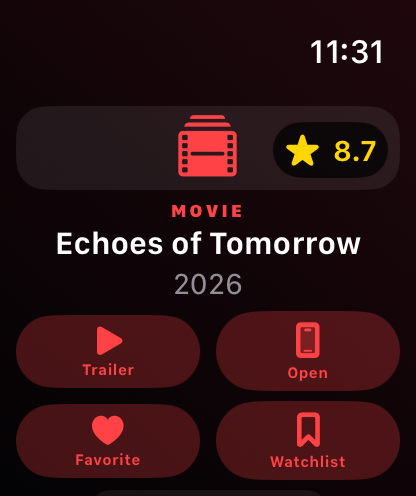
- Move between Apple devices naturally with five adaptive destinations, keyboard/pointer support, focus-driven TV navigation, multi-window Mac/visionOS details, and an Apple Watch companion that mirrors a safe title or exact episode and opens it back on iPhone.
- Track episode progress offline by marking one episode or every listed episode in a season watched/unwatched. Season completion is visible at a glance; the additive SwiftData migration preserves existing Favorite and Watchlist rows, and progress is never sent to the SmartMovie Worker or TMDb.
- Continue from a season by opening the first unwatched episode in order; the action is localized across all six supported locales.
- Explore Trending with daily and weekly Movie/TV shelves backed by the shared
/v2/trendingcontract. - Explore trending titles with daily and weekly Movie/TV shelves through the shared
/v2/trendingcontract. - Use the app in six languages: English, Vietnamese, Japanese, Korean, Simplified Chinese, and Traditional Chinese.
- Use adaptive Detail controls: actions and metadata switch from a row to a column when their full labels need more room; pill labels wrap instead of truncating. Dynamic Type, VoiceOver labels, Increase Contrast, Reduce Motion, and platform-native focus behavior remain part of the ongoing accessibility QA.
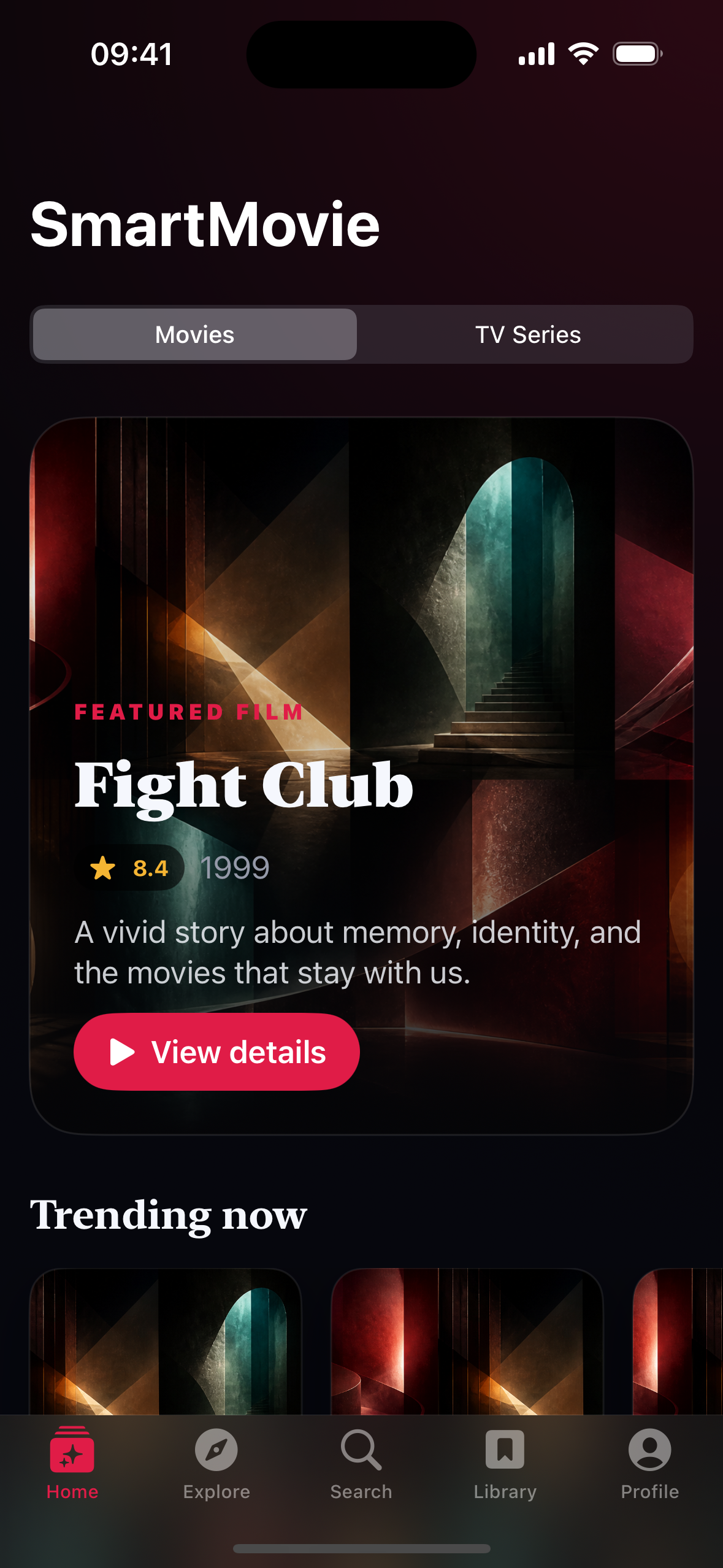
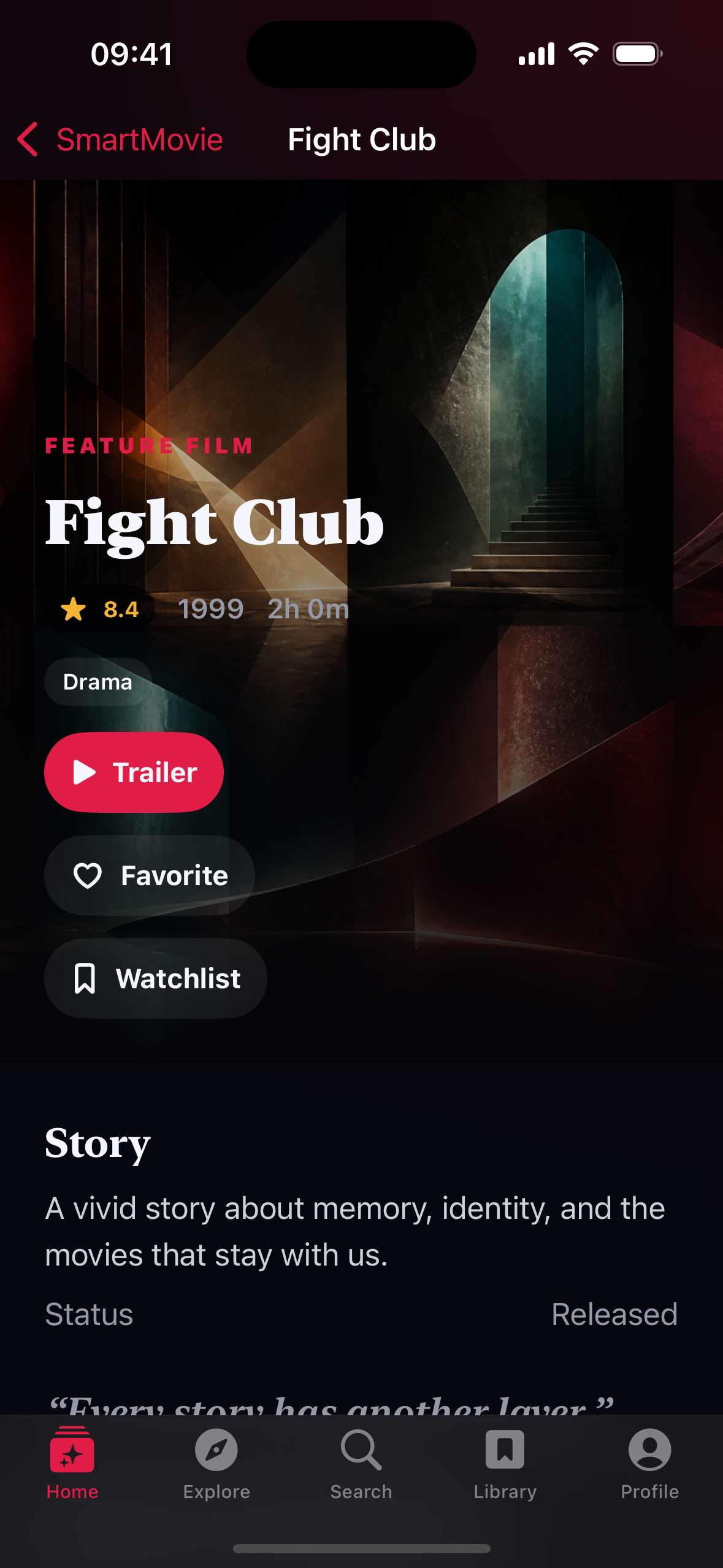
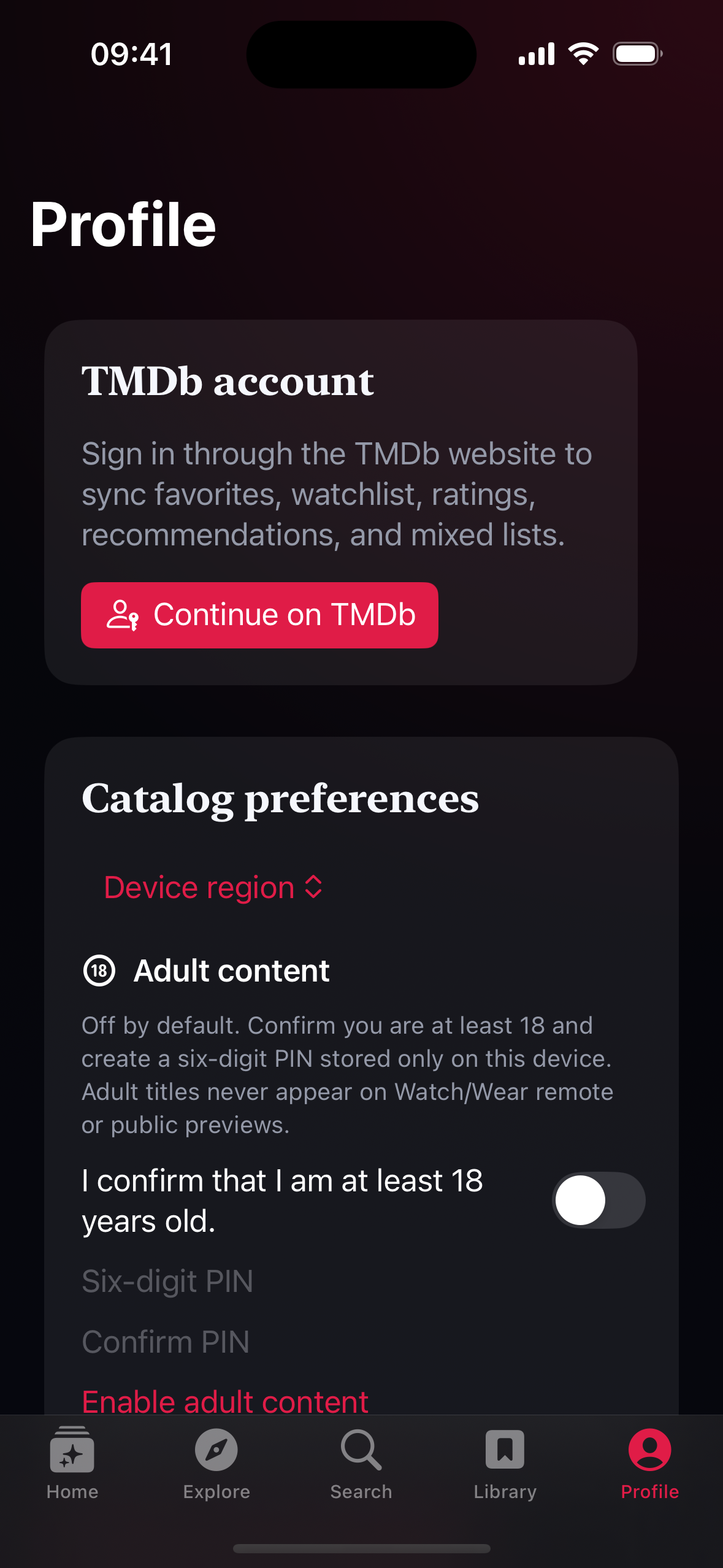
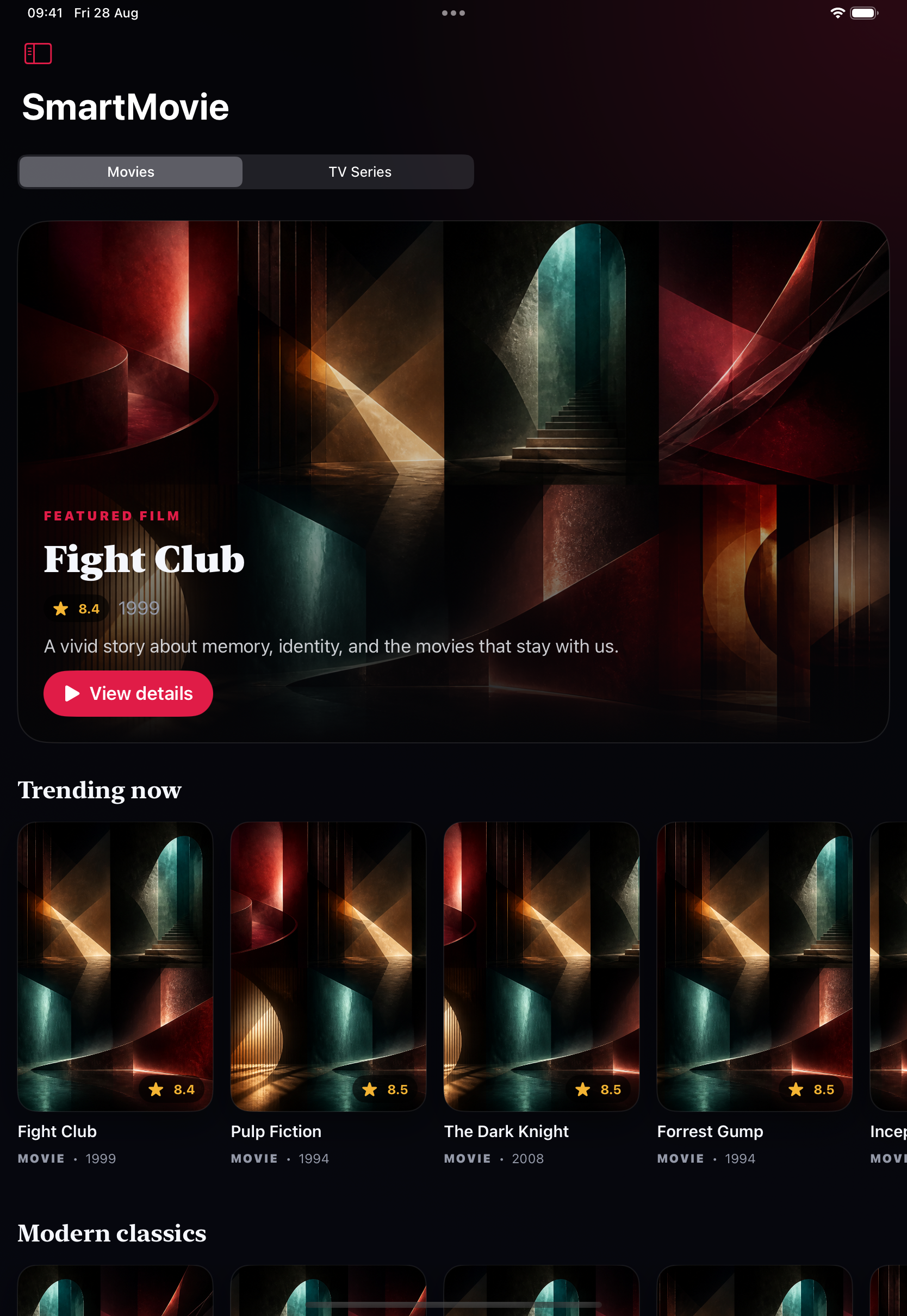
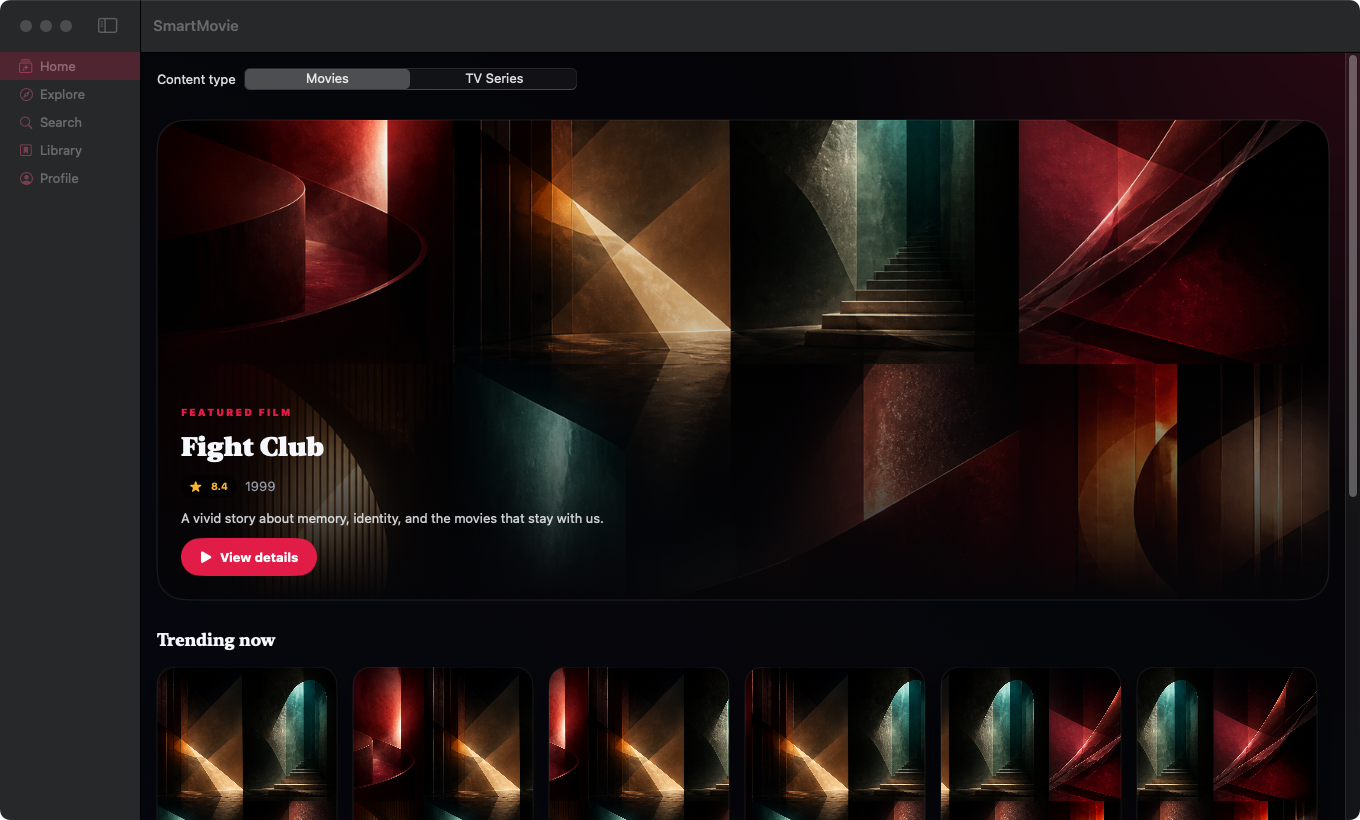
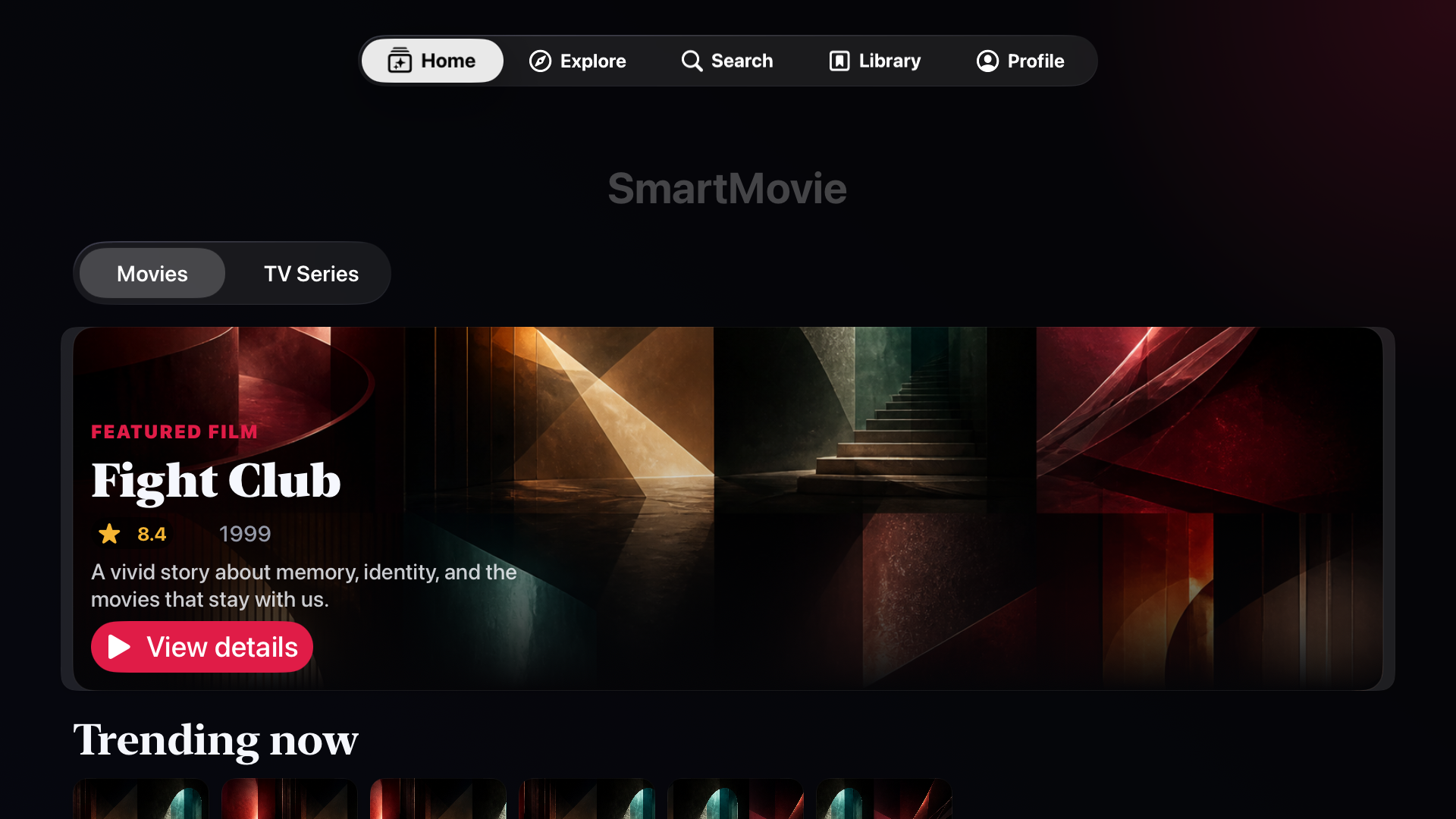
These are development captures, not store-release or live-TMDb evidence. The gallery mixes local /v1 + /v2 preview captures and older companion baselines; capture dates and remaining platform/UI gaps are recorded in SCREENSHOTS.md. Abstract artwork is generated demo imagery, not the actual movie poster or actor photograph.
If thumbnails are missing, see image loading diagnostics: on 29 August, both configured Worker domains still failed DNS while the public TMDb image CDN was reachable. Preview artwork tests passing does not mean production image delivery is fixed.
| Home Movie/TV switch, hero and catalog shelves |
Title detail Metadata, trailer and local-first library actions |
Profile TMDb browser auth, region and local adult-content PIN |
 |
 |
 |
| iPad Adaptive universal catalog for touch, keyboard and pointer |
Native macOS NavigationSplitView, resizable window and five destinations |
 |
 |
| Apple TV 10-foot catalog, all five destinations and focus navigation |
Apple Watch Safe title/episode context with exact-detail iPhone handoff |
 |
 |
Mac Catalyst shares the universal SwiftUI composition, but has no separate capture yet. The visionOS target uses the same SmartMovieKit in resizable windows, but this capture machine does not have a visionOS Simulator runtime. Neither platform is represented by relabeling another platform's image. See the Apple screen gallery and capture gaps.
| App / device | Minimum OS | Experience | Xcode scheme |
|---|---|---|---|
| iPhone | iOS 17 | Five native destinations, compact cards, browser-approved account flow, and full-screen entity details | SmartMovie |
| iPad | iPadOS 17 | Adaptive navigation, denser shelves, keyboard, and pointer support | SmartMovie |
| Mac Catalyst | macOS compatible with the iOS 17 target | Shared universal app with expanded navigation | SmartMovie |
| Apple TV | tvOS 17 | 10-foot layout, focus-driven shelves, Siri Remote/D-pad navigation, and trailer handoff | SmartMovieTV |
| Apple Vision Pro | visionOS 1 | Resizable catalog window and separate title-detail windows | SmartMovieVision |
| Apple Watch | watchOS 10 | Non-standalone WatchConnectivity companion for safe title/episode context and phone handoff | SmartMovieWatch |
| Native Mac | macOS 14 | NavigationSplitView, menu commands, keyboard shortcuts, and multi-window details |
SmartMovieNativeMac |
The universal Apple product uses bundle ID LamNDT.SmartMovie, the embedded watch companion uses LamNDT.SmartMovie.watchkitapp, and the native Mac product uses LamNDT.SmartMovie.NativeMac. The catalog products share the private CloudKit container iCloud.LamNDT.SmartMovie.
flowchart LR
    subgraph Apple["Native Apple apps"]
        Universal["iPhone · iPad · Catalyst"]
        TV["Apple TV"]
        Vision["Apple Vision Pro"]
        Mac["Native Mac"]
        Watch["Apple Watch remote"]
    end

    Universal --> Kit["SmartMovieKit"]
    TV --> Kit
    Vision --> Kit
    Mac --> Kit
    Watch <-->|"WatchConnectivity"| Universal
    Kit -->|"HTTPS /v2"| Worker["Cloudflare Worker"]
    Worker -->|"server-side v3/v4 credentials"| TMDb["TMDb API"]
    Worker --> Sessions["D1 sessions + catalog change cursors"]
    Kit --> Store["SwiftData library"]
    Store <-->|"private sync"| CloudKit["CloudKit"]
    Kit --> Images["TMDb image CDN"]
SmartMovieKit contains discriminated domain models and repository protocols, async/await catalog/account clients, SwiftData storage, durable library/account outboxes, observable feature state, localization, and shared SwiftUI components. App targets own lifecycle and platform adapters instead of duplicating product logic.
The Worker serves the legacy six-route /v1 catalog and the additive /v2 catalog/account surface. /v2 adds capabilities, entity search/detail, seasons/episodes, related title resources, regional providers, browser/TV authorization, profile/library state, ratings, recommendations, and custom lists. It owns TMDb credentials, validates queries and callbacks, normalizes errors, partitions public cache entries, rate-limits clients, and polls TMDb Movie/TV/Person change lists on an hourly cron. D1 stores encrypted session material, mutation-idempotency records, and non-personal catalog change cursors/revisions; changed entity revisions rotate the Cache API key for title, person, related-resource, season, and episode responses without exposing a debug route. Canonical OpenAPI 3.1 documents and fixtures live in backend/worker/contract.
The Android repository vendors that contract with a manifest containing its version, canonical source commit, OpenAPI checksum, fixture checksum, and frozen /v1 version. The sync workflow resolves the most recent commit that actually changed the contract or release train, then compares the generated snapshot with public Android main; an already-matching snapshot completes without cross-repository credentials, while a real diff requires the least-privilege PR token. Production Worker promotion is blocked until Android main pins the same contract and release train; staging remains available for compatibility testing.
Read Architecture for repository boundaries, synchronization rules, caching, and invariants.
SmartMovie/
├── SmartMovie/          # XcodeGen spec, Xcode project, app shells, entitlements, assets
├── SmartMovieKit/       # Shared Swift package, data/UI layers, localization, unit tests
├── backend/worker/      # TypeScript Cloudflare Worker, OpenAPI contract, fixtures, tests
├── release/             # Shared SmartMovie 3.0 release-train manifest
├── scripts/             # Read-only environment Doctor and release checks
├── docs/                # Architecture, testing, privacy, release operations, screenshots
└── .github/workflows/   # Swift, Xcode, simulator, contract, and Worker automation
- Full Xcode with the iOS, tvOS, watchOS, visionOS, and macOS SDKs
- XcodeGen 2.46 or newer
- SwiftLint
- Node.js 24 and npm for the Worker
- Apple silicon for visionOS builds and Simulator testing
Run the read-only environment check first:
./scripts/doctor.shIf macOS points at Command Line Tools instead of full Xcode, select the installed Xcode toolchain before building:
sudo xcode-select --switch /Applications/Xcode.app/Contents/DeveloperClone, generate, and open the project:
git clone https://github.com/LamPPKK/Smart-Movie-iOS.git
cd Smart-Movie-iOS
xcodegen generate --spec SmartMovie/project.yml
open SmartMovie/SmartMovie.xcodeproj
Choose SmartMovie, SmartMovieTV, SmartMovieVision, SmartMovieWatch, or SmartMovieNativeMac and a compatible destination. SmartMovie/project.yml is the canonical Xcode project definition; regenerate the project whenever it changes.
The apps never contain a TMDb credential. Debug uses https://staging-catalog.smartmovie.app/ and Release uses https://catalog.smartmovie.app/ after their Cloudflare DNS/TLS setup is complete.
cd backend/worker
npm ci
npx wrangler secret put TMDB_BEARER_TOKEN --env staging
npx wrangler secret put SESSION_ENCRYPTION_KEY --env staging
npx wrangler d1 migrations apply <auth-database-name> --env staging --remote
npm run dev
The account capability stays disabled unless the environment has its D1 binding, session-encryption secret, callback origin, and return-URI allowlist. Keep all TMDb and session secrets in Wrangler services only. Never commit them to Swift, an .xcconfig, an environment file, logs, screenshots, fixtures, or either client repository.
Run the local source gates from the repository root:
swiftlint lint --strict --no-cache
swift test --package-path SmartMovieKit --enable-code-coverage

cd backend/worker
npm ci
npm run check
npm run check:migrations
npm test

cd ../..
./scripts/verify-release.sh
The latest independent local Swift verification (29 August 2026) passed 100 tests, including artwork, compact/large-text Detail layout, watched Episode persistence/migration/compact accessibility layout, half-step rating choices/rendering, remote Episode account-state hydration, stale-response rejection, capability gating, and rating persistence/HTTP retry regressions. The backend type-check and test suites passed 100 Worker unit/contract tests plus 9 smoke-runner tests. Coverage includes canonical /v1 and /v2 fixture decoding, deterministic catalog-review and recommendation presentation, non-empty editorial and Movie/TV/Season/Episode media fixtures, image/video/external-ID presentation, numeric TMDb Season/Episode external-ID normalization, typed regional release/content-rating, Movie/TV alternative-title and translation metadata, configured capability/fixture equality, fail-closed browser/TV account rollout, malformed broker configuration and return-URI allowlists, cold-start callback deferral, stale completion invalidation, durable outbox isolation, capability-gated Advanced Discover and Profile provider regions with a fail-closed /v1 fallback, complete Movie/TV Discover queries and regional provider configuration, External ID and Credit Detail source/path mapping, account recommendations, normalized/paginated custom mixed lists, restart-safe pending item snapshots, explicit adult age confirmation, six-digit PIN validation, five-attempt lockout, Worker partitioning plus client-side fail-closed filtering for every entity-related title/credit surface, local adult filtering and in-flight request invalidation, metadata/item mutations, normalized person/title credit links, exact episode companion context, unknown and missing nullable fields, success/error schema validation, repeatable D1 migrations, encryption/callback/CSRF controls, durable idempotency, TMDb Changes pagination/backlog recovery, invalid cursor recovery, verified changing-page-count fallback, D1 parameter-bound chunking, monotonic revision and cache-bypass behavior, retries, cancellation, pagination, and data behavior without live personal credentials. The protected staging runner additionally exercises all Movie/TV Favorite and Watchlist combinations, Movie/TV/Episode ratings, both recommendation feeds, canonical list-ID replay after a lost response, the complete mixed-list lifecycle through verified deletion, stable idempotency keys across 429/5xx/mutation_in_progress retry, private cache headers on success and error responses, one Worker version, and exact restoration after success or failure.
CI independently builds and analyzes iOS, iPad/Catalyst, tvOS, native macOS, watchOS, and visionOS, then installs and launches the iOS app in Simulator. Read Testing for destination-specific commands and the manual device matrix.
- TMDb application credentials and encrypted upstream account tokens exist only in protected Worker services.
- The Worker rejects unknown routes, query fields, media types, languages, sort orders, and out-of-range values.
- Search text, credentials, session tokens, PINs, raw client identifiers, and personal library data are not logged by design.
- Optional account approval happens on TMDb. Clients retain only an opaque broker token; Web receives a secure
HttpOnlycookie. - Favorite, Watchlist, rating, and list mutations are local-first and persist in durable outboxes until the Worker acknowledges the same idempotency key.
- Watch remote messages stay between paired Apple devices.
- There is no separate SmartMovie identity, analytics SDK, advertising SDK, or in-app purchase flow.
Read the Privacy overview before configuring production services.
The shared release manifest pins SmartMovie 3.0.0 and contract 2.0.0. Apple build numbers and Android version codes increase independently while Apple, Android, TV, watch companion, desktop JVM, JavaScript, and Wasm remain on the same semantic release train.
Before App Store submission, the release owner must rotate any historical TMDb credential, activate both Worker domains, configure signing and the CloudKit production schema, add approved TMDb/platform artwork, publish support and privacy URLs, and complete platform-specific screenshots and metadata.
Run ./scripts/release-preflight.sh staging before dispatching staging and ./scripts/release-preflight.sh production before production promotion; reserve all for the final combined audit. The read-only preflight verifies the local release/contract checksum, required GitHub environment and repository secret names, production approval/branch protection, Android main contract parity where production requires it, public DNS/TLS, and optional local Wrangler authentication. After deployment, add --live to require the exact live 3.0.0 capability surface and a real Cloudflare Worker version identifier. It never reads or prints secret values and does not change deployments, secrets, DNS, D1 schemas, or account data.
Follow the Release runbook for staging smoke tests, protected account tests, TestFlight, production promotion, store submission, and rollback. TMDb coverage records product blockers; Release readiness separates automated gates from credentials, DNS, signing, artwork, and store-owner actions that cannot live in source control.
This product uses the TMDB API but is not endorsed or certified by TMDB. Movie and television metadata and artwork are supplied by The Movie Database. Availability data is supplied by JustWatch through TMDb and is attributed wherever shown.