



Create chalk style schemes with simpler style strings
Note
You may don't need this module if you only want to use color texts with simple styles since Node.js 22.13.0 has a new built-in API util.styleText that can do the similar thing as this module.
npm install chalk-pipeimport chalkPipe from "chalk-pipe";
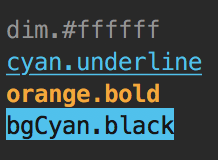
console.log(chalkPipe("blue.bold")("Hello world!"));Use dot . to separeate multiple styles:
const link = chalkPipe("blue.underline");
const error = chalkPipe("bgRed.#cccccc");
const warning = chalkPipe("orange.bold");

console.log(link("Link!"));
console.log(error("Error!"));
console.log(warning("Warning!"));
chalkPipe is also chalk:
const blue = chalkPipe("blue");
const link = blue.underline;

console.log(link("Link!"));import chalkPipe, { chalk, Chalk } from "chalk-pipe";
const customChalk = new Chalk({ level: 1 });
console.log(chalkPipe("underline", chalk.blue)("Link!"));
console.log(chalkPipe("underline", customChalk.blue)("Link!"));All Chalk exported functions, variables, and declarations are exposed for convenience.
This can be useful if you want to use chalk directly.
import { chalk, Chalk } from "chalk-pipe";

const customChalk = new Chalk({ level: 0 });

console.log(chalk.blue("Hello"));
console.log(customChalk.green("World"));Example:
chalkPipe("blue.underline")("Link!");Example:
import { Chalk } from "chalk-pipe";

const chalk = new Chalk({ level: 1 });

chalkPipe("underline", chalk.blue)("Link!");All supported keyword names are exposed as array of strings for convenience.
import { keywordNames } from "chalk-pipe";

console.log(keywordNames.includes("pink"));
//=> true- chalk-pipe-cli - CLI for this module
- ink-color-pipe - Ink component for this module
- inquirer-chalk-pipe - A inquirer plugin for input chalk-pipe style strings
- chalk - Output colored text to terminal
MIT © LitoMore