Authors: Ben Benyamin, David Khachatryan, Haodong Wang, Pushkar Dave, Sairam Umakanth
Note: This video is lengthy and could not be embedded directly into the README. Please click on the image below to view the video.
The documentation for the whack_a_mole package can be found online here.
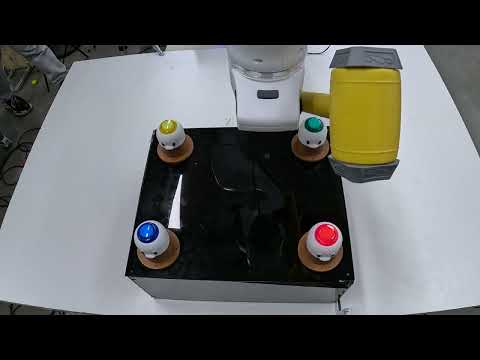
This package enables the Franka Emika Panda robot play whack-a-mole on a custom whack-a-mole game. The physical setup requires a RealSense2 camera, a singular April tag attached to the base of the robot, a servo/hammer end-effector attachment connected to an Arduino microcontroller, and optionally a DIY whack-a-mole set attached to its own Arduino microcontroller. The game is played using color and illumination detection and the "moles" are hit using a servo-hammer end-effector attachment, the IDE code for which is also provided within this repository. The franka robot is operated using MoveIt wrapper API created by our team (https://github.com/ME495-EmbeddedSystems/homework-3-group-4) and to use whack-a-mole API, the Moveit wrapper API must be cloned in the same workspace as the whack-a-mole API. The package also contains Arduino IDE code to program a DIY whack-a-mole.
- Install dependencies:
rosdep install --from-paths src --ignore-src -r -y - Set up a
workspaceon your computer with thesrcdirectory. - Go to your
workspace/srcand clone this repository. - In the same
workspace/src, clone our MoveItAPI (https://github.com/ME495-EmbeddedSystems/homework-3-group-4) andcolcon buildall repositories - [OPTIONAL] Create servo/hammer end-effector attachment and upload
servo_serial_communication.inoto it via an Arduino microcontroller - [OPTIONAL] Create DIY whack-a-mole set and
build_moles.inoto it via an Arduino microcontroller - Set up April Tag 36h11:0 with base attachment found here (wengmister/Apex-Putter#2)
- Mount Realsense 2 camera in a location that is never impeded by the arm and
sudo installrequiedrealsense2andapriltag_rospackages - Connect to Franka Emika Panda Robot
- Run
ros2 launch whack_a_mole planner_swing.launch.xmlin terminal to load Rviz configuration of physical set-up - [OPTIONAL] Use
ros2 service call /go_home std_srvs/srv/Emptyto send robot to home configuration - Run
ros2 service call /call_play std_srvs/srv/Emptyto make the robot play the game and enjoy!
comm_node: interfaces between other ROS nodes and servo/hammer for actuation of hammerswing: sends path planning and execution commands to MoveIt APIcamera_node: uses realsense2 topics for color and illumination detection and broadcasts tf of colorsarduino_hint: receives feedback from whack-a-mole and loops call of/playservice incall_playcallback to play game in perpetualitygame: looks up transforms of colors and sends service request to swing to actuate hammer
camera.launch.py: launchescamera_nodeandrealsense2_camerafor color detection, and also launches rviz files for physical setupplanner_swing.launch.xml: launches rest of nodes created in package,apriltag_noderequired for april tag detection, and includescamra.launch.pyandobject_mover.launch.pyinobject_mover, the MoveIt API package
The camera_node subcsribes topics published by the realsense camera and detects colors and broadcasting the frames of the colors to the TF tree, thus making the camera and color frames visible on Rvizz. To bring in the robot, the MoveIt API is launched along with the apriltag_node and game. The apriltag_node detects the april tag attached to the base of the robot. In the game node, a static transform between the base of the robot and the base april tag and the transform is computed using real world values once the april tag is attached to the base of the robot. Now the tf tree has all the info it needs for rviz to map the entire physical setup. Once the /call_play service is called, it causes a loop of /play service calls within the hint node. This hint node also receives a stream of data from the arduino on which button is lit up. Within the /play service callback in the game node, the transforms for the illuminated color is looked up from the tf tree and the /pick_pose custom service type is called, for which the service is located within the comm_node. Within the pick_pose callback, it interacts with MoveIt API to plan a path to the request goal pose and completes the action of swinging the hammer by calling custom action type called swing_hammer. The swing_hammer action sends a request to the servo controlled by an Arduino microcontroller to actuate the servo and swing the hammer, thus completing the hit action. This process is looped in hint node until the user kills the node on the terminal. The associated RQT graph and TF tree are shown below.


whack-a-mole_rvizz.webm
