A production-ready eCommerce store for a premium Handmade Carpets & Artisan Crafts brand





Khorasan Carpets is a fully functional, real-world eCommerce application built with modern web technologies. It features a complete customer-facing storefront and a full admin panel ready for production deployment.
This project demonstrates:
- Full-stack Next.js 14 App Router architecture
- Real-time Firebase backend (Auth + Firestore + Storage)
- Secure Stripe payment processing
- Role-based access control (Admin / SuperAdmin / Customer)
- Clean, scalable TypeScript codebase
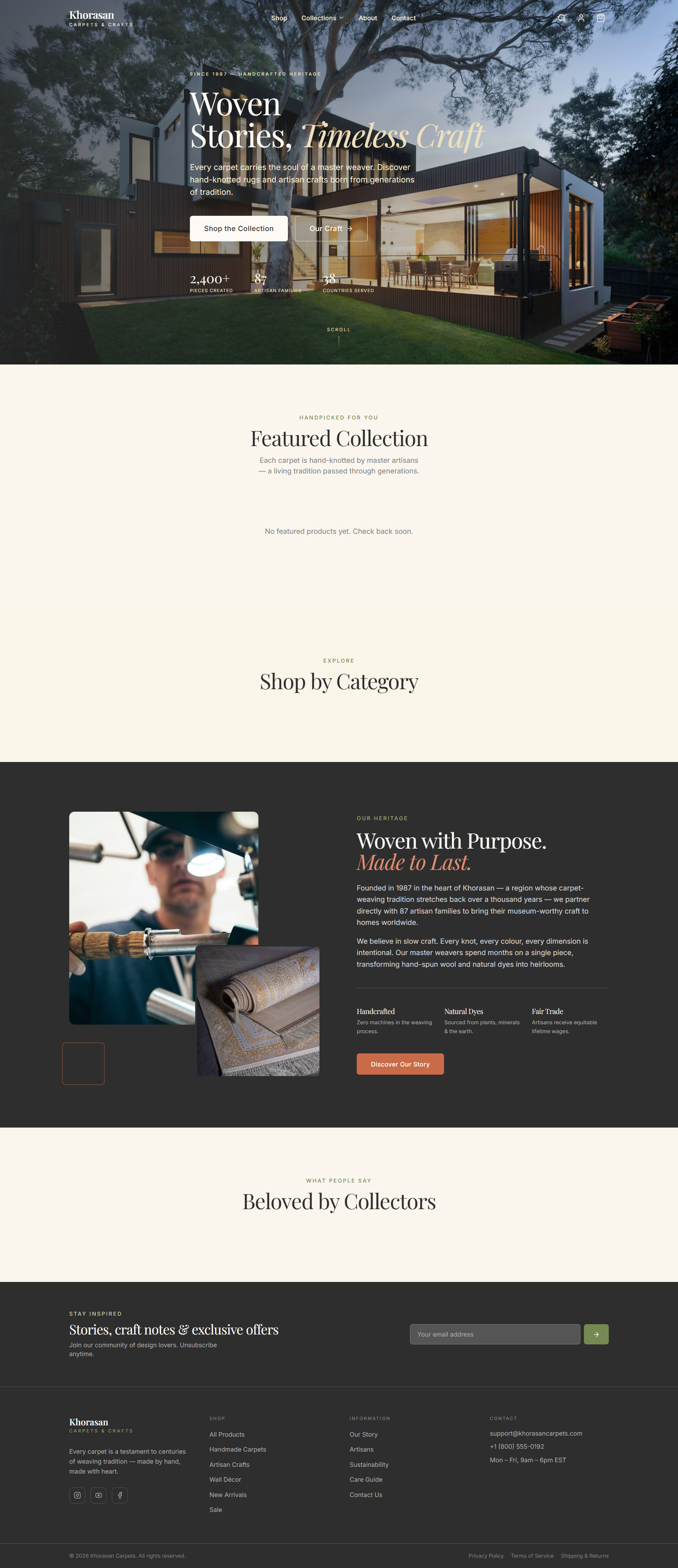
- Homepage — Hero section, featured products, category grid, testimonials, newsletter
- Shop — Filter by category, price range, material, technique + sort options
- Product Detail — Image gallery with zoom, product info, reviews, related products
- Cart — Slide-out drawer with real-time quantity updates
- Checkout — Stripe payment integration with order confirmation
- Auth — Register, Login, Password Reset via Firebase Authentication
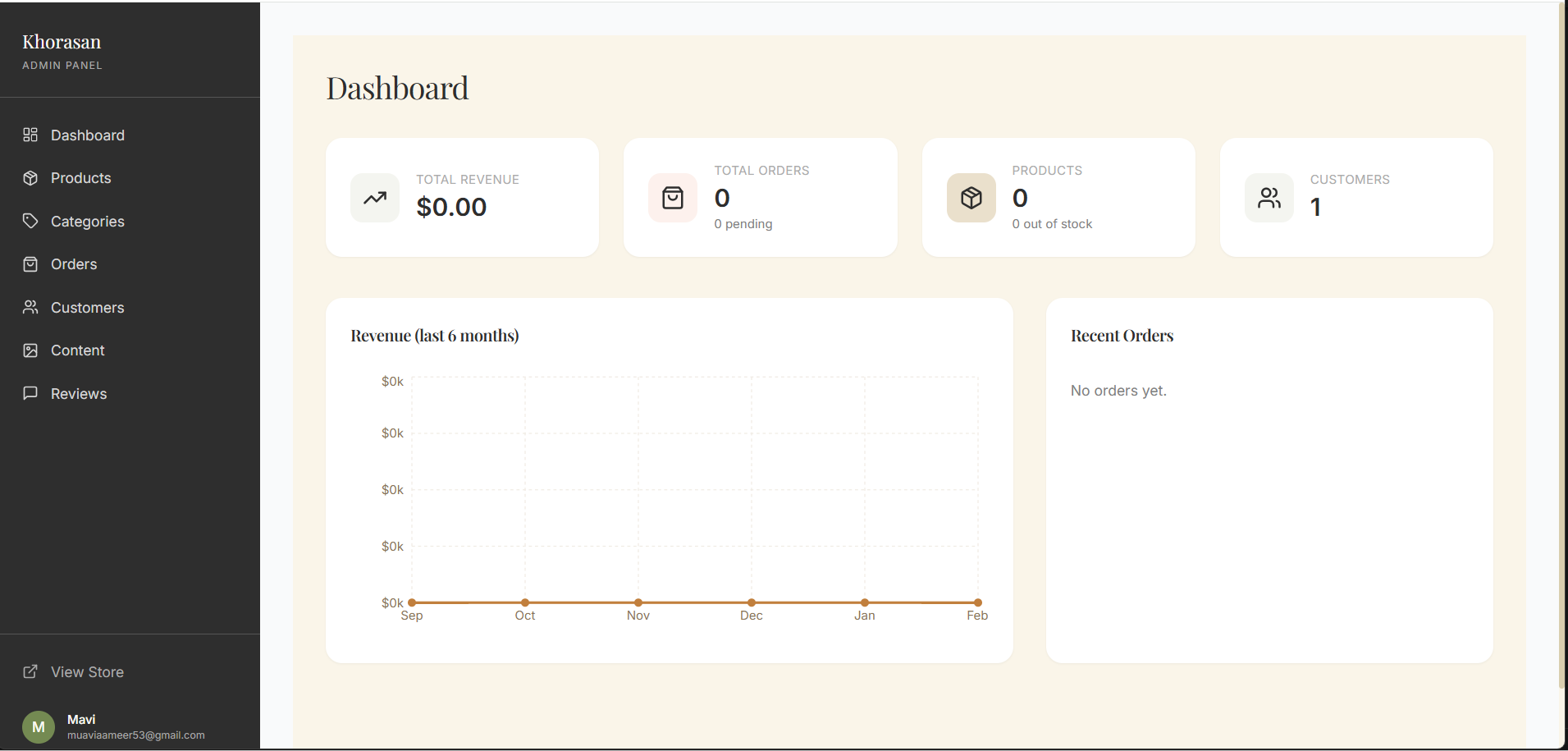
- Dashboard — Revenue charts, order stats, recent orders table
- Products — Full CRUD with image upload to Firebase Storage
- Categories — Hierarchical category management
- Orders — View all orders, update order/payment status
- Customers — View all registered users
- Reviews — Moderate and approve/reject product reviews
- Content — Manage homepage testimonials and banners
- Server-side rendering + static generation with Next.js App Router
- Firestore security rules for data protection
- Firebase Storage with upload progress tracking
- Email notifications via Nodemailer (SMTP)
- Firebase Cloud Functions for backend logic
- Fully responsive design — mobile first
- Skeleton loading states & toast notifications
| Layer | Technology | Purpose |
|---|---|---|
| Framework | Next.js 14 (App Router) | Full-stack React framework |
| Language | TypeScript 5.5 | Type safety |
| Styling | Tailwind CSS 3 + Custom Design System | UI styling |
| Database | Cloud Firestore | NoSQL real-time database |
| Auth | Firebase Authentication | User auth & sessions |
| Storage | Firebase Storage | Product image uploads |
| Payments | Stripe PaymentIntents | Secure card payments |
| State | Zustand | Cart & auth state management |
| Forms | React Hook Form + Zod | Form handling & validation |
| Animation | Framer Motion | UI animations & transitions |
| Charts | Recharts | Admin dashboard charts |
| Nodemailer (SMTP) | Order confirmation emails | |
| Functions | Firebase Cloud Functions v2 | Serverless backend logic |
| Hosting | Firebase Hosting / Vercel | Deployment |
- Node.js 20+
- npm or yarn
- Firebase project (create one here)
- Stripe account (create one here)
# 1. Clone the repository
git clone https://github.com/Mavi9412/Handcraftstore.git
cd khorasan-carpets

# 2. Install dependencies
npm install

# 3. Install Cloud Functions dependencies
cd functions && npm install && cd ..

# 4. Set up environment variables
cp .env.local.example .env.local
# Fill in your values in .env.local

# 5. Run the development server
npm run dev
Open http://localhost:3000 in your browser.
Create a .env.local file in the root directory:
# ── Firebase (Client-side — public) ─────────────────────────────
NEXT_PUBLIC_FIREBASE_API_KEY=your_api_key
NEXT_PUBLIC_FIREBASE_AUTH_DOMAIN=your_project.firebaseapp.com
NEXT_PUBLIC_FIREBASE_PROJECT_ID=your_project_id
NEXT_PUBLIC_FIREBASE_STORAGE_BUCKET=your_project.appspot.com
NEXT_PUBLIC_FIREBASE_MESSAGING_SENDER_ID=your_sender_id
NEXT_PUBLIC_FIREBASE_APP_ID=your_app_id

# ── Firebase Admin (Server-only — never expose) ──────────────────
FIREBASE_ADMIN_PROJECT_ID=your_project_id
FIREBASE_ADMIN_CLIENT_EMAIL=firebase-adminsdk@your_project.iam.gserviceaccount.com
FIREBASE_ADMIN_PRIVATE_KEY="-----BEGIN PRIVATE KEY-----\n...\n-----END PRIVATE KEY-----\n"

# ── Stripe ───────────────────────────────────────────────────────
NEXT_PUBLIC_STRIPE_PUBLISHABLE_KEY=pk_test_...
STRIPE_SECRET_KEY=sk_test_...
STRIPE_WEBHOOK_SECRET=whsec_...

# ── Email ────────────────────────────────────────────────────────
EMAIL_HOST=smtp.gmail.com
EMAIL_PORT=587
EMAIL_USER=your@email.com
EMAIL_PASS=your_app_password
EMAIL_FROM="Khorasan Carpets <noreply@yourdomain.com>"

# ── App ──────────────────────────────────────────────────────────
NEXT_PUBLIC_APP_URL=http://localhost:3000
Get Firebase Admin credentials: Firebase Console → Project Settings → Service Accounts → Generate new private key
- Go to Firebase Console and create a project
- Enable Authentication → Email/Password provider
- Enable Firestore Database (production mode)
- Enable Storage
- Install Firebase CLI and deploy rules:
npm install -g firebase-tools
firebase login
firebase use --add

# Deploy Firestore rules, indexes, and Storage rules
firebase deploy --only firestore:rules,firestore:indexes,storage:rules- Register at
/auth/register - Firebase Console → Firestore →
userscollection → your document - Set
rolefield toadmin - Sign out and sign back in → admin panel access at
/admin
- Get API keys from Stripe Dashboard
- For local webhook testing:
stripe listen --forward-to localhost:3000/api/stripe/webhook- For production, add webhook endpoint in Stripe Dashboard:
- URL:
https://yourdomain.com/api/stripe/webhook - Events:
payment_intent.succeeded,payment_intent.payment_failed
- URL:
khorasan-carpets/
├── src/
│   ├── app/
│   │   ├── (store)/              # Public storefront
│   │   │   ├── page.tsx          # Homepage
│   │   │   ├── shop/             # Product listing with filters
│   │   │   ├── products/[slug]/  # Product detail page
│   │   │   ├── cart/             # Shopping cart
│   │   │   ├── checkout/         # Stripe checkout
│   │   │   └── auth/             # Login / Register / Reset
│   │   ├── (admin)/              # Admin panel (role-gated)
│   │   │   └── admin/
│   │   │       ├── dashboard/
│   │   │       ├── products/
│   │   │       ├── orders/
│   │   │       ├── categories/
│   │   │       ├── customers/
│   │   │       ├── content/
│   │   │       └── reviews/
│   │   └── api/                  # Next.js API Route Handlers
│   │       ├── products/
│   │       └── stripe/
│   ├── components/
│   │   ├── layout/               # Header, Footer
│   │   ├── product/              # ProductCard, Gallery, Reviews
│   │   ├── home/                 # Hero, FeaturedProducts, etc.
│   │   ├── shop/                 # Filters, SortBar
│   │   ├── checkout/             # CheckoutForm, OrderSummary
│   │   ├── admin/                # Sidebar, AuthGuard, ProductForm
│   │   └── ui/                   # Shared UI components
│   ├── lib/
│   │   ├── firebase/             # client.ts, admin.ts, collections.ts
│   │   ├── firestore/            # queries.ts
│   │   ├── stripe/               # client.ts
│   │   ├── email.ts
│   │   └── utils.ts
│   ├── store/                    # Zustand stores (cart, auth)
│   └── types/                    # TypeScript interfaces
├── functions/                    # Firebase Cloud Functions
├── firestore.rules               # Firestore security rules
├── storage.rules                 # Storage security rules
├── firestore.indexes.json
└── firebase.json
| Collection | Purpose |
|---|---|
users |
User profiles + roles (customer, admin, superadmin) |
products |
Product catalog with full metadata |
categories |
Hierarchical product categories |
orders |
Customer orders with line items |
reviews |
Product reviews (moderated) |
testimonials |
Homepage testimonials |
newsletterSubscribers |
Email subscriptions |
contacts |
Contact form submissions |
siteContent |
CMS content blocks |
banners |
Promotional banners |
npm install -g vercel
vercel deploy
Add all environment variables in Vercel Dashboard → Settings → Environment Variables.
Then deploy Firebase services separately:
firebase deploy --only firestore,storage,functionsnpm run build
firebase deploy| Page | Path | Description |
|---|---|---|
| Dashboard | /admin/dashboard |
Revenue charts & stats |
| Products | /admin/products |
Create, edit, delete products |
| Categories | /admin/categories |
Category management |
| Orders | /admin/orders |
Order management & status updates |
| Customers | /admin/customers |
Registered users list |
| Reviews | /admin/reviews |
Moderate product reviews |
| Content | /admin/content |
Homepage content management |
Contributions are welcome! Feel free to open an issue or submit a pull request.
- Fork the project
- Create your feature branch (
git checkout -b feature/AmazingFeature) - Commit your changes (
git commit -m 'Add some AmazingFeature') - Push to the branch (
git push origin feature/AmazingFeature) - Open a Pull Request
Distributed under the MIT License. See LICENSE for more information.
Ameer Muavia
- GitHub: @Mavi9412
- LinkedIn: ameer-muavia
If you found this project helpful, please give it a star!