Releases: MoscaDotTo/Winapp2
Winapp2.ini v251109

This is a large release. Focus is split between removing entries for legacy applications no longer accessible from their original vendor, and modernizing entries for applications which are. This is a work in progress, and not yet complete. This update primarily modernizes entries from #.ini to B.ini
Applications considered unavailable for download are mostly still accessible on hubs like Softonic. Almost all removed entries are available in archived entries.ini. If an entry for a piece of software you are using has been archived, please file an issue.
The System Ninja flavor of winapp2.ini in particular is greatly improved in this update
New browsers supported in this release:
BriskBard
Ghost Browser
Helium
Lunascape Phoebe
Midori
Mullvad
Norton Neo
UC Browser
Wavebox
Chromium browsers supported by winapp2.ini
360 Secure Browser
AOL Shield
Arc
Avast Secure browser
AVG Secure Browser
Avira Secure Browser
Brave (stable, beta, nightly)
CCleaner Browser
Cent Browser
Chromium
Coc Coc
Comodo Dragon
Cromite
DuckDuckGo
Ecosia Browser
Epic Privacy Browser
FlashPeak SlimJet
Ghost Browser
Google Chrome (stable, beta, dev, canary)
Helium
Iridium
Maxthon
Microsoft Edge
Microsoft Outlook (WebView2, disabled)
NAVER Whale
Norton NEO
Norton Secure Browser
Opera (stable, beta, developer, air)
Opera GX
Tencent QQBrowser
Perplexity Comet
Sleipnir
Supermium
Thorium
UCBrowser
Wavebox
Vivaldi
Yandex Browser (stable, beta)
Gecko browsers supported by winapp2.ini
ArtisBrowser
FlashPeak SlimBrowser
Floorp
IceCat
LibreWolf
Mercury
Midori
Mozilla Firefox (Stable, Beta, Developer, Nightly)
Mullvad
Mypal
Pale Moon
SeaMonkey
Thunderbird
Waterfox
Zen
Other browsers supported by winapp2.ini
Lunascape Phoebebase winapp2.ini diff summary:
  Changes between version 251002 and version 251109
    Summary
      Net entry count change: 196
      Modified entries: 102
       + 311 added keys across 83 entries
       - 344 removed keys across 36 entries
       ~ 52 updated keys replacing 52 keys across 31 entries
      Removed entries: 314
       @ 0 removed entries have been merged into 0 modified entries
       + 20 removed entries have been merged into 20 added entries
       & 85 removed entries have been renamed and may contain other minor changes
       - 209 entries have been removed without replacement
      Added entries: 510
       + 405 new entries without merged content
       @ 20 added entries contain keys merged from 20 removed entries
       & 85 added entries are renamed versions of removed entries and may contain other minor changes
full winapp2.ini diffs 251002 -> 251109:
Base
BleachBit
CCleaner
System Ninja
Tron
Winapp2.ini v251002 and Winapp2ool v1.6.9406.42493
Winapp2ool now produces diffs for each flavor between official builds
Base diff: https://raw.githubusercontent.com/MoscaDotTo/Winapp2/refs/heads/master/Non-CCleaner/diff.txt
BleachBit Diff: https://raw.githubusercontent.com/MoscaDotTo/Winapp2/refs/heads/master/Non-CCleaner/BleachBit/diff.txt
CCleaner diff: https://raw.githubusercontent.com/MoscaDotTo/Winapp2/refs/heads/master/diff.txt
System Ninja diff: https://raw.githubusercontent.com/MoscaDotTo/Winapp2/refs/heads/master/Non-CCleaner/SystemNinja/diff.txt
Tron Diff: https://raw.githubusercontent.com/MoscaDotTo/Winapp2/refs/heads/master/Non-CCleaner/Tron/diff.txt
Diffs from v251001 to v251002
Base: https://raw.githubusercontent.com/MoscaDotTo/Winapp2/29ddd4b52d1dc2ed7a82f3559933bb4c387ca12c/Non-CCleaner/diff.txt
BleachBit: https://raw.githubusercontent.com/MoscaDotTo/Winapp2/29ddd4b52d1dc2ed7a82f3559933bb4c387ca12c/Non-CCleaner/BleachBit/diff.txt
CCleaner: https://raw.githubusercontent.com/MoscaDotTo/Winapp2/29ddd4b52d1dc2ed7a82f3559933bb4c387ca12c/diff.txt
System Ninja: https://raw.githubusercontent.com/MoscaDotTo/Winapp2/29ddd4b52d1dc2ed7a82f3559933bb4c387ca12c/Non-CCleaner/SystemNinja/diff.txt
Tron: https://raw.githubusercontent.com/MoscaDotTo/Winapp2/29ddd4b52d1dc2ed7a82f3559933bb4c387ca12c/Non-CCleaner/Tron/diff.txt
These diffs are only produced between sequential versions, so you are still advised to use winapp2ool locally to diff against the remote version to ensure that you have the most complete and accurate changelog for your system!
Winapp2.ini v251001 and Winapp2ool v1.6.9404.30098
As of last month, the CCleaner flavor of winapp2.ini is being built once again. As mentioned in the last announcement, this is now an automated process.
Over the last week, support has also been implemented for BleachBit, System Ninja, and Tron flavors of winapp2.ini.
Likewise, Winapp2ool has been updated to support these new flavors. Rather than a single "non-ccleaner" mode, there is now a flavor selection in the winapp2ool settings. Flavors can also be set via the commandline.
Winapp2ool also now properly supports paths with spaces in them. If you wish to provide a path containing spaces for a directory parameterization, put it in quotes
eg winapp2ool -bleachbit -s -download winapp2 -1d "C:\New Folder\BleachBit Flavor"
will silently open the downloader and download the bleachbit flavor of winapp2.ini to C:\New Folder\BleachBit Flavor
Full Changelog: v250921...master
Winapp2.ini CCleaner Flavor
The CCleaner flavor of winapp2.ini is once again available. Currently it seeks only to place web browsers and similar applications back into their CCleaner categories (having been recently moved to separate sections due to being generated automatically)
Accordingly, the historical non-ccleaner ini file has been updated as well as part of the expanded build process. This is now where winapp2.ini is built automatically and by default. This represents the completion of an important shift in approach to the development on this repo, which will make keeping winapp2.ini up to date far more simple and streamlined.
I am a solo developer managing an immense dataset with potentially serious ramifications when mistakes are made, and I appreciate your patience and feedback during this shift! Please report any issues you may have!
Winapp2.ini 250828 and Winapp2ool v1.6+
Did you notice? The winapp2.ini project quietly turned 15 years old on August 23 2025
To celebrate, I have completed a major overhaul to how winapp2.ini is built and maintained, with the hopes of lowering the barrier of entry.
One Monolithic File
winapp2.ini has been for many years, incomprehensibly large for the under initiated user. Submitting a change to GitHub has required modifying the 25000+ line ini file. Sometimes this has been made impossible through the web editor, leaving some users with no simple way to contribute. To allievate this problem, the set of application cleaning rules not specifically targeting web browsers has been broken into 27 smaller files. These files organize the entries that comprise winapp2.ini entirely alphabetically.
If you wish to contribute to winapp2.ini, please modify these small files! They remain small enough to be accessible through the web editor if that is your preference
Browser Monoliths
winapp2.ini has had something of a strange approach to web browser entries, informed largely by the way CCleaner categorizes and handles these browsers. As part of the pivot to non-ccleaner-as-default, I have created a system within winapp2ool called the Browser Builder. The Browser Builder takes in a small set of information about each type of web browser engine's (Chromium or Gecko) prescribed set of entries and the set of actively developed browsers using those engines and produces a bespoke entry for each web browser to the best of its ability.
There are some caveats to this, some browsers share User Data directory folders (such as Chromium and SRWare Iron). This makes it impossible to meaningfully delineate one from the other when both are installed. Nevertheless, all the browsers which are capable of it have had their cleaning entries separated from one another. This means no more "Chromium" entries that actually target 8 different Chromium based browsers. Each browser entry now cleans only the browser it is named for. As a result, there are ~700 new browser entries in winapp2.ini
The browser builder, by virtue of generating information from a broad scaffolding system, provides both over and undercoverage across its output. A new feature of winapp2ool has been implemented which helps with this. Winapp2ool now ships with a feature called Flavorize which applies a complex series of transmutations to an ini file. These include removals, replacements, and additions of entire sections or individual keys within them. These corrective rulesets are now part of the winapp2.ini generative pipeline and if you wish to make additions or removals to browser entries, you should consult these files. They live in the \Assember\BrowserBuilder folder in the main repo and are well documented!
It is worth noting for the end user that Browser Builder allows you to easily add support for browsers on your machine which are installed to non-default locations such as Portable Apps and persist this support across winapp2.in updates
Flavorize also allows us to create tool or OS-specific variants of winapp2.ini through this same system with relative ease. For example, to produce a CCleaner version of winapp2.ini, which has historically only removed content from the base file, we can now apply Flavorization using a set of files containing the information which needs to be changed, rather than manually maintaining a record of all such changes across time. This has been part of a longer term goal for this project which is now complete.
A build script has been provided requiring winapp2ool v1.6. It constructs the file from the separate base entry files and the browser builder input and should be usable with a single click by anyone wishing to produce and updated copy of winapp2.ini carrying their changes.
Winapp2ool changes
Winapp2ool itself has had to evolve a substantial amount during this time to accommodate these changes. It is still in many ways in a state of flux. You may notice that some menus have been re-arranged or re-designed, or that some modules provide output only when they complete their work when they used to provide it during. An example of a known issue is the now-inconsistent menu header coloring. This is a result of being between output systems and will be progressively resolved in future releases. Please report any crashes, errors, or bugs you encounter while using winapp2ool.
Full Changelog: V1.5...v1.6
winapp2.ini 23XXXX & Winapp2ool 1.5
DUE TO AN OVERSIGHT, THIS WAS NEVER PUBLISHED. THIS DOCUMENT WAS ORIGINALLY WRITTEN 2023-03-02 AND INTENDED TO BE PUBLISHED AT THAT TIME
Winapp2.ini v23XXXX
This project (winapp2.ini) has been active for almost 13 years now, the last 7 or so have been spent on GitHub but we find our roots and still today much of our community on the CCleaner Community Forums. I'd like to start this release announcement for winapp2.ini with a very special thank you to all the contributors over the years who have made this project possible and continue to do so with their hard work.
The fruits of this labor are many and as a result, winapp2.ini over time can become bloated, outdated, or just downright confusing. This was addressed in the first major refactor in late 2017 / early 2018. That refactor reduced much of the overall complexity of winapp2.ini by combining multiple entries for each program. For example, there used to be about 5 different Skype entries, each targeting a different piece of the software. The goal of the 2017 refactor was largely to clean up the many syntax errors and add style guidelines and consistent styling (and as a result, was the genesis of winapp2ool to help further this process) but in this process, there was a major reduction of the complexity of what a user was faced with when installing winapp2.ini
By 2022, we had mostly ballooned back up to our historical entry count of over 3000 entries. This is not inherently a problem, but there was certainly some bloat. Last summer, I began another major refactor on winapp2.ini to reduce its file size (thankfully, most formatting issues are a thing of the past!) and the natural result of this was another complexity reduction. There are many changes to the file itself but I want the outline some of the motivations and approach I took in making them, and explain where I want to take this project.
Reducing Entry Fatigue
winapp2.ini is exhaustive. it's also exhausting. exhausting to look at, exhausting to maintain (even with winapp2ool). When an average new user loaded up winapp2.ini 1 year ago, they were met with dozens if not hundreds of vaguely named entries pointing to obscure components of software and the windows operating system in general.
One major part of this work, which is largely complete, is to meaningfully and usefully reduce the number of entries present in the file. This is achieved in a few ways:
Outright removal: Many entries have been removed from winapp2.ini's main distribution and moved to the archive. The overwhelming majority of these entries belong to one of two categories: outdated/unsupported web browsers, and software no longer available to download from the original vendor. These were removed from the mainline distribution to reduce the amount of "dead" entries (entries which will effectively be "trimmed" by 100% of users) and reduce the overall size of the file. Most users should not even notice this change. Most of the entries that have been archived are for long defunct live-services. Nevertheless, if something you were using disappeared and you can't find it, definitely reach out.
Merger: Many entries have disappeared without being removed. A great deal of entries have been merged together. This is especially true of components of the Windows operating system and the many components of web browsers (especially chrome based). Many new entries that exist in the "Windows" category reflect this.
For example, the new Windows Shell * entry is the amalgam of what was previously 7 individual entries
Cached File Extensions *
Cached Shell Extensions *
Icon Cache *
Screenshot Index *
Sharing MFU *
Shell Experience Host *
Text Input *
This is a double edged sword. Ostensibly this reduces user choice, as if you were previously selective of which of these you ran you have no choice, however as part of a broader pivot away from CCleaner as the basis for our work, I am encouraging users to make more active use of Include/Exclude features available as part of winapp2ool and CCleaner. The upside is, you shouldn't need an associates degree in reading MSDN to configure winapp2.ini with some idea of what you're doing anymore.
Additionally entries for multiple different versions of an application, such as different major releases or win32 vs UWP have had their entries combined.
Increasing entry name usefulness
Each entry should apply to the scope of the program it targets. Some entries simply had bad names, others were relics of our various old naming schemes and entry creation process. In many (not all) cases, I've removed indicators from the entry name itself as to what is being targeted. There are always exceptions where it's relevant, but it makes the list of entries easier to look at and easier to conceptualize.
Untethering from CCleaner
CCleaner is fine as a tool, there is nothing wrong with it. But the disk cleaner component definitions aren't regularly updated. To that end, I want to move away from winapp2.ini as a ccleaner-supplement by default. This work is multi-faceted but is largely motivated by changes I want to make to how winapp2.ini is maintained and built.
In the short term this will result in some perhaps annoying overlap between CCleaner and winapp2.ini. In the long term, this will enable us to produce many new varieties of pre-compiled "flavors" of winapp2.ini for different use cases, including with CCleaner. This will turn the CCleaner version into a variant of the Non-CCleaner winapp2.ini which will be overall way easier to maintain with winapp2ool.
In essence it will be easier to modify a Non-CCleaner winapp2.ini to be a CCleaner winapp2.ini than it currently is to do the reverse. This is mostly a backend change and won't immediately effect end users except for the overlap. In the future, this is necessary enable the "flavors" I mentioned above, but for now it's likely to be somewhat of an annoyance for some CCleaner users. Sorry!
Another step taken here is the elimination or reduction of some CCleaner keys that don't carry cleaning info. DetectOS has been removed. It has been replaced where relevant with detection criteria suited to the systems it was designed to reach. There were many places where it was simply not needed and has been removed.
Warnings have been largely eliminated. Entries bearing warnings have largely been renamed to make what they're removing more clear. Some have just been moved to archive or winapp3 for being aggressive. Lacking a consistent style, many warnings were legitimately difficult to understand in what they were attempting to warn about. Some simply stated they were removing what the entry name already said they were removing. Where necessary they can always be added back in the future.
CCleaner-specific environment variables will be phased out over time in favor of paths defined in terms of Windows environment variables. This is to increase support for non-ccleaner software. Nothing should change for the user here, but if you're submitting entries please keep this in mind.
Windows XP
I'm not going to go out of my way to eliminate any and all support we have for Windows XP but I'm also not really going to continue to maintain winapp2.ini with it in mind. I haven't maintained winapp2oolXP for some time and have no idea if it still functions on its intended target system, I don't have the time or resources to create a development environment just for windows XP. Sorry there's not more I can do here. The shift in environment variables will likely have the most impact on any users still running windows XP.
There have been and will be growing pains, but we'll have a better project for it in the end. There's a few other general style changes (aesthetics of the actual text file itself) I've made that perhaps I've overlooked, but this should be the bulk of it.
winapp2ool v1.4+
-
Winapp2ooXP is still having issues with antivirus vendors flagging it even in the wake up the most recent changes. It will hopefully be available at a later date
-
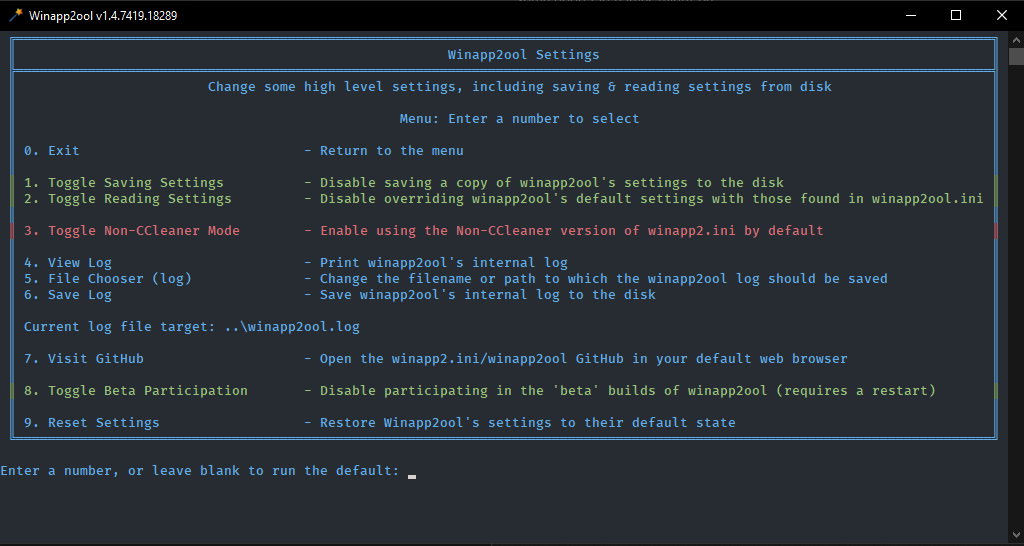
Winapp2ool now has a cute little magic wand icon. It was free! woooo!
Much has changed in winapp2ool since v1.02 was released over a year ago!
Colorful menus - winapp2ool now uses colors to provide information about the status of toggle settings or the inability to run a module. The top winapp2ool settings menu option is always yellow, for example.
The application will now fit to the width of the console window if you make it larger than the default
Winapp2ool settings - There's now a top level module for managing some of the winapp2ool settings
Some of those settings themselves are new features:
you can now optionally save your winapp2ool settings to and read them back from disk (optionally, save without reading or read without saving)
toggle the use of the Non-CCleaner file (previously a commandline arg "-ncc" which is still supported!)
View and save the internal winapp2ool log
- Winapp2ool now has an internal logging feature! you can view it from these settings or by typing "printlog" on the main menu
You can also change the save target destination, it is winapp2ool.log by default
Open the GitHub
And toggle participation in the beta. This will download the beta executable and restart your application.
Of course, if you modify your settings the "reset settings" option will make itself visible as usual.
WinappDebug:
"Autocorrect" has been renamed to "Saving"
Many changes have been made to what and how the debugger detects as errors, you can see the most major changes in the Toggle Scan Settings screen, where you'll see a substantially larger number of options
Trim:
Toggle Download (Non-CCleaner) has been removed as the use of the non-ccleaner file is now a top level setting
Applications whose registry path contains the word "software" will no longer be improperly trimmed from the file (sorry, Foxit Reader!)
Diff:
Diff now offers to trim the remote file before diffing (by default) so you don't get a useless changelog with thousands of additions against your trimmed file
Diff no longer shows the full entry text by default. You can turn this back on by enabling "verbose mode"
Enjoy!
winapp2ool v1.02
What's new in winapp2ool v1.02:
Crash fixes:
winapp2ool should crash less often when handed invalid ini data
winapp2ool should no longer crash for users with number formats that are inconsistent with en-us
New features:
VirtualStore locations have been removed from winapp2.ini and incorporated as a part of the trim process. These keys will now be inserted where necessary when you trim your file. Check it out!
Minefield:
A new module that is designed to hold concepts for modules before they're fully fledged ideas. Stuff in this module should be considered alpha and may not always/ever work, or ever become a full feature. You can access the minefield by typing "m" in the main menu.
Right now, the only real feature in Minefield is JavaMaker. It was designed with the help of Fred de Vies, the creator of JavaRA. It will attempt to generate a winapp2.ini entry for your system to clean up after the messy Java Runtime Environment installer.
Downloader:
You can now download several new files from the GitHub including the winapp2ool readme.
Changes:
Commandline args have been simplified and allow for some more plaintext. This should hopefully make things less confusing in general! Check the ReadMe for more information.
winapp2ool out of beta
Here's the 1.0 release of winapp2ool - finally! Many changes have been made since even the most recent (master) beta build (0.85)
The application has been majorly rewritten at very low levels in many places, but appears to be (mostly) bug free. If you find anything majorly busted, please file an issue!
Alongside winapp2ool's release comes its sister program, built for .NET 4.0 - winapp2oolXP. This should allow WindowsXP users to use the full suite of winapp2ool modules without getting blocked by that pesky .NET 4.6 requirement for downloading the executable.