A lightweight, type-safe document image correction library for Node.js, Bun, and browsers. Provides three independent, lazy-loading correction services powered by PaddlePaddle ONNX models:
DocOrientService— document orientation classification (0/90/180/270 degrees)TextUnwarpService— geometric document unwarping (UVDoc model)TextOrientService— text line orientation classification (0/180 degrees)
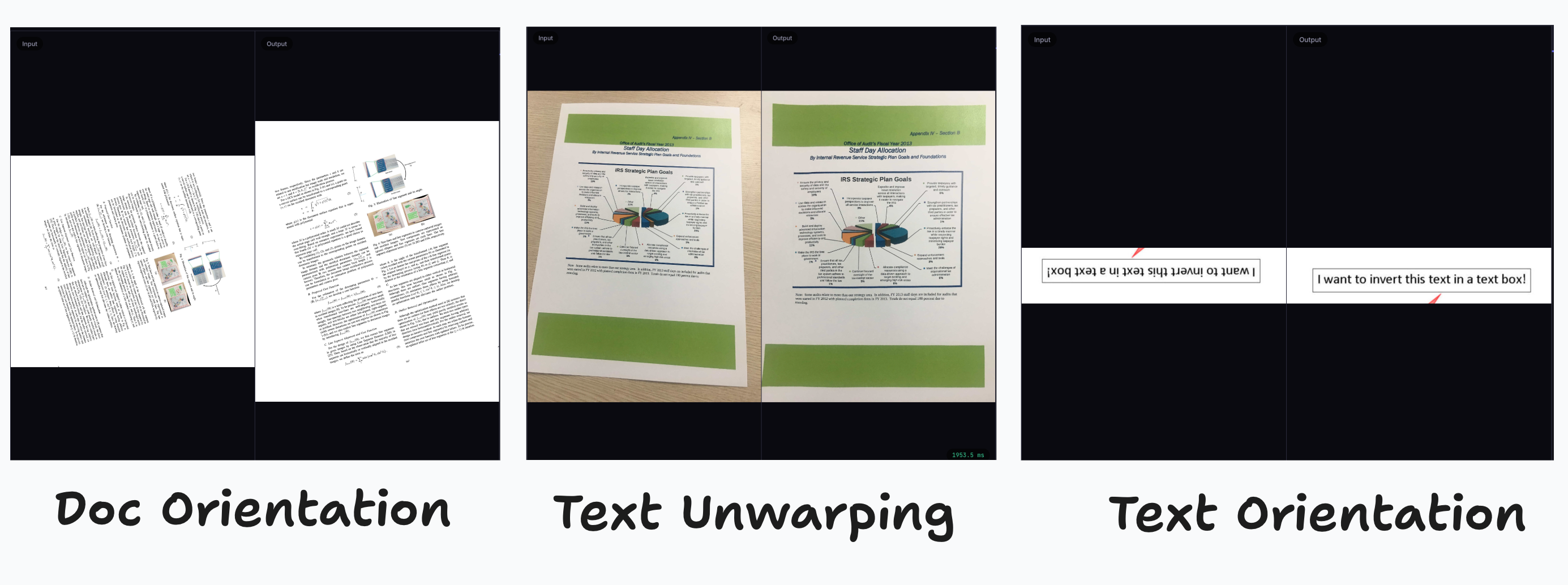
Each service is fully self-contained: it handles model downloading, caching, ONNX session management, and cleanup independently. Models are lazily loaded on first use -- only the model you need is downloaded.
npm install ppu-doc-correction
yarn add ppu-doc-correction
bun add ppu-doc-correctionimport { DocOrientService } from "ppu-doc-correction";
const service = new DocOrientService({
debugging: { verbose: true },
});
const result = await service.run(imageBuffer);
console.log(result.orientation); // 0 | 90 | 180 | 270
console.log(result.scores); // [0.82, 0.06, 0.03, 0.09]
await service.destroy();import { TextUnwarpService } from "ppu-doc-correction";
const service = new TextUnwarpService();
const result = await service.run(warpedImageBuffer);
// result.correctedImage is the unwarped ArrayBuffer
await service.destroy();import { TextOrientService } from "ppu-doc-correction";
const service = new TextOrientService();
const result = await service.run(textLineBuffer);
console.log(result.orientation); // 0 | 180
await service.destroy();const service = new DocOrientService({
model: "./models/PP-LCNet_x1_0_doc_ori.onnx",
});You can also pass an ArrayBuffer directly:
const modelBuffer = await Bun.file("./models/PP-LCNet_x1_0_doc_ori.onnx").arrayBuffer();
const service = new DocOrientService({ model: modelBuffer });When debug: true is set, corrected images are saved to the debugFolder (default: out/):
const service = new DocOrientService({
  debugging: { debug: true, verbose: true, debugFolder: "out" },
});const service = new DocOrientService();
service.clearModelCache();Or via CLI:
bun clear-cacheImport from ppu-doc-correction/web:
import { DocOrientService } from "ppu-doc-correction/web";

const service = new DocOrientService();
const result = await service.run(canvas);
console.log(result.orientation);
await service.destroy();
See the interactive demo: Web Demo
| Model | Input Shape | Output Shape | Purpose |
|---|---|---|---|
| PP-LCNet_x1_0_doc_ori | [1, 3, 224, 224] | [1, 4] | Document orientation (4 classes) |
| UVDoc | [1, 3, H, W] | [1, 3, H, W] | Text image unwarping |
| PP-LCNet_x0_25_textline_ori | [1, 3, 80, 160] | [1, 2] | Text line orientation (2 classes) |
Models are sourced from ppu-paddle-ocr-models.
A larger, more accurate text orientation model:
import { TextOrientService, MODEL_BASE_URL } from "ppu-doc-correction";

const service = new TextOrientService({
  model: `${MODEL_BASE_URL}/correction/PP-LCNet_x1_0_textline_ori.onnx`,
});Each service accepts its own options object:
| Property | Type | Description |
|---|---|---|
model |
string | ArrayBuffer |
Model path, URL, or buffer. Omit for default. |
debugging |
DebuggingOptions |
Logging and image dump behavior |
session |
SessionOptions |
ONNX Runtime session configuration |
docOrient / textUnwarp / textOrient |
preprocessing options | Service-specific preprocessing |
| Property | Type | Default | Description |
|---|---|---|---|
verbose |
boolean |
false |
Enable detailed console logs |
debug |
boolean |
false |
Save corrected images to disk |
debugFolder |
string |
"out" |
Output directory for debug images |
| Property | Type | Default | Description |
|---|---|---|---|
executionProviders |
string[] |
['cpu'] |
ONNX execution providers |
graphOptimizationLevel |
string |
'all' |
Graph optimization level |
enableCpuMemArena |
boolean |
true |
CPU memory arena |
enableMemPattern |
boolean |
true |
Memory pattern optimization |
bun task bench index> bun task bench
$ bun scripts/task.ts bench
Running benchmark: doc-orient.bench.ts
clk: ~2.96 GHz
cpu: Apple M1
runtime: bun 1.3.7 (arm64-darwin)
benchmark avg (min … max) p75 / p99 (min … top 1%)
------------------------------------------- -------------------------------
DocOrientService.run() 137.59 ms/iter 138.61 ms █ █
(135.59 ms … 139.92 ms) 139.59 ms █▅ ▅ ▅█ ▅ ▅ ▅ ▅
( 0.00 b … 31.02 mb) 16.63 mb ██▁▁▁█▁▁██▁▁▁█▁█▁█▁▁█
Running benchmark: text-orient.bench.ts
clk: ~3.03 GHz
cpu: Apple M1
runtime: bun 1.3.7 (arm64-darwin)
benchmark avg (min … max) p75 / p99 (min … top 1%)
------------------------------------------- -------------------------------
TextOrientService.run() 11.54 ms/iter 11.59 ms ▅ █▅
(11.31 ms … 11.99 ms) 11.90 ms ▃█▃██▃████
( 0.00 b … 3.38 mb) 1.41 mb ▄██████████▁▁▄█▄▁▄█▁▄
Running benchmark: text-unwarp.bench.ts
TextUnwarpService.run()
3448.26 ms (includes model load)
output: 9570021 bytes- Fork the repository
- Create a feature branch
- Implement changes and add tests
- Submit a pull request
bun test
bun build:test
bun lintMIT — see LICENSE.
Emit .js and .d.ts files to lib.
Move package.json, README.md to lib and publish.
bun task bench index     # Run bench/index.bench.ts
bun task bench --node    # Run in Node.js