The chordMelodyCreator.py is a python utility script which generates 4/4 melody and chord progression based on
permutation and random picking. The script can help people find a musical idea, a small jingle or a background music.
Note: This does not use Google Magenta or any AI. But output generated by the script can be fed to Magenta for
continuation and Accompanying music generation.
- python 3.x
- MIDIFile (Dependency)
- Basic idea of music theory i.e. knowledge on Rhythm, Harmony and Melody.
- Some exposure with MIDI
- Optional - Exposure to DAW in case you want to edit the generated midi and create your own music with different sound fonts.
This is a step-by-step process.
- Select Chords of your choice
- Fill up the
input.jsonas per requirement - Fill up the
noteToMidiNumber.jsonas per your requirement. - Run the
chordMelodyCreator.py - Import the generated MIDI in DAW and use Soundfont of your choice
- The script also generates a
chordBot.jsonwhich you can use in chordbot to generate accompanying backing track. - The script also generates a
noteSeq.json. If you want to play an instrument on your own, this file gives you the generated melody in json format.
The audio of this video was completely generated using this script, no manual intervention made in the chord progression or melody. I only chose the instruments.
There are two input files that you need to process as per your requirement.
This is the main configuration file for the script to run. Please do not omit any field of the json or the script will break. No Validation was added for the input provided by user.
Following are the details of the fields in the configuration.
- name
This is the name of the output that is going to be generated. If you are chordbot user, your chord progression will have this name too.
- dir
The directory where the output will be generated
- beatsPerBar
Number of beats in each bar. This is to help generate 3/4 or 4/4 music
- length
The length of the composition.
- noteRangeLow
The lowest note in the composition.
- noteRangeHigh
The highest note in the comosition.
- preferredSequences
This is an array of arrays. The inner arrays are sequences that you want to have in your composition. This is useful if you are working with Indian Raga sequence.
- excludedNotes
If you want to skip some notes in between the range provided by noteRangeLow and noteRangeHigh
- endWithFirstChord
This is to resolve the composition. If selected true, the chord progression will end on the first chord. This gives a
resolved feeling to the listener.
- tempo
Tempo of the composition
- auxilaryNotes
List of auxilary notes. A random note will be chosen when there is a repetition of same note for more than 2 beats. You need to provide a list of auxilary notes for each of the notes.
- chords
A list of chords that you want in your composition. The melody will revolve around the notes in the chords.
Following is a detailed description of each field present in a chord.
- name
Name of the chord
- lowOctaveNotes
The lowest octave notes used in the chord.
- middleOctaveNotes
Notes of the chord from middle octave
- highOctaveNotes
Notes of the chord from high octave
- passingNotes
Passing notes for the chord of all three octaves. During melody generation a suitable passing note will be picked by the script.
- chordbotSignature
This field is a little tricky to explain if you do not have experience with Chordbot. In case, you do not understand what is going on, simply copy and paste this field in each chord.
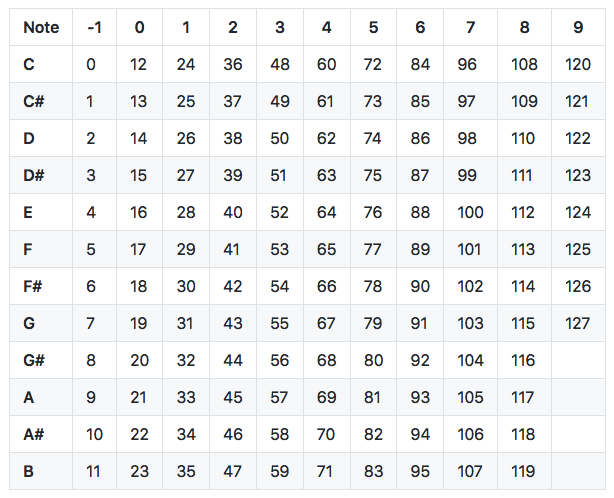
As the name suggests, it is a simple one to one mapping from midi note numbers to human readable music notation.
Populate this file as per your requirement. following table can help you with the note number and note.