Releases: Piebald-AI/piebald-issues
v0.3.2

- Fixed command prompt window flashing on each hook invocation on Windows.
- Fixed
"continue": falsenot being respected for all hooks. - Fixed
additionalContextinSessionStarthooks not being properly injected. - Added
--version/-Vflags to Piebald binaries. - Fixed a bug handling parallel tool calls in the Claude Code engine.
- Added support for
.github/copilot-instructions.md.
v0.3.1
- Added support for NVIDIA Nemotron's flavor of the Responses API with
response.reasoning_part.added&response.reasoning_part.done. - Made file edit diffs more compact.
- Fixed a bug launching Claude Code in certain directories.
- Fixed a bug when going from a subagent chat to the parent chat in some cases.
- Fixed bugs in the file browser UI.
- Fixed a bug where the last used of multiple terminals would be forgotten when switching away.
- Fixed a bug where empty messages sometimes weren't filtered out after conversion to the OpenAI completions format.
- Handled a bug with pasting images where the mime type as reported by the OS may be incorrect.
v0.3.0
We've added a Claude Code provider that avoids direct Anthropic OAuth login and uses Claude Code under the hood, as well as support for Claude Code hooks, cloud chat sharing, Claude, ChatGPT, and Gemini subscription usage/rate limit monitoring, a token count badge, and Bedrock API keys.
Claude Code provider
Our Claude provider now uses Claude Code under the hood, instead of calling the Claude.ai API directly. Since we're using Claude Code itself to make the requests, you can now be sure there's no risk of getting your Claude.ai account banned. (FWIW, we've never received a single report of an account ban due to use of Piebald.)
By default, Piebald will use your existing Claude Code installation, if any, by searching for claude on your PATH. If you have Claude Code installed in an unusual location, however, you can specify the path to the claude binary manually in your Claude Pro/Max provider settings. And if you don't have Claude Code installed, you can use Piebald to install the latest version and keep it up-to-date automatically.

Claude Code's hooks
We've added support for Claude Code's hooks, so when you open a project that has a .claude/hooks and .claude/settings.json, the hooks will activate at the points you've configured.
We currently support the following Claude Code hooks: PostCompact, PostToolUse, PostToolUseFailure, PreCompact, PreToolUse, SessionStart, Stop, StopFailure, SubagentStart, SubagentStop, UserPromptSubmit.
We don't currently support the following hooks because they don't have direct equivalents in Piebald: ConfigChange, CwdChanged, Elicitation, ElicitationResult, FileChanged, InstructionsLoaded, Notification, PermissionDenied, PermissionRequest, PostCompactResult, PostToolBatch, SessionEnd, Setup, TaskCompleted, TaskCreated, TeammateIdle, UserPromptExpansion, WorktreeCreate, WorktreeRemove. However, please let us know if any these would be essential to you.

Subscription usage limit monitor & token count display (Pro)
We've added two widgets to the chat top bar that show the number of tokens that your current chat is using and your current subscription usage, if you're using a Claude Pro/Max subscription, ChatGPT subscription, or a Google AI subscription.

Chat sharing (Pro)
You can now share chats from Piebald! Click the ellipsis menu on a chat in the sidebar or chat titlebar and click Share. Just choose an expiration date and then copy the link and send it! Anyone with the link will be able to view the chat (here's the chat in the video).

Passing a prompt from the command line
You can now pass a prompt to Piebald from the command line with an argument (e.g. piebald /code/myfolder "Explore this project") or with a command line flag (e.g. piebald --prompt "Add tests").

Bedrock API keys
We now support Amazon Bedrock API keys. Go to Settings → Providers → New Provider → Amazon Bedrock → API key and paste your key. We support long-lived and short-lived keys.

Other
- Added French, Portuguese, Korean, Turkish, and Italian translations.
- Removed Qwen.ai provider—Alibaba have officially sunset the OAuth free tier.
- Rebuilt the
AskUserQuestiontool to support multiple questions in one call, optional descriptions for the answers, and optional previews. - Improved the web server token system so that you can open multiple tabs or windows of Piebald Web.
- Added DuckDuckGo in addition to Exa as a search engine for the
WebSearchtool. - Added a fourth plan approval option, Approve and implement in new worktree.
- Changed wording of generation errors from "Error during generation" to "Generation error".
- Emphasized preference for explicit user instruction in the
LaunchSubagenttool description. - Added the ability to configure the profile used for subagents launched in a particular chat.
- Added plan information to the window title on Linux like the custom titlebar on Windows and macOS.
- Added support for line and column numbers to AI file mention detection.
- Added web fetch and web search requests to HTTP traffic viewer.
- Added functionality to automatically cancel all generations on signout.
- Added functionality to automatically move down to the first diff in the selected file in the Git tab.
- Enhanced the
WriteFiletool to automatically create directory trees when they don't already exist. - Enhanced chat compaction to use a toast, not a dialog, to avoid blocking the whole app during compaction.
- Enhanced title generation and compaction to strip thinking blocks if thinking is enabled on the respective built-in profiles.
- Fixed Glama MCP count display.
- Added handling for the
RECITATIONstop reason in Gemini providers. - Added handling for
response.failed,response.incomplete, andresponse.metadataevents in OpenAI providers with Response API. - Enhanced
RunTerminalCommandtool calls to return the first and last 10k characters instead of the first 20k. - Made tool calls full width by default.
- Fixed a bug where DeepSeek reasoning wasn't passed back to their API, breaking DeepSeek v4 tool calling support.
- Added a feature to display Appeal and Verify links that are sometimes returned with Gemini/Antigravity error.
- Enhanced the
Grepbuilt-in tool to work with multiple space-separated search dirs (e.g.backend/src frontend/src). - Fixed a bug where long provider names would overflow the provider card.
- Added automatic retry for intermittent client connection errors.
- Added functionality to automatically detect the name and command line of the currently executing process in a particular terminal and display them as the chat title and description.
- Made
RunTerminalCommandtool calls automatically collapsed. - Fixed a bug where codeblocks in admonitions weren't displayed properly.
- Improved handling of MCP servers that don't support CIMD or DCR.
- Enhanced error display for errors from APIs that use QuantumNous's NewAPI product.
- Fixed bugs with our OpenRouter Responses support.
- Fixed a bug where pressing Esc to close dialogs also stopped generation.
- Removed toast that appears when modifying settings in the chat generation config sidebar.
- Made tool call output truncation during chat compaction much more aggresive.
- Improved MCP server OAuth signin to use our hosted redirect URL (piebald.ai/desktop/redirect) for all MCP servers.
v0.2.7
- Piebald is now built on Linux ARM64 in addition to x64.
- Added support for Claude Opus 4.7.
- Fixed Qwen.ai OAuth tokens automatic refreshing.
- Fixed a bug where Claude via Antigravity couldn't call MCP tools without arguments.
- Fixed latest Antigravity version detection.
- Updated Antigravity
claude-sonnet-4-6-thinkingmodel ID toclaude-sonnet-4-6. - Compacted Code tab UI in the project sidebar.
- Handled some incompatibilities with OpenAI-"compatible" providers.
- Fixed error finish reason handling for OpenRouter response with upstream errors.
- Fixed a bug that could sometimes break file-@mentioning.
v0.2.6
- Fixed more chat crashing errors.
- Fixed "missing thinking" and "missing signature" errors with custom Anthropic providers.
- Fully updated Antigravity version.
- Fixed Antigravity error display.
- Added a confirmation dialog before disabling telemetry or error reporting.
- Added
/bugslash command alias for opening the feedback submission dialog. - Changed dialog overlay effect.
- Fixed provider selection bugs that occur after deleting a provider used by existing chats.
v0.2.5
In this release, we've added a feature for setting a default permission mode that new chats will use. We've also fixed several bugs.
- Added the ability to customize default permission mode used for new chats and renamed "Default" to "Read-only".
- Added Ctrl+-, Ctrl+=, and Ctrl+0 to control font size zoom.
- Added buttons to copy tool input and output.
- Added execution time to tool calls.
- Made the Chats, Terminals, and Code tab headers sticky so that they stay in view while scrolling the sidebar.
- Fixed a bug where branch tabs would overflow off the screen.
- Fixed a bug where skill slash commands weren't recognized after being pasted.
- Fixed a bug where creating a chat after deleting the last used provider would throw errors.
- Fixed a bug where non-image files (files not ending with .png, .jpg, .jpeg, .webp, or .gif) could be attached with the "Attach image" button.
- Fixed a bug where deleting a chat would switch you to another project.
- Improved error messages when MCP servers fail to start.
- Fixed the "Use" and "Start using" buttons when no project was active.
- Fixed a bug where the app would crash due to minor issues in our OpenAI Responses API support.
- Fixed title generation with ChatGPT providers.
- Fixed chat crashing errors.
- Implemented fixes for "Invalid request data" error when using Claude Max subscription.
- Implemented fixes for Gemini Code Assist support to reduce access suspension risk.
v0.2.4
- Fixed context notifications not showing on new messages.
- Added the number of chats in the worktree to the delete worktree dialog.
- Updated auto-approval rules to include all read-only tool calls, including those operating outside the current project's directory.
- Fixed Qwen.ai OAuth support by adding an empty system prompt when no system prompt is defined
- Added prompt caching support to Qwen.ai OAuth providers.
- Fixed Qwen.ai OAuth re-authentication and access token refreshing.
- Fixed automatic title generation being blocking until multi-step generation are finished.
- Fixed a bug where the sidebar would incorrectly mark chats as having draft prompts
- Added pre-validation to tool calls, so that obvious errors (e.g. an Edit tool call with
oldStringidentical tonewString) are auto-approved and fail instead of requiring manual approval. - Fixed a bug where deleting the current chat's provider shows noisy errors.
- Fixed animation bug with the minimized feedback dialog.
- Added a setting (on by default) to expand tool calls, resulting in reduced flickering
- Added buttons alongside the jump-to-top and jump-to-bottom buttons for jumping up and down through messages.
- Fixed a bug with automatic empty chat cleanup.
- Fixed a bug when listing built-in slash commands.
- Made Glob/Grep tools properly respect
.gitignore. - Fixed a bug wher subagent chats weren't being trashed along with the parent chat.
v0.2.3
We've added remote MCP headers and manual OAuth configuration (client ID, client secret, and callback port, like Claude Code), background color customization, and a few other small features and bug fixes.
Manual MCP header and OAuth configuration
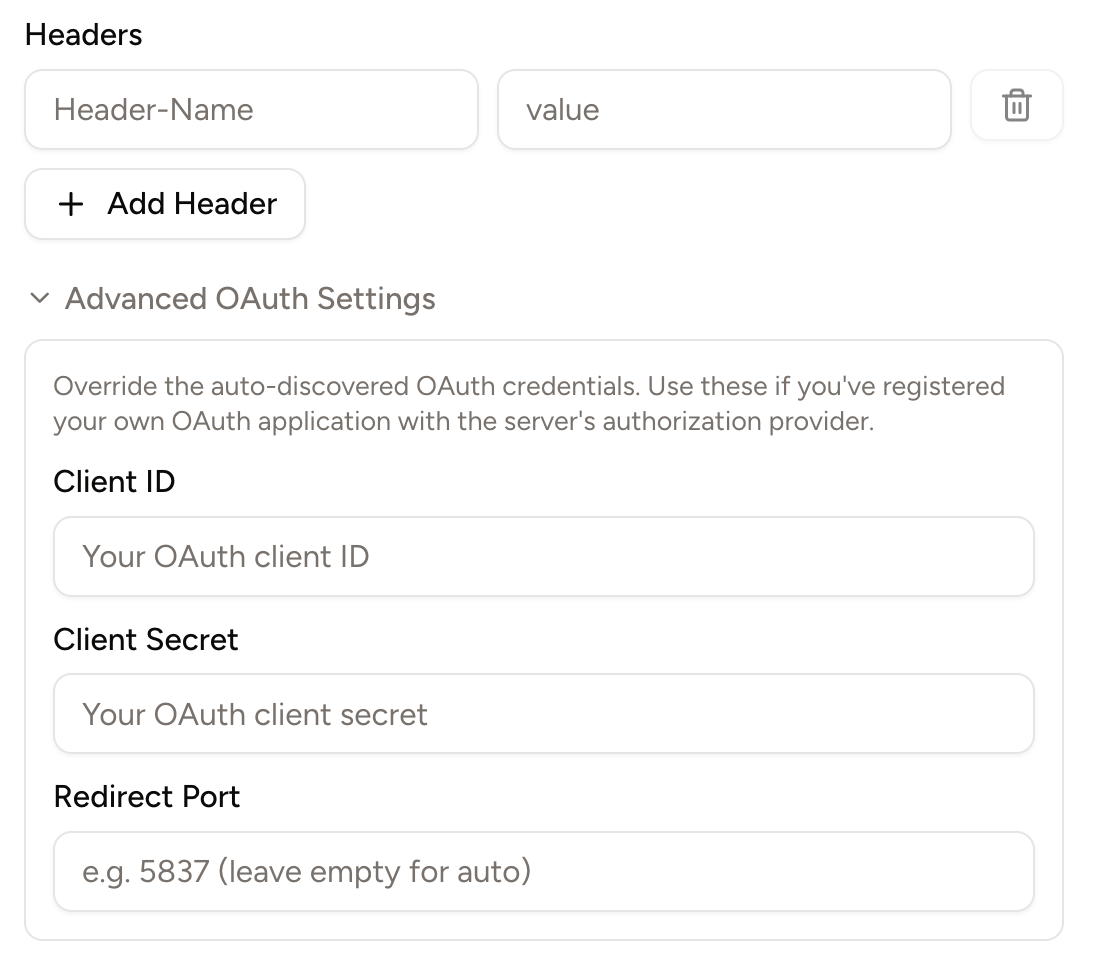
Some remote MCP servers, like GitHub's, recommend using headers like the Authentication: Bearer ... to authenticate the server. Others, like Slack's, require users to manually input a client ID, client secret, and callback port (authentication parameters that are required for a complete OAuth login process).
Piebald now supports both remote MCP headers and manually inputting client ID, client secret, and callback port:
Background color customization
You can now customize the background color of the entire interface for light mode and dark mode. Go to Settings → Appearance and change the Background Color settings:

Other
- Automatically minimize the feedback dialog when you click Submit.
- Added a new button to delete all trashed chats in a project.
- Changed the color for the AGENTS.md or CLAUDE.md context notification from red to blue to avoid it looking like an error.
- Added a copy button to file paths displayed in file read, write and edit tool calls.
- Added a button on toast notifications to close them.
- Fixed Qwen OAuth provider token refreshing.
- Fixed "bad request" error when using Qwen.ai OAuth.
- Fixed a bug when deleting worktrees.
- Cleaned terminal output of ANSI escape sequences before giving it to the model.
- Fixed a bug when a project that was a Git repo is no longer a Git repo.
- Made chats with stale "Pending your approval" status be automatically corrected.
v0.2.2
We're continuing work on big features like hooks and a tab bar, but we've fixed lots of bugs and added a few minor UI enhancements:
- Added Help → Check for Updates menu
- Added setting Chat Interface → Auto-scroll During Streaming
- Fixed trashed subagent chats remaining in sidebar
- Fixed Ctrl+S and Cmd+S save shortcut in file editor
- Fixed handling of missing
choicesfield in streaming error responses - Added fold and unfold for unchanged diff regions
- Added support for loading skills from Claude Code plugins
- Fixed file clicking when terminal is fullscreen
- Fixed OpenAI handling of responses with blank token values
- Added a button to provider cards to make it easy to start using that provider
- Limited Git status items to 10k to keep the app from freezing
- Added a button to queued messages for sending immediately
- Correctly set chat status to idle when a tool call is interrupted
- Fixed AI file mentions in markdown lists
- Added automatic exponential backoff and retry. Useful for providers with aggressive short-lived usage limits like Qwen and intermittent errors
- Clicking on projects that have multiple worktrees, all of which except the root worktree are inactive, will now take you directly into the root worktree, instead of taking you to the worktree listing view. If you want to go to the worktree listing view, you can use the new "View Worktrees" project menu item
- Removed the warning that mentions Piebald v0.1.19 from provider cards
- Fixed a bug that occurs when reloading with empty chats
- Fixed a bug with the builtin
WebFetchtool where fetching large web pages would crash the app - Fixed synchronization of the select boxes under the message input with the select boxes in the Chat Settings sidebar
v0.2.1
We're still working on features for subsequent releases, but this is a bug-fixes-only release.
- Made our Copilot support dynamically use completions/responses/messages API
- Made our Copilot support correctly list all available models
- Implemented several internal performance improvements
- Increased default MCP tool call timeout from 30s to 60s and made it configurabled
- Fixed a language glitch when reloading the app the app language customized
- Fixed bash
find -execcomands incorrectly being auto-approved - Added a
PIEBALD_DISABLE_ERROR_REPORTINGenvironment variable - Added
~/.claude/commands(old-style pre-skills Claude Code custom slash commands) and derivative./.agents/commandsdirectories to skill search path - Fixed backticks being included when copying portions of code blocks
- Made Glob/Grep tool calls cancelable
- Fixed regenerated and subsequent messages not displaying
- Fixed Zapier link
- Fixed Glama scrape count
- Added Ctrl+C, Ctrl+V, Ctrl+Shift+C, and Ctrl+Shift+V keyboard shortcuts for copying from and pasting into the terminal
- Disable compaction actions when the current chat is empty
- Show the jump-to-top/-bottom buttons during scrolling
- Corrected AGENTS.md context notification name in some cases
- Fix a sign-in error
- Fix a regex error in some browsers
- Fix a bug when deleting worktrees
- Show the Qwen model name instead of "coder-model"
- Fix a crash when using Qwen providers
- Sanitize unusual enums from MCP tool schemas for Gemini
- Fix compaction provider/model being hidden when auto-compact is disabled