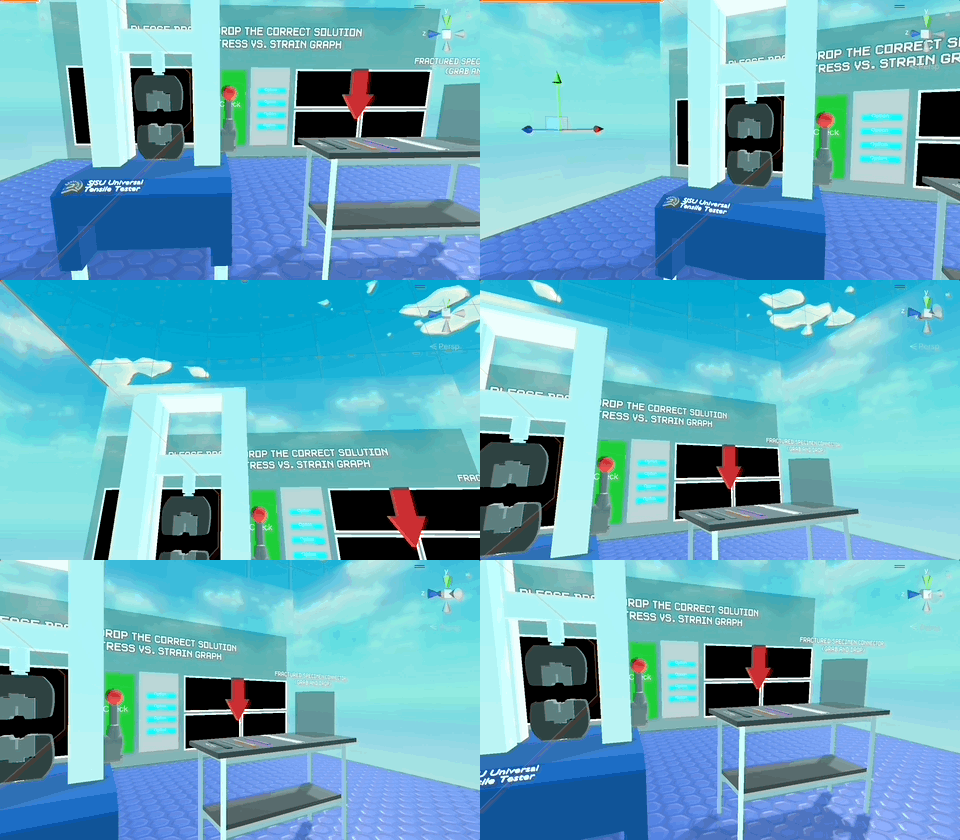
CVRLabSJSU allows students to simulate tensile testing of specimen materials, interactive diagrams demonstrating Poisson's ratio, and provides a way to quiz them based on the lab experimentations. This laboratory is being used to research the effects of "embodied cognition" described in Markansky et. al, 2020, through an A/B split test.
- Download the two APK's in the following Google Drive link.
- If you wish to use the embodied version of the lab, use
VRlab_A, otherwise useVRlab_B. - Sideload the apk to your Meta Quest 2 using a Usb-C cable using a tool such as SideQuest and run the application.
- Keep in mind, the current builds may be continuously updated. All previous versions will always remain available.
- Clone the repository
- Open the
src/Unity/VRlabfolder using Unity Desktop. The latest Unity version should work, although the project was developed withUnity 2022.2.18f1 , macOS Silicon. - Make any customizations as necessary
- Switch the build to Android, Build and Run with your Oculus Quest 2 headset connected. More information: https://developer.oculus.com/documentation/unity/unity-build/
All project files are stored in the Assets folder within the Unity project, and the general architecture is the following:
-
3D Models: All of the 3D models used in the lab, such as the Tensile Testing machine, the hands, connected and separated specimen, and the guiding arrow. -
Animations: All animations and animation controllers used for both labs, sorted in folders. -
CSV: Here, when testing CSV files will be generated with results such as student ID, and other metrics. -
Imported packages: All the imported material which was not created specifically during this project's current development, such as the skybox, TextMeshPro, samples from the XR Interaction Toolkit system and the previous files of the CVR lab. -
Lighting: Lighting and skybox information for the different scenes. -
Materials: All the materials used for texturing 3D assets in the lab. -
Prefabs:- ===VR=== : All of the required components for the full VR rig. Can be dragged and dropped into any Unity scene.
- Arrow : Prefab for the arrow guidance system, can be dragged and dropped, then customized. Needs a list of colliders to point to, and when the colliders touch the player, the arrow will point to the next collider and text will update in an order-based fashion.
- Coordinates : A 3d object used to illustrate the X, Y and Z coordinates for demonstrations.
- Graph : Graph displayer. Can display data using array-based information, and be customized with aspects such as color, font, text sizing, labels etc.
- Handle : Red spherical handles utilized to interact with objects within poisson's lab. They display a dotted line which is connected to an object, and can be used for interactions.
- Next Lab Station : Button station that when pressed, loads the next lab.
- Reset Station : Button station that when pressed, resets the current lab. Useful in case a bug occurs, or the student wishes to reset.
- Whiteboard Station : Whiteboard station with its corresponding marker. Aspects like size, colors and thickness may be customized through the inspector and its corresponding scripts.
-
Scenes:- Version_A folder : Version A of Poisson's and The Tensile Testing Lab, where the student interacts with objects within.
- Version_B folder : Version B of Poisson's and the Tensile Testing Lab, where the student watches a pre-recorded video of the interactions.
- MainMenu : The main menu, where the student inputs his information and the labs are loaded.
-
Textures: 2D textures used for Menu, Poission and Tensile lab as well as Render textures, which are used for the whiteboard, and versions B of the labs. -
UI: Fonts used in the lab ( Creative Commons 0 License ) -
Video: Video demos used for the in-lab tensile testing tutorial, and lab version B tutorial.
All project code is within the Scripts folder inside the Assets folder, written with C#, and these are the script's functions:
-
CSVDataWriter.cs: Export custom CSV data to the Meta Quest headset on final build, or within the editor in the CSV folder if testing. -
/DirectionalArrow: ContainsDirectionManager.cs, which makes the arrow system follow the next collider on the array, and updates the text within the guiding arrow. -
/MainMenu/: Code used for the Main Menu.PinpadButton.cs: Attached to each button in the pinpad system. Uses triggers to detect button presses, and a coroutine to change color when pressed. Sends this information to StudentIDManager.StudentIDmanager.cs: Singleton; Manages operations when pinpad buttons are pressed, such as updating the UI, clearing the numbers, or saving the student ID.TransitionManager.cs: Singleton; Using the enum, developer may choose between type_A and type_B for the lab. This setting has to be changed in the inspector before building in order to execute the correct lab. Loads scenes as necessary using scene numbers.
-
/Poisson_A/: Code used for poisson lab version A.HandleLineRenderer.cs: Using a LineRenderer, renders a line between a handle and an object, such as the samples inside the Poisson lab.PoissonCheckButton.cs: Used to detect when the "Check" Button is pressed when solving the quiz.PoissonQuizManager.cs: Used to manage the quiz system for the poisson's ratio questions, where a student increases/decreases the size of an outline to answer, what a specimen would look like after compression or extension. Uses a delta size approach to calculate correct answers, sets shapes to green if correct red otherwise.PoissonStationController.cs: One is used in each Poisson station, updates the specimen controller for the cube and cylinder samples, as well as set the poisson graph.SolidShapeController.cs: Calculates handle separation in order to drive simulations, such as extension and compression of samples given a poisson's ratio.SpecimenController.cs: Using a poisson's ratio value, calculates the X, Y and Z axis scale values to simulate deformation of the cylindrical or square sample. Updates pressure text (MPa).
-
/Tensile_A/: Code used for Tensile lab version A./Graphs: Code used for rendering the lab's graphs.GraphManager.cs: Renders graphs depending on the graph type that is in the tensile tester ( Polymer, Metal or Ceramic )GraphWindowController.cs: The most important script for graph rendering. Controls each window that is being rendered, with parameters such as font, subdivision count, point size, graphing speed etc. All graphing information is documented with Headers in the Unity editor.
ButtonStation.cs: Same as poisson's check button, reloads tensile scene ( is redundant, now that I look at it ).ConfirmButton.cs: Button for confirming a selection when solving the quiz.FracturedSpecimenConnector.cs: Connects broken specimen by changing their 3D model to one which has the connections, and a black line to show the fracture point so that students can measure deformation after testing.Option.cs: Assigned to every option for the quiz to manage their text, material and color.OptionManager.cs: Has an array of Options ( Option.cs ), and manages the logic for any changes made to them, resets position, color etc. as necessary.OptionReceiver.cs: Uses socket interactors to manage the solution object being dragged and dropped to each solution field, such as YS, TS and FS,OptionReceiverManager.cs: Gets information from the socket interactors in "OptionReceiver.cs", sets soultions to red or green depending on solution, handles ID's to identify the correct solutions.PullLever.cs: Detects if lever in tensile tester is being pulled, starts the tensile testing process when a specimen is inserted and the lever is pulled.Specimen.cs: Has functions to manage specimen behavior such as BreakSpecimen, ConnectSpecimen, and resets specimen if they fall to the floor using OnCollisionEnterTensileLabManager.cs: Manages all major behaviors inside the tensile lab, such as which specimen is selected, what is the question number, what are the correct solutions etc.
-
/Tensile_B/: HasVideomanager.cs, which manages the videos played in both verions of labs (Tensile B and Poission B). -
/Whiteboard/: Scripts for the whiteboard station and its drawing functions ( work in progress )PenController.cs: Cast a ray to the whiteboard, find collision position, send information to WhiteboardController.cs.WhiteboardController.cs: Handle parameters such as stroke width, color, and lerping amount. Draws into the whiteboard's render texture.WhiteboardResetButton.cs: TODO, clean the whiteboard.
CVRLabSJSU is brought to you by the VR/AR/CV Lab at San José State University. Special thank you to Jon Oakes from KLEVR lab at the MLK library for help with hardware and student testing, Ismet Gurleroglu and the SPE club for their help testing early versions of the lab, and Dr. Vimal Viswanathan for advising.
Rafael Padilla Perez ([email protected])
Ozgur Keles, Ph.D
This project is a new repository. which includes some 3D meshes from CVRLabSJSU project by Vincent Brubaker-Gianakos https://github.com/Apelsin/CVRLabSJSU, which is a fork from the CVRLabSJSU project by Ian Hunter, which is in turn a fork of the SBHacks project by Connor Smith, Anish Kannan, and Kristin Agcaoili.
Hand models and rig provided under creative commons 4.0 license: https://developer.oculus.com/licenses/creative-commons-4.0