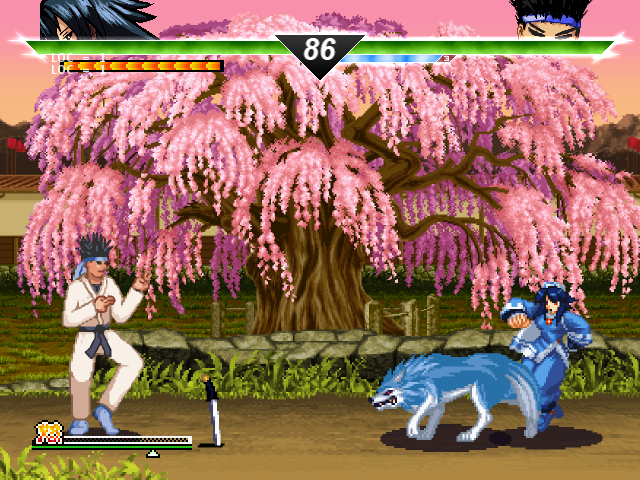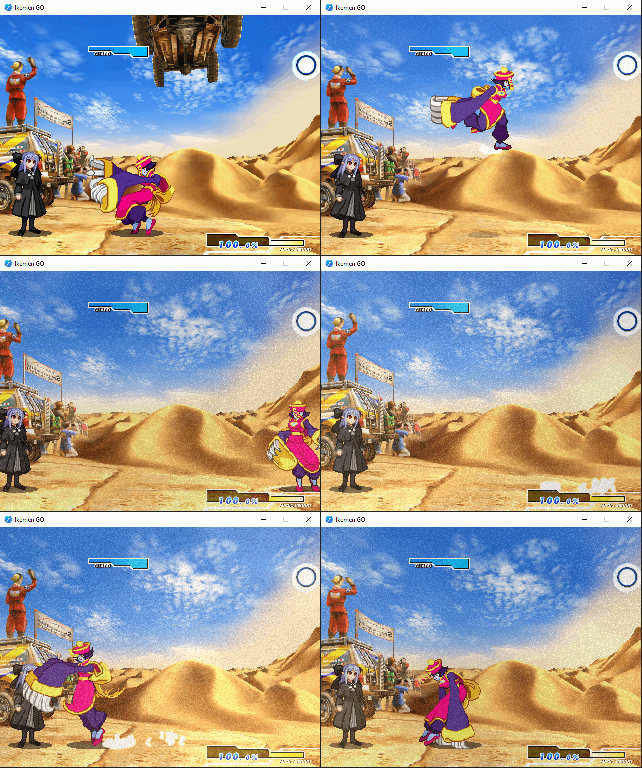
A system to replace Ikemen's default shadows for rounder shadows similar to those present in Capcom games like SFIII and MvC1. This is based of MFG user inktrebuchet's mugen code.
To install
- Drop the contents of the repository in a new folder named
shadowsindata\. - Go to
save\and openconfig.ini - Near the beginning of the file you should see a block like this:
; Common states (CNS or ZSS)
States  = data/functions.zss, data/action.zss, data/dizzy.zss, data/guardbreak.zss, data/score.zss, data/system.zss, data/tag.zss, data/training.zss
; Common packs of graphic and/or sound effects called during the match by using
; a specific prefix before animation and sound numbers (like lifebar fightfx)
Fx      =
You just need to add my files so the engine can read them:
; Common states (CNS or ZSS)
States  = data/functions.zss, data/action.zss, data/dizzy.zss, data/guardbreak.zss, data/score.zss, data/system.zss, data/tag.zss, data/training.zss, data/shadows/shadows.zss, data/shadows/config.zss
; Common packs of graphic and/or sound effects called during the match by using
; a specific prefix before animation and sound numbers (like lifebar fightfx)
Fx      = data/shadows/shadows.def
The order isn't very relevant, just make sure to include a comma if either file is NOT the last the last line on the block, and to ommit it if it isn't.
Config Options
Config.zss includes a few settings you can tweak. Be careful not to delete the semicolon on these.
map(shadow_quality):= 2;
Controls the resolution of the shadow sprites. By defaults it is set to 2, the shadow sprite is the size you'd expect in a 480p game. 1 is low res (240p), 3 is high definition (720p) and 4 is a special, adaptative value. With 4 the shadow sprites will adapt to the localcoord of the stage (defaulting to 240p if undefined) so shadows will never be mismatched in resolution relative to the stage.
map(shadow_max):= stagevar(shadow.intensity)+64;
This daunting-looking expression controls the maximum intensity of the shadows (i.e. when the character is at floor level). It's expressed in the terms of shadow.intensty, because stages themselves define how dark their shadows should be (even though most creators use the default values), and the system tries to follow their same rules. You can change this to a single static value if you want; the default mugen stage uses an intensity of 128, so 128+64 = 192.
map(shadow_min):= stagevar(shadow.intensity)-48;
This other expression controls the minimum intensity of the shadows (i.e. when the character is high up in the air). You can also change it to a single static value, even the same as max intensity if you don't care for the fading effect. The default value is equivalent to 128-48=80.
Adjusting Stages
Shadows are automatically hidden on any stage that has reflection declared (mixing shadows and reflections is bad form!). If you wish to disable it for any specific stage because the shadows are ill-fitting, you can do it by opening the stage's def file and include the following section after [Infp]:
[Constants]
NoShadows = 1
Adjusting Characters
I tried to make this system work as well as I could with any and all characters, but due to the sandbox nature of mugen content I can't gurantee some things won't look off. The good part is that fixing stuff, if needed, can be done relatively painless. Let's look at Rera by Misao. This is how she looks on a clean download.
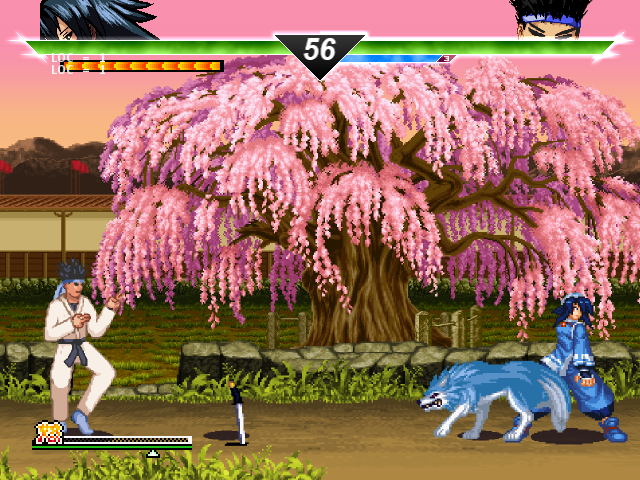
Let's fix her issues one by one, starting with Rera herself. Her shadow is a bit too small for her stance, we can change this by going to Rera.def and adding a new section:
Shadow_Scale = 1.3
1.0 leaves the character as it'd look without declaring shadow scale; 1.3 means the shadow is 30% wider and on the flipside 0.7 would mean 30% slimmer.
This only affects the "main body" of the character, we need to fix her helpers individually. By default helpers have much smaller shadows than playable characters and this works fine enough for projectiles, but for human-sized (or larger) helpers we need to give them their own scale.
Using debug mode (ctrl+d) we can check Rera's wolf "Shikuruu" runs on state 6000 (conveniently enough placed in "Shikuruu.cns").
;                            シクルゥ
;==========================================================================
;立ち
[Statedef 6000]
type = S
physics = S
velset = 0, 0
sprpriority = 5
anim = Ifelse(PrevStateNo=6010,6011,6000)

[State 6000, Shadow]; add this block right here
type = mapset
trigger1 = ishelper;
map = "Shadow_Scale"
value = 1.5
Finally Rera's dagger is called "CHICHIUSHI" and it starts on state 197 (located on "Rera_A.cns"). Its sprite has the quirk of having a shadow drawn directly, so instead of changing the circular one drawn by the system, it'd be better to disable it entirely. You can do it this way:
;---------------------------------------------------------------------------
;武器
[Statedef 197]
type    = S
movetype= I
physics = S
ctrl = 0
velset = 0,0
anim = 197
sprpriority = 3

[State 197, No Shadow]; Add this block right here
type = assertspecial
trigger1 = 1
flag = noshadow
This is how Rera looks after our minor edits.