
A solar forecast that learns from your panels.
A Home Assistant integration that predicts your PV production, corrects itself against what your installation really produces, and publishes the result where Home Assistant already knows how to show it.
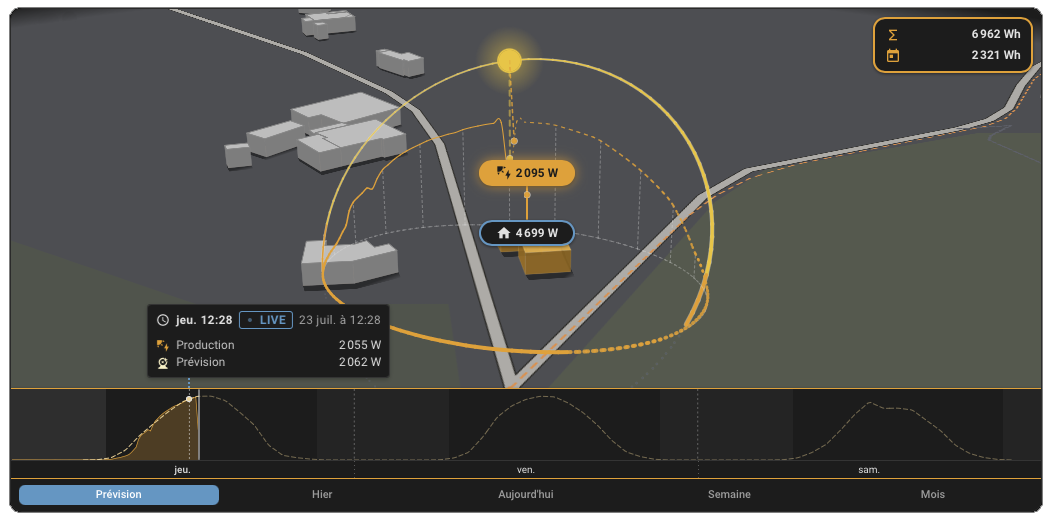
Measured 2 055 W, predicted 2 062 W. Seven watts apart, on a real installation.
Learn more Data contract Changelog





Helios Forecast is in the HACS default store.
- In HACS, search for Helios Forecast and install it.
- Restart Home Assistant.
- Go to Settings > Devices and services > Add integration, and search for Helios Forecast.
- Fill in your first panel line: orientation, peak power, and your PV production sensor.
The production sensor must be a cumulative energy sensor in kWh, your inverter's or meter's running total, not an instantaneous power sensor in W. Only an energy sensor carries the long-term statistics the learning reads.
About the "custom integration" warning in your log
Home Assistant logs We found a custom integration helios_forecast which has not been tested by Home Assistant at startup. That notice appears for every
integration installed outside of core, which means every HACS integration. It is
informational and does not indicate a problem.
A native provider for the Energy dashboard. The prediction appears in Home Assistant's own Energy view, right next to your real production. No card required, no extra setup.
Real entities, built for the recorder. Power now, next hour, per-day energy and peaks over a seven day horizon, energy left today, and a forecast reliability score. All usable straight away in automations, history graphs and template sensors.
A sub-hourly detail series the Helios card reads for full-fidelity visuals, so the card does not have to compute a forecast of its own.
Every entity is listed on the website.
Helios Forecast computes the whole production curve, not just the current value: one point every 15 minutes, from midnight today through the seven-day horizon, each with the predicted watts and its P10/P90 confidence band. An Energy Management System can read it to shift battery charging into the expected peak, work out how much sun is still to come, or find the latest safe charging start.
As a service (recommended). helios_forecast.get_forecast returns the curve
as response data, on demand:
# How much PV energy is still forecast for the rest of today
script:
  sun_left_today:
    sequence:
      - action: helios_forecast.get_forecast
        response_variable: helios
      - variables:
          remaining_kwh: >
            {{ (helios.forecast
                 | selectattr('datetime', 'match', now().strftime('%Y-%m-%d'))
                 | selectattr('datetime', 'ge', now().isoformat())
                 | map(attribute='watts') | map('float') | sum
                 * 0.25 / 1000) | round(1) }}
      - action: persistent_notification.create
        data:
          title: Solar forecast
          message: "About {{ remaining_kwh }} kWh of sun still to come today."
The response is a list of buckets (p10 / p90 are null until the forecast has
learned enough of your history to publish a band):
forecast:
  - datetime: "2026-09-12T14:00:00+02:00"
    watts: 3120.4
    p10: 2610.0
    p90: 3450.8
  - datetime: "2026-09-12T14:15:00+02:00"
    watts: 3038.1
    p10: 2550.2
    p90: 3380.5
  # ... one point every 15 minutes
With more than one installation, pass config_entry_id (from Settings >
Devices and services) to choose which one to read.
As an attribute. The same curve rides on the power_now sensor as its
forecast attribute, handy in a template sensor:
{{ state_attr('sensor.helios_forecast_power_now', 'forecast') }}If you have a battery, Helios Forecast can project its state of charge over the next 48 hours. It runs the production forecast against your home's own consumption, which it derives from your Home Assistant Energy dashboard (no extra sensor to wire), and integrates the battery's charge from your current SoC.
Turn it on in the integration settings by filling in your battery capacity and
your state-of-charge sensor; the reserve, efficiency and charge/discharge
limits are optional. A Predicted battery state of charge sensor then appears,
carrying the full curve as its forecast attribute (plus the day's projected low
and high, and the forecast reliability so you know how far to trust it).
It predicts, it never commands. Sending the charge order stays with your own automation, which knows your inverter — Helios just tells it what's coming:
# Top the battery up from the grid tonight only if it's predicted to run low
- action: helios_forecast.get_battery_soc_forecast
  response_variable: soc
- variables:
    lowest: "{{ soc.forecast | map(attribute='soc') | map('float') | min }}"
- condition: template
  value_template: "{{ lowest < 20 }}"
- action: switch.turn_on
  target:
    entity_id: switch.force_battery_charge
The response:
forecast:
  - datetime: "2026-09-12T14:00:00+02:00"
    soc: 78.4
  - datetime: "2026-09-12T14:15:00+02:00"
    soc: 80.1
  # ... one point every 15 minutes, 48 hours ahead
One honest note: home consumption is a learned average, so the projection is a good steer, not a guarantee — read it alongside the reliability figure, and it gets better as it sees more of your history.
It starts from physics: Open-Meteo irradiance, global tilted irradiance per panel orientation, the direct and diffuse split, snow cover, combined with your installation geometry and a cell-temperature derate so hot days are not over-predicted.
Then it stops trusting the physics alone. It learns a correction from your home's own recorded production, matching past hours on cloud cover, sun geometry and outdoor temperature. Over time the prediction absorbs what no generic model can know about your site: shading, soiling, an orientation that is a few degrees off, inverter clipping, even battery curtailment.
It also publishes a reliability score, which reflects how much history backs the learning, how accurate it has been recently, and how predictable today's sky is. A forecast that tells you when to doubt it is worth more than one that does not.
Everything runs on your server. No account, no API key, no browser-side maths.
A panel line is a group of co-oriented panels. There are two ways to describe your installation, and the right one depends on your sensors.
One entry per line, recommended when each line has its own production sensor. Each entry gets its own device, entities and detail series, so every line can be wired to its own card. Add the integration once per line.
Several lines in one entry, for two strings on one inverter that reports a single combined value. Add the first line, then tick add another line for each extra orientation. The lines share one production sensor and one inverter limit, and the forecast sums them by their kWp share. Use Configure to edit the shared settings or the lines later. Each line can also override the shared inverter cap and GPS coordinates, for a micro-inverter string that saturates on its own or a line mounted somewhere other than the entry's home location.
Helios turns your Energy dashboard into a live 2.5D scene: the sun crossing its arc over your home, your production, grid and battery flowing in real time. It draws this integration's prediction as the dashed curve your measured production tracks against, so you see the forecast and the reality on the same picture.
Neither needs the other. Together they are the whole story.
Early days, and moving fast. The data contract the card is built against is documented and frozen, so a change on either side cannot silently break the other.
| CONTRACT.md | The data contract between the integration and the card |
| CHANGELOG.md | What changed, release by release |
| helios-ha.org | The full entity list and how it all fits together |
Requires Home Assistant 2025.1.0 or later.
Found a bug, or is a forecast off? Open an issue. Feedback is very welcome, and it is what shapes the roadmap.
Helios Forecast is built and maintained by one person, in the open, and given away. A star costs nothing and helps other people find it. A coffee keeps the next cycle going.

Helios Forecast, a self-learning solar forecast integration for Home Assistant. Copyright (C) 2026 Jérôme CREMOUX (ReikanYsora).
Licensed under the GNU General Public License v3.0, see LICENSE.