
Telemetry for MCP widgets. Capture how your interactive widget is used inside a sandboxed Claude / ChatGPT / mcp-ui host — and forward it anywhere, even past the host CSP.


Quickstart · How the bridge works · Adapters · Configuration · Docs · Demo
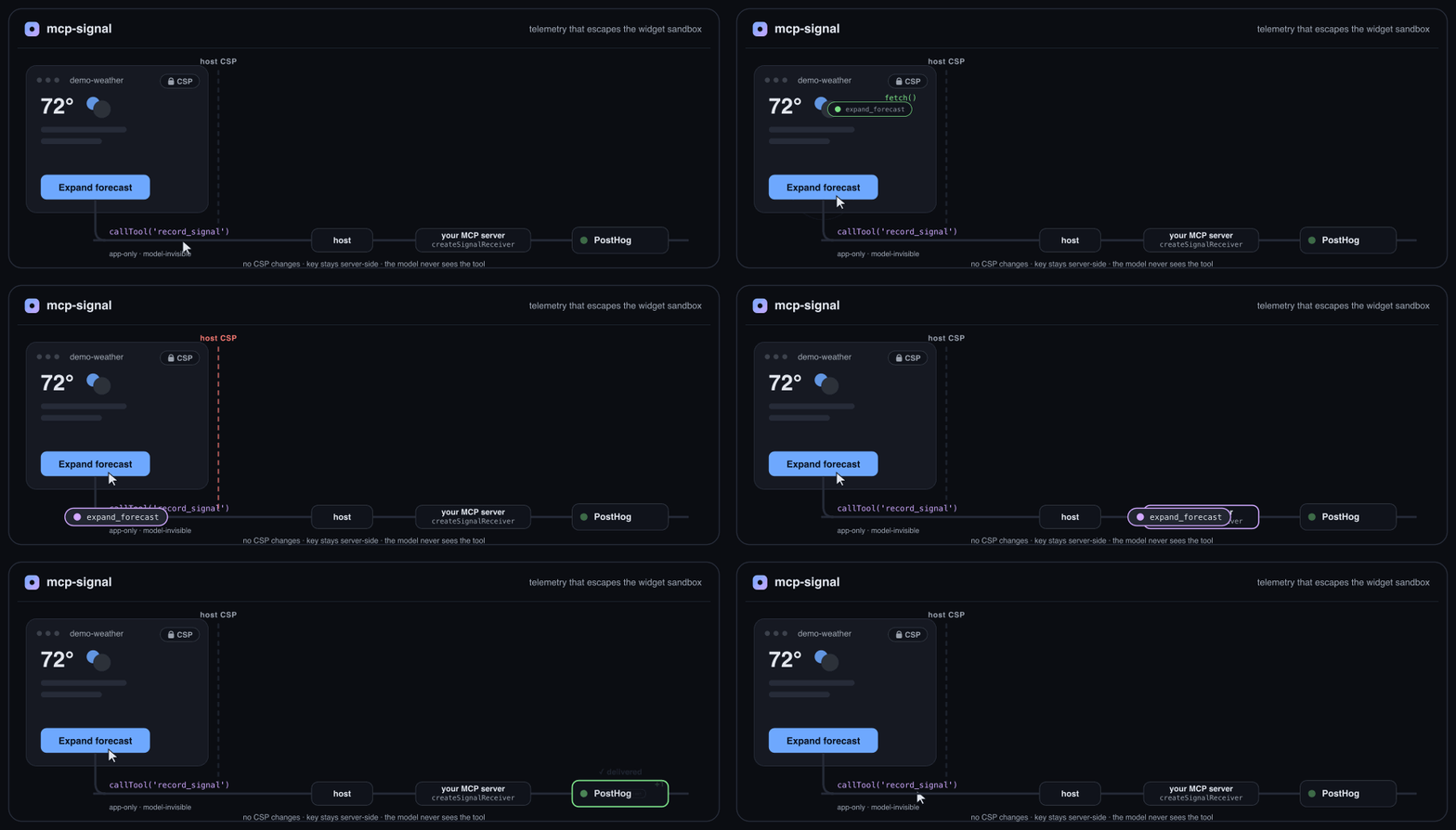
Drop mcp-signal into an interactive MCP widget and get the boring-but-essential answers: does it
load? which controls get used? where do people drop off? what errors happen inside that sandboxed
iframe? Regular web-analytics snippets don't work cleanly in these sandboxes, and there's no standard
instrumentation story — this is that layer.
import { createSignal, consoleAdapter } from 'mcp-signal';

const signal = createSignal({
  widgetName: 'weather',
  adapters: [consoleAdapter()],
});

signal.track('forecast_expanded', { day: 'tue' });
That's a working first event. Swap consoleAdapter() for a real destination when you're ready.
- 🪶 Tiny & dependency-free — ~5.3 kB min+gzip, zero runtime deps. Ships ESM, CJS, a standalone
<script>IIFE, and full TypeScript types. - 🧱 Escapes the widget sandbox — the recommended bridge routes events through a model-invisible MCP tool call, so they leave a CSP-locked widget with no CSP changes and your analytics key stays server-side.
- 🔌 Pluggable adapters — PostHog, webhook, and console included; the core knows no vendor, and writing your own is a small, documented contract.
- 🤖 Auto-captures the essentials — load / visible / hidden / close lifecycle, uncaught errors, and
opt-in
[data-mcp-signal]clicks — with zero code — plustrack()for everything else. - 🎛️ Production-minded — size + interval batching, exponential-backoff retries, idempotency keys,
and a
beforeSendhook to redact or drop. - 🔒 Privacy-first — no phone-home, no fingerprinting, no user identity. You decide exactly what's sent.
npm install mcp-signalUsable from TypeScript or plain JS. For a raw-HTML (srcdoc) widget with no bundler, you can also
inline the standalone build — see docs/setup.md. If your MCP server renders the
widget HTML, mcp-signal/inline does the inlining for you in one call
(injectSignal(html, { bridge: { toolName } })) — no vendoring, no bundler config.
import { createSignal, consoleAdapter } from 'mcp-signal';

const signal = createSignal({
  widgetName: 'weather',
  widgetVersion: '1.0.0',
  adapters: [consoleAdapter()],
});

// lifecycle + errors are captured automatically. Add your own:
document.querySelector('#expand').addEventListener('click', () => {
  signal.track('forecast_expanded', { day: 'tue' });
});
Open the console — you'll see mcp_signal_loaded and every track() call.
The reliable production path routes events through a small app-only tool on your MCP server, which forwards them to PostHog (or anywhere). This works even under the strictest host CSP and keeps your analytics key server-side.
In your widget:
import { createSignal, bridgeAdapter } from 'mcp-signal';

const signal = createSignal({
  widgetName: 'weather',
  adapters: [bridgeAdapter({ toolName: 'record_signal' })],
});
On your MCP server (register one tool — the package hands you the descriptor):
import { createSignalReceiver, posthogAdapter, signalToolDefinition } from 'mcp-signal/server';

const receiver = createSignalReceiver({
  adapters: [posthogAdapter({ apiKey: process.env.POSTHOG_KEY, host: 'eu' })],
});

const tool = signalToolDefinition(); // app-only, model-invisible, read-only
server.registerTool(tool.name, tool, (args) => receiver.handleToolCall(args));
signalToolDefinition() sets _meta.ui.visibility: ["app"] (the model never sees the tool — zero
context cost) and readOnlyHint: true (silent on ChatGPT, first-use-then-remembered on Claude). Full
walkthrough incl. @modelcontextprotocol/ext-apps: docs/setup.md ·
docs/bridge.md.
import { createSignal, posthogAdapter } from 'mcp-signal';

const signal = createSignal({
  adapters: [posthogAdapter({ apiKey: 'phc_public_key', host: 'eu' })],
});
Direct HTTP only leaves the widget if you allowlist the destination in your resource's CSP. The package generates it for you:
import { cspMeta } from 'mcp-signal';
cspMeta([posthogAdapter({ apiKey: 'phc_x', host: 'eu' })]);
// => { ui: { csp: { connectDomains: ['https://eu.i.posthog.com'] } } }
See the honest trade-offs in Limitations.
Widgets can't make arbitrary network calls — a strict host CSP blocks them. So instead of fighting the sandbox, the bridge hands each batch to a model-invisible, app-only MCP tool that your server already trusts. Your server forwards it on. No CSP changes, no exposed keys, no context cost.
flowchart LR
  W["widget<br/>bridgeAdapter"] -- "callTool('record_signal', …)" --> H[host]
  H -- "tools/call" --> S["your MCP server<br/>createSignalReceiver"]
  S -- "server-side POST" --> D[(PostHog / webhook)]
| Event | When |
|---|---|
mcp_signal_loaded |
SDK initializes |
mcp_signal_visible |
widget becomes visible |
mcp_signal_hidden |
widget is hidden (also flushes) |
mcp_signal_closed |
widget is torn down (pagehide) |
mcp_signal_error |
uncaught error / unhandled rejection |
mcp_signal_interaction |
click on a [data-mcp-signal] element (opt-in) |
| (your name) | every track(name, props) call |
Every event carries a best-effort context: widget name/version, an anonymous per-load
sessionId, detected host, theme, locale, display mode, timezone, and viewport — only where reliably
obtainable, and never any user identity. See Privacy & data.
| Adapter | Package | Purpose |
|---|---|---|
consoleAdapter() |
mcp-signal |
Local dev; always works under any CSP |
webhookAdapter({ url }) |
mcp-signal |
POST batches to any URL |
posthogAdapter({ apiKey, host }) |
mcp-signal |
PostHog Cloud (US/EU) or self-hosted |
bridgeAdapter({ toolName }) |
mcp-signal |
Route via an MCP tool call (recommended) |
createSignalReceiver({ adapters }) |
mcp-signal/server |
Server-side counterpart to the bridge |
Full config for each is in docs/adapters.md. Writing your own is a small, documented contract — see docs/writing-an-adapter.md.
createSignal(config) takes these options (all optional). The client it returns exposes track(),
flush(), shutdown(), setContext(), getContext(), queueLength, and enabled.
All createSignal options
| Option | Default | Description |
|---|---|---|
adapters |
[consoleAdapter()] |
Destinations. |
widgetName / widgetVersion |
— | Attached to every event's context. |
enabled |
true |
false = hard no-op, no listeners attached. |
autoCaptureLifecycle |
true |
Emit loaded/visible/hidden/closed. |
autoCaptureErrors |
true |
Capture uncaught errors + rejections. |
autoCaptureInteractions |
false |
true or { attribute, captureAllClicks, eventName }. |
batchSize |
20 |
Flush when the queue reaches this. |
flushIntervalMs |
5000 |
Periodic flush; 0 disables. |
maxQueueSize |
500 |
Drop oldest beyond this (backpressure). |
requestTimeoutMs |
8000 |
Per in-session send timeout. |
retry |
{maxRetries:3,…} |
Exponential backoff for in-session sends. |
beforeSend |
— | (event) => event | null — redact or drop. |
context |
— | Static properties merged into every event's context. |
sessionId |
auto | Override the session id. |
host |
auto | Override host detection. |
debug |
false |
Verbose logs + CSP diagnostics. |
git clone https://github.com/Roee-Tsur/mcp-signal
cd mcp-signal
npm install
npm run example        # builds, then serves http://localhost:8787
Click around and watch events arrive through both transports (webhook + bridge) live, in the page and in your terminal. See example/README.md.
The SDK collects nothing on its own and never phones home. It sends exactly what you configure. It
attaches non-invasive context (theme, locale, viewport, an anonymous per-load session id — no user
identity, no fingerprinting), which you can trim or redact with beforeSend, or disable entirely
with enabled: false. You are responsible for your end users' privacy and applicable law. Read
the full Privacy & data guide before shipping.
mcp-signal is honest about its v0.1 edges:
- Direct HTTP needs a CSP allowlist. Widgets are network-restricted by the host; the SDK can't
self-authorize egress. Use the bridge, or add the domain via
cspMeta(). - Tool-call approval is a host's call. Read-only tools are silent on ChatGPT and first-use-then-remembered on Claude, but the spec lets a host prompt; we can't guarantee zero prompts everywhere.
- Fire-and-forget. Cross-origin sends can't read responses (that's how they stay CSP-simple), so delivery is best-effort with retries + idempotency keys, not confirmed.
- Host detection is best-effort.
chatgptvs a framed host isn't always distinguishable synchronously; passhostto override.
Details and workarounds: docs/limitations.md.
- A hosted dashboard (data lives in your destination for now).
- More adapters: Segment, Amplitude, GA4, Mixpanel, OpenTelemetry.
- Drop-in tool-registration helpers for popular MCP server frameworks.
- Consent / CMP tooling and PII-scrubbing helpers.
- A durable, cross-load retry queue.
- Richer opt-in auto-capture.
Not in v0.1: a storage/query backend, a dashboard, and server-side MCP telemetry (tool-call/resource metrics) — widgets only for now.
Issues and PRs welcome — see CONTRIBUTING.md. The bar for a new adapter: implement the small contract, stay dependency-free, and pass the contract test.
MIT © 2026 Roee Tsur