Playing Racing Games using Gestures!
Do you want to play racing game without touching your keyboard keys 🙄? Then you are at the right place 😇. This project is an application of Hand Detection, that helps demonstrate and simulate Gesture-based Driving 😎.
- Clone this repo.
- Make sure all necessary dependencies are installed.
- Dive into the project folder & run
python run.pyin your terminal. - Wait for the program to load-up & voila 🥳 then you can play game using gestures!
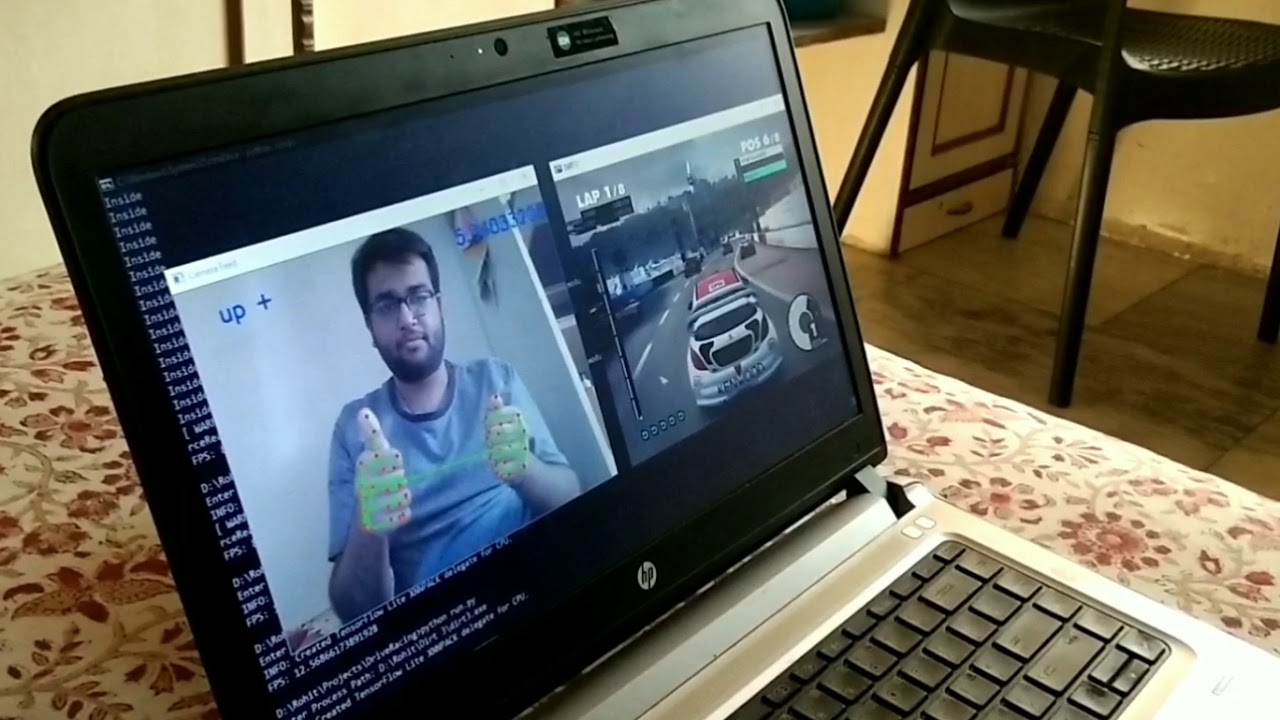
- YouTube Video - GestureDriving Gameplay of DiRT 3 game
- Taking arguments from terminal
- Used argparse library to handle command-line arguments.
- Tried to make sure, the whole program is manually configurable.
- Optional Arguments:
Arg Argument Description -h --help Show Help Messages -dr --displayRunning Display the Running Processes Paths -de --displayEnlisted Display the Enlisted Processes Paths -a val --add val Number of Process Paths to be added to Collection -rm --remove Remove Process Path(s) from Collection -e --edit Edit Process Path(s) in Collection -dc --default_configuration Display Default Configuration -c --configure Run with Manual Configuration. Place "-1" to skip - Note:
-coptional argument takes a number of arguments/values-frame_width: width of the input camera videoframe_height: height of the input camera videofps_div: frames to be considered apart from each othermin_detection_conf: minimum detection confidencemin_tracking_conf: minimum tracking confidencemeasure:0for distance measure or1for comparison measurenitrous:0for no-nitrous or1for nitrous supportdir_thr_sm: direction threshold smalldir_thr_bg: direction threshold bigapp_flag: apply keyboard mapping to all applications
- Displaying Running processes paths
- Used psutil library to get list of running processes paths.
- Add, remove, edit, display Collection/Enlisted processes paths
- Used basic file operations on
txtfile. - The program will only run if process's path enlisted is found to be running.
- If
Noprocess is enlisted, the program will run inDemomode.
- Used basic file operations on
- Display default configuration
- Used
inspectmodule to get default configuraton arguments.
- Used
- Detecting hands in the realtime video feed
- Implementing driving actions
- Without Nitrous support
Right Thumb Down: Acceleration (Up Arrow)Left Thumb Down: Reverse (Down Arrow)Both Thumbs Up: No Action
- With Nitrous support
Right Thumb Down: Nitrous & Acceleration (Ctrl + Up Arrow)Left Thumb Down: Reverse (Down Arrow)Both Thumbs Up: Acceleration (Up Arrow)
- Note: If both the thumbs are down, preference will be given to
left thumb.
- Without Nitrous support
- Implementing turning actions
- Considered angle of rotation to make a turn.
- While angle below
dir_thr_sm: no action. - While angle between
dir_thr_sm&dir_thr_bg: button is pressed & released. - While angle above
dir_thr_bg: button is pressed until angle is no longer above.
- While angle below
- Considered angle of rotation to make a turn.
- Support for One-Hand Driving
- Driving actions will be dependent upon the hand used (left/right).
- Turning actions will take center of video frame as reference.
- Configuring Driving & Turning actions
- Can be easily re-configured with little knowledge of python 🤗.
- Determining if thumb is down enough
- Considered
constant*handSizeto get a threshold for determining if thumb is down on index-finger.
- Considered
- Implementing key-mappings of keyboard
- Used keyboard library for key-mappings.
- Determining if enlisted process is focused
- Used win32gui library to get
hwnd, passing it to win32process library to get it's correspondingpid. - This is followed by matching it to enlisted process
pidgot from psutil. - If both the pids' matches, then key-mapping are performed else not.
- This ensures key-mappings are restricted to enlisted process only.
- Used win32gui library to get
- Provide options for changing key-mappings.
- Provide GUI Interface for manual configuration.
- Improve Hand detection & tracking specially in case of high contrast.
- Improve thumb-based & turn action while playing.
- Support for multiple applications at a time.
- Support for OS other than Windows.
- Automatic start-up support when OS loads.