


Create a GitHub contribution streak badge SVG using GitHub EST API and Deno, and deploy it to GitHub Pages.
This is my example👇
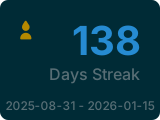
-
Stability: Existing streak tools often rely on on-demand SVG generation via external URLs, which can occasionally fail to render.
-
Cost Free: This repository generates the SVG once per day using GitHub Actions and serves it via GitHub Pages, ensuring stable availability without any cost.
deno -v
deno 2.6.3- Fork this repository.
- Go to
Settings>Secrets and variables>Actionsin your repository. - Click
New repository secretand add a Personal Access Token (withrepoandread:userscopes) with the following name:GH_TOKEN
- Check and update your GitHub username in
.github/workflows/main.yml. - Enable Actions and either run the
Create GitHub Streak SVGworkflow manually, or wait for the next scheduled run (every day at 9:00 JST). - Use streak badge.
[](https://github.com/RyosukeDTomita/github-grass-streak)-
install deno using nix:
nix develop
-
create a GitHub Personal Access Token with
repoandread:userscopes. -
add the following environment variables:
export GH_USER="<YOUR_GITHUB_USERNAME>"
export GH_TOKEN="<YOUR_GITHUB_TOKEN>"
-
run the script to check if it works:
deno run test # unit test
deno run start
ls github-streak.svg