
Car Valley is a modern web application for car sales and management, built with React, Redux (State Manager), TypeScript, and Vite. It provides a seamless experience for browsing, purchasing and managing vehicles and users.
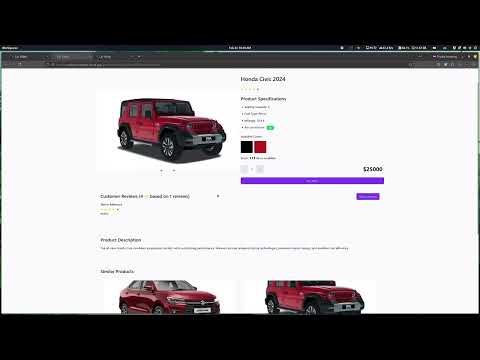
- 🔐 Secure Authentication System
- 🚙 Advanced Car Search & Filtering
- 💳 Secure Payment Integration
- 📱 Responsive Design
- 🛡️ Admin Dashboard
- 📊 Sales Analytics
- ⭐ User Reviews & Ratings
- 🔍 Detailed Vehicle Information
- 🎨 Modern UI with Tailwind CSS
- Frontend Framework: React 18
- Build Tool: Vite
- Language: TypeScript
- Styling: Tailwind CSS
- UI Components: Radix UI
- Form Handling: React Hook Form
- Validation: Zod
- State Management: Redux Toolkit
- Routing: React Router DOM
- Animations: Framer Motion
- Package Manager: Bun
- Component Library: Shadcn/ui
Before you begin, ensure you have installed:
- Bun (Latest version)
- Node.js (v18 or higher)
-
Clone the repository
git clone https://github.com/SMTamim/ph-a4-express-ecommerce-client car_valley cd car-valley -
Install Bun (if not installed)
curl -fsSL https://bun.sh/install | bash -
Install dependencies
bun install
-
Start development server
bun run dev
5 . Build for production
bun run build:prodcar-valley/
├── src/
├── app
├── assets
├── components
├── hooks
├── layout
├── lib
├── pages
├── redux
├── routes
├── schema
├── types
└── utils
├── public/
The project uses various configuration files:
vite.config.ts- Vite configurationtailwind.config.js- Tailwind CSS configurationtsconfig.json- TypeScript configuration.eslint.config.js- ESLint rules
bun run dev- Start development serverbun run build:prod- Build for productionbun run preview- Preview production buildbun run lint- Run ESLint
- Fork the repository
- Create your feature branch (
git checkout -b feature/AmazingFeature) - Commit your changes (
git commit -m 'Add some AmazingFeature') - Push to the branch (
git push origin feature/AmazingFeature) - Open a Pull Request
This project is licensed under the MIT License - see the LICENSE file for details.
- Shadcn UI for the beautiful components
- Radix UI for accessible primitives
- Tailwind CSS for the utility-first CSS framework
- Vercel for deployment
Made with ❤️