webge_opt.mp4
- Download the
WEBGE_30-04-2026.zipzip from the releases page. - Install it in Blender from
User Preferences -> Install Add-on from File. - Enable the add-on and click "
Install CEF" in the add-on panel to download the dependency. - Click "
Embed Runtime for Standalone Player" so thewebge.pymodule is available inside your.blendfile.
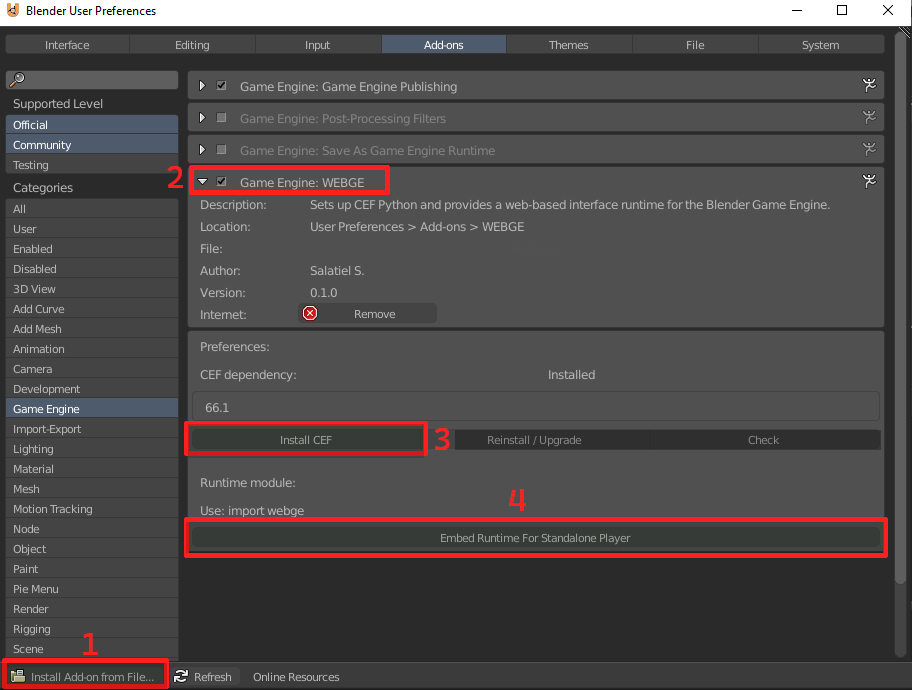
You are all set.
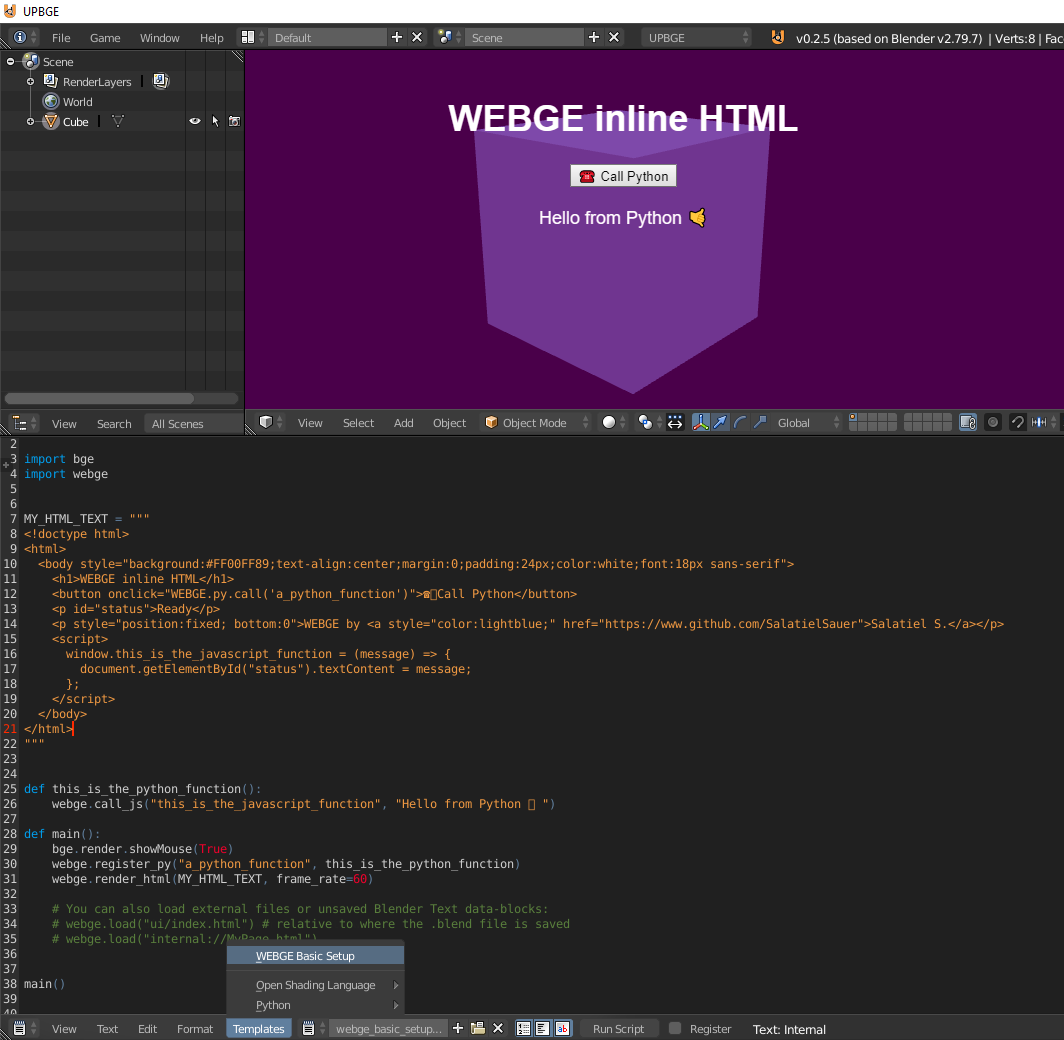
Optionally, to create a quick test template, select an object and go to Templates -> WEBGE Basic Setup in the text editor menu. This creates a basic WEBGE setup that you can test immediately by pressing P to start the game.
When you click "WEBGE Basic Setup", the add-on automatically adds an Always sensor connected to a Python controller on the selected object.
-
I do not see the interface when the game starts:
Because WEBGE depends on
cefpython3, it is only available for UPBGE 2.79 and vanilla Blender 2.79.Make sure
webge.pyis embedded in your.blendfile by using the add-on menu inUser Preferences -> Embed Runtime for Standalone Player. Otherwise, WEBGE will work when you pressP, but not when you launch the standalone player. -
I see the interface, but I cannot see the game behind it (transparency):
Make sure your element CSS uses a transparent color. Make sure your scene is lit; otherwise, you will not see anything behind the web interface, duh :P
-
I do not want to include HTML as text inside Python. I want a separate file:
This is fully supported with
webge.load("file.html"). You can also reference the name of a text block that only exists inside Blender, and it will work. External files are resolved relative to the directory where your.blendfile is saved. -
It does not work in newer UPBGE versions:
Newer UPBGE versions use newer Python versions. WEBGE depends on
cefpython3, whose latest version only supports Python 3.9, so WEBGE is not currently available for newer UPBGE versions.
import webge

webge.init()
webge.load("https://www.google.com")
webge.load("ui/menu.html")
webge.load("internal://anyfile.html")
webge.execute_js("alert('running javascript!')")
webge.call_js("someJavaScriptFunction", "hello", 123, {"testing": True})
webge.open_devtools()
webge.close_devtools()
webge.register_py("somePythonFunction", lambda name, data: "Hello " + name)
webge.shutdown()
init() can be called without a page URL. Relative paths passed to init() or
load() are resolved from the current .blend file directory.
call_js(function_name, *args) is the preferred API for logic brick Python
controllers. Arguments are JSON-encoded before they are passed to JavaScript, so
strings, numbers, booleans, lists, and dictionaries can be passed without
manually building JavaScript source.
JavaScript can call registered Python functions through the injected bridge:
WEBGE.py.call("somePythonFunction", "The Unnamed",).then(function (result) {
  console.log("Python returned:", result);
}).catch(function (error) {
  console.error(error.message);
});
Register only explicit callable names with register_py(function_name, function).
The bridge intentionally does not evaluate arbitrary Python source from the UI.
Use unregister_py(function_name) or clear_py_functions() to remove exposed
functions.
Open Chromium DevTools from any UPBGE Python controller after init():
import webge

webge.open_devtools()
Close it with:
webge.close_devtools()The overlay closes any open DevTools window when init() starts or replaces a
player overlay. shutdown() closes DevTools, closes the overlay browser, and
then shuts CEF down.
WEBGE was put together by Salatiel S., but it only exists thanks to cefpython:
Discord: @Salatiel#5274