Snapshot Control v0
This node creates the snapshot table to control snapshot-based tables like PITs. The snapshot table will hold daily snapshot start at a specific, user defined start date. The table is amterialized, thus to prevent daily loading, the end date will be set manually to pre-calculate the end date.
| Config Name | Config Type | Explanation |
|---|---|---|
| Snapshot Start Date | textBox | In the Config section on the right there is a tab called 'Data Vault'. Expand this and you get a text box 'Snapshot Start Date (yyyy-mm-dd)'. A default value is set. The format has to be 'yyyy-mm-dd', any other format will definitely lead to an error. This defines the start date of the SNAPSHOT_v0 table, so the oldest date available later in snapshot-based tables. |
| Snapshot End Date | textBox | In the Config section on the right there is a tab called 'Data Vault'. Expand this and you get a text box 'Snapshot End Date (yyyy-mm-dd)'. A default value is set. The format has to be 'yyyy-mm-dd', any other format will definitely lead to an error. This defines the end date of the SNAPSHOT_v0 table, so the last date that is loaded into the table. |
| Daily Snapshot Time | textBox | In the Config section on the right there is a tab called 'Data Vault'. Expand this and you get a text box 'Daily Snapshot Time (hh:mm:ss)'. A default value is set. The format has to be 'hh:mm:ss', any other format will definitely lead to an error. This defines the daily snapshot time, as the values in the tables are timestamps. |
| Sys Column Name | Default Value | Explanation |
|---|---|---|
| SDTS | 2020-01-01 07:00:00 (Start Date) | The sdts is the snapshot date timestamp. It is the daily snapshot date and time beginning with the user set values in the config section. It ends on the given snapshot end date. |
| FORCE_ACTIVE | TRUE | The FORCE_ACTIVE column is a boolean, basically set as true, to individually join later on in the snapshot based tables on every snapshot date. FIXME |
| REPLACEMENT_SDTS | SDTS | FIXME |
| CAPTION | CONCAT('Snapshot ', DATE("sdts")) | The caption of the snapshot. |
| IS_HOURLY | CASE
WHEN EXTRACT(MINUTE FROM "sdts") = 0 AND EXTRACT(SECOND FROM "sdts") = 0 THEN TRUE ELSE FALSE |
In case the snapshot date timestamp is set to an full hour (hh:00:00) this value is set to 'TRUE'. |
| IS_DAILY | CASE
WHEN EXTRACT(HOUR FROM "sdts") = 0 AND EXTRACT(MINUTE FROM "sdts") = 0 AND EXTRACT(SECOND FROM "sdts") = 0 THEN TRUE ELSE FALSE |
In case the snapshot date timestamp is set to exactly 12am (00:00:00) this value is set to 'TRUE'. |
| IS_BEGINNING_OF_WEEK | CASE
WHEN EXTRACT(DAYOFWEEK FROM "sdts") = 1 THEN TRUE ELSE FALSE |
In case the day of snapshot date is the first day of the week this value is set to 'TRUE'. |
| IS_BEGINNING_OF_MONTH | CASE
WHEN EXTRACT(DAY FROM "sdts") = 1 THEN TRUE ELSE FALSE |
In case the day of snapshot date is the first day of the month this value is set to 'TRUE'. |
| IS_BEGINNING_OF_QUARTER | CASE
WHEN EXTRACT(DAY FROM "sdts") = 1 AND EXTRACT(MONTH FROM "sdts") in (1, 4, 7, 10) THEN TRUE ELSE FALSE |
In case the day of snapshot date is the first day of the quarter (Months 1, 4, 7, 10) this value is set to 'TRUE'. |
| IS_BEGINNING_OF_YEAR | CASE
WHEN EXTRACT(DAY FROM "sdts") = 1 AND EXTRACT(MONTH FROM "sdts") = 1 THEN TRUE ELSE FALSE |
In case the month of the snapshot date is the first month of the year and the day of snapshot date is the first day of the month this value is set to 'TRUE'. |
Create the node:
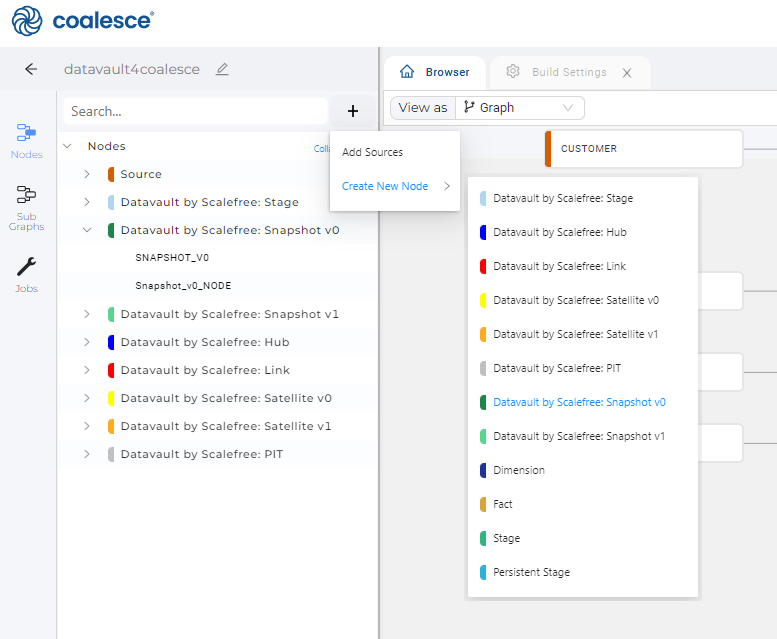
- In the Browser, on the left side next to 'Search...' field click on the + (plus) to create a new undependent node
- Hover over 'Create New Node' and select 'Datavault by Scalefree: Snaptshot v0'
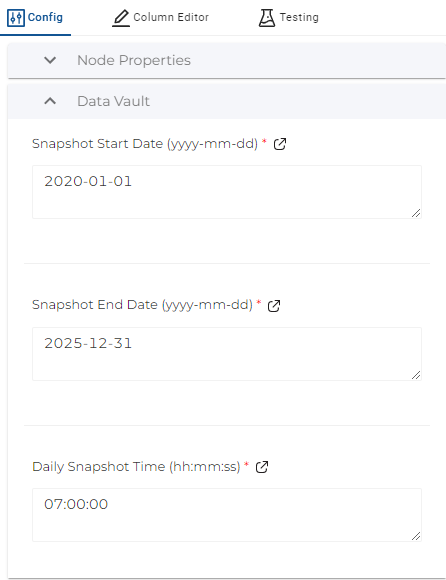
- Define the Snapshot Start Date, Snapshot End Date and Daily Snapshot Time
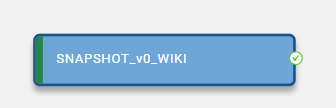
- Create and run the node