


Widgets and functions to implement hashTag decorated text.
Detects the words start with # like a Twitter.

- As TextField
You can use HashTagTextField to decorate input text.
    HashTagTextField(
    decoratedStyle: TextStyle(fontSize: 14, color: Colors.blue),
    basicStyle: TextStyle(fontSize: 14, color: Colors.black),
    ),
decoratedStyle is the textStyle of tagged text. basicStyle is for untagged text.
Other arguments are basically same as those of material TextField
- As ReadOnlyText
If you want to decorate the text only to display, HashTagText will help you.
    HashTagText(
        text: "#Welcome to #hashtagable \n This is #ReadOnlyText",
        decoratedStyle: TextStyle(fontSize: 22,color:Colors.red),
        basicStyle: TextStyle(fontSize: 22,color:Colors.black),
        onTap: (text) {
          print(text);
        },
    )
The argument onTap(String) is called when user tapped a hashTag.
You can add some actions in this callback with the tapped hashTag.

- Check if the text has hashTags
   print(hasHashtags("Hello #World"));
   // true

   print(hasHashtags("Hello World"));
   // false
- Extract hashTags from text
   final List<String> hashTags = extractHashTags("#Hello World #Flutter Dart #Thank you");
   // ["#Hello", "#Flutter", "#Thank"]
-
DetectableTextField is published as a refinement of this package. hashtagale forces you to use hashtag, but this one allows you to detect anything you want.
-
If you also want to decorate At sign, you can do that by adding the argument
decorateAtSign: true.
    HashTagText(
        text: "#Hello World @flutter_developers",
        decoratedStyle: TextStyle(fontSize: 14,color:Colors.red),
        basicStyle: TextStyle(fontSize: 14,color:Colors.black),
        onTap: (text) {
          print(text);
        },
        decorateAtSign: true,
    )
Then HashTagText and HashtagTextField come to decorate the words start with # or @.
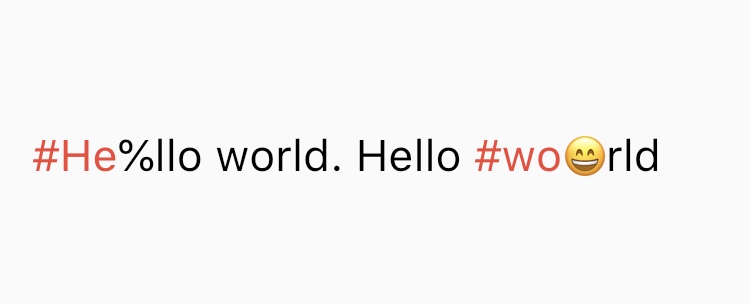
- The decoration rules are almost same as twitter. It does not decorate the tags which contain emoji or symbol.
It needs space before
#(or@) to decorate.
- Supported Languages are English, Japanese, Korean, Spanish, Arabic, Thai, and Norwegian.
If you have any requests or questions, please feel free to ask on github.
Contributors: Santa Takahashi, Matheus Perez, Marcel Schneider, Ho Kim