Releases: ShizCalev/MGSHDFix
3.1.0

MG1 / MG2 Nexus Page | MGS2 Nexus Page | MGS3 Nexus Page | GitHub Repo (You're already here!) | GitLab Repo Mirror
What's Changed
A lot's changed with this version! Tons of new fixes, restorations, and legacy bugs have been fixed. Expect a lot more to be added over the coming month(s) - this is still just the start!
A small note to start - our main repo's URL has been updated to https://github.com/ShizCalev/MGSHDFix . This was a normal git transfer, so any API calls/PR's made towards the original repo URL will continue functioning / be redirected seamlessly. Thank you Lyall for getting this projected started years ago. ♥
[Brackets denote what version the bug was introduced, ie Sons of Liberty, Substance, HD Collection, Master Collection]
🚀 New Fixes & Features
🖥️ Performance Optimization
- All games have had their performance even further optimized, CPU usage & (for handhelds) Total Power Draw are now reportedly equal to playing MGS2 / MGS3 on PCSX2. (by @cipherxof in PR #225 )
Ingame captions can now have their size & opacity adjusted.
- (I personally recommend setting "Caption Outline Opacity" to 30%.)
🎮 Content Restoration:
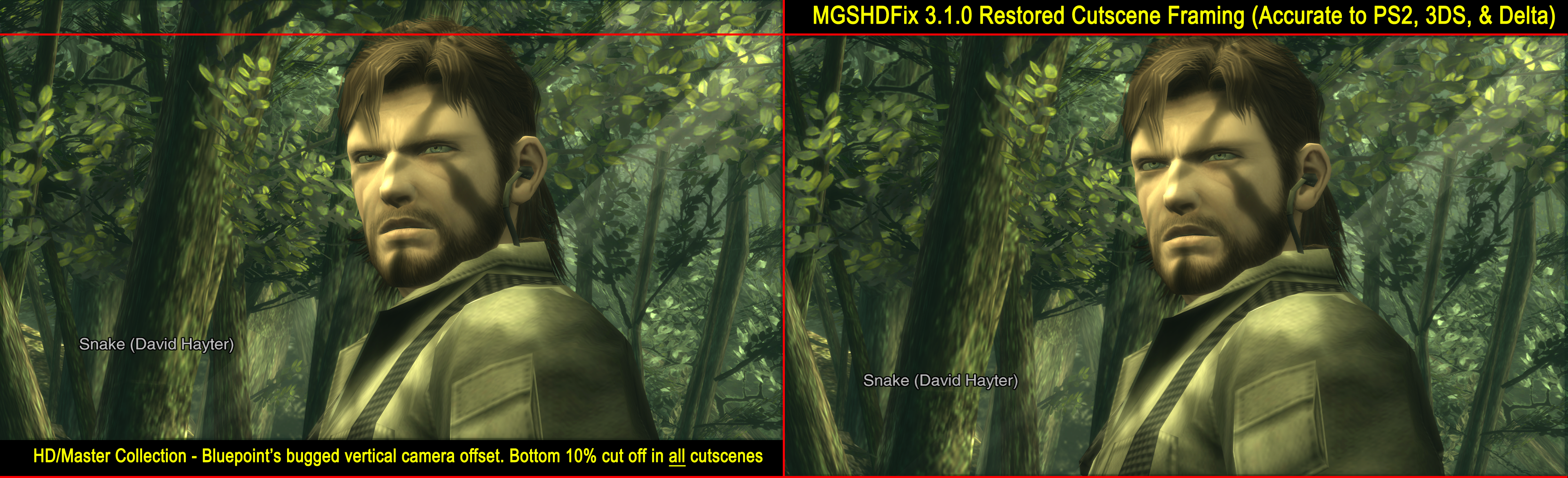
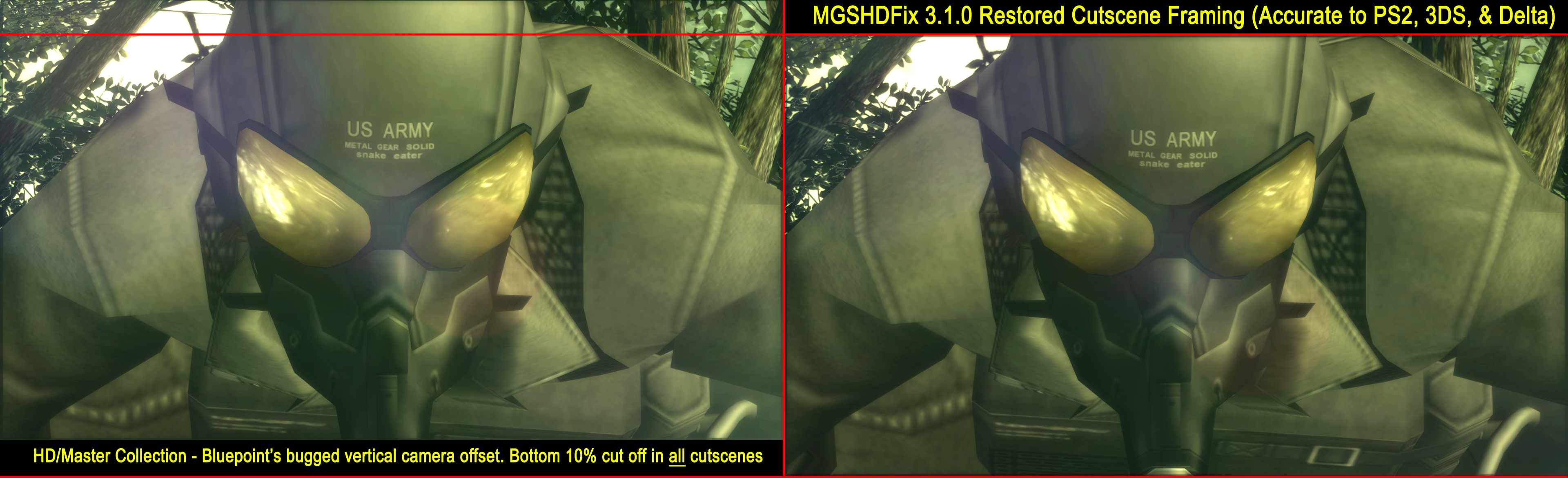
Restored MGS3's cutscene framing back to its original PS2 positioning. [2011 HD Collection]
- Bluepoint's viewport offset math was off slightly, and that resulted in all cutscenes having the bottom ~10% of the screen cut off / shifted upwards.
- This issue was fixed in the 3DS port and Delta.
- The viewport has been to-the-pixel perfectly centered in the middle of the original PS2 camera position.
- As the game's aspect ratio is taller than the original PS2 aspect ratio (16:9 vs 2.35:1 cinematic ultra-wide), there is still slightly more visible at the tops & bottoms of the frame than the original game.
- One or two spots have been noticed to briefly view off the edge of the map / through geometry. This also occurs in the original PS2 version. Some tweaks are being made by hand as needed - please report if you notice any more.
- Example 1 | Example 2 | Example 3 / 4 / 5
MGS2: Restored missing sun-glare / sparkle effects during Late-Game cutscene involving Emma in Shell 1.
- This effect has been broken in every version of the game since 2002 PS2 Substance.
- Trying to avoid spoilers here since it is a major story moment - MAJOR STORY SPOILER EXAMPLE
Tons of MGS2's particle effects have had their speeds restored to their original PS2 timings. [2011 HD Collection]
- Notably, rain, and splashing effects throughout the tanker cutscenes.
- A lot more effects are still being corrected, the goal is to do a full audit of -every- particle system in both MGS2 & MGS3.
- Example 1 | Example 2
Restored MGS2's Optical (Stealth) Camo refraction effects, as well as the missing stealth camo breaking effect during the opening Tanker cutscenes. (by @gibletto in PR #228 ) [2011 HD Collection]
Option to disable Bluepoint's HD Collection repositioned 16:9 gameplay camera angles - which zoomed most camera angles in to limit seeing outside the edges of the map.
- This will allow you to at times see outside the bounds of the map.
- In some areas, such as Strut D in MGS2, this can increase your vertical and horizontal screen vision by as much as ~15%.
- This option can be toggled on and off in realtime (you may have to leave and reenter the room for the update to take effect.)
- Examples
🐛 MGS2 Bugfixes
- Fixed Sensor-A's (the bomb sensor) bomb radar overlay drifting as the player moved. [2011 HD Collection - This was fixed by Armature Studios with the 2012 Vita port, but broken again in the Master Collection]
- Corrected Solidus's voice positioning when striking Raiden with his tentacle attack. (by @Jacky720 in PR #227 ) [2001 Sons of Liberty]
- Restored all information in the dogtag viewer which was censored. [2011 HD Collection]
- Restored broken MGS1 & Ghost Babel Colonel sprites during GW codec calls. [2011 HD Collection]
- Fixed the harrier not swapping to its damaged state textures when struck by stinger missiles. (by @Jacky720 in PR #229 ) [2011 HD Collection]
- Fixed boss Metal Gear Ray unit numbers not advancing past B-01F. (by @Jacky720 in PR #229 ) [2011 HD Collection]
- Fixed coolant spray not fogging mirrors up. (by @Jacky720 in PR #232 ) [2011 HD Collection]
- Fixed coolant spray fog on glass showing up as hot while wearing thermal goggles. [2002 PS2 Substance]
✨ New MGS2 Features
Option to swap OK & Cancel (X / O buttons) in menus.
Several options to always force Player Models, Marines, and Hostages to always render as their high-polygon (high LOD) models.
Option to restore the original Japanese Sons of Liberty mobile phone's Metal Gear Solid theme ringtone, which went missing in all future versions of the game.
- This is on by default.
Difficulty Restoration Options:
Option to restore grenade cooking, so grenades will start counting down towards detonation the moment you press the weapon button.
- Bluepoint changed this PS2 behavior to only start counting down once the grenade is thrown.
- This can be toggled on/off at will.
Option to restore original Solidus choking duration and life reduction.
-
Bluepoint made this sequence significantly easier with the HD Collection.
-
HDC Durations: Very Easy: 600, Easy: 650, Normal: 700, Hard: 750, Extreme: 800, European Extreme: 850
-
PS2 Durations: Very Easy: 600, Easy: 635, Normal: 900, Hard: 1200, Extreme: 1500, European Extreme: 3000
-
HDC Life Amount: Very Easy: 200, Easy: 184, Normal: 168, Hard: 152, Extreme: 136, European Extreme: 120
-
PS2 Life Amount: Very Easy: 200, Easy: 120, Normal: 100, Hard: 75, Extreme: 50, European Extreme: 30
Options to force Real Time Clock based Shell 1 core hostage easter eggs.
👀 Bluepoint's First Person Shooter Mode (EXPERIMENTAL)
Options have been added to enable First Person Shooter mode.
-
This was a cut-feature originally developed by Bluepoint for the 2011 HD Collection.
-
This feature was cut around 7/7/2011. Functionality is a bit glitchy, as this feature was not fully completed.
-
Things are still being patched up by hand with love. Be sure to report glitches on our GitHub repo so we can address everything that's janky. <3
- Arm positions are a bit glitchy when holding some weapons. This is being addressed in an upcoming patch.
📸 Bluepoint's MGS2 Subsistence-style Third Person Freecam (EXPERIMENTAL)
Options have been added to enable a Subsistence style third person camera in MGS2 which is controlable using the right analog stick.
-
This is another cut feature that Bluepoint was working on for the 2011 HD Collection.
-
Implementation has been left faithful to how things were designed by Bluepoint for this initial version.
- The camera returns to the original isometric camera angles when in some tight corridors / hallways to prevent the camera from clipping through walls.
-
This third person camera has been disabled in VR Missions as it defeats a number of puzzles and glitches through the level on a few maps. VR missions will be reenabled in a future patch as those issues are corrected / limited.
-
The third person camera has also been disabled while holding the high frequency blade for this inital version, as the right analog stick is conflictingly mapped to both swinging & moving the camera at the same time.
-
I personally recommend using D-Pad Left for zoom reset, and D-pad Up & Down for zoom in / out.
-
Always keep aiming integration has been added.
-
if the camera gets stuck at a weird angle, just tap first person view a few times to reset your camera.
⚙️ MGSHDFix – Internal Improvements
- Config tool: Now supports gamepad inputs for all hotkeys. (These mappings are based off the default ingame steam binds.)
New Contributors
Full Changelog: 3.0.3...3.1.0
Installation
🚩 If updating from a previous version of MGSHDFix:
- Delete
d3d11.dllfrom your game folder.
Steps:
- Download the file marked MGSHDFix_v3.1.0.zip from the "Assets" section below.
- Extract the contents of the release zip into your game folder.
- (e.g.,
steamapps\common\MGS2orsteamapps\common\MGS3for Steam.)
- (e.g.,
- Set both "Internal Resolution" & "Internal Upscaling" to Default / Original in the game's launcher. (Resolution is entirely handled by MGSHDFix.)
- Launch the MGSHDFix Config Tool (in the game's /plugins folder) to generate a settings file if you're installing the mod for the first time.
Steam Deck/Linux Additional Instructions
🚩 These steps are only needed if you’re on Steam Deck/Linux. Skip if you’re using Windows.
-
Open up the game properties of either MGS2/MGS3 in Steam and add the following line to the launch options:
`WINEDLLOVERRIDES="wininet,winhttp=n,b"...
Contributors


Assets 3
3.0.3
What's Changed
🚀 New Fixes & Features
🔧 Reduced MG1/MG2, MGS2, and MGS3's CPU usage (by @cipherxof in #224)
- Resolved a major performance regression Konami introduced with all Master Collection titles in patch 1.4.0.
- Konami moved window event handling off the main game thread to a separate thread.
- The new thread continuously ran even when no events were present in the queue, causing a busy-wait.
- This was causing one CPU core to essentially park itself at 80%~100% usage at all times, even on beefy hardware.
- This fix dramatically reduces CPU usage across all titles.
- Steam Deck / handheld total power draw (TPD) is roughly halved as a result.
- GPU utilization is also noticably improved.
Before the fix:

After the fix:

⚙️ MGSHDFix – Internal Improvements
- Visible notifications for when the MGS2 Community Bugfix Compilation is not installed were removed (these will be exclusively reserved for mods that correct crashes going forward.)
- MGS2 Community Bugfix Compilation & MGS3 Community Bugfix Compilation installation status is now quietly displayed at the bottom of the MGSHDFix Config Tool instead.
- (By the way, the MGS3 Community Bugfix Compilation dropped today too. ♥)
- Fixed under-spec GPU warnings not displaying properly for laptops with external monitors plugged in.
Full Changelog: 3.0.2...3.0.3
Installation
🚩 If updating from a previous version of MGSHDFix:
- Delete
d3d11.dllfrom your game folder.
Steps:
- Download the file marked MGSHDFix_v3.0.2.zip from the "Assets" section below.
- Extract the contents of the release zip into your game folder.
- (e.g.,
steamapps\common\MGS2orsteamapps\common\MGS3for Steam.)
- (e.g.,
- Set both "Internal Resolution" & "Internal Upscaling" to Default / Original in the game's launcher. (Resolution is entirely handled by MGSHDFix.)
- Launch the MGSHDFix Config Tool (in the game's /plugins folder) to generate a settings file if you're installing the mod for the first time.
Steam Deck/Linux Additional Instructions
🚩 These steps are only needed if you’re on Steam Deck/Linux. Skip if you’re using Windows.
-
Open up the game properties of either MGS2/MGS3 in Steam and add the following line to the launch options:
`WINEDLLOVERRIDES="wininet,winhttp=n,b" %command%` -
When opening the MGSHDFix Config Tool on Steam Deck/Linux, a Proton Tricks Wine Prefix window will pop up. Select any game and hit "OK" to open the MGSHDFix Config Tool.
- If you do not have any games in the list, or the MGSHDFix Config Tool fails to launch, add it as a non-steam game and launch it once through Steam to generate a new Proton Tricks Wine Prefix entry.
- You can remove the Config Tool from your Steam game list and launch it directly after generating this prefix.
Configuration
- See MGSHDFix Config Tool.exe in the
/pluginsfolder to adjust settings for the fix.
Feedback & Support
If you encounter bugs, need help, or want to suggest improvements, please open an issue on the GitHub repository.
Contributors
Assets 3
3.0.2
What's Changed
🚀 New Fixes & Features
🎧 Audio Output Mode
- The "Force Stereo Output" option has been replaced with a new "Audio Output Mode" dropdown in the config tool to better clarify its purpose.
- This option defaults to Stereo (2.0) audio output.
In some environments, the game always outputs 5.1 channel surround sound, even on systems which only have stereo audio / headphones.
- This causes audio to be routed to channels that do not exist, resulting in several issues:
- Punching sounds being quiet while in first person view
- Gunshots and voices from enemies behind you being extremely quiet or outright silent
- Rain sounds drowning out codec/radio conversations.
- Audio peaking / crackling at times (outside of the normal initial Windows volume issue.)
- Some systems may have only presented one of these issues. Quiet gunshots & punching, for example, are really are only noticeable if you're actively listening for the problem (I just realized a few days ago that I've had the issue myself the entire time the Master Collection has been out. It's extremely subtle, lol.)
- These issues are resolved by the "Stereo" audio output option.
- There is no impact on audio quality between Stereo vs Surround Sound, spectrogram analysis shows audio signal is pretty much 1:1 - https://i.imgur.com/f7Wh1lX.png
- Note: Proper surround sound output requires physical 5.1+ speakers. Virtual surround solutions such as Razer THX Spatial Audio are not supported by the game's audio engine and will result in missing audio.
- Some users may need to slightly adjust in game volume after switching to Stereo, as multiple channels are no longer being collapsed into a single speaker.
Comparison video of broken vs fixed stereo output: https://youtu.be/sl6WfmQvALw
Full Changelog: 3.0.1...3.0.2
Installation
🚩 If updating from a previous version of MGSHDFix:
- Delete
d3d11.dllfrom your game folder.
Steps:
- Download the file marked MGSHDFix_v3.0.2.zip from the "Assets" section below.
- Extract the contents of the release zip into your game folder.
- (e.g.,
steamapps\common\MGS2orsteamapps\common\MGS3for Steam.)
- (e.g.,
- Set both "Internal Resolution" & "Internal Upscaling" to Default / Original in the game's launcher. (Resolution is entirely handled by MGSHDFix.)
- Launch the MGSHDFix Config Tool (in the game's /plugins folder) to generate a settings file if you're installing the mod for the first time.
Steam Deck/Linux Additional Instructions
🚩 These steps are only needed if you’re on Steam Deck/Linux. Skip if you’re using Windows.
-
Open up the game properties of either MGS2/MGS3 in Steam and add the following line to the launch options:
`WINEDLLOVERRIDES="wininet,winhttp=n,b" %command%` -
When opening the MGSHDFix Config Tool on Steam Deck/Linux, a Proton Tricks Wine Prefix window will pop up. Select any game and hit "OK" to open the MGSHDFix Config Tool.
- If you do not have any games in the list, or the MGSHDFix Config Tool fails to launch, add it as a non-steam game and launch it once through Steam to generate a new Proton Tricks Wine Prefix entry.
- You can remove the Config Tool from your Steam game list and launch it directly after generating this prefix.
Configuration
- See MGSHDFix Config Tool.exe in the
/pluginsfolder to adjust settings for the fix.
Feedback & Support
If you encounter bugs, need help, or want to suggest improvements, please open an issue on the GitHub repository.
3.0.1
What's Changed
⚙️ MGSHDFix – Internal Improvements
- Added an option to disable Windows slideshow performance warning.
- Version checking for ASI loader has been expanded to include wininet.dll in addition to the previous winhttp.dll version check. (As some mod makers are only packaging one DLL and not the other.)
- Added options to disable save folder read-only/writable verification.
- Cleaned up some depreciated options from the MGSHDFix config tool for screen alignment with MG1 / MG2, which have been added to the in-game menu.
- Improved the main game window's initial window layering (ie being placed over the taskbar) behavior while in either borderless windowed or standard windowed mode.
🐛 MGSHDFix – Bug Fixes
- Fixed a scenario where Steam Deck would get stuck with a black screen after attempting to open a NexusMods URL.
- Fixed MGSHDFix Config Tool's .asi path detection when added as a non-Steam game on some Linux distros.
- Fixed a crash log which would appear in Windows event viewer when closing the game's launcher.
- Fixed a scenario where duplicate ASI Loader dll detection would fail if the user was using DXVK or custom build versions of ASI Loader.
- Fixed the game appearing over console notifications on start-up.
- Fixed the load saved game menu not automatically defaulting to the most recent save.
- Fixed Skip Launcher not working properly for Metal Gear 1 / Metal Gear 2: Solid Snake.
- Fixed some log spam when alt-tabbing.
- Corrected a minor typo in the config tool's "Damaged Steam Cloud Save Data Fix" options.
Installation
🚩 If updating from a previous version of MGSHDFix:
- Delete
d3d11.dllfrom your game folder.
Steps:
- Download the file marked MGSHDFix_v3.0.1.zip from the "Assets" section below.
- Extract the contents of the release zip into your game folder.
- (e.g.,
steamapps\common\MGS2orsteamapps\common\MGS3for Steam.)
- (e.g.,
- Set both "Internal Resolution" & "Internal Upscaling" to Default / Original in the game's launcher. (Resolution is entirely handled by MGSHDFix.)
- Texture / Movie resolution is not affected / can be set however desired.
- Launch the MGSHDFix Config Tool (in the game's /plugins folder) to generate a settings file if you're installing the mod for the first time.
Steam Deck/Linux Additional Instructions
🚩 These steps are only needed if you’re on Steam Deck/Linux. Skip if you’re using Windows.
-
Open up the game properties of either MGS2/MGS3 in Steam and add the following line to the launch options:
WINEDLLOVERRIDES="wininet,winhttp=n,b" %command% -
When opening the MGSHDFix Config Tool on Steam Deck/Linux, a Proton Tricks Wine Prefix window will pop up. Select any game and hit "OK" to open the MGSHDFix Config Tool.
- If you do not have any games in the list, or the MGSHDFix Config Tool fails to launch, add it as a non-steam game and launch it once through Steam to generate a new Proton Tricks Wine Prefix entry.
- You can remove the Config Tool from your Steam game list and launch it directly after generating this prefix.
Configuration
- See MGSHDFix Config Tool.exe in the
/pluginsfolder to adjust settings for the fix.
Feedback & Support
If you encounter bugs, need help, or want to suggest improvements, please open an issue on the GitHub repository.
3.0.0
What's Changed
⚙️ MGSHDFix – Updated for patch 3.0.0.
- MGS2 Plant Intro & Ending Skybox fixes have been removed. The issue has been fixed officially by Konami.
- All other MGSHDFix corrections (effect speeds, vector line/rain/laser scaling, ect.) have not been fixed by Konami. Ergo, MGSHDFix is still relevant (unfortunately.)
🚀 New Fixes & Features
🖥️ Graphics
- Added support for supersampling and downsampling (Graphics -> Internal Resolution -> Render Width / Height)
🎮 Content Restoration
- Added a config option to restore Gackt's dogtag (a Japanese musician) in MGS2, which was renamed to "Gecko" with the MC. (Config Tool -> Tweaks -> Various. On by default.)
🧪 Stability
- Added a config option to automatically disable Windows fullscreen optimization for the game, which can fix crashes and framerate drops on some systems
💾 Achievements
- Fixed MGS2's Bye Bye Big Brother achievement progress not being tracked across gameplay sessions.
⚙️ MGSHDFix – Internal Improvements
- Improved support for 4:3 aspect ratio internal resolution.
- Added a config option to automatically delete outdated save data when fixing damaged Steam Cloud saves, as opposed to moving them to an "Outdated Saves" backup folder. (Config Tool -> General -> Damaged Save Data Fix. Set to "Move Outdated Save Data" by default.)
- Added a config option to disable Damaged Save Data Fix.
- Added a config option to enable/disable console notifications when damaged save files are fixed.
- Added a warning if an outdated version of ASI Loader has been installed after MGSHDFix, which can result in crashing.
- Added a warning if the game's save folder is not writable (i.e. if the game is installed on a read-only SD card), which would make the game unsavable.
- Added a warning if Windows background slideshow mode is enabled (which causes performance drops in all DirectX games.)
- Added a warning for severely outdated GPU drivers (which can result in crashes.)
- Added a warning for severely outdated Windows versions (which can cause crashes.)
- Added warnings to the config tool if it detects that MGSHDFix is NOT installed in the correct folder (ie the zip was extracted to a new folder inside the game folder, instead of directly extracted into the game folder.)
- Added warnings to the config tool if multiple copies of ASI Loader are installed (ie d3d11.dll from the MGS3 Crouch Walking mod, DXGI.dll from MGS3 Subsistence mod), which would cause the game to crash (due to double-initialization of mods) before it could warn you about the same issue.
- Added logging for currently installed mods (ie reshade, asi mods, asi loader version, upscaled texture packs, ect.) to assist with troubleshooting
- Made the MGSHDFix warning for the main launcher's FSR internal upscaling options being enabled more obvious. (MGSHDFix increases the resolution itself, the launcher's internal resolution options should ALWAYS be set to original/default.)
🧩 Missing Major Bugfix Mods Warnings
- Added warnings if major bugfix / crashfix mods are not installed (which are not directly bundled with MGSHDFix due to file size.)
- MGS2 Better Audio Mod: Resolves a show-stopping crash/hang during a late-game cutscene.
- MGS2 Community Bugfix Compilation: Restores missing audio, fixes thousands of textures bugs, holes in models, and localization / typo errors.
- These warnings can be disabled in the config tool. Internal -> Warn When Missing Major Bugfix Mods
🐛 MGSHDFix – Bug Fixes
- Fixed viewport not properly scaling with resolution when using borderless windowed mode + a smaller internal resolution.
- Fixed the game window not being properly centered in the screen when using a windowed / borderless windowed that is smaller than your monitor's native resolution
- Fixed a momentary performance hitch which could occur during initial startup related to MGSHDFix's logging
- Fixed achievement persistence not saving progress if you closed the game before transitioning to another room
- Fixed achievement persistence not saving your progress correctly if you only increment an achivement stat by one (ie you tranqalize 1 guard and immediately close the game)
- Fixed config tool not displaying error messages properly in some situations.
- Fixed low spec GPU warning not appearing if a user's GPU was so low spec that their game crashed before it even warned about it.
- Fixed the config option to disable effect speed fixes not working properly
- Fixed MGSHDFix's language selection options not actually working.
- Removed invalid region/language selection options from MGSHDFix's config tool.
- Fixed a scenario where a duplicate installations of ASI loader would not be properly detected.
Full Changelog: 2.8.3...3.0.0
Installation
🚩 If updating from a previous version of MGSHDFix:
- Delete
d3d11.dllfrom your game folder.
Steps:
- Download the file marked MGSHDFix_v3.0.0.zip from the "Assets" section below.
- Extract the contents of the release zip into your game folder.
- (e.g.,
steamapps\common\MGS2orsteamapps\common\MGS3for Steam.)
- (e.g.,
- Set both "Internal Resolution" & "Internal Upscaling" to Default / Original in the game's launcher. (Resolution is entirely handled by MGSHDFix.)
- Launch the MGSHDFix Config Tool (in the game's /plugins folder) to generate a settings file if you're installing the mod for the first time.
Steam Deck/Linux Additional Instructions
🚩 These steps are only needed if you’re on Steam Deck/Linux. Skip if you’re using Windows.
-
Open up the game properties of either MGS2/MGS3 in Steam and add the following line to the launch options:
`WINEDLLOVERRIDES="wininet,winhttp=n,b" %command%` -
When opening the MGSHDFix Config Tool on Steam Deck/Linux, a Proton Tricks Wine Prefix window will pop up. Select any game and hit "OK" to open the MGSHDFix Config Tool.
- If you do not have any games in the list, or the MGSHDFix Config Tool fails to launch, add it as a non-steam game and launch it once through Steam to generate a new Proton Tricks Wine Prefix entry.
- You can remove the Config Tool from your Steam game list and launch it directly after generating this prefix.
Configuration
- See MGSHDFix Config Tool.exe in the
/pluginsfolder to adjust settings for the fix.
Feedback & Support
If you encounter bugs, need help, or want to suggest improvements, please open an issue on the GitHub repository.
2.8.3
What's Changed
⚙️ MGSHDFix – Internal Improvements
- Added links to our discord support channel to various log & console messages.
- Added more controller related troubleshooting information.
- Reworked the "always keep aiming" feature (again) so that it no longer affects weapons like the knife.
Full Changelog: 2.8.2...2.8.3
Installation
🚩 If updating from a previous version of MGSHDFix:
- Delete
d3d11.dllfrom your game folder.
Steps:
- Download the file marked MGSHDFix_v2.8.3.zip from the "Assets" section below.
- Extract the contents of the release zip into your game folder.
- (e.g.,
steamapps\common\MGS2orsteamapps\common\MGS3for Steam.)
- (e.g.,
- Set both "Internal Resolution" & "Internal Upscaling" to Default / Original in the game's launcher. (Resolution is entirely handled by MGSHDFix.)
- Launch the MGSHDFix Config Tool (in the game's /plugins folder) to generate a settings file if you're installing the mod for the first time.
Steam Deck/Linux Additional Instructions
🚩 These steps are only needed if you’re on Steam Deck/Linux. Skip if you’re using Windows.
-
Open up the game properties of either MGS2/MGS3 in Steam and add the following line to the launch options:
`WINEDLLOVERRIDES="wininet,winhttp=n,b" %command%` -
When opening the MGSHDFix Config Tool on Steam Deck/Linux, a Proton Tricks Wine Prefix window will pop up. Select any game and hit "OK" to open the MGSHDFix Config Tool.
- If you do not have any games in the list, or the MGSHDFix Config Tool fails to launch, add it as a non-steam game and launch it once through Steam to generate a new Proton Tricks Wine Prefix entry.
- You can remove the Config Tool from your Steam game list and launch it directly after generating this prefix.
Configuration
- See MGSHDFix Config Tool.exe in the
/pluginsfolder to adjust settings for the fix.
Feedback & Support
If you encounter bugs, need help, or want to suggest improvements, please open an issue on the GitHub repository.
2.8.2
What's Changed
🐛 MGSHDFix – Bug Fixes
- Fixed Snake turning around after firing while "Always Keep Aiming" is enabled. (It's still recommended to use the "While in First Person" and "While Holding Lock On" options instead of this option.)
Full Changelog: 2.8.1...2.8.2
Installation
🚩 If updating from a previous version of MGSHDFix:
- Delete
d3d11.dllfrom your game folder.
Steps:
- Download the file marked MGSHDFix_v2.8.2.zip from the "Assets" section below.
- Extract the contents of the release zip into your game folder.
- (e.g.,
steamapps\common\MGS2orsteamapps\common\MGS3for Steam.)
- (e.g.,
- Set both "Internal Resolution" & "Internal Upscaling" to Default / Original in the game's launcher. (Resolution is entirely handled by MGSHDFix.)
- Launch the MGSHDFix Config Tool (in the game's /plugins folder) to generate a settings file if you're installing the mod for the first time.
Steam Deck/Linux Additional Instructions
🚩 These steps are only needed if you’re on Steam Deck/Linux. Skip if you’re using Windows.
-
Open up the game properties of either MGS2/MGS3 in Steam and add the following line to the launch options:
`WINEDLLOVERRIDES="wininet,winhttp=n,b" %command%` -
When opening the MGSHDFix Config Tool on Steam Deck/Linux, a Proton Tricks Wine Prefix window will pop up. Select any game and hit "OK" to open the MGSHDFix Config Tool.
- If you do not have any games in the list, or the MGSHDFix Config Tool fails to launch, add it as a non-steam game and launch it once through Steam to generate a new Proton Tricks Wine Prefix entry.
- You can remove the Config Tool from your Steam game list and launch it directly after generating this prefix.
Configuration
- See MGSHDFix Config Tool.exe in the
/pluginsfolder to adjust settings for the fix.
Feedback & Support
If you encounter bugs, need help, or want to suggest improvements, please open an issue on the GitHub repository.
2.8.1
What's Changed
🐛 MGSHDFix – Bug Fixes
- Fixed the launcher closing prematurely when users had specific arguments in their Steam launch options.
- Fixed the missing settings file message not saying to run the Config Tool to generate your settings file.
- Added more verbose instructions on how to open the Config Tool on Linux / Steam Deck (yes, the .exe -can- be opened directly on Linux/Steam Deck! ♥)
- The config tool now locks out the "skip launcher splashscreens" option when "skip launcher" is enabled, to make it more obvious to users that you won't see the launcher's splashscreens when skipping the launcher anyway...
- The config tool's "Launch Game" option will now launch the game more reliably.
Full Changelog: 2.8.0...2.8.1
Installation
🚩 If updating from a previous version of MGSHDFix:
- Delete
d3d11.dllfrom your game folder.
Steps:
- Download the file marked MGSHDFix_v2.8.1.zip from the "Assets" section below.
- Extract the contents of the release zip into your game folder.
- (e.g.,
steamapps\common\MGS2orsteamapps\common\MGS3for Steam.)
- (e.g.,
- Set both "Internal Resolution" & "Internal Upscaling" to Default / Original in the game's launcher. (Resolution is entirely handled by MGSHDFix.)
- Launch the MGSHDFix Config Tool (in the game's /plugins folder) to generate a settings file if you're installing the mod for the first time.
Steam Deck/Linux Additional Instructions
🚩 These steps are only needed if you’re on Steam Deck/Linux. Skip if you’re using Windows.
-
Open up the game properties of either MGS2/MGS3 in Steam and add the following line to the launch options:
`WINEDLLOVERRIDES="wininet,winhttp=n,b" %command%` -
When opening the MGSHDFix Config Tool on Steam Deck/Linux, a Proton Tricks Wine Prefix window will pop up. Select any game and hit "OK" to open the MGSHDFix Config Tool.
- If you do not have any games in the list, or the MGSHDFix Config Tool fails to launch, add it as a non-steam game and launch it once through Steam to generate a new Proton Tricks Wine Prefix entry.
- You can remove the Config Tool from your Steam game list and launch it directly after generating this prefix.
Configuration
- See MGSHDFix Config Tool.exe in the
/pluginsfolder to adjust settings for the fix.
Feedback & Support
If you encounter bugs, need help, or want to suggest improvements, please open an issue on the GitHub repository.
2.8.0
What's Changed
⚙️ MGSHDFix – Universal Config Tool
- Created a brand new settings configuration program, dubbed Universal Config Tool, which works on both Windows & Steam Deck.
- This tool makes it so user settings are now fully persistent across MGSHDFix updates. No more manual .INI config file editing!
- For those who still wish to manually edit settings, you can open the .settings file the tool generates with any text editor.
- Can be found in the /plugins folder under the name MGSHDFix Config Tool.exe.
- This tool features the full feature set you'd expect from a settings config program - i.e. in-depth mouse-over explanations of all the mod's settings, proper keybinding inputs, Mod update alerts, ect.
- This tool has been specifically designed to be highly reusable, with a focus on ease of adding new options, and wxWidgets as its only external dependency.
- A standalone GitHub repository for it will be made available in the next few days so that other mod makers can easily integrate it into their own projects! (Lets eliminate those annoying .ini files once and for all haha.)
🚀 New Features & Fixes
🌱 Grass Render Distance
- Added new Grass Render Distance controls, fully togglable in-game via hotkey.
- Prevents grass from disappearing at long distances (a leftover PS2 performance optimization that stands out at modern resolutions).
- Can be set to always render grass at all distances (default), use a custom distance multiplier for fine-tuned control over the vanilla distances, or completely disable grass rendering (by setting the scaling value to 0.)
- Additional render distance fixes are still in development.
👓 MGS3 NVG Fix
- Fixed misaligned/unusable Night Vision Goggles crosshairs in MGS3 (HD Collection bug).
⌨️ Hotkey Input Behavior
- Added an option to only capture MGSHDFix hotkey inputs while the game has focus (ignoring alt-tabbed state).
🎮 Controller Binding Detection
- MGSHDFix now shows a clearer warning in its log file if controller inputs are not properly bound in Steam Input’s user interface.
🖥️ CPU Core Limiter
- Added an option to automatically limit CPU cores for users who experience rare cutscene crashes on specific hardware and driver configurations.
- For users who experience this issue, it's suggested you also disable hardware acceleration on any web browsers or media players that you typically keep open while the game is running.
- This is a rare Windows driver-related issue, but this option provides a limited workaround.
- (I personally experienced this issue for most of 2024 and resolved the issue on my system with a full Windows re-installation.)
🐛 MGSHDFix – Bug Fixes
- Fixed a crash message when exiting the game through the in-game menu with Skip Launcher enabled.
- Fixed a potential crash with Stat Persistence if Windows UAC was set to maximum.
- Fixed the aim after equip bugfix not applying correctly in MGS2 when weapon switch mode was set to Previous.
- Fixed a crash when MGSHDFix checked for updates while a user's firewall blocked internet access to the game.
- 2.8.0 by @ShizCalev in #185
Full Changelog: 2.7.0...2.8.0
Installation
🚩 If updating from a previous version of MGSHDFix:
- Delete
d3d11.dllfrom your game folder. - Delete old MGSHDFix files (e.g.,
MGSHDFix.iniandMGSHDFix.asi) before installing the update.
Steps:
- Download the file marked MGSHDFix_v2.8.0.zip from the "Assets" section below.
- Extract the contents of the release zip into your game folder.
- For example:
steamapps\common\MGS2orsteamapps\common\MGS3for Steam.
- For example:
- Set both "Internal Resolution" & "Internal Upscaling" to Default / Original in the game’s launcher.
- Resolution is entirely handled by MGSHDFix.
Steam Deck/Linux Additional Instructions
🚩 These steps are only needed if you’re on Steam Deck/Linux. Skip if you’re using Windows.
-
Open the game properties for either MGS2 or MGS3 in Steam and add the following line to the launch options:
`WINEDLLOVERRIDES="wininet,winhttp=n,b" %command%`
Configuration
- See MGSHDFix Config Tool.exe in the
/pluginsfolder to adjust settings for the fix.
Feedback & Support
If you encounter bugs, need help, or want to suggest improvements, please open an issue on the GitHub repository.
Contributors


Assets 3
2.7.0
What's Changed
Hey everyone, Afevis here!
First off, sorry for the rapid fire updates lately. I'm cramming as much as I can into MGSHDFix before Delta’s release in just 19 days so I can focus on a few day 1 projects I have planned for it.
(And yes I definitely noticed all those green medical crosses in the trailers lol)
I know updating config files every release can be a pain, so I am currently exploring a full in-game overlay for MGSHDFix to replace the .ini file.
This will let settings persist across updates, allow toggling features on and off in real time without restarting, and even enable live adjustments like rain, laser, and UI scaling widths all without leaving the game, as well as show ranking stats in real time such as guards killed, continue count, number of alerts, shots fired, etc., and other debugging information.
With that out of the way, let's get to the good stuff.
🚀 New Features & Fixes
🖥️ UI Scaling Fix
- All vector-based UI elements now properly scale with the game’s resolution. No more tiny codec lines and practically invisible thermal goggle crosshairs.
- Fixes a shared engine bug present since the 2002 Xbox port of MGS2. (Yes, MGS3 also has the same issue.)
- Applies to:
- Scaling now matches with PCSX2.
- Before and after screenshots of all our various fixes can be found here:
https://github.com/Lyall/MGSHDFix/tree/master/screenshots


🕸️ Wireframe Mode
- Added Wireframe Rendering with two modes:
- With skyboxes
- Without skyboxes
- Toggle freely during gameplay. Great for debugging, exploration, or stylish screenshots.
⌨️ MGSHDFix Keybind System
- Introduced customizable hotkeys for toggling features in real time:
- Rain and Laser scaling shaders
- UI scaling shaders
- Wireframe modes
- Works with any keyboard key or mouse button.
- Configured via the
.inifile for now. Will move to the planned in-game overlay in a future update.
⚙️ MGSHDFix – Internal Improvements
- Split the log file into
MGSHDFix_Game.logandMGSHDFix_Launcher.logso we always have both contexts when a user reports an issue on GitHub.
Full Changelog: 2.6.2...2.7.0 / #181
Installation
🚩 If updating from a previous version of MGSHDFix:
- Delete
d3d11.dllfrom your game folder. - Delete old MGSHDFix files (for example,
MGSHDFix.iniandMGSHDFix.asi) before installing the update.
Steps:
- Download the file marked MGSHDFix_v2.7.0.zip from the "Assets" section below.
- Extract the contents of the release zip into your game folder.
- For example:
steamapps\common\MGS2orsteamapps\common\MGS3for Steam.
- For example:
- Set both "Internal Resolution" & "Internal Upscaling" to Default / Original in the game's launcher.
- Resolution is entirely handled by MGSHDFix.
Steam Deck/Linux Additional Instructions
🚩 These steps are only needed if you’re on Steam Deck/Linux. Skip if you’re using Windows.
-
Open up the game properties of either MGS2/MGS3 in Steam and add the following line to the launch options:
`WINEDLLOVERRIDES="wininet,winhttp=n,b" %command%`
Configuration
- See MGSHDFix.ini in the
/pluginsfolder to adjust settings for the fix.
Feedback & Support
If you encounter bugs, need help, or want to suggest improvements, please open an issue on the GitHub repository.