How to Install Kerbal Star Systems 2
Follow this guide to install Kerbal Star Systems 2 (KSS2) correctly for Kerbal Space Program 1.12.x. Manual installation is required - CKAN is not supported.
| Component | Minimum | Recommended |
|---|---|---|
| KSP Version | 1.12.x | Latest 1.12.x release |
| RAM | 16 GB | 16-32 GB for heavy mod setups |
| GPU | 2 GB VRAM | 4 GB+ VRAM |
| Disk Space | 5 GB | 10 GB with all packs installed |
| Platform | Windows | macOS/Linux untested |
🛑 Important: KSS2 is not distributed via CKAN.
Please do not redistribute or attempt to index this mod without permission.
Manual installation ensures correct file handling and compatibility.
- Visit GitHub Releases
- Download the newest .zip files (Core_Configs, Core_Textures + at least 1 system)
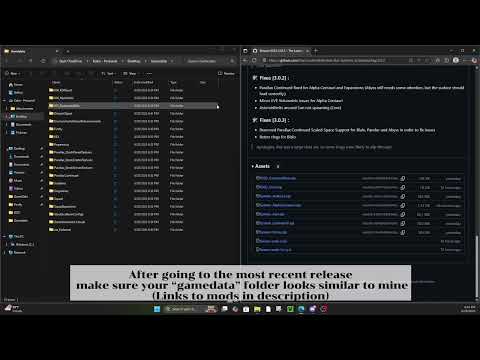
- Extract the download and place the
KSS2folder(s) directly into yourGameDatadirectory.
Result:
Kerbal Space Program/GameData/KSS2

- Required mods (specific versions listed on their pages):
| Dependency | Source | Purpose |
|---|---|---|
| Kopernicus | GitHub | Required framework for custom planetary systems |
| HarmonyKSP | GitHub | Required framework for custom planetary systems |
| KSPTextureLoader | GitHub | Optimizes texture loading and memory usage |
| ModuleManager | KSP Forum | Applies config patches at game load |
| KopernicusExpansion-ER | Github | Enables wormholes and special FX |
| KSP Community Fixes | Github | Critical bugfix pack |
| VertexMitchellNetravaliHeightMap | Github | Advanced terrain detail |
| VertexHeightOblateAdvanced | Github | Oblate planet shapes |
| VertexColorMapEmissive | Github | Adds emissive color mapping |
- recommended enhancements (optional)
| Mod | Source | Purpose |
|---|---|---|
| Parallax Continued | GitHub | High-detail terrain and tessellation (manual install required) |
| Scaled Decorator | GitHub | Unity Effects |
| Sigma Binary | GitHub | Accurate binary celestial behavior |
| Sigma HeatShifter | GitHub | Realistic atmospheric heating |
| Sigma LoadingScreens | GitHub | Custom loading screens |
| Sigma Replacements – SkyBox | GitHub | Custom skybox for deep-space environments |
| Volumetric EVE (v5 only!) | Patreon | Volumetric clouds, auroras, geysers (requires Scatterer) |
| Scatterer | GitHub | Atmospheres, ocean shaders, and light scattering (used by Volumetric EVE) |
- extra visual options
| Mod | Source | Purpose |
|---|---|---|
| Singularity | GitHub | Black hole and wormhole rendering |
| Firefly | SpaceDock | Realistic re-entry and plasma effects |
| Distant Object Enhancement | GitHub | Long-range object visibility (may overlap with Scatterer) |
| PlanetShine | Forum | Reflected glow from planets and moons |
| Deferred Rendering | GitHub | Optional global lighting overhaul |
- Start the game normally.
- The first load may take several minutes.
- CKAN is not supported - install manually to prevent path errors.
- Do not rename folders (configs reference exact paths).
- The first load may take 2-5 minutes due to Kopernicus caching.
- Avoid legacy visual packs (e.g. Stock EVE, Astronomer’s Visual Pack).
- The KSS2 splash art appears on startup.
- In the Tracking Station, additional star systems are visible.
- If you only see Kerbol:
- Check that Kopernicus and ModularFlightIntegrator are installed.
- Confirm you don’t have a nested GameData/GameData/ folder.
- Confirm you got only 1 KSS2 folder in GameData
- Confirm you installed Core + at least 1 system
| Issue | Cause | Fix |
|---|---|---|
| Black planets | Texture Quality set to Half | Set to Full in KSP graphics settings |
| Missing atmospheres | Scatterer missing | Reinstall Scatterer |
| Crash on load | Out of RAM | Remove heavy visual mods or increase paging file |
| Long loading times | Normal behavior | Wait 2-5 minutes for Kopernicus cache |
💬 Need help? Join our Discord for installation support.