Having problems or want to chat? Join the Haxe Discord, then follow the haxe-fmod thread.
- Features
- Supported Platforms
- Prerequisites
- How to Use This Library
- Selecting an FMOD Engine Version
- HTML5 Builds
- FMOD Studio Project Configuration
- Migrating From Previous haxe-fmod Versions?
- License
- Special Thanks
- Feature Requests and Contact
- FMOD Studio API at runtime: events, buses, VCAs, snapshots, banks, global and labeled parameters, 3D/listeners, and profiling with some known limitations
- Typed callbacks that carry event data (beats, timeline markers, etc.)
- Live Update for mixing sounds while playtesting
- Helper scripts to map FMOD Studio events to game code
- Many, many more
This is a faithful implementation of the FMOD stack. If this library doesn't support something you need, make an Issue and I will try to add it!
| Platform | Architecture | Targets |
|---|---|---|
| HTML5 | All | WebAssembly |
| Windows | x86_64 | C++, HashLink |
| Linux | x86_64 | C++, HashLink |
| macOS | ARM64 (Apple Silicon) | C++, HashLink |
Haxe - built and tested against 4.3.6, with 4.3.7 covered by the nightly canary. Haxe 5 is not tested yet.
FMOD Engine SDK - Download version 2.03.12 from fmod.com/download. See How to Use This Library for setup instructions.
Projects that need C++ builds (so building via lime build mac, lime build windows, and/or lime build linux) require a C++ compiler to be installed locally. HashLink and HTML5 builds do not.
- macOS: Xcode Command Line Tools - install with
xcode-select --install - Windows: Build Tools for Visual Studio 2022 with the "Desktop development with C++" workload selected during installation. Direct download, or find the Fall 2022 LTSC build tools link here.
- Linux:
gccandg++(install via your package manager, e.g.sudo apt install build-essential)
This library has been tested on games built with the lime and openfl CLI tools, and should work on any Haxe framework that utilizes the Project.xml file for builds.
See the example project for a working HaxeFlixel game with this FMOD integration.
1. Add the library to your Haxe project:
Download the package via Haxelib
If required, import the library in your project. On HaxeFlixel projects, add <haxelib name="haxefmod" /> to the "Libraries" section of your Project.xml file.
2. Download FMOD Studio and set up your project:
This will be the tool you use to manage all audio for your game. Download FMOD Studio here. Once installed, follow the FMOD Studio Project Configuration section before moving on.
3. Set up the FMOD Engine SDK:
This library requires you to supply your own FMOD Engine SDK (separate from FMOD Studio). The only officially supported version is 2.03.12. Download it from fmod.com/download.
If you would like to use any other version of the FMOD Engine, see Selecting an FMOD Engine Version.
For C++ and HashLink builds, set the FMOD_SDK environment variable to point to the FMOD Engine directory:
# For Linux/macOS
# in ~/.bashrc or ~/.zshrc
export FMOD_SDK="$HOME/fmod/fmodstudioapi20312" # (use $HOME, not ~)

# For Windows
# in the Environment Variables UI
# FMOD_SDK=C:\path\to\fmodstudioapi20312
For HTML5 builds, set a separate FMOD_SDK_WEB variable:
# For Linux/macOS
# in ~/.bashrc or ~/.zshrc
export FMOD_SDK_WEB="$HOME/fmod/fmodstudioapi20312html5" # (use $HOME, not ~)

# For Windows
# in the Environment Variables UI
# FMOD_SDK_WEB=C:\path\to\fmodstudioapi20312html5
This allows you to have both your C++/HashLink SDK and HTML5 SDK configured simultaneously.
4. Check your setup:
haxelib run haxefmod check will check various aspects of your local dev environment to verify your setup and is highly recommended.
5. Use the library in code:
The FmodManager class is the primary way to interact with FMOD in your game. It abstracts away nearly all of the low-level details of the FMOD API. The FmodEvents constants used below are generated from your banks (see FMOD Studio Project Configuration). You can look through all of the available function calls with descriptions here.
public function StartLevel():Void {
    // One background song at a time. Transitions ride the authored fadeout
    FmodManager.PlaySong(FmodEvents.MusicMainLevel);
}

public function JumpPressed():Void {
    // Fire-and-forget playback
    FmodManager.PlaySoundOneShot(FmodEvents.SFXJump);
}

public function StartEngine():Void {
    // Handle-based playback for sounds you control over time
    engineSound = FmodManager.PlaySound(FmodEvents.SFXEngine);
    engineSound.setParameter("RPM", 0.2);
}

public function OnBeat():Void {
    // Typed callbacks with payloads
    FmodManager.OnSongEvent(data -> switch (data) {
        case TimelineBeat(bar, beat, _, _, _, _): pulseUI(bar, beat);
        default:
    });
}
The FmodManager class needs to be updated to support the full capabilities of this library, so if it does not allow some functionality you need, you can reach into the deeper FMOD libraries directly:
// Escape hatch example: everything FMOD Studio exposes is reachable
import haxefmod.studio.StudioSystem;

var music = StudioSystem.getBus("bus:/Music");
music.setVolume(0.5);

var description = StudioSystem.getEvent("event:/Ambience/Forest");
trace(description.getParameterDescriptionCount());
Make sure to call FmodManager.Update() once per frame. HaxeFlixel games (flixel 5.9.0 or newer) can call haxefmod.flixel.FmodFlxSetup.init() once in their first state instead. It initializes FMOD, adds the FmodFlxUpdater plugin so Update runs every frame, and wires the flixel volume keys and sound tray to the FMOD master bus (with the tray's own beep silenced, since FMOD owns the audio now).
6. Build and run:
All targets work with standard lime commands:
lime test html5
lime test hl
lime test windows
lime test linux
lime test mac
macOS note: SDK libraries downloaded through a browser carry the quarantine attribute. FMOD signs its libraries so builds normally run without issue, but if macOS blocks the dylibs, clear the flag with xattr -dr com.apple.quarantine "$FMOD_SDK".
The officially supported FMOD Engine version is 2.03.12. Other versions may work fine, but I have not tested them.
This library comes pre-bundled with HashLink binaries (hdlls) for FMOD Engine version 2.03.12.
If you use a different FMOD Engine version and want HashLink builds, you must compile the hdll for your platform from source against your installed version of the FMOD Engine:
# 1. Set FMOD_SDK to your version
export FMOD_SDK=/path/to/your/fmodstudioapi

# 2. Compile the hdll (from your project directory)
haxelib run haxefmod build-hdll

# 3. Build as normal
lime test hl
This requires a C compiler (gcc on Linux, cc on macOS, cl on Windows) and HashLink headers installed on your system.
The build-hdll command will auto-detect your platform, find HashLink headers in common locations, compile the hdll, and place it in a .haxefmod/ directory in your project. If HashLink headers aren't found automatically, set HASHLINK_DIR to your HashLink installation directory.
At build time, lime test hl uses a tiered fallback to find the right hdll:
- Project-local
.haxefmod/hlaxe_fmod.hdll- used if present (custom-compiled viabuild-hdll) - Pre-built
<haxefmod_library_install_location>/templates/bin/hl/<Platform>/hlaxe_fmod.hdll- ships with the library (FMOD Engine 2.03.12)
The build log will tell you which one was used.
For HTML5 builds to work, a dedicated scene must be run before the game starts to give the FMOD Engine a chance to fully load. See LoadFmodState.hx in the example project for a demonstration of how to handle this. The Main.hx file loads the startup scene, the startup scene initializes FMOD and waits for it to report back as initialized, then the game is started.
One of the most powerful features of the FMOD ecosystem. Mix your sounds in real-time by binding FMOD Studio to a running instance of your game.
Live Update only works on C++ and HashLink builds. HTML5 builds will not work. The FMOD team said this is a limitation caused by running games inside web browsers and they have no plans to support this.
Live Update can be activated in three ways:
- Adding it to the initialization config in Haxe:
FmodManager.Initialize({liveUpdate: true});- Adding the
haxefmod_live_updateflag to your build command - Debug builds have this on by default
Note: On macOS and Windows, you may see a firewall dialog asking to allow incoming network connections when running your game with Live Update active. Live Update opens a local network socket (port 9264) so FMOD Studio can connect to your game for real-time audio mixing.
The export script generates Haxe-native constants files to make referencing your sounds much easier. Once installed, pressing Ctrl+B in FMOD Studio writes the files to your project and builds your FMOD sound banks in one step. This flow has the added benefit of keeping your FMOD Studio project and your Haxe references to sounds perfectly synchronized.
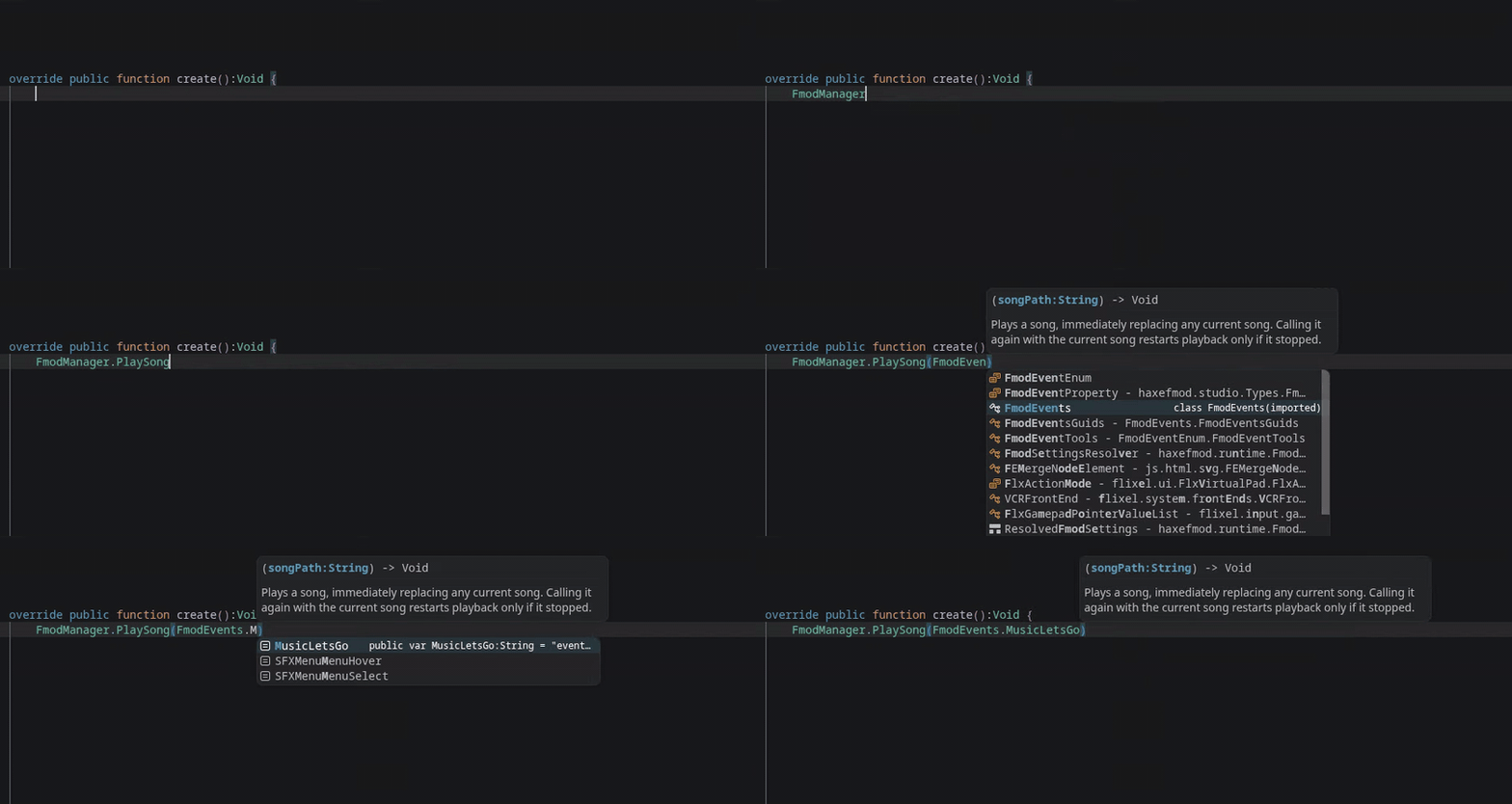
FmodEvents.hx,FmodBuses.hx,FmodVCAs.hx,FmodSnapshots.hx, andFmodParameters.hx...Guidscompanion classes in each file with the same names mapped to GUIDs (kept separate from the main class so autocomplete stays clean)FmodEventEnum.hx- a plain enum mapping to every event, for tool integrations (see Event Enums)
Use the constants as a clean substitution for full FMOD Studio event paths:
FmodManager.PlaySong(FmodEvents.MusicMainLevel);
FmodManager.PlaySong("event:/Music/MainLevel"); // non-constant variant

FmodManager.PlaySoundOneShot(FmodEvents.SFXCoin);
FmodManager.PlaySoundOneShot("event:/SFX/Coin"); // non-constant variant- Copy
fmod-scripts/ExportHaxeConstants.jsinto your FMOD Studio scripts folder (Scriptsnext to your.fspro, or the FMOD Studio global scripts directory in the install directory). - Reload scripts in FMOD Studio (Scripts menu) or restart Studio.
- Press
Ctrl+B(or Scripts -> Export Haxe Constants and Build) and pick your Haxe project'ssourcefolder once. The choice is cached using a file titledCachedHaxeConstantsOutputLocationthat is stored next to your.fspro.
From then on Ctrl+B regenerates the constants and builds banks as one step.
If you are using a flow or tool that works better with enums, FmodEventEnum.hx holds enum representations of all sounds with additional helper functions that map them back to the path and GUID strings.
To make the generated classes and the library available everywhere without per-file imports, create an import.hx next to your game's Main.hx. Wrap the imports in #if !macro: the FMOD classes use build macros and importing them inside the macro context breaks compilation.
#if !macro
import haxefmod.FmodManager;
import FmodEvents;
#end
Note: Remember, for the generated files to stay up to date, you must run the export script every time you build your sound bank.
See MIGRATION.md for the complete mapping.
This entire project was started as an expansion of Aaron Shea's faxe.
If you have any feature requests or are having issues using the library, please do one (or both) of the following:
-
Join the Haxe Discord, then ask any questions you have in the haxe-fmod thread. Responses will be quick!
-
Open an Issue here on GitHub.