Quick start
Here is how to use daming components to implement the feature:
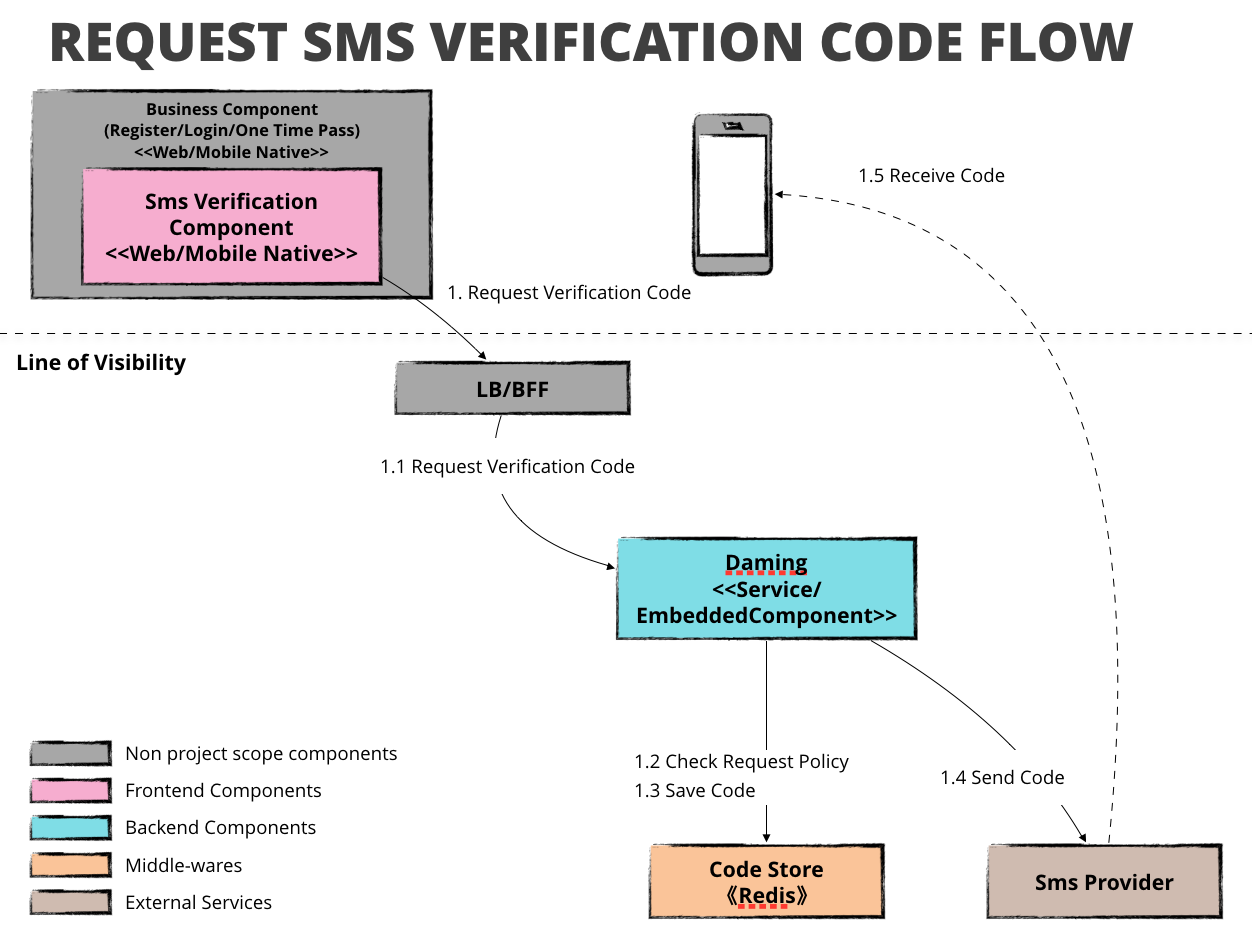
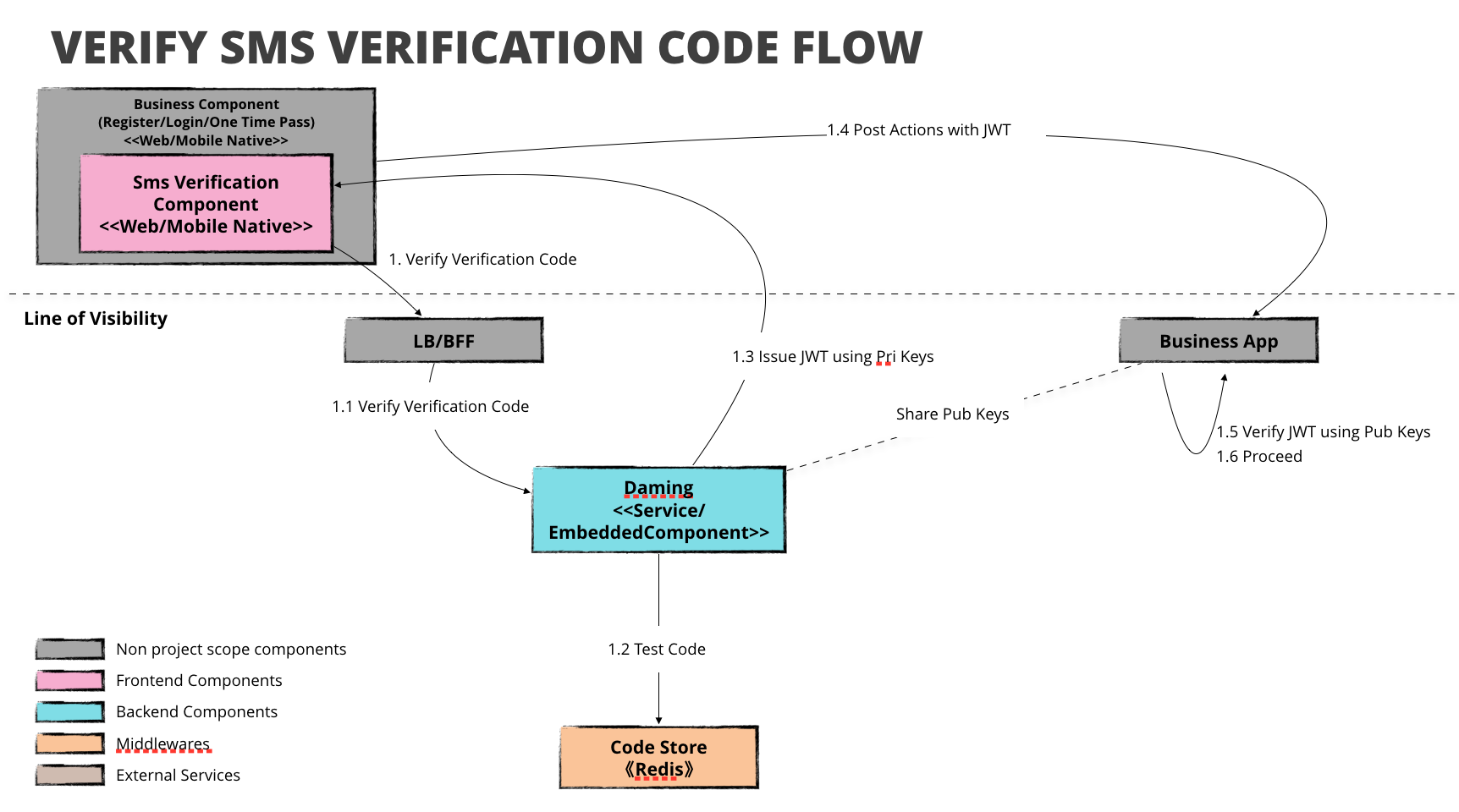

Add this starter to your project
With gradle:
compile group: "com.github.hippoom:sms-verification-starter:${latestVersion}"

# RedisSmsVerificationStore depends on this
compile "org.springframework.data:spring-data-redis:2.1.2.RELEASE"
You'll need to setup private key location so that the application can generate a JWT once the mobile number is verified.
# application-{profile}.properties
daming.jwt.privateKeyFileLocation=/home/your-app/sms-verification-private.der
Start your app, and run
>curl -H 'Content-Type: application/json' -XPOST ${host}:${port}/api/sms/verification/code -d '{"mobile": "${your mobile}"}'
You'll see the following log entry
Sending verification code ${a code} to mobile {your masked mobile}, the code is expiring in PT1M
Copy the code and run this since it does not send you a message by default
>curl -H 'Content-Type: application/json' -XDELETE ${host}:${port}/api/sms/verification/code -d '{"mobile": "${your mobile}","code":"${the code}"}'
{"token":"{a very long string}"}%
The JWT contains the mobile phone number that has been verified. The client can sent it to next endpoint such as register or login. The endpoint should verify the JWT with the public key paired to the private key and extract the mobile:
Jwts.parser().setSigningKey(getPublicKey("./sms-verification-public.der"))
                .parseClaimsJws(actual).getBody().get("mobile")

private PublicKey getPublicKey(String filename) throws Exception {

        byte[] keyBytes = Files.readAllBytes(Paths.get(filename))

        X509EncodedKeySpec spec =
                new X509EncodedKeySpec(keyBytes)
        KeyFactory kf = KeyFactory.getInstance("RSA")
        return kf.generatePublic(spec)
} The starter supports aliyun sms out of box, you can enable it by
# application-{profile}.properties
daming.sms.provider=aliyun
And access key and secret if you don't have a configured IAcsClient instance
daming.aliyun.accessKeyId={your key id}
daming.aliyun.accessKeySecret={your key secret}
Do remember to include aliyun sdk in your dependencies
    compile("com.aliyun:aliyun-java-sdk-core:4.0.6")
    compile("com.aliyun:aliyun-java-sdk-dysmsapi:1.1.0")
or with a configured IAcsClient instance named acsClient
@Bean(name="acsClient")
public IAcsClient acsClient() {
    IClientProfile profile = DefaultProfile.getProfile(regionId, accessKeyId, accessKeySecret);
    DefaultProfile.addEndpoint("cn-hangzhou", "cn-hangzhou", "Dysmsapi", "dysmsapi.aliyuncs.com");
    // other configurations
    return new DefaultAcsClient(profile);
}
The last step is to configure sms signature and template code, you can find them on Aliyun Sms's console
daming.aliyun.sms.signature={your text} #encode it in unicode
daming.aliyun.sms.templateCode={your code}