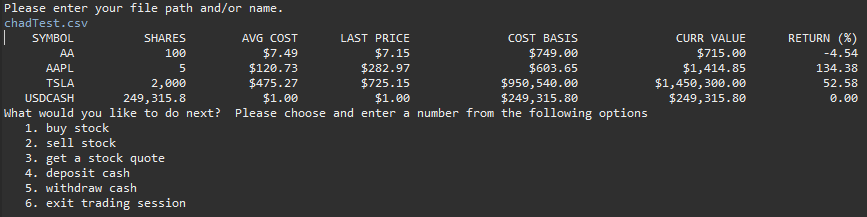
This program enables a user to simulate trades for US stocks. The user can load a pre-existing portfolio file (.csv or .txt) or begin the program without an existing portrolio, then save their portfolio to a .csv or .txt. Trades made in the program throughout the day are then saved to the file and can be reloaded for trading day over day. The program will keep track of cash balances, provide real time pricing for updated positions and calculate returns. The user can also deposit or withdraw cash, or get a stock quote with helpful information before deciding to trade or not. When attempting to trade, the program will validate that you have sufficient shares to sell, or cash to purchase stock. It will also check to confirm you have a valid symbol and prompt the user to re-enter a symbol in the event it is invalid or does not exist.
- The program supports long only (buy and sell, no shorting securities), US stock trading.
- While the program pulls in live pricing intraday, the program will still run outside of market hours (9:30AM - 4:00PM EST) and allows the user to trade at the last close price.
- The file loaded and saved must be a .csv or .txt file and it is assumed the file will have the correct data in respective columns. Rows where data is invalid will be skipped upon loading and the user will receive a noficiation if a row was skipped.
In order to run the program, you need to add the Jar file to its own build path that the project points to. This allows the program to access the endpoint url and access the required data for the program.
To Add the Jar to your build path Right click the Project > Build Path > Configure build path> Select Libraries tab > Click Add External Libraries > Select the Jar file.
You can use StockPortfolio.csv or StockPortfolio.txt to test program functionality. Please do not edit StockPortfolioTest.csv as that is being used for JUnit tests that require data from the file.
-
PositionFileIO: This will load in the user's portfolio from a file or create a new file to track the user's portfolio. Trades will take place within the program and update the portfolio. When the user is done with their trading sessoin, their updated portfolio is written back out to their portfolio file to be used for the next trading session or trading day.
-
Position: The Position object takes in data related to the position (symbol, shares, average cost) and calculates position economics (cost basis, current market value, position return). These positions will be grouped in the portfolio object and updated throughout the program as trades are completed.
-
Portfolio: The portfolio object is a grouped set of positions. When trades are completed in the program, the portfolio is updated accordingly (cash is adjusted, positions are created, deleted, updated based upon the trade taking place). The portfolio is loaded in from the file at the start of the program and written back out to the file at completion of the trading session.
-
Trade: The trade class will be used to interact with the user and get the trade instructions. The trade instructions will then permeate throughout the program, updating postiions and the portfolio accordingly.
-
YahooQuote: This class uses yahoo finance as a data source and pulls data for a stock or ETF in to the program. The current price will be used to update positions and the portfolio accordingly.
-
FinancialActivity: Interface that can be used in future iterations to expand valid financial instruments for the program.
Initial Load:
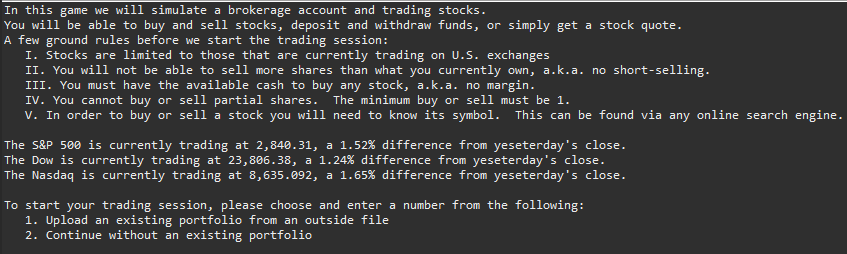
Portfolio Display and Options: