A somewhat configurable, to do list program for Windows, which let's you easily write onto your wallpaper image.
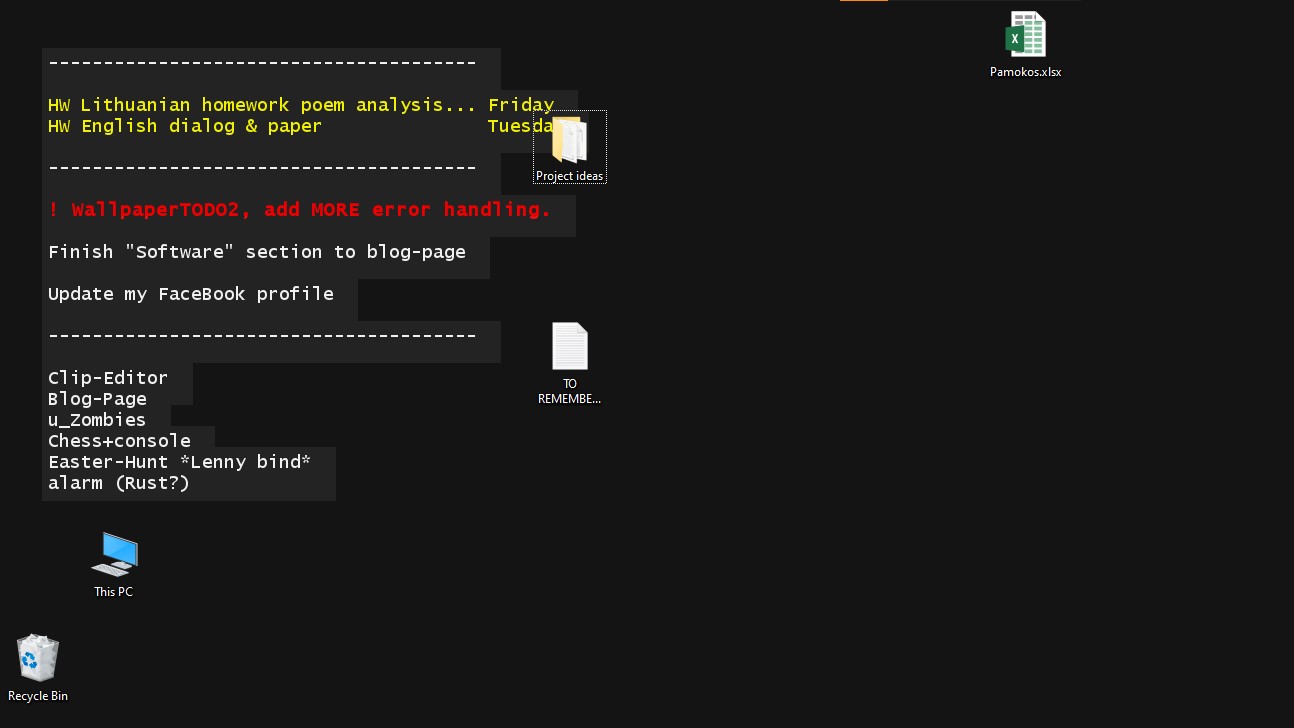
After installing the program: in your %LocalAppData%\Ult1\WallpaperTODO2 folder you can find config.cfg & profiles directory,
config.cfg has some general options,
while \profiles let you customise the look of the wallpaper. YAML is used for all configuration files.
The program uses notepad.exe for editing notes with symbols (e.g. '#', '!', "HW") at starts of lines denoting type of information in the line.
Many explanations can be found in config.cfg & default_(light/dark/wallpaper).yml
Although, at the start there will be three different profiles, default_light, default_dark & default_wallpaper.
All default profiles have line labels such as:
!(important);HW(homework);ND(alias for homework („namų darbai" meaning "homework" in my native tongue)).
All profiles (currently unconfigurable, although, it might become configurable):
#(comment) and the line starting with this will not be drawn onto the wallpaper.
(string) current_profile: let's you select a profile. Its value should be a filename (without extension), which is in \profiles directory, although, it can also be a path, just again, without file extension or .yml!
(boolean) pop_up_dialog_boxes: when a common error (one, that is caught by me) occurs, this makes a Windows dialog box popup, instead of just a message in the console & a crash.
(boolean) open_notepad: automatically opens todo.txt as notepad, let's you edit todos easily. This can be turned off to make it easier to design a profile.
I'll finish this later as a proof of concept
I finished it and proved the concept?
This refers to the style of the actual text, in case of (for example) HTML, this would be for <p> and <span> elements.
text (and everything under labels) has:
- (string)
font: which specifies the font used. Some fonts don't work, but, if it's fixable & needed, I might fix it. - (string)
color: this specifies the text's color using a hex code. - (int)
size: it's technically in pixels, although,sizeis mainly used for constructing the font. - (int)
style: all possible styles are:0(Plain),1(Bold),2(Italic),4(Underlined). To use multiple styles, simply concatinate the numbers, e.g.14would give you a bold and underlined text. - (int)
weight: the "boldness" of the text, all possible values are: [0; 9].
text section also has (List or Object[]) labels, with all the same properties as it's parent(text) and also (List or String[]) symbols, which is for specifying the symbols, lines need to start with for the styling to apply, e.g.: ! WATER THE CACTUS Sunday would (by default) be bold red. Also, notice how there is a space at the very start of the line, this is optional, but in case the first character of a line is a space, it will be ignored, despite that it isn't meant to work with unicode spaces.
text_box is the box surrounding the text... It can be "disabled" by setting it's color to "#0000" or "transparent".
It's properties:
- (string)
background: another hex color code. - (boolean)
wrap_around_letters: It sets the text box to wrap around lines instead of being one, solid rectangle having the width of the longest line. - (int) padding: this is, more or less, the CSS padding property, with it the background will be slightly larger.
- (int) margin: how far away everything is from the top left corner.
If (boolean) use_image is set to true:
- (string)
image_path: is a link to a file. A macro: "$DATA_DIR" exists, it is replaced by %LocalAppData%\Ult1\WallpaperTODO2 Otherwise: - (string)
bg_color: I should really rename this tocolor..., either way, it's the color of the background, (obviously) it should be opaque. - (int)
width: the generated image's width, this can be good for 4x3, 1x1, 16x10 or 10x16, but small monitors. - (int)
height: analogous towidth.
hex is "hexadecimal" shortened while hexadecimal is the word for base 16. It is made up of numbers from: 0 to 9 and letters from a to f.
You can find a bunch of color pickers online that will convert the color to the standard (just kidding! it's just JavaScript stuff again!) hexadecimal color code. The Javascript's hexadecimal code has several versions, but often is: #rrggbb, #rgb and #rrggbbaa. r - red, g - green, b - blue, a - alpha/transparency, besides that, each value goes from 0 to 255 or from 00 to ff.
While here: the possible formats are: #rrggbb, #aarrggbb, #aall (l - lightness/grey brightnesss) and only in text_box: transparent.
Examples of value hex in profiles.yml:
"#ffff"- opaque white"#ff00"- opaque black"#0000"same as "transparent""#00ff00"- opaque green"#7f0000"- dark-ish red (exactly half of max brightness for red)"#20000000"- very clear/transparent black"#7fff0000"- semi-transparent red"#deadbeef"- slightly transparent light blue
I am pretty sure, that capital letters work as hex codes. ¯\_(ツ)_/¯
- WallpaperTODO1 exists.
- Q: Does it work on Linux and Mac? A: I don't know, it's written in Java, so parts of it should work, although it certainly won't set the wallpaper image. Besides that, the paths might not work... ¯\_(ツ)_/¯