
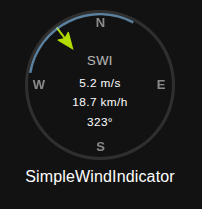
SimpleWindIndicator is a universal React component for displaying wind direction and speed as a circular indicator. Built on Material-UI and D3, it provides extensive customization options for appearance and behavior.
- 🧭 Wind direction display with arrow indicator
- 💨 Wind speed visualization through arrow length
- 🎨 13 predefined themes (dark, light, ocean, sunset, blur, neon, forest, arctic, volcano, evil, vintage, mint, cherry)
- 📐 Direction segment for displaying angle ranges with intelligent behavior
- 🔄 Two segment modes: auto-expand (connects to arrow) or fixed (independent)
- 🎯 Raw arc mode for drawing full arcs without smart optimization
- 🎬 Smooth animations with individual control for arrow, segment, and text
- 🔤 Customizable compass labels (N, S, E, W)
- 📱 Responsive design with various size options
- ⚡ Advanced animations with optimized performance
- 🎛️ Three display variants (standard, compact, detailed)
npm install simple-wind-indicatorimport SimpleWindIndicator from './SimpleWindIndicator';
function App() {
return (
<SimpleWindIndicator
direction={45}
speed={15.2}
title="Wind Direction"
subtitle="Current"
/>
);
}| Prop | Type | Default | Description |
|---|---|---|---|
direction |
number |
- | Wind direction in degrees (0-360) |
speed |
number |
- | Wind speed value |
| Prop | Type | Default | Description |
|---|---|---|---|
minDirection |
number |
- | Minimum direction for blue segment (degrees) |
maxDirection |
number |
- | Maximum direction for blue segment (degrees) |
autoExpandSegment |
boolean |
true |
If true, segment automatically expands to include arrow; if false, segment stays fixed |
enableRawArc |
boolean |
false |
When autoExpandSegment=false, if true, always draws full arc between min/max without choosing shorter path |
| Prop | Type | Default | Description |
|---|---|---|---|
maxSpeed |
number |
32 |
Maximum speed value for arrow length calculation |
minArrowLength |
number |
0 |
Minimum arrow length as percentage (0-1) |
maxArrowLength |
number |
1.35 |
Maximum arrow length as percentage (0-2) |
arrowColor |
string |
- | Custom arrow color (hex/rgb/theme color) |
arrowThickness |
string|number |
2 |
Arrow tail thickness in pixels |
arrowHeadSize |
string|number |
- | Arrow head size multiplier |
arrowOpacity |
number |
1 |
Arrow opacity (0-1) |
arrowShadow |
string |
- | Arrow shadow CSS value |
| Prop | Type | Default | Description |
|---|---|---|---|
segmentColor |
string |
- | Custom segment color |
subtitleColor |
string |
- | Custom subtitle text color |
title |
string |
- | Main title text |
subtitle |
string |
- | Subtitle text |
titleColor |
string |
- | Title text color |
titleSize |
string|number |
16 |
Title font size (CSS value) |
titleWeight |
string |
'normal' |
Title font weight (normal/bold/100-900) |
subtitleSize |
string |
13 |
Subtitle font size (CSS value) |
subtitleWeight |
string |
'bold' |
Subtitle font weight |
valuesColor |
string |
- | Speed/direction values text color |
valuesSize |
string|number |
11.5 |
Values font size (CSS value) |
valuesWeight |
string |
'normal' |
Values font weight |
compassColor |
string |
- | Compass directions (N,S,E,W) text color |
backgroundColor |
string |
- | Background color of the circle |
| Prop | Type | Default | Description |
|---|---|---|---|
borderColor |
string |
- | Border color of the circle |
borderWidth |
string|number |
3 |
Border width in pixels |
borderStyle |
string |
'solid' |
Border style (solid, dashed, dotted) |
| Prop | Type | Default | Description |
|---|---|---|---|
segmentOpacity |
number |
0.8 |
Segment opacity (0-1) |
segmentThickness |
string|number |
8 |
Segment thickness in pixels |
| Prop | Type | Default | Description |
|---|---|---|---|
compassSize |
string|number |
- | Compass labels font size |
compassWeight |
string |
'bold' |
Compass labels font weight |
compassOpacity |
number |
0.5 |
Compass labels opacity (0-1) |
customCompassLabels |
Array |
- | Custom compass labels [N, E, S, W] |
| Prop | Type | Default | Description |
|---|---|---|---|
animationDuration |
string|number |
'1.0s' |
Animation duration |
animationType |
string |
'ease-out' |
Animation timing function |
enableArrowAnimation |
boolean |
true |
Enable arrow direction and length animation |
enableSegmentAnimation |
boolean |
true |
Enable segment boundaries animation |
enableTextAnimation |
boolean |
true |
Enable speed and direction text animation |
enableHoverEffects |
boolean |
false |
Enable hover effects |
onClick |
Function |
- | Click handler function |
onHover |
Function |
- | Hover handler function |
tooltip |
string |
- | Tooltip text |
| Prop | Type | Default | Description |
|---|---|---|---|
hideNullValues |
boolean |
false |
Hide null values instead of showing "--" |
| Prop | Type | Default | Description |
|---|---|---|---|
preset |
string |
- | Predefined theme preset |
variant |
string |
'standard' |
Display variant (standard, compact, detailed) |
| Prop | Type | Default | Description |
|---|---|---|---|
speedUnit |
string |
'm/s' |
Primary speed unit |
secondarySpeedUnit |
string |
'km/h' |
Secondary speed unit |
speedUnitMultiplier |
number |
3.6 |
Multiplier for secondary unit |
| Prop | Type | Default | Description |
|---|---|---|---|
showCompass |
boolean |
true |
Show compass directions (N,S,E,W) |
showSegment |
boolean |
true |
Show blue direction segment |
showSpeed |
boolean |
true |
Show speed values |
showDirection |
boolean |
true |
Show direction degrees |
showTitle |
boolean |
true |
Show title below component |
showSubtitle |
boolean |
true |
Show subtitle inside component |
| Prop | Type | Default | Description |
|---|---|---|---|
circleSize |
number |
150 |
Component size in pixels |
customStyles |
Object |
{} |
Custom styling overrides |
SimpleWindIndicator features a comprehensive animation system with individual controls for each element:
Controls both direction and length animations:
- Direction: Smooth rotation using shortest path (350° → 20° goes through 0°, not 330°)
- Length: Proportional to speed with smooth transitions
Controls segment boundary movements:
- Expansion/Contraction: Smooth segment resizing
- Boundary Shifts: Intelligent path calculations for optimal visual flow
Controls numerical value transitions:
- Speed Values: Both primary (m/s) and secondary (km/h) units
- Direction Degrees: Synchronized with arrow direction using shortest path
// Full animation (default)
<SimpleWindIndicator
  direction={45}
  speed={15}
  enableArrowAnimation={true}     // Arrow rotates and resizes smoothly
  enableSegmentAnimation={true}   // Segment expands/contracts smoothly
  enableTextAnimation={true}      // Numbers change smoothly
  animationDuration="1.5s"
/>

// Only arrow animation
<SimpleWindIndicator
  direction={45}
  speed={15}
  enableArrowAnimation={true}     // Arrow animates
  enableSegmentAnimation={false}  // Segment snaps instantly
  enableTextAnimation={false}     // Numbers change instantly
/>

// Only text animation
<SimpleWindIndicator
  direction={45}
  speed={15}
  enableArrowAnimation={false}    // Arrow snaps to position
  enableSegmentAnimation={false}  // Segment snaps instantly
  enableTextAnimation={true}      // Only numbers animate smoothly
/>

// No animation (maximum performance)
<SimpleWindIndicator
  direction={45}
  speed={15}
  enableArrowAnimation={false}
  enableSegmentAnimation={false}
  enableTextAnimation={false}
  // All changes happen instantly
/>The animation system automatically calculates the shortest rotational path:
// Example: 350° → 20° transition
<SimpleWindIndicator
  direction={350}  // Starting position
  // Change to direction={20}
  // Animation path: 350° → 360° → 0° → 20° (30° total)
  // NOT: 350° → 330° → 310° → ... → 20° (330° total)
/>SimpleWindIndicator features three distinct segment modes to handle different use cases for wind direction visualization.
When autoExpandSegment={true}, the segment automatically expands to always include the wind arrow:
<SimpleWindIndicator
  direction={80}
  speed={12}
  minDirection={30}
  maxDirection={60}
  autoExpandSegment={true}  // Default
  // Segment expands from 30°-80° to include the arrow
/>
How it works:
- Original segment: 30°-60°
- Arrow at 80° (outside segment)
- Segment automatically expands to: 30°-80°
- Arrow is always connected to the segment
Smart expansion logic:
- Uses shortest path algorithm to minimize segment size
- Handles segments crossing 0° correctly
- Smooth animations during expansion/contraction
- Fallback system: If primary algorithm fails to include arrow, uses alternative expansion logic
When autoExpandSegment={false}, the segment stays exactly as defined, regardless of arrow position:
<SimpleWindIndicator
  direction={80}   // Arrow outside of segment
  speed={12}
  minDirection={30}
  maxDirection={60}
  autoExpandSegment={false}
  // Segment stays fixed at 30°-60°, arrow independent
/>
Use cases:
- Displaying fixed "optimal" or "safe" wind ranges
- Showing predefined sectors or zones
- Weather alerts for specific direction ranges
When autoExpandSegment={false} AND enableRawArc={true}, draws the full arc without optimization:
<SimpleWindIndicator
  direction={80}
  speed={12}
  minDirection={30}
  maxDirection={260}
  autoExpandSegment={false}
  enableRawArc={true}
  // Draws full 230° arc from 30° to 260° (not optimized shorter path)
/>
Normal behavior vs Raw Arc:
- Normal: 30°-260° becomes optimized 260°-30° arc (130°)
- Raw Arc: 30°-260° draws full 230° arc as specified
The auto-expand mode features a two-stage algorithm for maximum reliability:
Stage 1: Primary Algorithm
- Uses shortest path optimization
- Minimizes segment size while including arrow
- Handles complex cases with segments crossing 0°
Stage 2: Fallback Algorithm
- Activates if arrow still not included after Stage 1
- Uses simple expansion without shortest path optimization
- Guarantees arrow inclusion in all scenarios
// Example of fallback system in action:
<SimpleWindIndicator
  direction={220}     // Arrow position
  minDirection={300}  // Segment start
  maxDirection={60}   // Segment end (crosses 0°)
  autoExpandSegment={true}
  // Stage 1: Tries shortest path optimization
  // Stage 2: If needed, uses direct expansion
  // Result: Arrow is ALWAYS included
/>| Mode | autoExpandSegment | enableRawArc | Behavior |
|---|---|---|---|
| Auto-Expand | true |
any | Segment expands to include arrow (with fallback) |
| Fixed Smart | false |
false |
Fixed segment with optimized arc |
| Fixed Raw | false |
true |
Fixed segment with full arc |
The component includes 13 predefined themes that you can use with the preset prop:
dark- Dark theme with cyan accentslight- Light theme with gray tonesocean- Ocean-inspired blue-green themesunset- Warm orange sunset themeblur- Glassmorphism effect with blurneon- Cyberpunk neon colorsforest- Nature-inspired green themearctic- Cool blue arctic themevolcano- Fiery red-orange themeevil- Dark theme with purple accentsvintage- Retro brown-gold thememint- Fresh mint green themecherry- Pink cherry blossom theme
// Dark theme
<SimpleWindIndicator
  direction={270}
  speed={12.5}
  preset="dark"
  title="Wind Status"
/>

// Ocean theme with custom title
<SimpleWindIndicator
  direction={180}
  speed={8.3}
  preset="ocean"
  title="Sea Breeze"
  subtitle="Current"
/>

// Neon theme for cyberpunk UI
<SimpleWindIndicator
  direction={90}
  speed={20.1}
  preset="neon"
  title="WIND_SYS.EXE"
  circleSize={200}
/><SimpleWindIndicator
variant="standard"
direction={45}
speed={15}
/>Smaller size with hidden compass labels:
<SimpleWindIndicator
  variant="compact"
  direction={45}
  speed={15}
/>Larger size with enhanced text:
<SimpleWindIndicator
  variant="detailed"
  direction={45}
  speed={15}
/>Disable animations for high-frequency updates:
<SimpleWindIndicator
  direction={185}
  speed={12.8}
  minDirection={170}
  maxDirection={120}
  autoExpandSegment={true}
  enableArrowAnimation={false}    // No arrow animation
  enableSegmentAnimation={false}  // No segment animation
  enableTextAnimation={false}     // No text animation
  title="High-Frequency Data"
  subtitle="Real-time"
/>Full animation for dashboard displays:
<SimpleWindIndicator
  direction={185}
  speed={12.8}
  minDirection={170}
  maxDirection={120}
  autoExpandSegment={true}
  enableArrowAnimation={true}     // Smooth arrow rotation
  enableSegmentAnimation={true}   // Smooth segment expansion
  enableTextAnimation={true}      // Smooth number transitions
  animationDuration="2.0s"
  animationType="ease-out"
  title="Dashboard Display"
  subtitle="Animated"
/>Different animation settings for different elements:
<SimpleWindIndicator
  direction={95}
  speed={25.4}
  minDirection={80}
  maxDirection={100}
  autoExpandSegment={false}
  enableArrowAnimation={true}     // Arrow animates
  enableSegmentAnimation={false}  // Fixed segment (no animation)
  enableTextAnimation={true}      // Text animates
  title="Mixed Animation"
  subtitle="Arrow + Text Only"
/>Auto-expanding segment that always includes current wind:
<SimpleWindIndicator
  direction={185}  // Current wind direction
  speed={12.8}
  minDirection={170}  // Favorable range start
  maxDirection={120}  // Favorable range end (through North)
  autoExpandSegment={true}  // Always include current wind in segment
  title="Sailing Conditions"
  subtitle="Auto-Expand Range"
  preset="ocean"
  segmentThickness={12}
  animationDuration="2s"
/>Showing fixed optimal zones without modification:
<SimpleWindIndicator
  direction={95}  // Current wind
  speed={25.4}
  minDirection={80}   // Fixed optimal range
  maxDirection={100}
  autoExpandSegment={false}  // Keep zone fixed
  title="Turbine #07"
  subtitle="Optimal Zone"
  preset="forest"
  speedUnit="m/s"
  secondarySpeedUnit="mph"
  speedUnitMultiplier={2.237}
/>Drawing exact arc segments without optimization:
<SimpleWindIndicator
  direction={45}
  speed={15.2}
  minDirection={30}
  maxDirection={300}  // Large range
  autoExpandSegment={false}
  enableRawArc={true}  // Draw full 270° arc
  title="Coverage Area"
  subtitle="Full Range"
  preset="volcano"
  segmentOpacity={0.3}
/><SimpleWindIndicator
direction={45}
speed={12.8}
minDirection={30}
maxDirection={60}
autoExpandSegment={true}
title="Weather Station"
subtitle="Live"
preset="arctic"
showCompass={true}
showSegment={true}
enableHoverEffects={true}
animationDuration="1.0s"
/>// Mode 1: Auto-expanding (default)
<SimpleWindIndicator
direction={80}
minDirection={30}
maxDirection={60}
autoExpandSegment={true}
title="Auto-Expand Mode"
subtitle="Connects to arrow"
/>
// Mode 2: Fixed optimized
<SimpleWindIndicator
direction={80}
minDirection={30}
maxDirection={260}
autoExpandSegment={false}
enableRawArc={false}
title="Fixed Smart Mode"
subtitle="Optimized arc (130°)"
/>
// Mode 3: Fixed raw
<SimpleWindIndicator
direction={80}
minDirection={30}
maxDirection={260}
autoExpandSegment={false}
enableRawArc={true}
title="Fixed Raw Mode"
subtitle="Full arc (230°)"
/><SimpleWindIndicator
direction={180}
speed={25.4}
arrowColor="#ff4444"
backgroundColor="#f0f0f0"
borderColor="#333"
borderWidth={5}
circleSize={200}
segmentThickness={15}
customStyles={{
container: { margin: '20px' },
title: { fontFamily: 'Arial' }
}}
/><SimpleWindIndicator
direction={315}
speed={18.7}
enableHoverEffects={true}
onClick={() => console.log('Wind indicator clicked')}
onHover={() => console.log('Hovering over wind indicator')}
tooltip="Click for details"
animationDuration="0.5s"
/><SimpleWindIndicator
direction={120}
speed={10}
speedUnit="m/s"
secondarySpeedUnit="mph"
speedUnitMultiplier={2.237}
title="Wind Speed"
/><SimpleWindIndicator
direction={0}
speed={5.5}
customCompassLabels={["Nord", "Est", "Sud", "Ouest"]}
title="Vent (French)"
/>Hidden Elements
<SimpleWindIndicator
  direction={270}
  speed={null}
  hideNullValues={true}
  showCompass={false}
  showSegment={false}
  showDirection={false}
  title="Speed Only"
/>- Sailing: Monitor wind direction with auto-expanding optimal ranges
- Kitesurfing: Track wind conditions with fixed safety zones
- Paragliding: Display wind information with raw arc coverage areas
- Wind Turbines: Monitor wind direction with fixed optimal zones
- Construction: Track wind conditions with expandable safety ranges
- Aviation: Display wind information with raw arc runway coverage
- Weather Stations: Real-time wind with smart segment behavior
- Marine Weather: Coastal monitoring with fixed warning zones
- Agricultural: Wind monitoring with seasonal optimal ranges
- IoT Dashboards: Display outdoor conditions with adaptive ranges
- Garden Monitoring: Track wind with plant-specific safety zones
- Energy Monitoring: Wind data with efficiency range visualization
- Real-time Systems: Use
enableTextAnimation={false}for instant updates - Dashboard Displays: Use full animation for smooth visual appeal
- Mixed Requirements: Selective animation control for optimal UX
The customStyles prop allows you to override default styles for different parts of the component:
<SimpleWindIndicator
  direction={90}
  speed={15}
  customStyles={{
    container: {
      margin: '20px',
      boxShadow: '0 4px 8px rgba(0,0,0,0.1)'
    },
    paper: {
      background: 'linear-gradient(45deg, #FE6B8B 30%, #FF8E53 90%)'
    },
    arrow: {
      filter: 'drop-shadow(0 2px 4px rgba(0,0,0,0.3))'
    },
    title: {
      fontFamily: 'Roboto, sans-serif',
      textTransform: 'uppercase'
    },
    subtitle: {
      fontStyle: 'italic'
    },
    speedText: {
      backgroundColor: 'rgba(255,255,255,0.8)',
      borderRadius: '4px',
      padding: '4px 8px'
    }
  }}
/>The component gracefully handles invalid or missing data:
// Null values
<SimpleWindIndicator
  direction={null}
  speed={null}
  hideNullValues={false} // Shows "--" for null values
/>

// Invalid direction (will be normalized)
<SimpleWindIndicator
  direction={450} // Becomes 90 degrees
  speed={15}
/>

// Speed exceeding maxSpeed (arrow will be clamped)
<SimpleWindIndicator
  direction={180}
  speed={50}
  maxSpeed={30} // Arrow length will be at maximum
/>- Individual Animation Control: Disable specific animations for better performance
- requestAnimationFrame: Used for smooth 60fps animations
- CSS Transforms: Hardware-accelerated positioning and rotation
- SVG Optimization: Efficient rendering for compass and segments
- Smart Calculations: Arrow and segment computations are optimized
- Memory Management: No memory leaks in animation cycles
- Shortest Path Algorithm: Minimizes unnecessary rotations
- Fallback System: Ensures reliable behavior without performance cost
// High-frequency updates (every 100ms)
<SimpleWindIndicator
  enableArrowAnimation={false}    // Instant updates
  enableSegmentAnimation={false}  // No segment animation
  enableTextAnimation={false}     // Instant text updates
  direction={direction}
  speed={speed}
/>

// Standard dashboard (updates every 1-5 seconds)
<SimpleWindIndicator
  enableArrowAnimation={true}     // Smooth transitions
  enableSegmentAnimation={true}   // Smooth segment
  enableTextAnimation={true}      // Smooth text
  animationDuration="1.0s"        // Standard timing
  direction={direction}
  speed={speed}
/>

// Presentation mode (smooth, impressive)
<SimpleWindIndicator
  enableArrowAnimation={true}
  enableSegmentAnimation={true}
  enableTextAnimation={true}
  animationDuration="2.0s"        // Slower, more visible
  animationType="ease-out"
  direction={direction}
  speed={speed}
/>- Modern browsers with CSS3 transform support
- SVG support required for compass and segments
- requestAnimationFrame support for smooth animations
- Material-UI theme support required
@mui/material- Material-UI components@mui/icons-material- Navigation icond3-shape- Arc calculations for segmentsreact- React framework
MIT License
Copyright (c) 2025 Uliankin Yehor
Permission is hereby granted, free of charge, to any person obtaining a copy of this software and associated documentation files (the "Software"), to deal in the Software without restriction, including without limitation the rights to use, copy, modify, merge, publish, distribute, sublicense, and/or sell copies of the Software, and to permit persons to whom the Software is furnished to do so, subject to the following conditions:
The above copyright notice and this permission notice shall be included in all copies or substantial portions of the Software.
THE SOFTWARE IS PROVIDED "AS IS", WITHOUT WARRANTY OF ANY KIND, EXPRESS OR IMPLIED, INCLUDING BUT NOT LIMITED TO THE WARRANTIES OF MERCHANTABILITY, FITNESS FOR A PARTICULAR PURPOSE AND NONINFRINGEMENT. IN NO EVENT SHALL THE AUTHORS OR COPYRIGHT HOLDERS BE LIABLE FOR ANY CLAIM, DAMAGES OR OTHER LIABILITY, WHETHER IN AN ACTION OF CONTRACT, TORT OR OTHERWISE, ARISING FROM, OUT OF OR IN CONNECTION WITH THE SOFTWARE OR THE USE OR OTHER DEALINGS IN THE SOFTWARE.