Sketch plugin to generate PDF document based on selected artboards with generated numbers, like Numbering Machine does.
- Download the latest release and open it
- Duble click on
Numbering Machine.sketchpluginto install the plugin
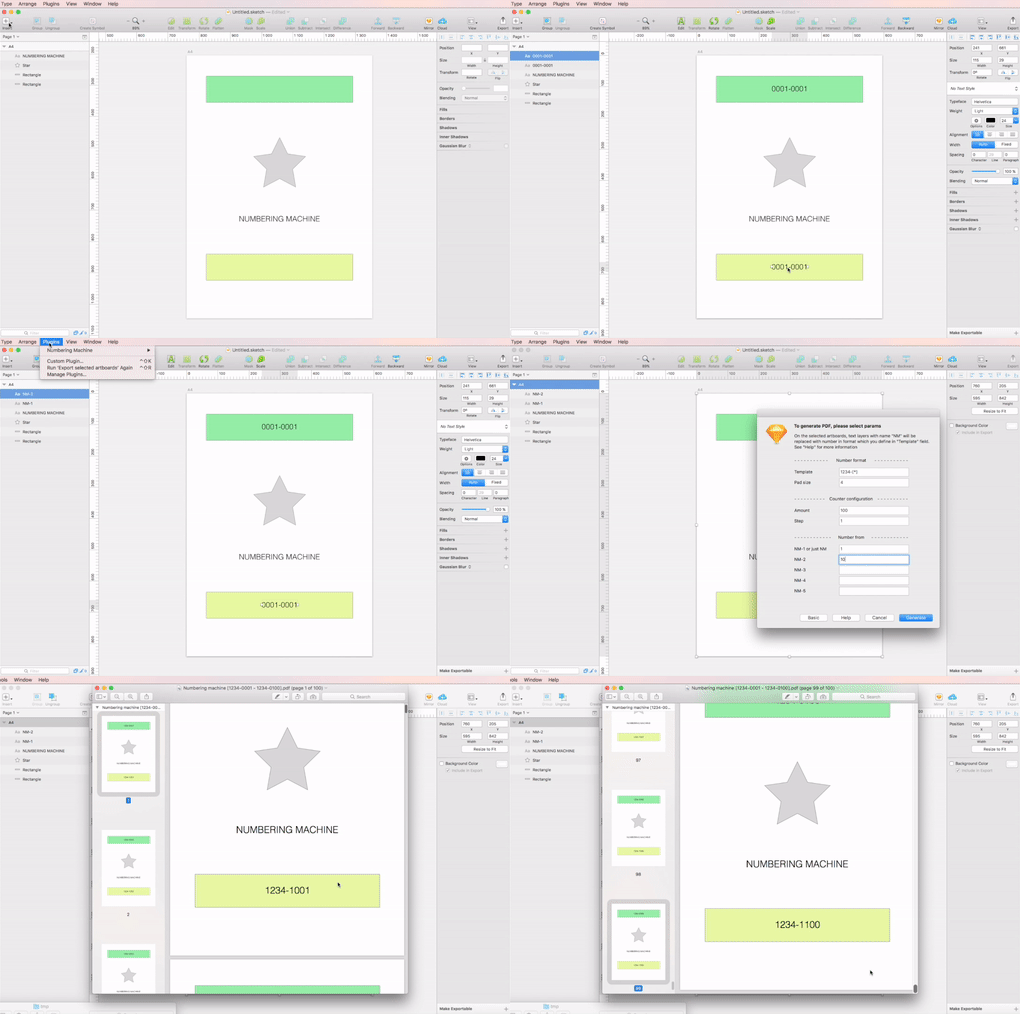

You can see it in more detail on Vimeo.
- Create text layer with any content with name
NM, this layer will be replaced with generated number. (Five different IDs could be placed on one artboard) - Select artboards wich you are going to export. (You can select several artboards)
- Run plugin (
Plugins -> Numbering machine -> Export selected artboards) - Configure numbering machine (see below)
- Generate and save PDF file
Start from number - From which number we should start the numbering
Generate amount - Amount of pages to be generated
Template - Template for number. Placeholder [*] have to be part of tempate. Placeholder [*] will be replaced with generated number
Pad size - How many leading zeros will be in generated number
Check digit - Apply check digit algorithm to generated number. Supported algorithms:
Start from number - From which number we should start the numbering
Step - Generate numbers with step (default 1).
Generate amount - Amount of pages to be generated
Numbering direction - Which direction to use for numbering. Very similar to "Layout direction" in printer settings. There are two options:
- "Direct sequence" (NM-1 -> NM-2 -> NM-3). When we are numbering all layers on the one page, then all on the second and so forth
- "Drill sequence" (NM-1 -> NM-1 -> ... -> NM-1 -> NM-2 ...). When we are numbering all layers with name
NM-1on all pages, then numbering allNM-2on oll pages and so forth