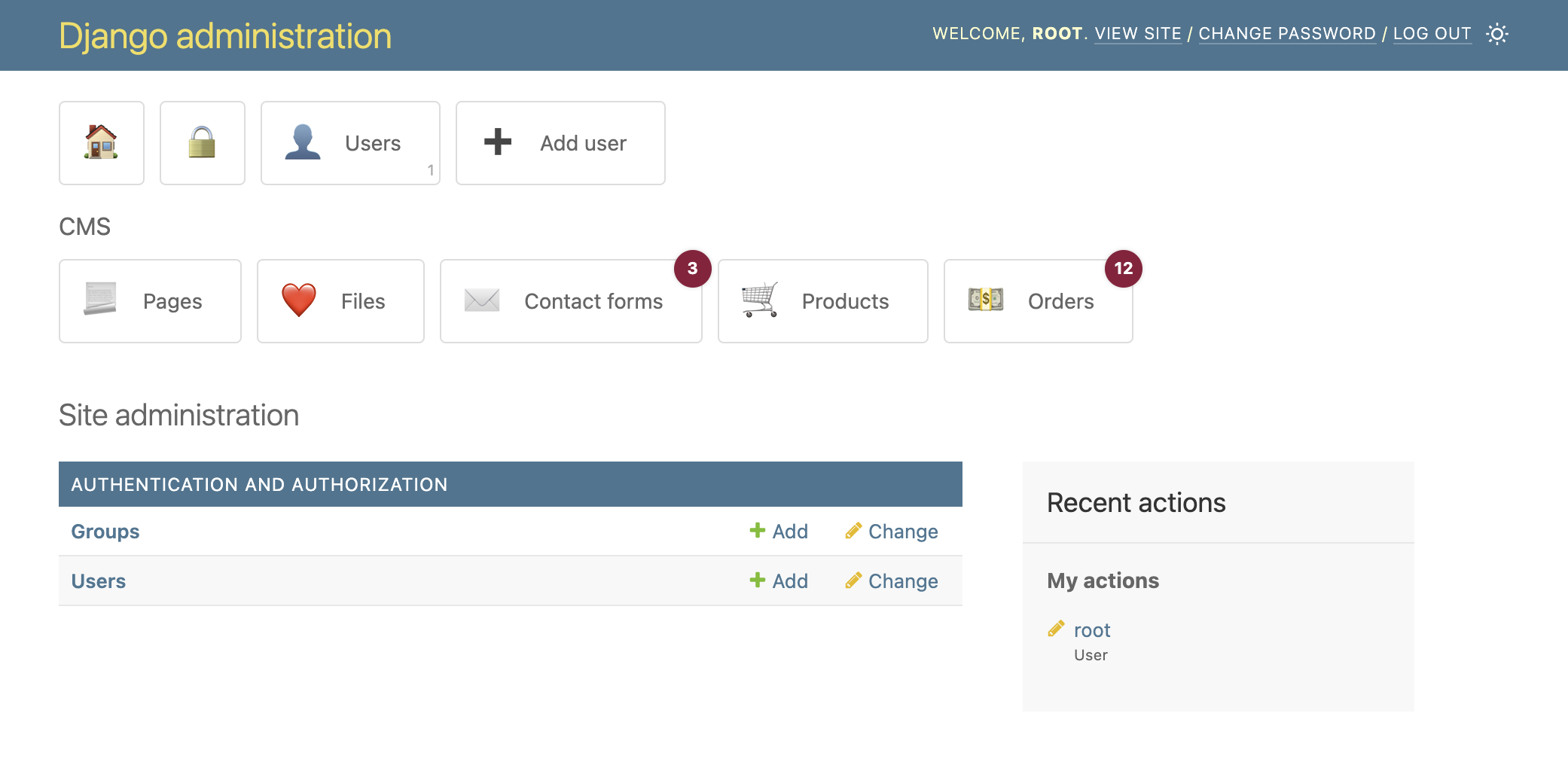
It's a simple dashboard app that adds shortcuts to your Django admin homepage. The keyword here is SIMPLE!
Because some people noted that it's sometimes hard to find the app you are looking for on the admin homepage.
"So why don't we customize the admin site a bit?"
"Nah, I don't want to go through all the hassle of editing templates or setting up a complex dashboard app ..."
Well, good thing django-admin-shortcuts is here, because it only takes five minutes of your time to go from the old dreadfully boring admin to the marvelous engineering excellence that is this app.
-
pip install django-admin-shortcuts -
add
'admin_shortcuts'to yourINSTALLED_APPS, just before'django.contrib.admin'<-- IMPORTANT -
add
ADMIN_SHORTCUTSto your settingsFor example:
ADMIN_SHORTCUTS = [
    {
        'title': 'Authentication',
        'shortcuts': [
            {
                'title': 'Groups',
                'url_name': 'admin:auth_group_changelist',
                               'has_perms': ['example.change_group', 'example.delete_group'],
            },
            {
                'title': 'Add user',
                'url_name': 'admin:auth_user_add',
                'test_func': 'example.utils.has_perms_to_users',
            },
        ]
    },
]
Where ...
- required
url_nameis a name that will be resolved using Django's reverse url method (see Django docs https://docs.djangoproject.com/en/5.0/ref/contrib/admin/#admin-reverse-urls) - optional
app_nameis the name of the admin app that will be used for URL reversal. You can safely ignore this if you have only one admin site in yoururls.py - optional
urlis a direct link that will overrideurl_name - optional
url_extrais extra stuff to be attached at the end of the url (like GET data for pre-filtering admin views) - optional
titleis the title of the shortcut - optional
countandcount_neware paths to a function inside your project that returns something interesting (like a count of all products or a count of all pending orders). The function can optionally take one argument,request, which is the current DjangoHttpRequestobject. - optional
test_funcis a path to a function inside your project that returns a boolean. If True the shortcut is displayed. Like above, this function can optionally take one argumentrequestas well. - optional
has_permsis a list of strings representing the built-in admin permissions required to display the shortcut. - optional
open_new_windowsets whether the link should open in a new window (default is False) - optional
iconis an emoji (if you don't specify one, magical ponies will do it for you)
-
profit!!
-
optionally, also add
ADMIN_SHORTCUTS_SETTINGSto your settings
ADMIN_SHORTCUTS_SETTINGS = {
    'open_new_window': False,
}
Where ...
- optional
open_new_windowmakes all shortcuts open in a new window
ADMIN_SHORTCUTS = [
    {
        'shortcuts': [
            {
                'url': '/',
                'open_new_window': True,
            },
            {
                'url_name': 'admin:logout',
            },
            {
                'title': 'Users',
                'url_name': 'admin:auth_user_changelist',
                'count': 'example.utils.count_users',
            },
            {
                'title': 'Groups',
                'url_name': 'admin:auth_group_changelist',
                'count': 'example.utils.count_groups',
                'has_perms': ['example.change_group', 'example.delete_group'],
            },
            {
                'title': 'Add user',
                'url_name': 'admin:auth_user_add',
                'test_func': 'example.utils.has_perms_to_users',
                'has_perms': 'example.utils.has_perms_to_users',
            },
        ]
    },
    {
        'title': 'CMS',
        'shortcuts': [
            {
                'title': 'Pages',
                'url_name': 'admin:index',
            },
            {
                'title': 'Files',
                'url_name': 'admin:index',
                'icon': '❤️'
            },
            {
                'title': 'Contact forms',
                'url_name': 'admin:index',
                'count_new': '3',
            },
            {
                'title': 'Products',
                'url_name': 'admin:index',
            },
            {
                'title': 'Orders',
                'url_name': 'admin:index',
                'count_new': '12',
            },
        ]
    },
]
ADMIN_SHORTCUTS_SETTINGS = {
    'open_new_window': False,
}
- to change the CSS overwrite the
templates/admin_shortcuts/base.csstemplate - to change the which icons are magically selected specify the mappings in
ADMIN_SHORTCUTS_ICON_MAPPINGS