
Generate, refresh, and run assertions for VSCode TextMate grammar tests directly in VS Code. Works out of the box in grammar packages, and in any test file once the needed grammar is available in VS Code or configured.
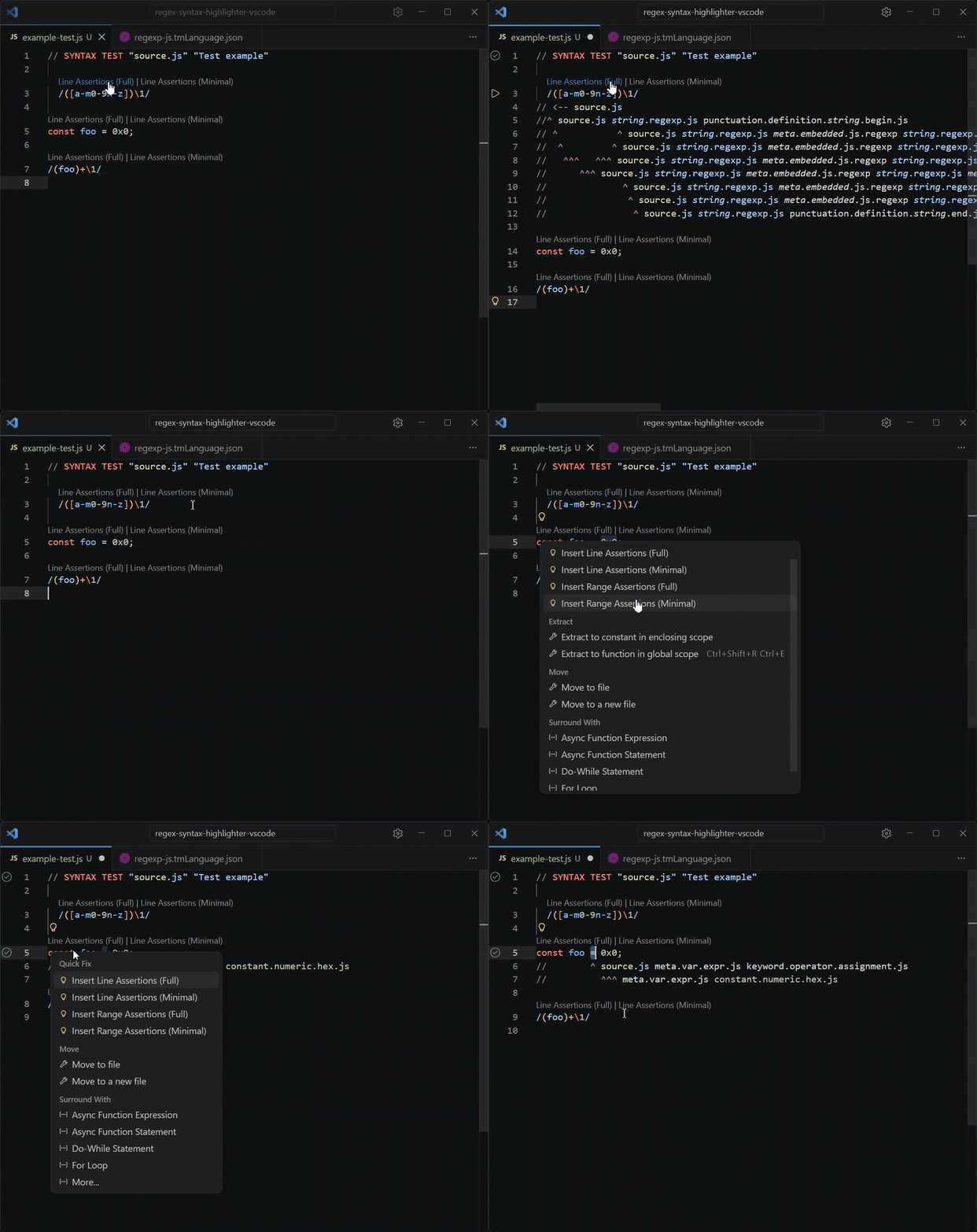
-
Open a syntax test file whose first line matches:
<comment token> SYNTAX TEST "<language scope>" "optional description" -
Use CodeLens, Code Actions (lightbulb), or the Command Palette to run one of:
Insert Assertionsis the primary command. It automatically switches between line and range behavior based on the current cursor or selection. See Command Behavior for the exact rules.Insert Line Assertionssafely generates or refreshes whole source line(s).Replace Line Assertionsfully replaces an existing line assertion block.Insert Range Assertionsgenerates assertions for the selected range or token at the cursor.... (Full)/... (Minimal)variants overridetmGrammarTestTools.scopeModefor that invocation.
-
The extension loads grammars from installed VS Code contributions (when
tmGrammarTestTools.autoLoadInstalledGrammarsis enabled), the nearest or configuredpackage.json, and optional provider output. It then tokenizes from the top of the syntax test up to each targeted source line and inserts or refreshes the assertion block under that line.
User-facing line and column numbers are 1-based unless explicitly noted otherwise.
Most commands also write context, timing, and grammar-loading details to the TM Grammar Test Tools Output panel.
Testing UI runs are subject to VS Code's own testing.saveBeforeTest behavior; see Testing UI.
You can bind keyboard shortcuts for all the extension commands.
Example keybindings.json snippet
- Existing assertion lines are skipped during tokenization so TextMate rule state is preserved across source lines.
- First-column tokens are emitted with the
<--/<~--syntax when needed. Insert Assertionsis selection-intent aware:- with a single plain cursor on a source line, it behaves like
Insert Line Assertions - with a whole-line selection, it also behaves like
Insert Line Assertions - with a partial selection, or with multiple cursors/selections touching the same source line, it behaves like
Insert Range Assertions - when multiple lines are touched, it resolves each source line independently
- CodeLens uses this command and scopes that auto behavior to the attached source line only, ignoring selections on other lines
- with a single plain cursor on a source line, it behaves like
Lineassertion commands are line-oriented:- with empty selection they target the line at cursor(s)
- with non-empty selection they target each touched non-blank source line top-to-bottom
- a non-empty selection made entirely of whitespace-only source lines is treated as intentional and command targets those lines too
Insert LineandInsert Rangeeither insert new assertions or, for existing blocks, perform a safe refresh, meaning they don't touch assertion lines that contain negative assertions.Rangecommands are selection- or token-range oriented:- with a non-empty selection(s), they generate assertions for the selected characters
- with an empty selection(s), they resolve the token at the cursor position(s) and use that token as the range. For example, if the cursor is in the middle of
quux;, it expands to the fullquuxtoken and emits assertions for it - when only part of a line is selected and that line already has assertions, they insert new assertions into the existing block (instead of replacing it)
- when the whole line is selected, they behave like
Lineassertion commands - that behavior is independent for each line touched by the selection(s) or cursor(s)
Rangecommands skip blank or whitespace-only lines, unless selection is made entirely of whitespace-only lines.
(Minimal)command variants:- may omit the header scope when it is shared by every token and there is at least one more specific scope to show.
- factor shared parent scopes so broader scopes are emitted once before narrower child scopes
- can either omit that shared header scope from the factored output or keep it as part of the shared factored prefix via
tmGrammarTestTools.minimalHeaderScopeFactoring - can retain either the last one or last two scopes on terminal token assertions via
tmGrammarTestTools.minimalTailScopeCount
Replace Linecommands always replace the whole assertion block for each targeted source line, so use with caution: they may wipe out negative assertions and weaken the test.
Code Actions and CodeLens expose the safe Insert commands. The potentially destructive Replace Line commands are available from the command palette.
tmGrammarTestTools.scopeModecan befullorminimal. The genericLineandRangecommands use that setting. The explicitFullandMinimalcommands override it for that invocation. Default isfull.Insert Assertions,Insert Line Assertions, andInsert Range Assertionsall follow this rule.
tmGrammarTestTools.minimalHeaderScopeFactoringcontrols whetherminimalmode omits the shared syntax-test header scope from factored output or keeps it in the shared factored prefix. Allowed values areomitSharedHeader(default) andkeepSharedHeader.tmGrammarTestTools.minimalTailScopeCountdefaults to1and, inminimalmode, keeps the last one or two scopes on terminal token assertions even when broader parent scopes were already factored out. Invalid values are clamped and logged as warnings.minimalHeaderScopeFactoringandminimalTailScopeCountcommand arguments can override these per invocation on any command whose effective scope mode isminimal, including all explicit...Minimalcommands. That is useful for custom keybindings such as bindingInsert Assertions (Minimal)with{ "minimalHeaderScopeFactoring": "keepSharedHeader", "minimalTailScopeCount": 2 }
Minimal mode examples
// "omitSharedHeader" (default)
  $foo;
# ^^^^ variable.other.php
# ^ punctuation.definition.variable.php

// "keepSharedHeader"
  $foo;
# ^^^^ source.php variable.other.php
# ^ punctuation.definition.variable.php
// "minimalTailScopeCount": 1 (default)
/[a-zz]/
// ^^^^^^ string.regexp.js constant.other.character-class.set.regexp
// ^ ^ punctuation.definition.character-class.regexp
// ^^^ constant.other.character-class.range.regexp
// "minimalTailScopeCount": 2
/[a-zz]/
// ^^^^^^ string.regexp.js constant.other.character-class.set.regexp
// ^ ^ constant.other.character-class.set.regexp punctuation.definition.character-class.regexp
// ^^^ constant.other.character-class.set.regexp constant.other.character-class.range.regexp-
tmGrammarTestTools.compactRangesdefaults totrueand merges disjoint caret ranges when they share the same rendered scope list and the tmgrammar assertion syntax can represent the merge. -
tmGrammarTestTools.autoLoadInstalledGrammarsdefaults totrueand controls whether installed VS Code grammars are loaded before local and provider grammars. -
tmGrammarTestTools.enableCodeActionsdefaults totrueand adds Code Actions for inserting assertions at the current cursor or selection, plus explicit line/range alternatives when useful. -
tmGrammarTestTools.enableCodeLensdefaults totrueand adds source-line CodeLens commands that insert assertions for that line, switching between line and range behavior based on the current selection on that line. -
tmGrammarTestTools.hideCodeLensOnCommentLinesdefaults totrueand hides CodeLens on source lines that look like language comments according to the active language configuration, with the syntax-test header comment token used as a fallback. -
tmGrammarTestTools.configPathpoints to the grammar packagepackage.jsonwhen the nearest one is not the right source for the current syntax test. -
tmGrammarTestTools.grammarProvider.*controls optional external grammar loading. See Grammar Provider. -
tmGrammarTestTools.testDiscovery.include/excludeoptionally add workspace files to the Testing view by glob. Matching files are treated as candidate syntax tests and validated lazily when expanded or run, so use reasonably narrow patterns. -
Debugging:
tmGrammarTestTools.logGrammarDetailsdefaults tofalseand, when enabled, logs detailed grammar selection info in the Output panel. Assertion generation logs the actually used grammar scopes with source labels; test runs log the merged grammar load order.
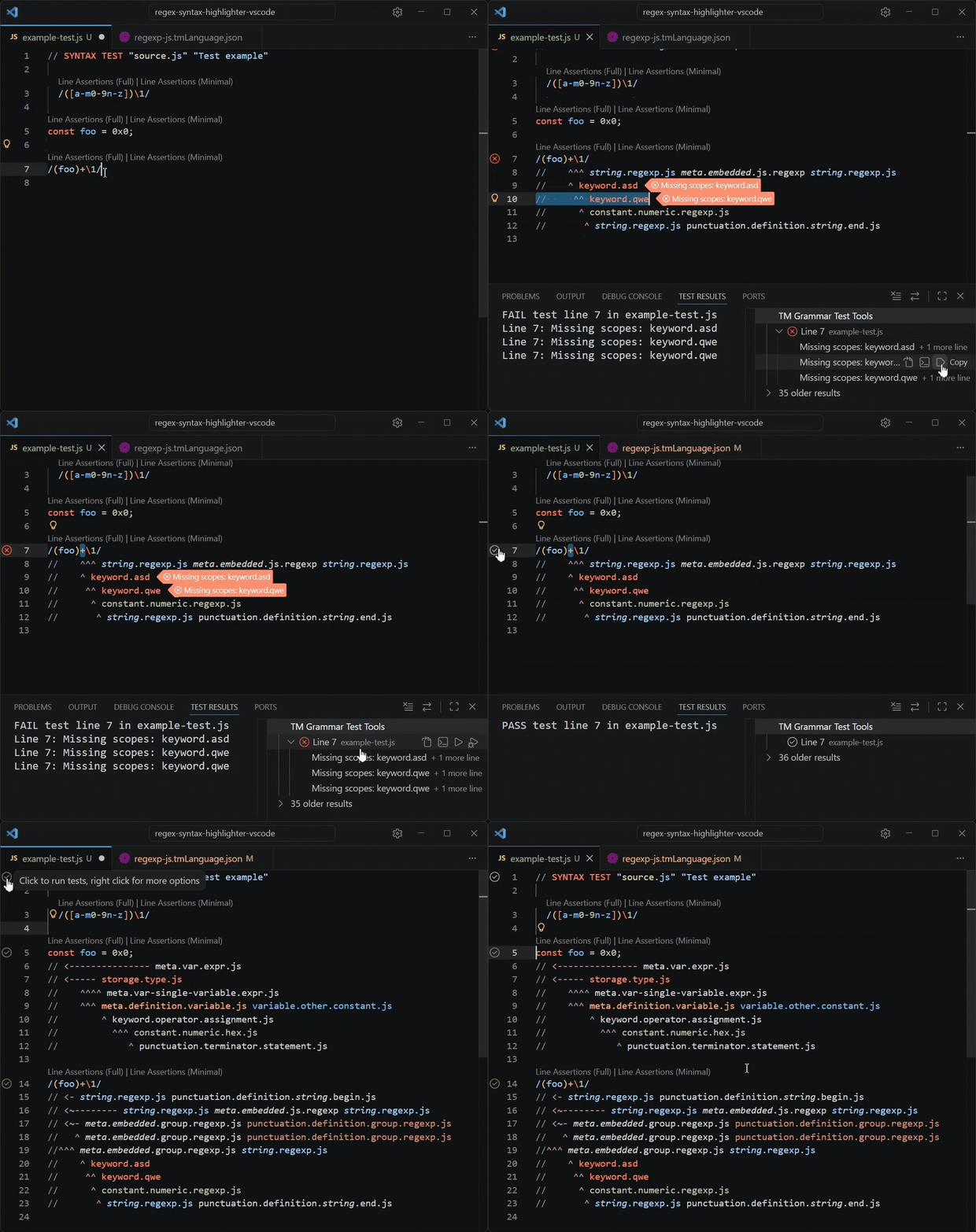
The extension integrates with VS Code’s native Testing UI.
- Open syntax test files are discovered in the Testing view.
tmGrammarTestTools.testDiscovery.includecan also add candidate syntax test files across the workspace. Those file items are validated lazily when expanded or run.- The extension creates one file item per discovered syntax test and one child item per source line that has an assertion block.
- You can run a whole file or a single asserted source line from the Testing view or gutter.
- Test execution currently uses the vscode-tmgrammar-test runner.
- In trusted workspaces, the extension prefers a local
vscode-tmgrammar-testdependency resolved from the active file's own project. For untitled drafts, it resolves from the effective workspace folder. If none is found, it falls back to the runner bundled with the extension. - In untrusted workspaces, the extension skips local runner loading and always uses the bundled runner.
- If a nearby
package.jsondeclaresvscode-tmgrammar-testbut the dependency cannot be resolved, the extension warns and falls back to the bundled runner. - If a local
vscode-tmgrammar-testpackage resolves but is unusable or incompatible, the test run fails explicitly against that local runner instead of silently switching to the bundled one. - The Output panel logs which runner source was selected for each test run.
- Test runs use the current editor text, including unsaved edits, but VS Code may still save the file before running tests unless
testing.saveBeforeTestis disabled in your settings.json. - Failures are shown in the Test Results UI. The
Go to Erroraction selects the failing assertion line. - Right-clicking a failing test exposes
Go to Source Range, which selects the source-line range covered by that failing assertion. - Currently, the
Debugaction uses the same runner asRun; debugger integration is not implemented yet.
The extension can load grammars from:
- installed VS Code extensions (including built-in ones)
- the nearest local
package.json, or the one pointed to bytmGrammarTestTools.configPath - the optional grammar provider command
If your syntax test is not inside the grammar extension repo, the usual ways to point it at the right grammars are:
- set
tmGrammarTestTools.configPathto thepackage.jsonthat contributes the relevant grammar - use a grammar provider when the needed grammars are generated, split across files, or not fully described by
package.json
The loading rules are then:
- When
tmGrammarTestTools.autoLoadInstalledGrammarsisfalse, installed VS Code grammars are skipped and only localpackage.jsonplus provider grammars are used. - For the same exact scope name, precedence follows that fixed load order: installed VS Code grammars first (when enabled) → then local
package.jsongrammars → then provider grammars. - Injection grammars are additive. A local or provider injection grammar can extend a base grammar that comes from an installed or built-in VS Code extension, either by adding more specific scopes within existing content or by contributing injected regions.
- If
tmGrammarTestTools.grammarProvider.commandis set, the extension runs it on each invocation and uses the returned grammar files for the current dump.
You can configure a grammar provider via workspace, workspace-folder, or global settings.json. This is useful when the grammars you want to test are generated, split across files, or not fully described by a nearby package.json (for example, when the source grammar is in .cson).
Example usage:
{
  "tmGrammarTestTools.grammarProvider.command": "node buildAndExportGrammars.js",
  "tmGrammarTestTools.grammarProvider.cwd": "${workspaceFolder}", // optional
  "tmGrammarTestTools.grammarProvider.scopes": ["source.js"], // optional
}
Provider command output can be either:
- newline-separated grammar file paths
- a JSON array of paths or grammar objects
- a JSON object with a
grammarsarray
Example output shape:
[
  "syntaxes/source.base.tmLanguage.json",
  {
    "path": "syntaxes/source.injection.tmLanguage.json",
    "scopeName": "source.injection",
    "injectTo": ["source.base"]
  }
]
See a small example provider that prints a JSON array of relative grammar paths.
Provider grammars participate in the normal load order described in Grammar Loading: exact scope-name matches override earlier sources, while injection grammars remain additive.
Supported variables in tmGrammarTestTools.grammarProvider.command:
${workspaceFolder}${projectRoot}${file}${fileDirname}${fileBasename}
Supported variables in tmGrammarTestTools.grammarProvider.cwd:
${workspaceFolder}${projectRoot}${fileDirname}
If tmGrammarTestTools.grammarProvider.scopes is set, the provider runs only when the syntax-test header scope exactly matches one of the configured values. Leave it empty or unset to allow the provider for any scope.
If ${workspaceFolder} is used in command or cwd, the active file must belong to a workspace folder.
${projectRoot} resolves to the nearest ancestor of the active file that contains package.json or .git. If neither is found, it resolves to the directory containing the file.
If tmGrammarTestTools.grammarProvider.cwd is empty or unset, the extension runs the provider command from the active document's workspace folder and falls back to ${projectRoot} when the file is outside the workspace.
command and cwd are resolved independently, so you can specify one in the workspace's .vscode/settings.json and the other in global settings.json, but in most cases it is reasonable to keep them together.
The CLI is currently available from a local checkout of this repository; it is not distributed separately yet. Clone the repository to use it.
For scripted use outside VS Code.
The CLI is read-only: it prints generated assertions to stdout and never modifies the file.
cd <this-repo-root>
npm run dump-assertions -- --file <syntax-test-file> --line <lineNumber>
# or
npm run dump-assertions -- --file <syntax-test-file> --range <startLine:startColumn-endLine:endColumn>

# From outside this repo:

# first compile:
cd <this-repo-root> && npm run compile

# then invoke it from anywhere:
cd <anywhere>
node <this-repo-root>/out/cli.js --file <syntax-test-file> <...>Required:
--file <syntax-test-file>points to the syntax test file.- At least one target is required:
--lineand/or--range.
Targets:
--line <lineNumber>generates assertions for a line containing source text. 1-based. You can repeat it.--range <startLine:startColumn-endLine:endColumn>generates assertions for a selected range using 1-based inclusive columns. You can repeat it too.- You can specify both at the same time.
Grammar loading:
--config <package.json>loads grammars from a grammar package manifest. If you omit it, the CLI searches upward from--filefor apackage.jsonwithcontributes.grammars.--provider-command <command>runs the command and loads the returned grammars.--provider-cwd <cwd>sets the provider working directory. If omitted, the CLI runs the provider from${projectRoot}for--file.--provider-scope <scope>is repeatable and limits provider execution to exact syntax-test header scope matches.--provider-timeout-ms <ms>sets the provider timeout; the CLI fails if the provider does not finish in time.
Render options:
--scope-mode <full|minimal>controls full vs minimal rendering.--minimal-header-scope-factoring <omitSharedHeader|keepSharedHeader>controls whether minimal mode omits the shared syntax-test header scope from the factored output or keeps it as part of the shared factored prefix. It can only be used with--scope-mode minimal, and--compareapplies it to the minimal half of the comparison output.--minimal-tail-scope-count <1|2>controls how many trailing scopes minimal mode keeps on terminal assertions. It can only be used with--scope-mode minimal, and--compareapplies it to the minimal half of the comparison output.--compact-rangesenables disjoint caret compaction. Enabled by default.--no-compact-rangesdisables disjoint caret compaction.
Output options:
--jsonprints structured JSON output. This is the default.--plainprints only the generated assertion lines.--compareprints the source line plus bothminimalandfullassertion blocks in plain text.--log-level <silent|info|debug>prints CLI diagnostics to stderr.
Notes:
- The CLI prints to stdout and never modifies the file.
- With
--log-level info, the CLI logs a short summary similar to the extension Output panel.--log-level debugalso logs the effective grammar-usage trace used for assertion generation. - It currently loads grammars only from local
package.jsonand/or--provider-command. It does not auto-load installed VS Code grammars.
Full usage example:
node <this-repo-root>/out/cli.js \
  --file /grammar-package/path/to/test.php \
  --provider-command "node utils/exportCsonGrammar.js" \
  --provider-cwd /grammar-package \
  --line 3 \
  --scope-mode minimal \
--plainRun npm test.
This repo also includes a minimal fixture grammar under fixtures/simple-grammar.
To try it inside this repo workspace:
- Start the
Run Extensiondebug configuration from VS Code's Run and Debug view. - In the Extension Host window, open
fixtures/simple-grammar/tests/example.simple-poc. - Try the extension features: CodeLens above source lines, Code Actions on a selection, command-palette commands, Testing UI gutter, etc.