Bhyvemgr is a bhyve management GUI written in Freepascal/Lazarus on FreeBSD. It needs a bunch of tools mostly installed on base system and some installed from ports/packages. Currently it supports amd64 and aarch64. The main goal is to be a desktop user application to easily and quickly setup and run virtual machines on the FreeBSD host.

- virtual machines management
- create virtual machines from cloud/vm images
- cloud init and naugeinit initialization support
- devices management (support almost all bhyve pci devices with some exceptions)
- dnsmasq support
- vnc and xfreerdp client support
- zfs/ufs support
- raw/zfs volume support
- bridge/tap support
- bhyve_config configuration variables support
- basic sudo/doas support
- uefi/uboot support only
- initial swtpm support on FreeBSD >= 1403000
- ipv4/ipv6 support
- aarch64 and amd64 support
- i18n support
- PF/NAT support
- and more
- Allow change VM (zfs/ufs) directory to custom ones
bhyve, bhyvectl, bhyveload, chown, chmod, fetch, file, ifconfig, install, kill, kldload, kldstat, makefs, pciconf, pfctl, pgrep, rm, service, sysctl, truncate, xz, zfs and zpool
bhyve-firmware (sysutils/bhyve-firmware), doas (security/doas), qemu-tools (emulatorsd/qemu@tools), remote-viewer (net-mgmt/virt-viewer), swtpm (sysutils/swtpm), sudo (security/sudo), and xfreerdp3 (net/freerdp3)
bhyvemgr can use two kind of network settings: Quick network configuration or Optimal network configuration. Choose one of them accord to your own needs. I recommend second one because it permits a complete network management of virtual machines. Take a look at network configuration guide for details about how use/configure them.
bhyve requires root privileges on FreeBSD. To handle these tasks, bhyvemgr uses sudo or doas to mitigate certain security risks. The easiest - but not recommended - way to configure sudo or doas is as follows:
For sudo, if the user is part of the wheel group. Alternatively, a specific user can be defined instead of the group - replace :wheel with a username, such as acm, for example.
%wheel ALL=(ALL:ALL) NOPASSWD: ALLFor doas, if the user is part of the wheel group. Alternatively, a specific user can be defined instead of the group - replace :wheel with a username, such as acm, for example.
permit nopass :wheelOtherwise, if you panic, use the following:
For sudo, if the user is part of the wheel group
%wheel ALL=(ALL:ALL) ALL
%wheel ALL=(ALL:ALL) NOPASSWD: /usr/sbin/bhyve, /usr/sbin/bhyvectl, /bin/chmod, /usr/sbin/chown, /sbin/ifconfig, \
                        /usr/bin/install, /bin/kill, /sbin/kldload, /sbin/pfctl, /usr/bin/pgrep, /bin/rm, \
                        /usr/sbin/service, /sbin/zfs
For doas, if the user is part of the wheel group
permit keepenv :wheel
permit keepenv nopass :wheel as root cmd /usr/sbin/bhyve
permit keepenv nopass :wheel as root cmd /usr/sbin/bhyvectl
permit keepenv nopass :wheel as root cmd /bin/chmod
permit keepenv nopass :wheel as root cmd /usr/sbin/chown
permit keepenv nopass :wheel as root cmd /sbin/ifconfig
permit keepenv nopass :wheel as root cmd /usr/bin/install
permit keepenv nopass :wheel as root cmd /bin/kill
permit keepenv nopass :wheel as root cmd /sbin/kldload
permit keepenv nopass :wheel as root cmd /sbin/pfctl
permit keepenv nopass :wheel as root cmd /usr/bin/pgrep
permit keepenv nopass :wheel as root cmd /bin/rm
permit keepenv nopass :wheel as root cmd /usr/sbin/service
permit keepenv nopass :wheel as root cmd /sbin/zfsWhen bhyvemgr starts in the first time, this will create a initial config file. It is mandatory to review, modify (if it is necessary) and press Save settings button from of Settings form the first time


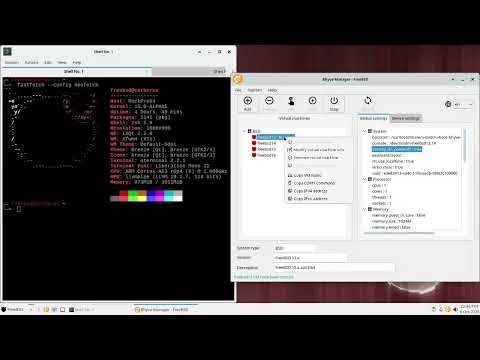
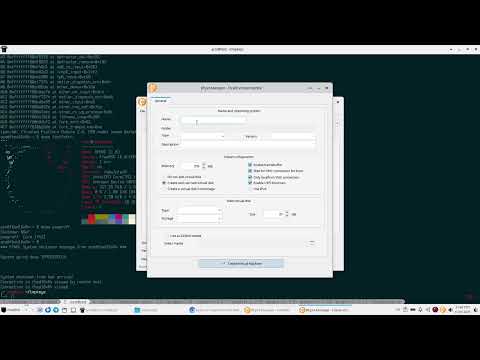
Bhyvemgr Wiki contains guides about how use bhyvemgr in some use cases. Enjoy creating and testing your virtual machines on FreeBSD