A PRM built with React Native and Expo that revolutionizes how you maintain meaningful connections through intelligent algorithmic prioritization and AI-powered conversation suggestions, proactively identifying at-risk relationships before they fade.
Devpost | Slides | Figma
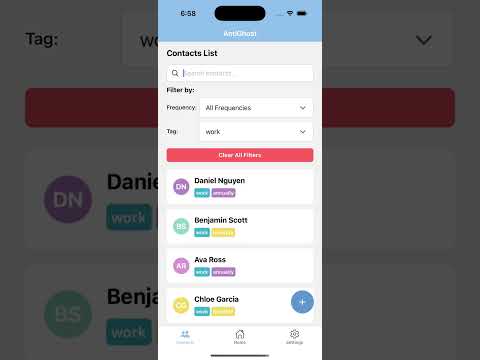
- AI-Powered Reminders: Get personalized conversation suggestions for contacts you haven't talked to recently
- Contact Management: Track your contacts with detailed information and conversation history
- Smart Prioritization: Automatically prioritize contacts based on how long it's been since your last conversation
- Quick Notes: Add and view conversation notes for each contact
- Google Sign-In: Secure authentication using Google Sign-In
- Real-time Database: Powered by Convex for seamless data synchronization
Before running this app, you'll need to set up the following services:
- Perplexity AI API - For conversation suggestions
- Firebase Project - For authentication
- Google Cloud Console - For Google Sign-In configuration
- Convex - For backend database and real-time functionality
Create a .env file in the root directory with the following variables:
# Perplexity API
EXPO_PUBLIC_PERPLEXITY_API_KEY=your_perplexity_api_key_here

# Google Console API
EXPO_PUBLIC_GOOGLE_CLIENT_ID=your_google_client_id_here

# Firebase Config
EXPO_PUBLIC_FIREBASE_API_KEY=your_firebase_api_key_here
EXPO_PUBLIC_FIREBASE_AUTH_DOMAIN=your_project.firebaseapp.com
EXPO_PUBLIC_FIREBASE_PROJECT_ID=your_project_id
EXPO_PUBLIC_FIREBASE_STORAGE_BUCKET=your_project.firebasestorage.app
EXPO_PUBLIC_FIREBASE_MESSAGING_SENDER_ID=your_sender_id
EXPO_PUBLIC_FIREBASE_APP_ID=your_app_id
EXPO_PUBLIC_FIREBASE_MEASUREMENT_ID=your_measurement_id

# Convex Config
EXPO_PUBLIC_CONVEX_URL=your_convex_deployment_url_here- Create a new Firebase project at Firebase Console
- Enable Authentication with Google Sign-In
- Download the
GoogleService-Info.plistfile and place it in the root directory - Copy the configuration values to your
.envfile
- Sign up for a Perplexity AI account at Perplexity AI
- Generate an API key from your account settings
- Add the API key to your
.envfile asEXPO_PUBLIC_PERPLEXITY_API_KEY
- Go to Google Cloud Console
- Create a new project or select your Firebase project
- Enable the Google Sign-In API
- Create OAuth 2.0 credentials for iOS and Android
- Add the client ID to your
.envfile asEXPO_PUBLIC_GOOGLE_CLIENT_ID
-
Install Convex CLI globally:
npm install -g convex
-
Create a new Convex project:
npx convex dev
-
Follow the setup wizard to create your Convex project
-
Copy the deployment URL to your
.envfile asEXPO_PUBLIC_CONVEX_URL -
The Convex functions are already set up in the
convex/directory
-
Install dependencies:
npm install
-
Start the development server:
npx expo start
-
Run on your preferred platform:
# iOS
npx expo run:ios

# Web
npx expo start --web
This project uses:
- Expo Router for navigation
- Convex for backend database and real-time functionality
- Firebase for authentication
- Perplexity AI for conversation suggestions
- React Native Google Sign-In for authentication
- Never commit your
.envfile to version control - The
.envfile is already included in.gitignore - All API keys are prefixed with
EXPO_PUBLIC_to make them available in the client-side code - For production, consider using a more secure method for API key management
- Convex and Firebase provide built-in security rules and authentication