
A pip installable python package to help with the AI workflow stages of detecting Wildlife from Space.
The features of the wfsai package include:
- Handling configuration based AI pipeline workflow/execution.
- Setting up reproducible file/directory compute environments.
- Retrieving local and remote datasets/configs.
- Ortho-rectification of VHR satellite imagery (using GDAL).
- Pan-sharpening of VHR satellite imagery (using GDAL, "weighted" Brovey algorithm).
- Tiling of VHR satellite imagery.
- Masking of VHR satellite imagery to shapefile with optional shapefile dilation.
Documentation for this package is hosted here
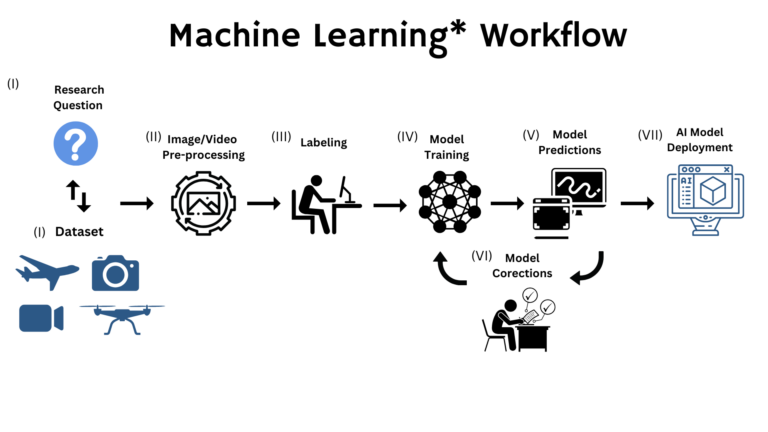
This python package aims to integrate with the common AI workflow shown in the diagram below:

(diagram courtesy of this blogpost. original diagram here)
Requires Python >=3.10
pip install git+https://github.com/antarctica/wfsai.git@main
conda/mamba create -n <environment-name> -c conda-forge git pip
conda/mamba activate <environment-name>
pip install git+https://github.com/antarctica/wfsai.git@main
Some of the modules within this wfsai package make use of the gdal python implementation, including it's underlying dependencies. We found that the best way to handle gdal and it's dependencies is to use a mamba environment with the mamba dependency solver. If you are using a conda/mamba environment in your project then simply include gdal as a dependency in your environment.yaml or use the command:
conda install -n <environment-name> -c conda-forge gdal
If retrieving a configuration from a remote repository then specify the REMOTE_CONFIG_REPO environment variable.
REMOTE_CONFIG_REPO=<url>With either remote or local config files, you should specify the CONFIG_FILE environment variable.
CONFIG_FILE=<config filename>From the diagram above, often the first step of AI workflow is to obtain a source dataset to answer a scientific question. Datasets may be remote or local to the working environment and it is helpful to set out a framework for how the data will be handled during the workflow.
For example:
configuration files -> retrieving/linking of input files -> intermediate files -> outputs.
show the built-in help for the wfsai package command line interface (cli)