Foundations for deployment & configuration : quickstart-ace-configurator
ITSM integration & SLO Quality of Service : itsm-integration-with-slo
✅ Dashboarding Dynatrace Simply Smarter : slo-simply-smarter
Demo (internal only): https://demo.live.dynatrace.com

Host GroupandManagement Zonebest practices with Deployment best practicesITSM integrationbest practices with ITSM integration & SLO Quality of Service
- Read configuration
- Write configuration
- Read SLO
- Write SLO
Prerequisite : python with requests installed
python 3.6+
pip install requests
- internet acces dahsboard template & slo template
- git clone on local host (linux or windows)
Download the script
git clone https://github.com/dynatrace-ace-services/slo-simply-smarter
cd slo-simply-smarter
Linux
Export variables
export MyTenant=abcd123.live.dynatrace.com for saas or export MyTenant=domaine.com/e/abcd12234 for managed (without https://...)
export MyToken=dt0c01.1234ABCD.XXXX
Optional variables
export Deploy=ALL|SLO (default Deploy=ALL, Deploy=SLO option does not deploy the dashboards but only creates the mapping SLO with already imported dashboards)
export Owner=ACE (default Owner=smarter, the owner don't need to exist as user)
Run the script
python3 Deploy_and_Update_SLO_Simply_Smarter.py

The SLO simply smarter is installed
If you use windows,
windows cmd
Export variables
set MyTenant=abcd123.live.dynatrace.com for saas or export MyTenant=domaine.com/e/abcd12234 for managed (without https://...)
set MyToken=dt0c01.1234ABCD.XXXX
Run the script
python Deploy_and_Update_SLO_Simply_Smarter.py
windows powershell
Export variables
$env:MyTenant="abcd123.live.dynatrace.com" for saas or export MyTenant=domaine.com/e/abcd12234 for managed (without https://...)
$env:MyToken="dt0c01.1234ABCD.XXXX"
Run the script
python Deploy_and_Update_SLO_Simply_Smarter.py
Doesn't work from Azure Bash. Works fine from VM host : linux or windows.
Open the python script and add these two temporary variables Cookie & X-CSRFToken and run the script (in this case MyTenant=[clusterid]-managed.internal.dynatrace.com:8021/e/[tenantid]) :
Cookie='xxx'
CSRFToken='xxx'
From the Mission Control, Dev Tools, collect the temporary X-CSRFToken and the full Cookie like that

and run the python script as described above.
If you can't install SLO Simply Smarter with python script, you can follow this workflow installaton which uses Bizops and Monaco
- Read configuration
- Write configuration
- Read SLO
- Write SLO
- Access problem and event feed, metrics, and topology (*)
- User sessions(*)
- Read metrics(*)
- Write metrics(*)
- Ingest Metrics(*)

(*) token used by BizOpsConfigurator (detail)
For Saas and Managed, with the bizops configurator
https://dynatrace.github.io/BizOpsConfigurator/index.html#begin
use your *tenant** and **token** (don't care with Source)
connect
deploy
.../ALL
Dynatrace_Simply Smarter
next
advanced (you can define the owenr = smarter)
done

- For OffLine environment, follow the process here
- Use monaco
installation
git clone https://github.com/dynatrace-ace-services/slo-simply-smarter
cd slo-simply-smarter
curl -L https://github.com/dynatrace/dynatrace-configuration-as-code/releases/download/v1.8.9/monaco-linux-386 -o monaco
chmod +x monaco
varaiables
export NEW_CLI=1
export MyTenant=abcd123.live.dynatrace.com for saas or export MyTenant=domaine.com/e/abcd12234 for managed (without https://...) or
export MyToken=dt0c01.1234ABCD.XXXX
deploy
./monaco deploy -e=environments.yaml SLOSimplySmarter
SLO Simply Smarter: for each SLO tile, mapp SLO Smarter and period
Set the period -1M and -1y manually for all the SLOs (by default -1w)
Application
Smarter - Application Performance => 1w, 1M and 1y
Smarter - Browser Monitor Availability => 1w, 1M and 1y
Smarter - HTTP Monitor Availability => 1w, 1M and 1y
Webservice and Webrequest
Smarter - Service Performance => 1w, 1M and 1y
Smarter - Service Availability => 1w, 1M and 1y
Database
Smarter - Database Performance => 1w, 1M and 1y
Smarter - Database Success Rate => 1w, 1M and 1y
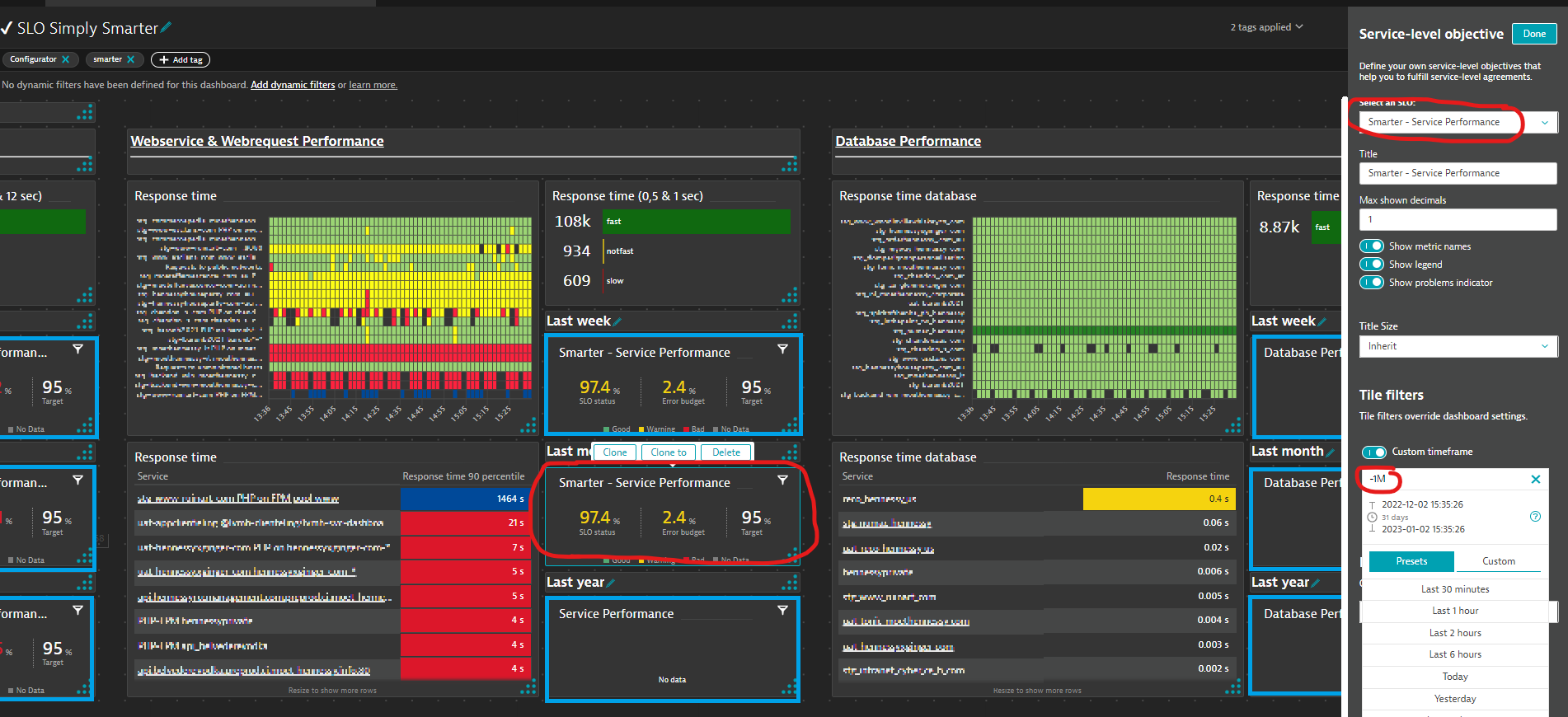
SLO Resource Optimization : for each SLO tile, mapp SLO Smarter and period
Memory
Optimization - Memory Usage => 1w, 1M and 1y
CPU
Optimization - CPU Usage => 1w, 1M and 1y
Disk
Optimization - Disk Usage => 1w, 1M and 1y

With Python - : see paragraph Automatic installation with python script
with this variable:
export Deploy=SLO