Releases: apollographql/apollo-client-devtools
v2.2.0

-
Use Apollo Client v2.5 local state 🎉 (#apollographql/apollo-client#4361)
@cheapsteak and @hwillson in #166 -
Include local fields and types in GraphiQL (#172, #159)
@justinanastos in #188
2.1.9
- Eliminate use of
window.localStorage, removing the need for 3rd party cookies (#118, #142)
@justinanastos in #185
2.1.8
- Fix mutations tab crashing devtools (#182)
@justinanastos in #184
2.1.7
- Removed https://devtools.apollodata.com/graphql from the content security policy section of
manifest.json, since it doesn't need to be referenced based on how that endpoint is being used. Removing it helps with Firefox's security review process.
@hwillson in #156 - Fix to address issues caused by internal initial state not being set properly, due to trying to access the Apollo Client
queryManagerwhen it hasn't finished initializing.
@adampetrie in #139 - Fix outdated client message
@jonas-arkulpa in #157 - Prepare to publish to npm (add README for npm and add version to package.json) (#160)
@cheapsteak in #167 - Adding code necessary for React Native support (#160)
@Gongreg in #165 - Publish built extension (dist/) (#169)
@cheapsteak in #170 - Make prettier more developer-friendly
@justinanastos in #178 - Add sourcemaps to build
@justinanastos in #179 - Fix empty cache crashing cache inspector (#107)
@justinanastos in #177 - Fix GraphiQL Documentation Explorer crashing with client schema extensions (#132)
@justinanastos in #180
2.1.5

2.1.4
- Removed all Google Analytics tracking.
@hwillson in #143 - Change cursor in dark theme to white.
@islam3zzat in #131 - Fix issue where "Run in GraphiQL" does not include fragments.
@henryqdineen in #133
2.1.3

Thank you to everyone who contributed these bug fixes!! 🎉
2.1.0 Rebuild

This release is based on a new architecture that should be more performant and stable. It also supports the entire link stack of your Apollo Client including subscriptions!
2.0.6
Installation
This is the last version of the devtools that works with apollo-client 1.*. If you are still on a pre 2.* version of apollo-client, download the attached zip file and install it to chrome.
Once you have the zip file saved, unzip it and then go to chrome://extensions (or find it in your menu in more tools > extensions), then activate the developer mode on the top right of the page:
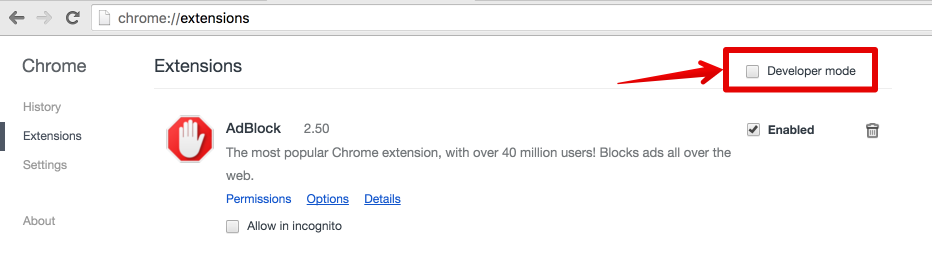
Then to install the extension, you just have to click on the recently unzipped folder on your computer:

Once you choose the folder, you should see the Apollo tab in your devtools when looking at your app!
