BigBen is a generic, multi-tenant, time-based event scheduler and cron
scheduling framework based on Cassandra and Hazelcast
It has following features:
- Distributed -
BigBenuses a distributed design and can be deployed on 10's or 100's of machines and can be dc-local or cross-dc - Horizontally scalable -
BigBenscales linearly with the number of machines. - Fault tolerant -
BigBenemploys a number of failure protection modes and can withstand arbitrary prolonged down times - Performant -
BigBencan easily scale to 10,000's or even millions's of event triggers with a very small cluster of machines. It can also easily manage million's of crons running in a distributed manner - Highly Available - As long as a single machine is available in the cluster,
BigBenwill guarantee the execution of events (albeit with a lower throughput) - Extremely consistent -
BigBenemploys a single master design (the master itself is highly available withn-1masters on standby in anncluster machine) to ensure that no two nodes fire the same event or execute the same cron. - NoSql based -
BigBencomes with default implementation withCassandrabut can be easily extended to support otherNoSqlor evenRDBMSdata stores - Auditable -
BigBenkeeps a track of all the events fired and crons executed with a configurable retention - Portable, cloud friendly -
BigBencomes as application bundled aswaror an embedded lib asjar, and can be deployed on any cloud,on-premorpublic
BigBen can be used for a variety of time based workloads, both single trigger based or repeating crons.
Some of the use cases can be
- Delayed execution - E.g. if a job is to be executed 30 mins from now
- System retries - E.g. if a service A wants to call service B and service B is down at the moment, then service A can schedule an exponential backoff retry strategy with retry intervals of 1 min, 10 mins, 1 hour, 12 hours, and so on.
- Timeout tickers - E.g. if service A sends a message to service B via
Kafkaand expects a response in 1 min, then it can schedule atimeout checkevent to be executed after 1 min - Polling services - E.g. if service A wants to poll service B at some frequency, it can schedule a cron to be executed at some specified frequency
- Notification Engine -
BigBencan be used to implementnotification enginewith scheduled deliveries, scheduled polls, etc - Workflow state machine -
BigBencan be used to implement a distributedworkflowwith state suspensions, alerts and monitoring of those suspensions.
BigBen was designed to achieve the following goals:
- Uniformly distributed storage model
- Resilient to hot spotting due to sudden surge in traffic
- Uniform execution load profile in the cluster
- Ensure that all nodes have similar load profiles to minimize misfires
- Linear Horizontal Scaling
- Lock-free execution
- Avoid resource contentions
- Plugin based architecture to support variety of data bases like
Cassandra, Couchbase, Solr Cloud, Redis, RDBMS, etc - Low maintenance, elastic scaling
See the blog published at Medium
for a full description of various design elements of BigBen
BigBen can receive events in two modes:
- kafka - inbound and outbound Kafka topics to consume event requests and publish event triggers
- http - HTTP APIs to send event requests and HTTP APIs to receive event triggers.
It is strongly recommended to use kafka for better scalability

Request and Response channels can be mixed. For example, the event requests can be sent through HTTP APIs but the event triggers (response) can be received through a Kafka Topic.
BigBen has a robust event processing guarantees to survive various failures.
However, event-processing is not same as event-acknowledgement.
BigBen works in a no-acknowledgement mode (at least for now).
Once an event is triggered, it is either published to Kafka or
sent through an HTTP API. Once the Kafka producer returns success, or HTTP API returns non-500 status code,
the event is assumed to be processed and marked as such in the system.
However, for whatever reason if the event was not processed and resulted in an error
(e.g. Kafka producer timing out, or HTTP API throwing 503),
then the event will be retried multiple times as per the strategies discussed below
Multiple scenarios can cause BigBen to be not able to trigger an event on time. Such scenarios are called
misfires. Some of them are:
-
BigBen's internal components are down during event trigger. E.g.BigBen's data store is down and events could not be fetchedVMsare down
-
KafkaProducer could not publish due to loss of partitions / brokers or any other reasons -
HTTP APIreturned a 500 error code -
Any other unexpected failure
In any of these cases, the event is first retried in memory using an exponential back-off strategy.
Following parameters control the retry behavior:
- event.processor.max.retries - how many in-memory retries will be made before declaring the event as error, default is 3
- event.processor.initial.delay - how long in seconds the system should wait before kicking in the retry, default is 1 second
- event.processor.backoff.multiplier - the back off multiplier factor, default is 2. E.g. the intervals would be 1 second, 2 seconds, 4 seconds.
If the event still is not processed, then the event is marked as ERROR.
All the events marked ERROR are retried up to a configured limit called events.backlog.check.limit.
This value can be an arbitrary amount of time, e.g. 1 day, 1 week, or even 1 year. E.g. if the the limit
is set at 1 week then any event failures will be retried for 1 week after which, they will be permanently
marked as ERROR and ignored. The events.backlog.check.limit can be changed at any time by changing the
value in bigben.yaml file and bouncing the servers.
BigBen shards events by minutes. However, since it's not known in advance how many events will be
scheduled in a given minute, the buckets are further sharded by a pre defined shard size. The shard size is a
design choice that needs to be made before deployment. Currently, it's not possible to
change the shard size once defined.
An undersized shard value has minimal performance impact, however an oversized shard value may
keep some machines idling. The default value of 1000 is good enough for most practical purposes as long as
number of events to be scheduled per minute exceed 1000 x n, where n is the number of machines in the cluster.
If the events to be scheduled are much less than 1000 then a smaller shard size may be chosen.
Each bucket with all its shards is distributed across the cluster for execution with an algorithm that ensures a
random and uniform distribution. The following diagram shows the execution flow.
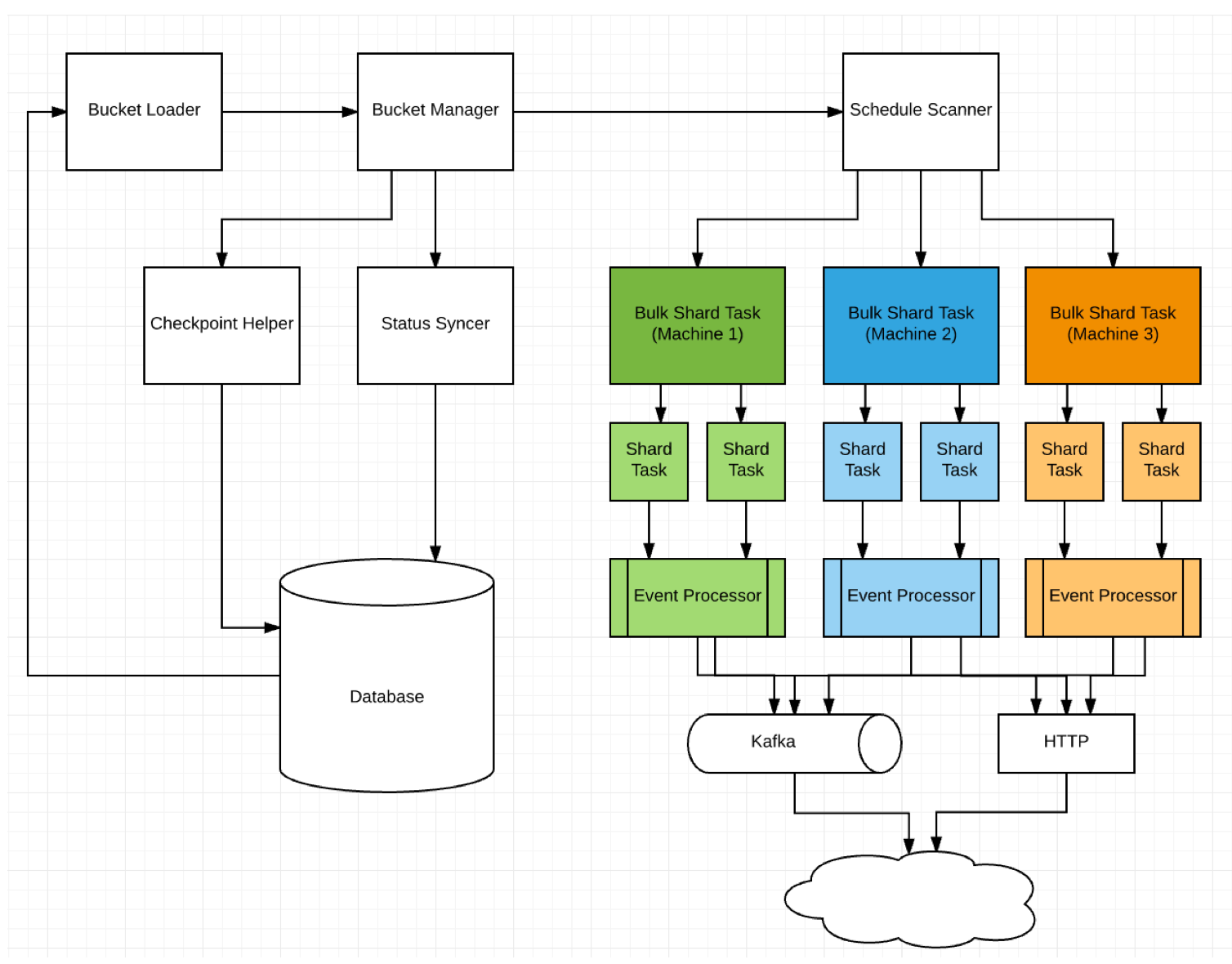
Multiple tenants can use BigBen in parallel. Each one can configure how the events will be delivered once triggered.
Tenant 1 can configure the events to be delivered in kafka topic t1, where as tenant 2 can have them delivered
via a specific http url. The usage of tenants will become more clearer with the below explanation of BigBen APIs
BigBen is dockerized and image (bigben) is available on docker hub. The code also contains
scripts, which start cassandra, hazelcast and app.
To quickly set up the application for local dev testing, do the following steps:
git clone $repocd bigben/build/docker- execute
./docker_build.sh - start cassandra container by executing
./cassandra_run.sh - start app by executing
./app_run.sh - To run multiple app nodes
export NUM_INSTANCES=3 && ./app_run.sh - wait for application to start on port
8080 - verify that
curl http://localhost:8080/pingreturns200 - Use
./cleanup.shto stop and remove allBigBenrelated containers
BigBen can be run without docker as well. Following are the steps
git clone $repocd bigben/build/exec- execute
./build.sh - execute
./app_run.sh
You can set the following environment properties
APP_CONTAINER_NAME(default bigben_app)SERVER_PORT(default 8080)HZ_PORT(default 5701)NUM_INSTANCES(default 1)LOGS_DIR(default bigben/../bigben_logs)CASSANDRA_SEED_IPS(default $HOST_IP)HZ_MEMBER_IPS(default $HOST_IP)JAVA_OPTS
#How to override default config values?
BigBen employs an extensive override system to allow someone to override
the default properties. The order of priority is system properties > system env variables >
overrides > defaults
The overrides can be defined in config/overrides.yaml file.
The log4j.xml can also be changed to change log behavior without
recompiling binaries
Following are the steps to set up Cassandra:
- git clone the
masterbranch - Set up a Cassandra cluster
- create a keyspace
bigbeninCassandracluster with desired replication - Open the file
bigben-schema.cqland executecqlsh -f bigben-schema.cql
GET /events/cluster
- response sample (a 3 node cluster running on single machine and three different ports (5701, 5702, 5703)):
{
    "[127.0.0.1]:5702": "Master",
    "[127.0.0.1]:5701": "Slave",
    "[127.0.0.1]:5703": "Slave"
}
The node marked Master is the master node that does the scheduling.
A tenant can be registered by calling the following API
POST /events/tenant/register
- payload schema
{
  "$schema": "http://json-schema.org/draft-04/schema#",
  "type": "object",
  "properties": {
    "tenant": {
      "type": "string"
    },
    "type": {
      "type": "string"
    },
    "props": {
      "type": "object"
    }
  },
  "required": [
    "tenant",
    "type",
    "props"
  ]
}-
tenant- specifies a tenant and can be any arbitrary value. -
type- specifies the type oftenant. One of the three types can be used- MESSAGING - specifies that
tenantwants events delivered via a messaging queue. Currently,kafkais the only supported messaging system. - HTTP - specifies that
tenantwants events delivered via an http callback URL. - CUSTOM_CLASS - specifies a custom event processor implemented for custom processing of events
- MESSAGING - specifies that
-
props- A bag of properties needed for each type of tenant. -
kafka sample:
{
    "tenant": "TenantA/ProgramB/EnvC",
    "type": "MESSAGING",
    "props": {
        "topic": "some topic name",
        "bootstrap.servers": "node1:9092,node2:9092"
    }
}- http sample
{
     "tenant": "TenantB/ProgramB/EnvC",
     "type": "HTTP",
     "props": {
          "url": "http://someurl",
          "headers": {
            "header1": "value1",
            "header2": "value2"
          }
     }
}GET /events/tenants
POST /events/schedule
Payload - List<EventRequest>
EventRequest schema:
{
  "$schema": "http://json-schema.org/draft-04/schema#",
  "type": "object",
  "properties": {
    "id": {
      "type": "string"
    },
    "eventTime": {
      "type": "string",
      "description": "An ISO-8601 formatted timestamp e.g. 2018-01-31T04:00.00Z"
    },
    "tenant": {
      "type": "string"
    },
    "payload": {
      "type": "string",
      "description": "an optional event payload, must NOT be null with deliveryOption = PAYLOAD_ONLY"
    },
    "mode": {
      "type": "string",
      "enum": ["UPSERT", "REMOVE"],
      "default": "UPSERT",
      "description": "Use REMOVE to delete an event, UPSERT to add/update an event"
    },
    "deliveryOption": {
      "type": "string",
      "enum": ["FULL_EVENT", "PAYLOAD_ONLY"],
      "default": "FULL_EVENT",
      "description": "Use FULL_EVENT to have full event delivered via kafka/http, PAYLOAD_ONLY to have only the payload delivered"
    }
  },
  "required": [
    "id",
    "eventTime",
    "tenant"
  ]
}
[{
"id":"1000001",
"eventTime":"2020-06-28T00:00:00Z",
"tenant":"1",
"payload":"send_email",
"mode":"UPSERT",
"deliveryOption":"PAYLOAD_ONLY"
}]GET /events/find?id=?&tenant=?
POST /events/dryrun?id=?&tenant=?
fires an event without changing its final status
BigBen provides full support for scheduling of cron expressions in a
distributed, fault tolerant manner. BigBen uses cron-utils
open source package to handle cron parsing and calculating execution times.
Please see more details on various types of crons supported by the cron-utils package.
The coverage is quite exhaustive (QUARTZ, UNIX, Cron4J, and Spring).
BigBen uses hazelcast to create a lock-free distributed cron execution system.
hazelcast partitions its data in 271 partitions and it takes care of distributing
these partitions equally among the cluster nodes. All the cron expressions are hashed to
these partitions, which means crons get distributed across the cluster.
Each node then spawns a thread (pool) called cron-runner executes every second and
checks which local crons are ready to execute. Note that there's no cross
node communication or locking involved in executing these crons.
Each cron requires a tenant which dictates how the cron is to be triggered
(much like any other event in BigBen).
BigBen aims to guarantee that
- As long as at least one node is available, the cron will execute
- A cron will always be executed on one node only (If the node goes down then the subsequent executions will happen on another node)
- Each cron trigger is tried four times (like other events in
BigBen) (default is now, 1 second later, 2 seconds later, 4 seconds later) - If all tries result in failure (e.g. if tenant's http service is not
responding or kafka cluster is down) and if cron log events support is enabled
(see below) then the event is stored in log table with the (last) associated failure.
All intermediate failures are also logged in the configured
log4jappenders as well. - The minimum execution interval supported is 1 second.
BigBen can optionally record each execution of cron trigger in a table called cron-events
(see bigben-schema.cql for table details).
The cron-events uses fully qualified cron-id (a combination of user
supplied cron-id, cron-type (e.g. QUARTZ, UNIX, etc), tenant) and a logGranularity
time unit as partition keys and the cron executionTime as the event time.
The table also stores what event is triggered at the trigger time. The cron-events
also supports log event retention as well.
E.g. you can set up a cron top execute every 1 minute and keep records grouped together at DAILY level with retention of 1 week for each event.
This support is optional. By default, the log events are turned off.
the cron log events are stored with consistency ONE. You can use a different
consistency by providing cron.log.events.write.consistency in bigben.yaml
POST /cron
Sets up a cron. (requires tenant to be set up first)
Sample request payload with event log enabled:
{
	"tenant": "tenant1",
	"id": "cronId1",
	"expression": "*/5 * * * * ? *",
	"type": "QUARTZ",
	"logGranularity": "MINUTES",
	"retention": 2,
	"retentionUnits": "MINUTES"
}
Sample request payload with event log disabled:
{
	"tenant": "tenant1",
	"id": "cronId1",
	"expression": "*/5 * * * * ? *",
	"type": "QUARTZ"
}
The response comes back with a description that tells how the cron
will be executed.
Sample response payload:
{
  "cron": {
    "id": "cronId1",
    "expression": "*/5 * * * * ? *",
    "type": "QUARTZ",
    "tenant": "tenant1",
    "logGranularity": "MINUTES",
    "retention": 2,
    "retentionUnits": "MINUTES"
  },
  "description": "every 5 seconds"
}
That's it! This cron will execute every 5 seconds as long as any node in cluster is alive.
GET /cron/{tenant}/{id}
Returns all crons (if multiple types) identified by this tenant and cronId combination.
DELETE /cron/{tenant}/{id}/{type}
Deletes a cron with specific combination.