- Overview
- Prerequisites
- Automated Deployment
- Manual Deployment
- Deployment Validation
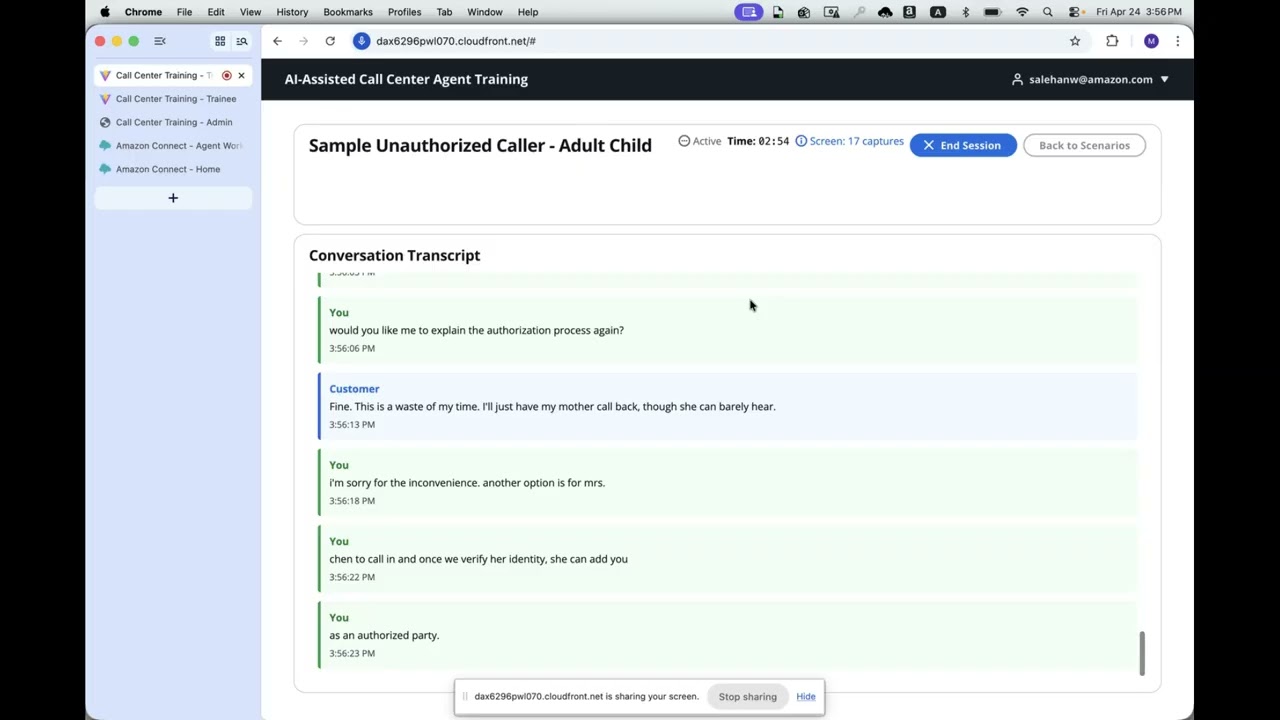
- Running the Guidance
- Next Steps
- Cleanup
- Notices
- FAQ, Known Issues, Additional Considerations, and Limitations
- Authors
This Guidance helps call center operations teams reduce representative onboarding time and improve training quality by providing AI-powered voice simulations of realistic customer interactions. An AI customer (powered by Amazon Nova 2 Sonic) engages trainees in real-time voice conversations based on configurable scenarios drawn from real call logs. Sessions are recorded in stereo WAV format with full transcripts and automatically scored against a detailed rubric using Amazon Bedrock (Claude).
Two deployment modes are supported:
- Web UI — Browser-based training via Amazon CloudFront, with Amazon Cognito authentication and role-based access (trainee/admin)
- Amazon Connect — Phone-based training where trainees call in and interact with the AI customer through Amazon Connect contact flows and AI Agents
Multilingual support covers English, French, Italian, German, Spanish, Portuguese, and Hindi via Nova 2 Sonic voices.


You are responsible for the cost of the AWS services used while running this Guidance. As of May 2026, the cost for running this Guidance with the default settings in the US East (N. Virginia) Region is approximately $350–$500 per month for processing 500 training sessions.
The following table provides a sample cost breakdown for deploying this Guidance with the default parameters in the US East (N. Virginia) Region for one month.
| AWS Service | Dimensions | Cost [USD] |
|---|---|---|
| Amazon Bedrock (Nova 2 Sonic) | 500 sessions × 5 min avg bidirectional streaming | ~$150.00 |
| Amazon Bedrock (Claude) | 500 scoring invocations, ~4K tokens each | ~$15.00 |
| Amazon Bedrock AgentCore Runtime | 500 sessions, on-demand compute | ~$50.00 |
| AWS Lambda | 2,500 invocations (scoring, admin, trainee, empathy), 512MB–2GB, 10–60s | ~$5.00 |
| Amazon DynamoDB | 3 tables, on-demand, ~5GB storage, 10K reads/writes per month | ~$5.00 |
| Amazon S3 | 50GB recordings storage + requests | ~$2.00 |
| Amazon CloudFront | 100GB data transfer, 100K requests | ~$10.00 |
| Amazon Cognito | 100 active users (Plus plan with threat protection) | ~$15.00 |
| Amazon API Gateway | 10,000 HTTP API calls | ~$1.00 |
| Amazon VPC (NAT Gateway) | 1 NAT Gateway + data processing | ~$35.00 |
| VPC Endpoints (Interface) | 5 interface endpoints (Bedrock, ECR, CloudWatch, Secrets Manager, AgentCore) | ~$50.00 |
| AWS KMS | 2 keys + 10K requests | ~$2.00 |
| Total | ~$340.00 |
Additional costs for Amazon Connect mode:
| AWS Service | Dimensions | Cost [USD] |
|---|---|---|
| Amazon Connect | 500 voice minutes (inbound/outbound) | ~$50.00 |
| Amazon Connect AI Agent | 500 sessions | ~$25.00 |
| Amazon Lex | 500 sessions | ~$4.00 |
| Toll-free phone number | 1 number + per-minute charges | ~$5.00 |
We recommend creating a Budget through AWS Cost Explorer to help manage costs. Prices are subject to change. For full details, refer to the pricing webpage for each AWS service used in this Guidance.
These deployment instructions are optimized to best work on Amazon Linux 2023. Deployment on macOS or other Linux distributions may require additional steps.
| Tool | Version | Install Command |
|---|---|---|
| Python | 3.13+ | Pre-installed on Amazon Linux 2023 |
| Node.js | 18+ | sudo dnf install nodejs |
| npm | 9+ | Included with Node.js |
| AWS CDK CLI | 2.x | npm install -g aws-cdk |
| Docker | 20+ | sudo dnf install docker && sudo systemctl start docker |
| jq | 1.6+ | sudo dnf install jq |
| AWS CLI | 2.x | Pre-installed on Amazon Linux 2023 |
- Amazon Bedrock model access — Enable the following models in your deployment region:
- Amazon Nova 2 Sonic (
amazon.nova-2-sonic-v1:0) - Anthropic Claude Sonnet 4 (
us.anthropic.claude-sonnet-4-6) - Amazon Nova 2 Lite (
us.amazon.nova-2-lite-v1:0)
- Amazon Nova 2 Sonic (
- Service quotas — Default quotas are sufficient for most deployments. If running more than 10 concurrent training sessions, request an increase for Bedrock AgentCore Runtime concurrent invocations.
- IAM permissions — The deploying principal requires
AdministratorAccessor equivalent permissions to create VPCs, Lambda functions, DynamoDB tables, S3 buckets, Cognito pools, CloudFront distributions, and Bedrock resources.
This Guidance uses AWS CDK. If you are using AWS CDK for the first time in your account/region, perform the following bootstrapping:
cd deployment
npm install
cdk bootstrap aws://ACCOUNT_ID/REGION
Replace ACCOUNT_ID with your AWS account ID and REGION with your target region (e.g., us-east-1).
This Guidance requires Amazon Bedrock AgentCore Runtime and Amazon Nova 2 Sonic, which are available in:
- US East (N. Virginia) —
us-east-1 - US West (Oregon) —
us-west-2
For Amazon Connect mode, the deployment region must also support Amazon Connect with AI Agents.
A cross-platform deploy script automates all deployment steps including dependency verification, infrastructure creation, frontend builds, and asset deployment.
# Clone the repository
git clone <repository-url>
cd call-center-training-agent

# Install dependencies (required before first deployment)
cd deployment && npm install
cd ../frontend/app && npm install
cd ../../connect-admin/app && npm install
cd ../../

# Run the deploy script
./deployment/deploy.sh --webui

# Seed database with sample scenarios
python scripts/seed_scenarios.py
Available deployment modes:
| Flag | Description |
|---|---|
--webui |
Core infra + AgentCore runtime + Browser-based Web UI |
--connect |
Core infra + Amazon Connect integration |
--all |
Everything (Web UI + Amazon Connect) |
--agentcore |
Core infra + AgentCore runtime only (no UI) |
What the script does:
- Verifies AWS CLI credentials and CDK prerequisites
- Deploys the Core infrastructure stack (VPC, S3, DynamoDB, KMS)
- Deploys the AgentCore Runtime stack (Docker image, IAM roles, Bedrock runtime)
- Deploys the UI stack(s) with
skipFrontend=trueto create infrastructure first - Fetches stack outputs and generates frontend environment variables
- Builds the React frontend(s) with production configuration
- Syncs built assets to S3 and invalidates CloudFront cache
Environment:
- Designed for Amazon Linux 2023 (CodeBuild, EC2, or Cloud9)
- Also runs on macOS with Docker Desktop installed
- Requires AWS CLI configured with appropriate credentials
Note: For a detailed understanding of each deployment step, see the Manual Deployment section below.
git clone <repository-url>
cd call-center-training-agent# CDK infrastructure dependencies
cd deployment && npm install
# Frontend dependencies (for Web UI mode)
cd ../frontend/app && npm install
# Connect Admin UI dependencies (for Connect mode)
cd ../../connect-admin/app && npm install
cd ../../cd deployment
cdk bootstrap aws://ACCOUNT_ID/REGIONcd deployment
cdk deploy CallCenterTraining-Core --require-approval never --context deployMode=webuiThis creates the VPC, S3 buckets, DynamoDB tables, KMS keys, and VPC endpoints.
cdk deploy CallCenterTraining-AgentRuntime --exclusively --require-approval never --context deployMode=webuiThis builds the Docker image, creates the IAM role, and provisions the Bedrock AgentCore Runtime.
cdk deploy CallCenterTraining-Web --exclusively --require-approval never --context deployMode=webui --context skipFrontend=true# Fetch stack outputs
WEB_OUTPUTS=$(aws cloudformation describe-stacks --stack-name "CallCenterTraining-Web" --output json)
# Extract values (requires jq)
USER_POOL_ID=$(echo "$WEB_OUTPUTS" | jq -r '.Stacks[0].Outputs[] | select(.OutputKey=="UserPoolId") | .OutputValue')
USERPOOL_CLIENT_ID=$(echo "$WEB_OUTPUTS" | jq -r '.Stacks[0].Outputs[] | select(.OutputKey=="UserPoolClientId") | .OutputValue')
IDENTITY_POOL_ID=$(echo "$WEB_OUTPUTS" | jq -r '.Stacks[0].Outputs[] | select(.OutputKey=="IdentityPoolId") | .OutputValue')
AGENT_RUNTIME_ARN=$(echo "$WEB_OUTPUTS" | jq -r '.Stacks[0].Outputs[] | select(.OutputKey=="AgentRuntimeArn") | .OutputValue')
API_GATEWAY_URL=$(echo "$WEB_OUTPUTS" | jq -r '.Stacks[0].Outputs[] | select(.OutputKey=="ApiGatewayUrl") | .OutputValue')
RECORDINGS_BUCKET=$(echo "$WEB_OUTPUTS" | jq -r '.Stacks[0].Outputs[] | select(.OutputKey=="RecordingsBucketName") | .OutputValue')
REGION=$(aws configure get region)
# Write environment file
cat > frontend/app/.env.production <<EOF
VITE_AWS_REGION=$REGION
VITE_USER_POOL_ID=$USER_POOL_ID
VITE_USER_POOL_CLIENT_ID=$USERPOOL_CLIENT_ID
VITE_IDENTITY_POOL_ID=$IDENTITY_POOL_ID
VITE_AGENT_RUNTIME_ARN=$AGENT_RUNTIME_ARN
VITE_API_URL=$API_GATEWAY_URL
VITE_RECORDINGS_BUCKET=$RECORDINGS_BUCKET
EOFcd frontend/app
npm run build
cd ../../
# Get bucket name and distribution ID
FRONTEND_BUCKET=$(echo "$WEB_OUTPUTS" | jq -r '.Stacks[0].Outputs[] | select(.OutputKey=="FrontendBucketName") | .OutputValue')
DISTRIBUTION_ID=$(echo "$WEB_OUTPUTS" | jq -r '.Stacks[0].Outputs[] | select(.OutputKey=="DistributionId") | .OutputValue')
# Upload assets and invalidate cache
aws s3 sync frontend/app/dist "s3://${FRONTEND_BUCKET}/" --delete
aws cloudfront create-invalidation --distribution-id "$DISTRIBUTION_ID" --paths "/*"cd deployment
./create-user.sh admin@example.com YourPassword123! --group adminpython scripts/seed_scenarios.py-
Open the AWS CloudFormation console and verify the following stacks show status
CREATE_COMPLETE:CallCenterTraining-CoreCallCenterTraining-AgentRuntime(Web UI mode)CallCenterTraining-Web(Web UI mode)CallCenterTraining-Connect(Connect mode)
-
Verify the CloudFront distribution is deployed:
aws cloudformation describe-stacks --stack-name CallCenterTraining-Web \
  --query 'Stacks[0].Outputs[?OutputKey==`CloudFrontUrl`].OutputValue' --output text
Open the returned URL in a browser. You should see the login page.
-
Verify the AgentCore Runtime is active:
aws cloudformation describe-stacks --stack-name CallCenterTraining-AgentRuntime \ --query 'Stacks[0].Outputs[?OutputKey==`AgentRuntimeArn`].OutputValue' --output text -
Verify DynamoDB tables exist:
aws dynamodb list-tables --query 'TableNames[?contains(@, `CallCenterTraining`)]'
Required inputs:
- Cognito user credentials (created via
create-user.sh) - Training scenario selection
- Microphone access in the browser
Steps:
- Open the CloudFront URL in a browser (Chrome or Edge recommended for WebRTC support).
- Log in with your Cognito credentials.
- Select a training scenario from the scenario library. Choose a customer voice, mood level, and language.
- Click Start Session — speak naturally via your microphone. The AI customer responds in real time.
- Click End Session when the conversation is complete.
- View the automated scoring results with detailed feedback across security, compliance, communication, and knowledge categories.
Expected output:
After ending a session, the scoring panel displays:
- Overall score (0–100)
- Category breakdowns with pass/fail indicators
- Specific feedback on areas for improvement
- Full transcript with timestamps
Required inputs:
- Admin UI credentials
- Trainee phone number
- Training scenario selection
Steps:
- Open the Connect Admin UI URL in a browser and log in.
- Select a training scenario and target trainee.
- Click Start Call — Amazon Connect places an outbound call to the trainee.
- The trainee answers and converses with the AI customer.
- Post-call scoring runs automatically after the call ends.
- Review results in the Admin UI dashboard.
- Customize scenarios — Create new training scenarios in
scenarios/based on your organization's call patterns. Each scenario includes customer context, key challenges, and success criteria. - Adjust scoring rubrics — Modify scoring criteria via the Admin dashboard to align with your quality assurance standards.
- Add languages — Configure additional Nova 2 Sonic voices for new language support.
- Integrate with existing LMS — Use the API Gateway endpoints to pull session scores into your Learning Management System.
- Scale for production — Increase NAT Gateway count and VPC endpoint capacity for higher concurrent session loads. Consider adding a custom domain with ACM certificate for CloudFront.
Destroy the deployed stacks:
cd deployment

# Destroy all stacks (reverse dependency order)
cdk destroy CallCenterTraining-Web --context deployMode=all --force
cdk destroy CallCenterTraining-Connect --context deployMode=all --force
cdk destroy CallCenterTraining-AgentRuntime --context deployMode=all --force
cdk destroy CallCenterTraining-Core --context deployMode=all --force
Resources that require manual deletion:
| Resource | Reason | Deletion Steps |
|---|---|---|
| S3 buckets (recordings, scoring, access logs) | Buckets with objects cannot be auto-deleted | Empty via aws s3 rm s3://BUCKET --recursive then delete via console |
| KMS keys | Scheduled deletion with 7–30 day waiting period | aws kms schedule-key-deletion --key-id KEY_ID --pending-window-in-days 7 |
| Cognito User Pool | Retained to prevent accidental user data loss | Delete via the Cognito console |
| DynamoDB tables (scenarios, sessions, criteria) | Retained to prevent data loss | Delete via the DynamoDB console |
| Toll-free phone numbers (Connect mode) | 30-day release quarantine | Release via Connect console → Channels → Phone numbers |
If you are removing the project entirely, also delete the CDK toolkit stack (CDKToolkit) if no other CDK projects use it in the same account/region.
Customers are responsible for making their own independent assessment of the information in this Guidance. This Guidance: (a) is for informational purposes only, (b) represents AWS current product offerings and practices, which are subject to change without notice, and (c) does not create any commitments or assurances from AWS and its affiliates, suppliers or licensors. AWS products or services are provided "as is" without warranties, representations, or conditions of any kind, whether express or implied. AWS responsibilities and liabilities to its customers are controlled by AWS agreements, and this Guidance is not part of, nor does it modify, any agreement between AWS and its customers.
Known Issues:
- Amazon Connect Lex integration toggle — After the first deployment of the Connect stack, a one-time manual toggle is required in the Connect console to reconcile the Lex bot integration. See docs/CONNECT_GUIDE.md for details.
- Duo mode (multi-character scenarios) — Supported only in Web UI mode. Amazon Connect AI Agents do not support multi-character handoffs.
Additional Considerations:
- This Guidance creates VPC interface endpoints that incur hourly charges regardless of usage. Consider disabling unused endpoints in
deployment/config.jsonto reduce costs. - The Cognito User Pool is configured with the Plus plan including threat protection. Downgrade to Essentials if advanced security features are not needed.
- Session recordings are stored unencrypted at rest in S3 with KMS server-side encryption. Access is restricted via IAM policies and bucket policies.
- All training data (scenarios, transcripts, scores) is synthetic or user-generated. No real customer data is used.
Limitations:
- Maximum concurrent sessions depend on Bedrock AgentCore Runtime quotas (default: 10 concurrent invocations).
- Nova 2 Sonic voice streaming requires a stable internet connection with low latency (<200ms RTT recommended).
- Screen recording analysis requires Chrome or Edge browsers with screen capture API support.
For any feedback, questions, or suggestions, please use the issues tab under this repo.
- Mohammad Salehan