

A python monitoring and trading bot which exploits price-spreads between different cryptocurrency exchanges.
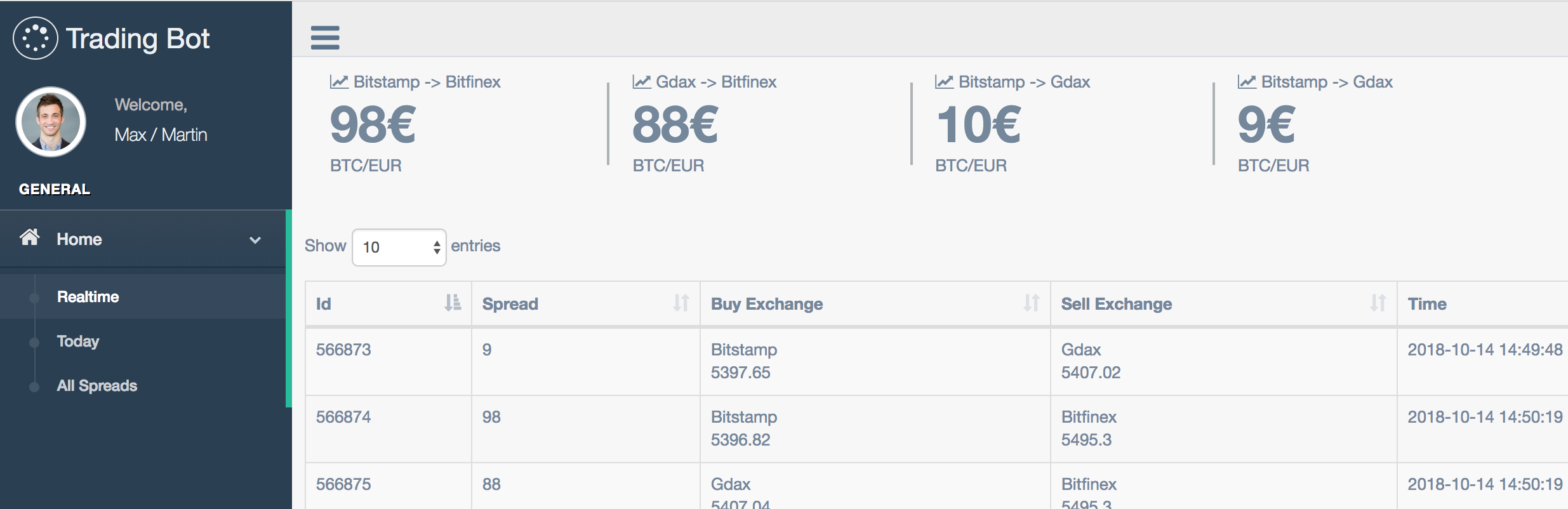
For collaboration or development work:
- Telegram — @k02_xx
- Monitoring of spreads between exchanges (Coinbase Exchange, Bitfinex, Bitstamp, plus optional CCXT venues)
- Order-book VWAP sizing (does not assume you can fill the full size at the top of book)
- Net spread after per-exchange taker fees and latency slippage
- Multiple currency pairs (BTC/EUR, ETH/USD, ...)
- Notifications on spread thresholds via Pushbullet / stdout
- Paper trading by default: simultaneous buy-low / sell-high inventory arb with risk limits
- Optional live IOC two-leg execution (off unless you explicitly enable it; both venues must support live orders)
- Historical spreads + paper/live trades in the web UI (
/,/trades,/api/status) - Highly configurable
The following example explains spreads between exchanges:
| Exchange | BTC/EUR price |
|---|---|
| Coinbase Exchange | 5000€ |
| Bitfinex | 5600€ |
This results in a spread of 600€ for the price of 1 BTC in EUR between Coinbase Exchange and Bitfinex (this example is not based on ask and bid prices for simplicity reasons, the bot itself uses those correct prices).
(example based on above table)
Preparation:
- Store 5000€ on Gdax
Spread exploitation:
- Buy BTC on Gdax for 5000€
- Send BTC from Gdax to Bitfinex
- Pay fees for transaction and wait until it's confirmed
- Sell BTC on Bitfinex for 5600€
Postprocessing (steps needed to be able to repeat exploit):
- Transfer 5600€ from Bitfinex to Gdax to repeat
| Advantages | Disadvantages |
|---|---|
| Capital needed: 5000€ | Risk of price fluctuation until transaction is confirmed |
| Postprocessing partly done manually (SEPA transfer of the euro amount) | |
| Postprocessing is time-consuming (couple of days for international SEPA transfer) |
Preparation:
- Store 5000€ on Gdax account
- Store 1 BTC on Bitfinex account
Spread exploitation:
- Buy 1 BTC on Gdax
- Simultaneously sell 1 BTC on Bitfinex
The bot now:
- Pulls L2 order books (falls back to ticker if a book is unavailable)
- Walks both books to get a VWAP fill for the configured size
- Subtracts venue taker fees + extra slippage
- Requires the same pair to stay profitable for
SPREAD_CONFIRMATION_CYCLES(default 2) - Checks inventory, daily caps, cooldown, and a kill switch
- Executes both legs together (paper fill at VWAP, or live IOC limits)
Postprocessing (needed to repeat the trade):
- Transfer 5600€ from Bitfinex to Gdax
- Transfer 1 BTC from Gdax to Bitfinex
| Advantages | Disadvantages |
|---|---|
| No real risk of price fluctuation (whole spread exploitation only takes a couple of seconds) | Same disadvantages as strategy 1 (except the risk of price fluctation) |
| Capital needed: ~ 2x5000€ (fiat currency: 5000€ + BTC worth ~5000€) |
The following table demonstrates the amount of BTC and fiat stored on the exchanges during the different phases of the execution of the strategy:
Preparation
| Exchange | Amount of BTC | Amount of € |
|---|---|---|
| Gdax | 0 | 5000 |
| Bitfinex | 1 | 0 |
After Spread exploitation
| Exchange | Amount of BTC | Amount of € |
|---|---|---|
| Gdax | 1 | 0 |
| Bitfinex | 0 | 5600 |
Profit: 600€ (excluding fees for simplicity)
Paper mode simulates exactly this inventory shift. Live mode is opt-in (LIVE_TRADING=1 and PAPER_TRADING=0) and will halt if only one leg fills.
Cross-exchange spreads are usually small after fees. Run paper mode first and treat live trading as experimental.
- Monitoring, net-spread math, paper trading, risk limits, and the dashboard work
- Live trading is implemented for Coinbase Exchange (GDAX adapter) and CCXT venues with API keys; Bitfinex/Bitstamp native adapters still do not place live orders
- Create a file named
HALT_TRADING(or setHALT_TRADING=1) to stop trading immediately
The bot itself is placed at bitcoin_arbitrage/monitor with its entry point / main class being bitcoin_arbitrage/monitor/monitor.py.
The code within bitcoin_arbitrage/ is a Flask app which is just a fancy wrapper for the monitor/bot with a web UI.
Configuration of the bot is done by copying the settings.py file.
Requirements:
- python >= 3.6
- pipenv (install via
pip install pipenv)
Run the monitor:
pipenv install- Install requirementsscripts/copy-config- Copy config file (some dummy settings are set by default)- If you already have
bitcoin_arbitrage/monitor/settings.py, merge the new trading flags fromsettings_sample.py(paper trading, confirmation cycles, risk limits) - Set
FLASK_SECRET_KEYto a long random value before starting the web app - Optional: set
FLASK_DEBUG=1for local debugging scripts/run- Run the monitor (paper trading is on by default; live trading stays off)
You can use the following systemd service entry:
[Unit]
Description=Bitcoin Arbitrage Monitor
After=network-online.target

[Service]
Type=simple
User=bitcoin
Restart=always
WorkingDirectory=/home/bitcoin/bitcoin-arbitrage
ExecStart=/home/bitcoin/bitcoin-arbitrage/scripts/run

[Install]
WantedBy=multi-user.target
Manually:
scripts/test
With PyCharm:
