A Python package for handling DAQ-HDF5 (*.dh5) files. The DH5 format is a hierarchical
data format based on HDF5 designed for storing
and sharing neurophysiology data, used in the Brain Research Institute of the University of
Bremen since 2005.


📖 Documentation: dh5io.readthedocs.io
The repository contains several packages:
dh5iocontains code for reading, writing and validating HDF5 files containing data according to the DAQ-HDF5 specification. It also provides MNE-Python integration viadh5io.dh5mne.dhspeccontains the specification of the DAQ-HDF5 file format as Python code (constants, dtypes and enums, with no I/O dependencies).dh5clicontains the command-line and GUI toolsdh5tree,dh5mergeanddh5browser.dh5neo(WIP) contains code for reading DAQ-HDF5 data into Neo objects (e.g. for use with Elephant, SpikeInterface and ephyviewer).dhzio(experimental) mirrors the DH5 structure in a Zarr store instead of HDF5.
Install the package using uv (recommended):
uv pip install dh5ioOr with pip:
pip install dh5ioThe core package only requires numpy and h5py. Optional features are available as
extras:
| Extra | Adds | For |
|---|---|---|
neo |
neo |
dh5neo, reading data as Neo objects |
mne |
mne, psutil |
dh5io.dh5mne, reading data as MNE Raw |
browser |
ephyviewer, PySide6 |
the dh5browser GUI |
dhzio |
zarr |
the experimental Zarr backend |
all |
all of the above | everything |
pip install "dh5io[browser]"   # e.g. for the GUI browser
pip install "dh5io[all]" # everythingInstalling the package provides three commands. See the CLI documentation for details.
dh5tree mydata.dh5Prints the contents of a file as a tree: CONT groups (grouped by sampling rate), SPIKE and WAVELET groups, events and trials.
Merges multiple DH5 files that contain the same CONT blocks recorded at different, non-overlapping times. CONT, WAVELET, TRIALMAP and EV02 data are concatenated, INDEX offsets are adjusted, and the merge is recorded in the file's processing history.
# Merge all common blocks
dh5merge file1.dh5 file2.dh5 file3.dh5 -o merged.dh5

# Auto-suggest the output name from the common filename prefix
dh5merge session_part1.dh5 session_part2.dh5   # -> session_part_merged.dh5

# Merge only specific CONT blocks
dh5merge file1.dh5 file2.dh5 -o merged.dh5 --cont-ids 0 1 2

# Run without arguments to open a graphical file selector
dh5mergeA graphical browser built on ephyviewer showing
analog signals, spike trains, events and trials on a shared time axis, with trial-by-trial
navigation. Requires dh5io[browser].
dh5browser mydata.dh5            # open at the first trial
dh5browser mydata.dh5 -t 2       # open at trial 2
dh5browser                       # open a file picker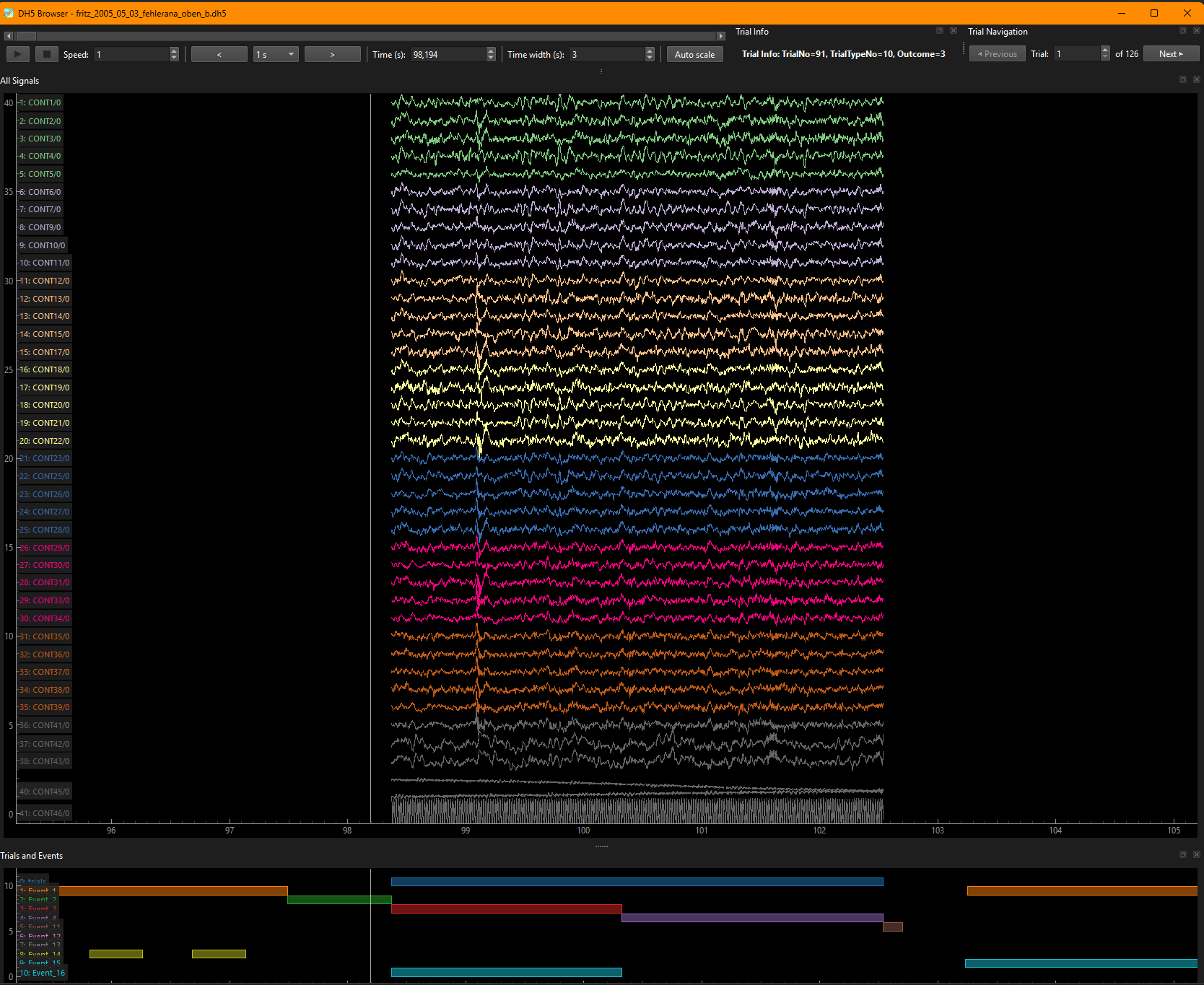
from dh5io import DH5File

with DH5File(example_filename, "r") as dh5:
    # inspect file content
    print(dh5)

    cont = dh5.get_cont_group_by_id(1)  # Get CONT group with id 1
    print(cont)

    trialmap = dh5.get_trialmap()
    print(trialmap)
DAQ-HDF5 File (version 2) <example_filename> containing:
├───CONT Groups (7) [discontinuous, simultaneous start]:
│ └─── 1000 Hz
│ ├─── CONT1 — 1ch, 1443184 samples, 385 regions
│ ├─── CONT60 — 1ch, 1443184 samples, 385 regions
│ ├─── CONT61 — 1ch, 1443184 samples, 385 regions
│ ├─── CONT62 — 1ch, 1443184 samples, 385 regions
│ ├─── CONT63 — 1ch, 1443184 samples, 385 regions
│ ├─── CONT64 — 1ch, 1443184 samples, 385 regions
│ └─── CONT1001 — 1ch, 1443184 samples, 385 regions
├───SPIKE Groups (1):
│ └─── SPIKE0
├───WAVELET Groups (2):
│ ├─── WAVELET1
│ └─── WAVELET1001
├─── 10460 Events
└─── 385 Trials in TRIALMAP
/CONT1 in <example_filename>
├─── id: 1
├─── name:
├─── comment:
├─── sample_period: 1000000 ns (1000.0 Hz)
├─── n_channels: 1
├─── n_samples: 1443184
├─── duration: 3021.76 s
├─── n_regions: 385
├─── signal_type: None
├─── calibration: [1.0172526e-07]
├─── data: (1443184, 1)
└─── index: (385,)
This example shows how to open a DH5 file, inspect its content, and retrieve a specific CONT
group. The DH5File class provides methods for accessing the various groups and datasets
within the file. The Cont, Wavelet, Spike (coming in next versions) and Trialmap
classes provide convenient wrappers for working with these raw HDF5 groups and datasets. The
corresponding h5py classes can be accessed
directly for lower-level operations using the _file, _group and _dataset attributes
(e.g. cont._group or cont.data._dataset).
CONT data is stored as int16; multiply by the Calibration attribute to obtain volts,
which cont.calibrated_data does for you.
As an alternative to the object-oriented approach using DH5File, you can use the
functional API provided by the library. This API offers a set of functions for reading and
writing data to DH5 files without the need to create file objects. These functions in the
respective modules (dh5io.cont, dh5io.spike, etc.) use the
h5py classes as input and output. This is the
recommended way if you are familiar with HDF5 and the specification of the DH5 format.
from dh5io.dh5mne import read_raw_dh5, epochs_from_dh5   # requires dh5io[mne]

raw = read_raw_dh5(example_filename, cont_ids=[60, 61, 62])
epochs = epochs_from_dh5(raw)
from dh5neo import DH5IO # requires dh5io[neo]
block = DH5IO(example_filename).read_block()git clone https://github.com/brain-bremen/dh5io.git
cd dh5io
uv sync --extra dev # install with all dev dependencies
git config --local core.hooksPath .githooks # enable the pre-push test hook
uv run pytest tests # run the test suite
uv run ruff check . && uv run ruff format . # lint and format
uv run mypy src # type checkSee the changelog for release
notes; its source lives in docs/source/changelog.md.