
High-Performance · Multi-Model · Enterprise-Grade AI Chat Management Platform
An open-source AI chat platform built with Rust + Vue 3. Supports OpenAI, Claude, Ollama and more. Features WebSocket streaming chat, RBAC admin dashboard, OpenAI-compatible API, VIP plans, WeChat integration — everything you need to deploy your own ChatGPT-like service.



🇨🇳 中文 · 🌐 Website · 🐛 Issues · 🗺️ Roadmap
QiLuo AI is an AI chat management platform built on the QiLuo framework. It inherits QiLuo's enterprise-grade development capabilities (RBAC permission management, system monitoring, code generator, etc.) and deeply integrates multi-model AI conversation capabilities on top of that.
QiLuo AI provides a complete AI chat system built from scratch, including:
- Multi AI Provider Integration — Built-in adapters for OpenAI, Claude, Ollama, and more, easily extensible
- AI User Management — Independent user registration/login system with SMS verification code support
- Session Management — Create, edit, delete sessions; persistent message history with pagination
- VIP Plan System — Tier-based model access control with usage statistics and daily limits
- OpenAI-Compatible API — Accessible via standard OpenAI SDK, compatible with Cherry Studio and other clients
- Access Key Management — Self-service API Key generation for secure AI interface calls
- Voice Input & Screenshot — Browser-based speech recognition and screenshot-as-input
- Multimodal Conversations — Support for image paste and camera photo upload
A modern, beautiful full-screen AI chat application with dark/light theme switching.
| Feature | Screenshot |
|---|---|
| Chat Interface | 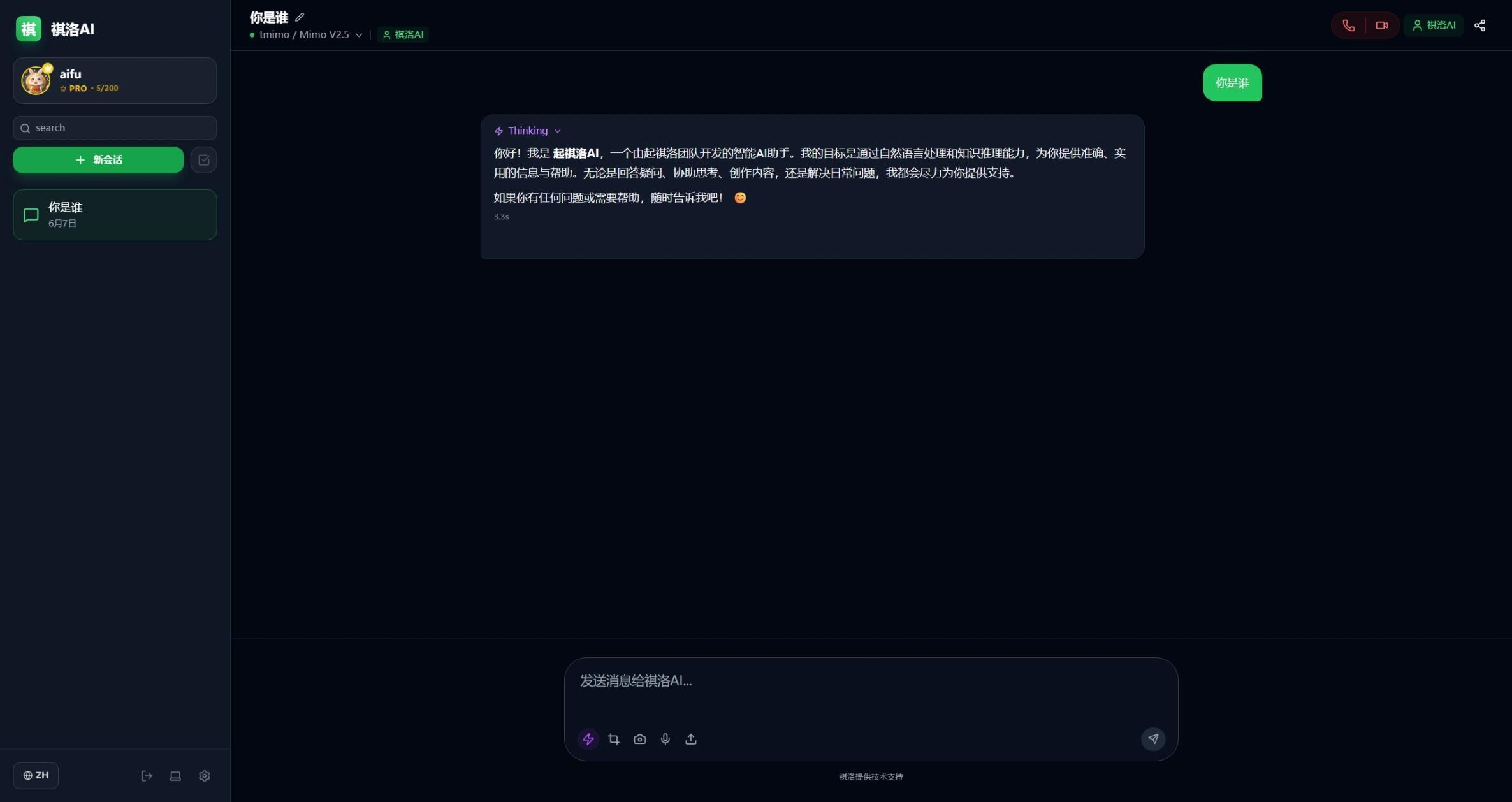 |
| Model Selection | 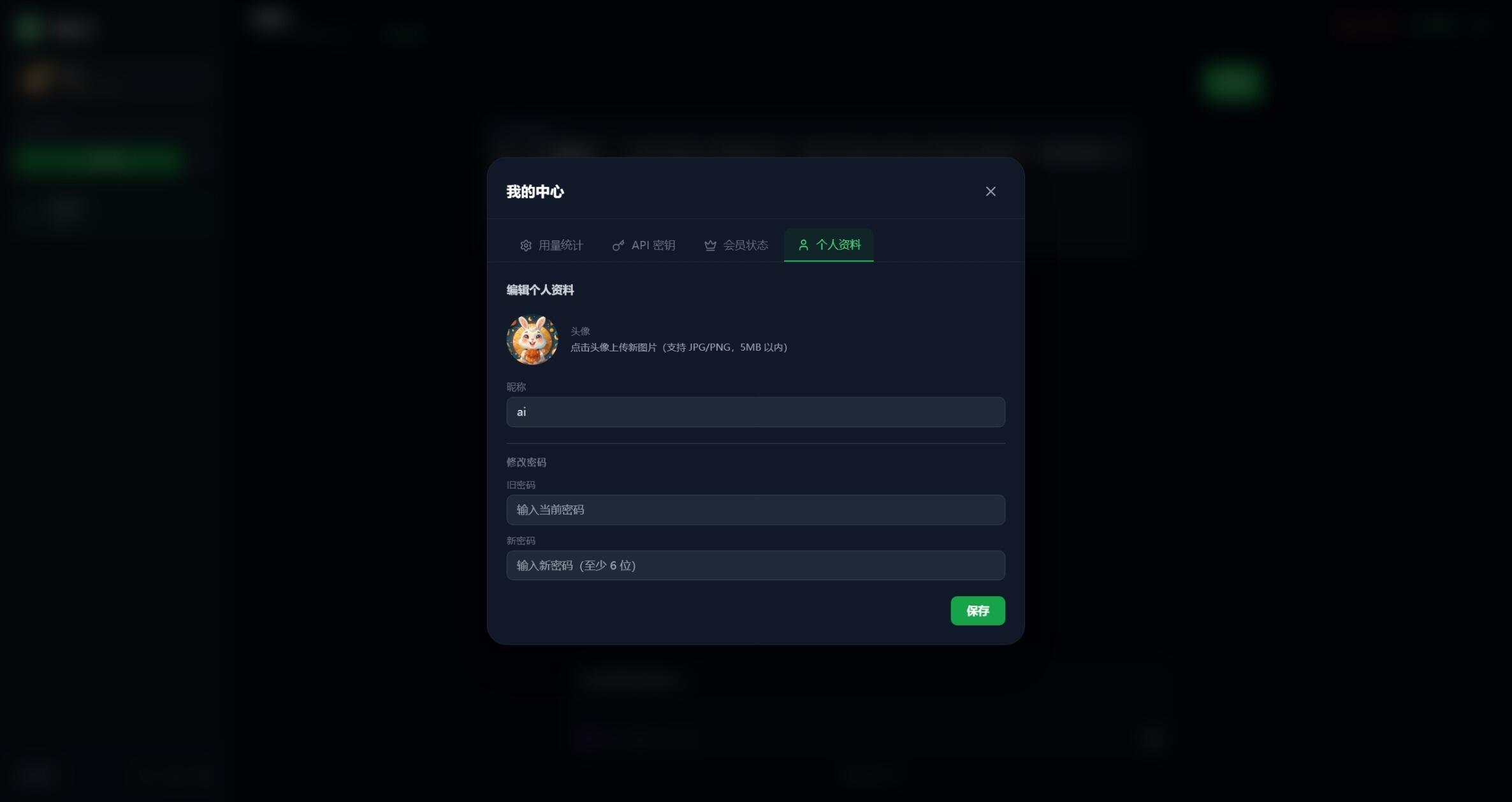 |
| Settings Panel | 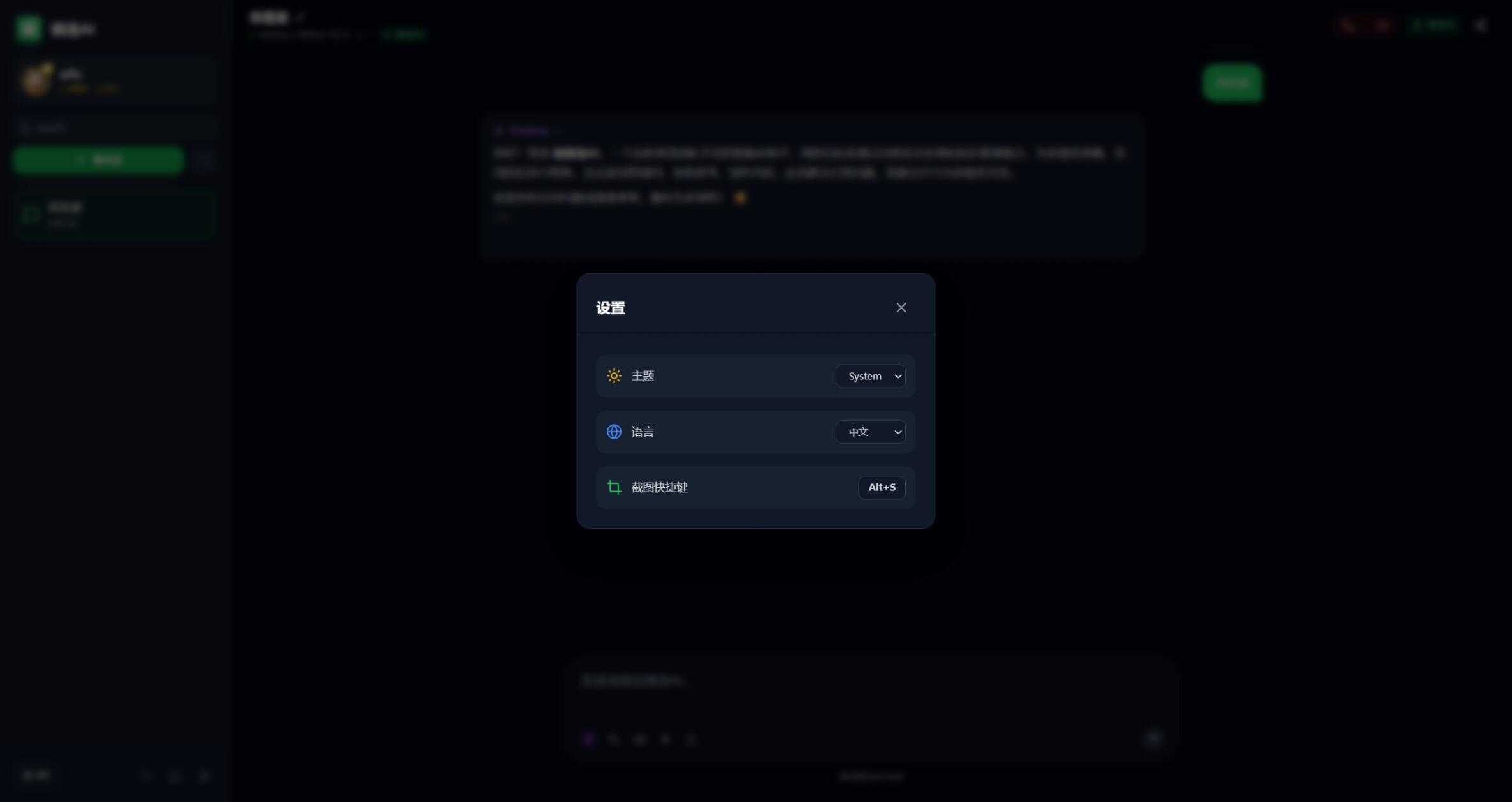 |
| VIP Plans | 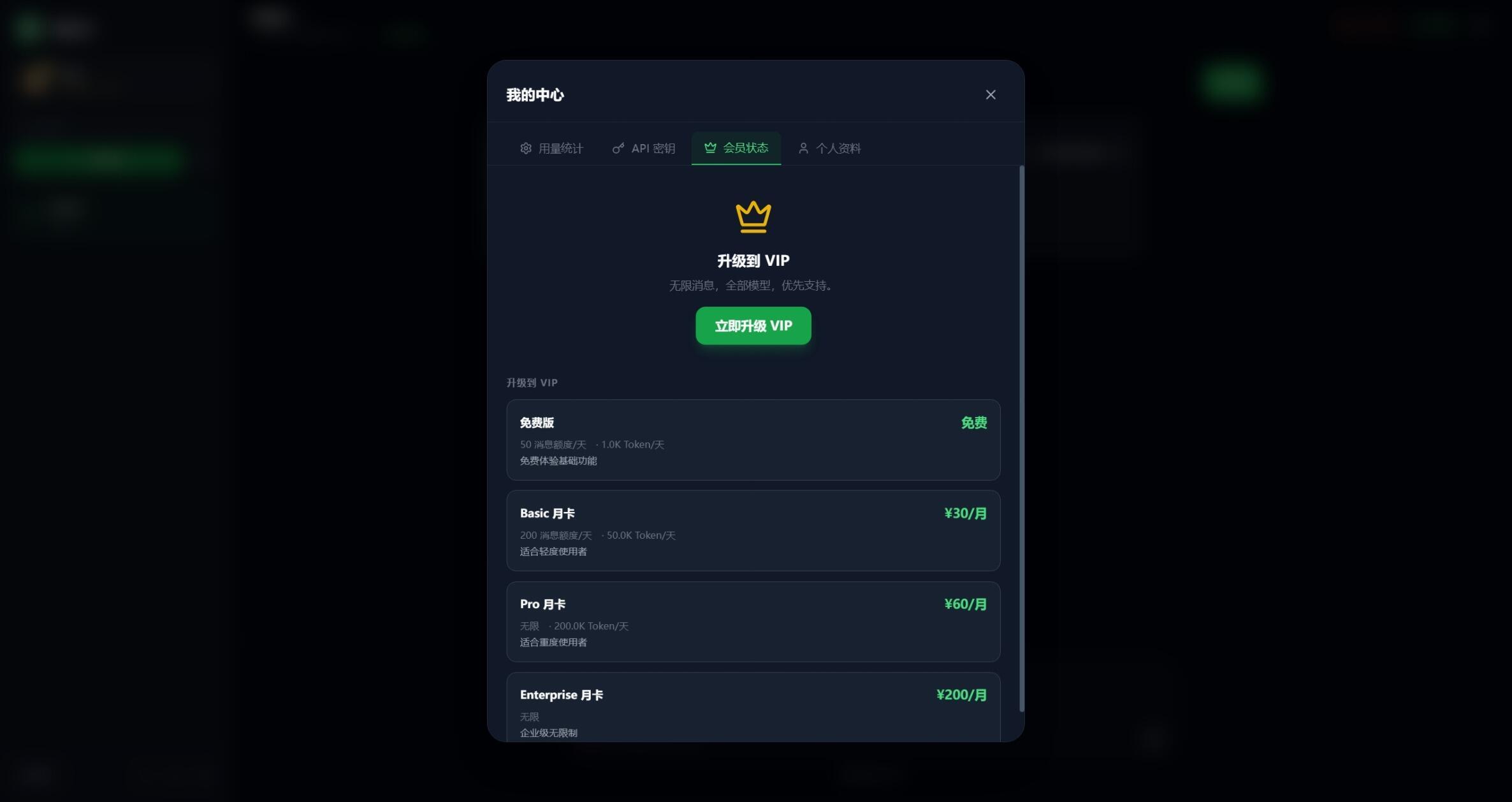 |
A lightweight, clean H5 chat interface for mobile and desktop.
| Feature | Screenshot |
|---|---|
| Chat Interface | 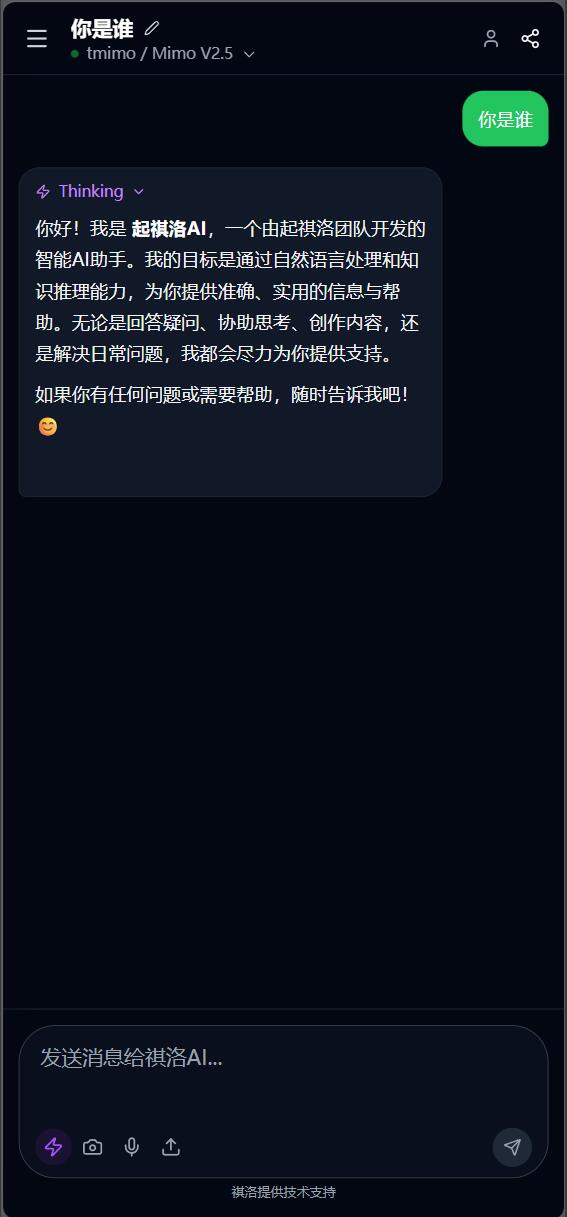 |
| Model Selection | 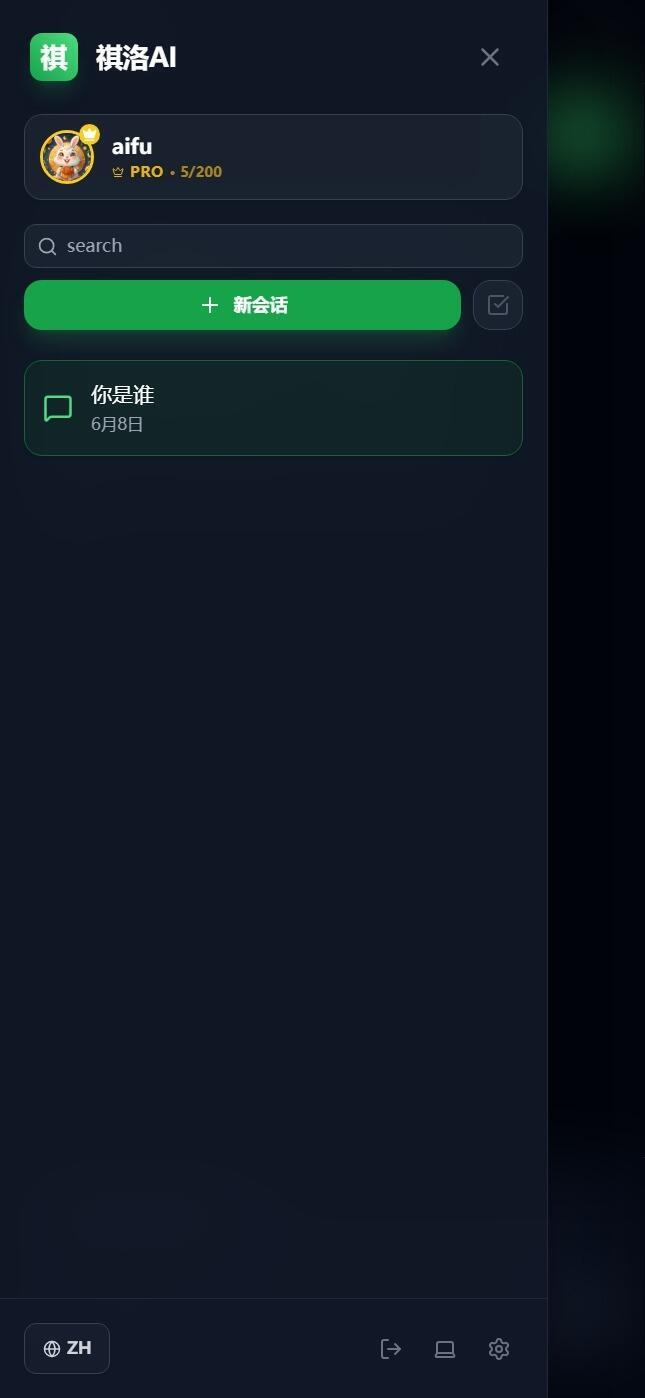 |
| Feature | Screenshot |
|---|---|
| AI Operation Statistics | 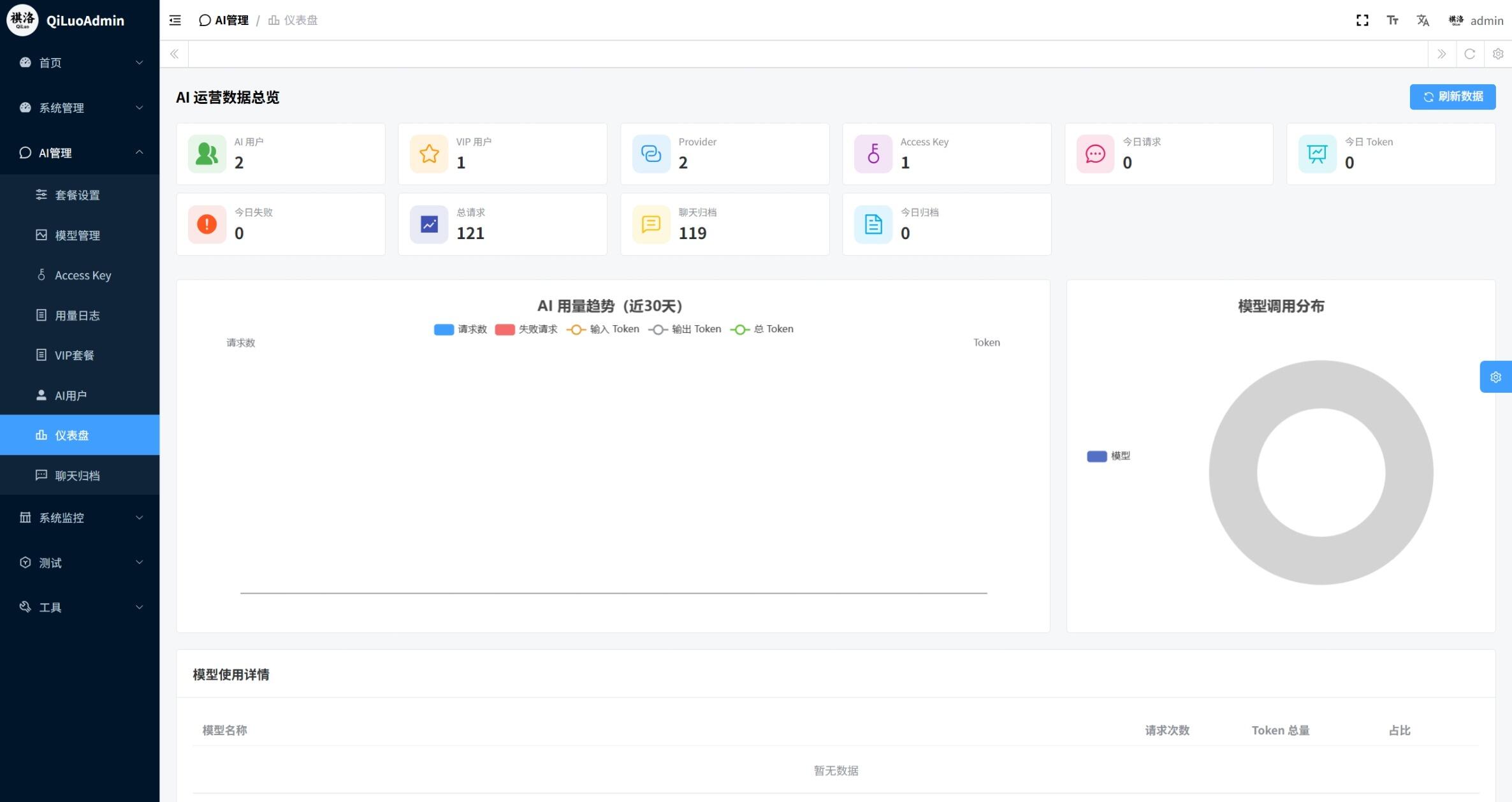 |
| AI User Management | 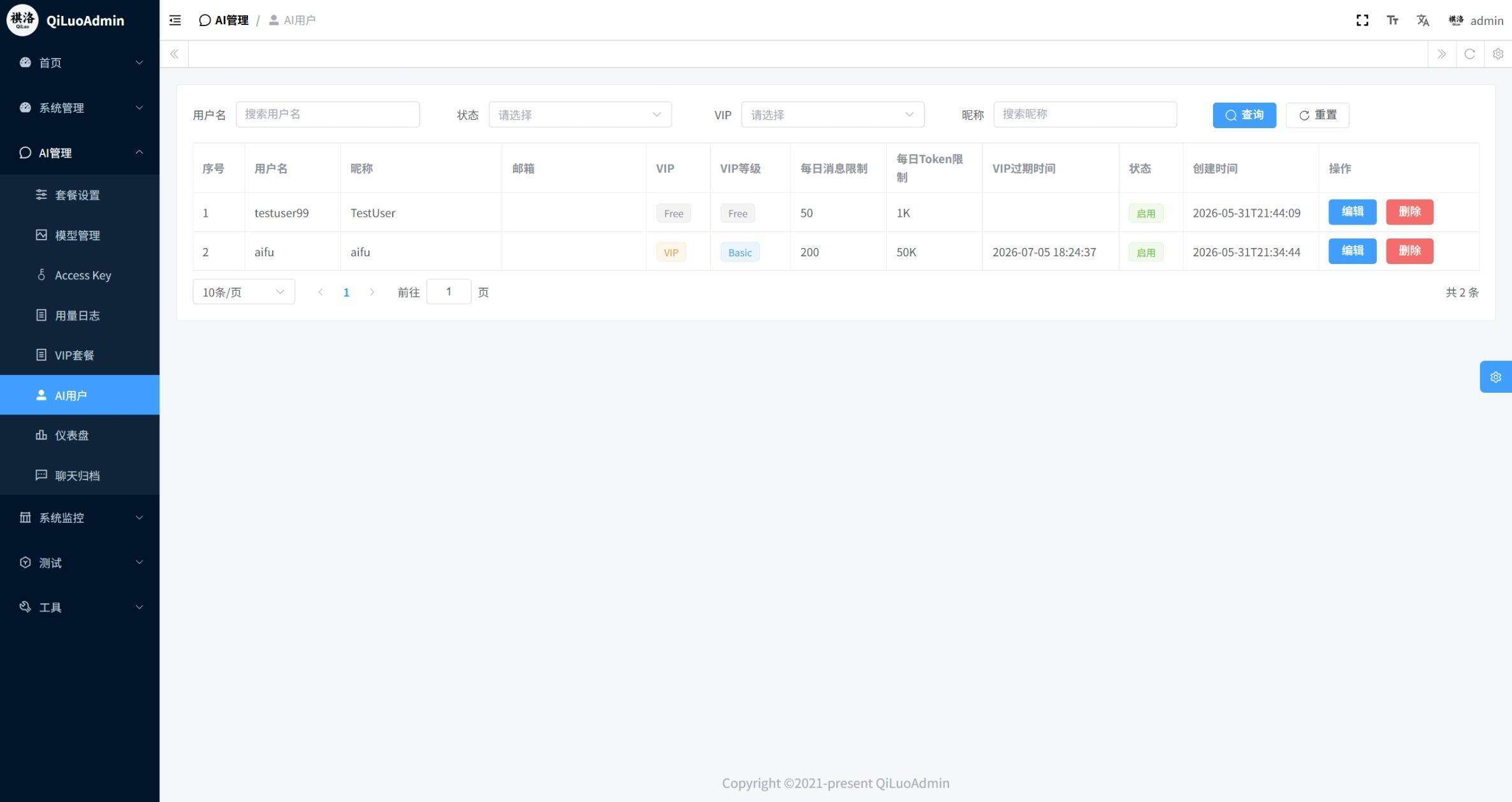 |
| AI Provider Configuration | 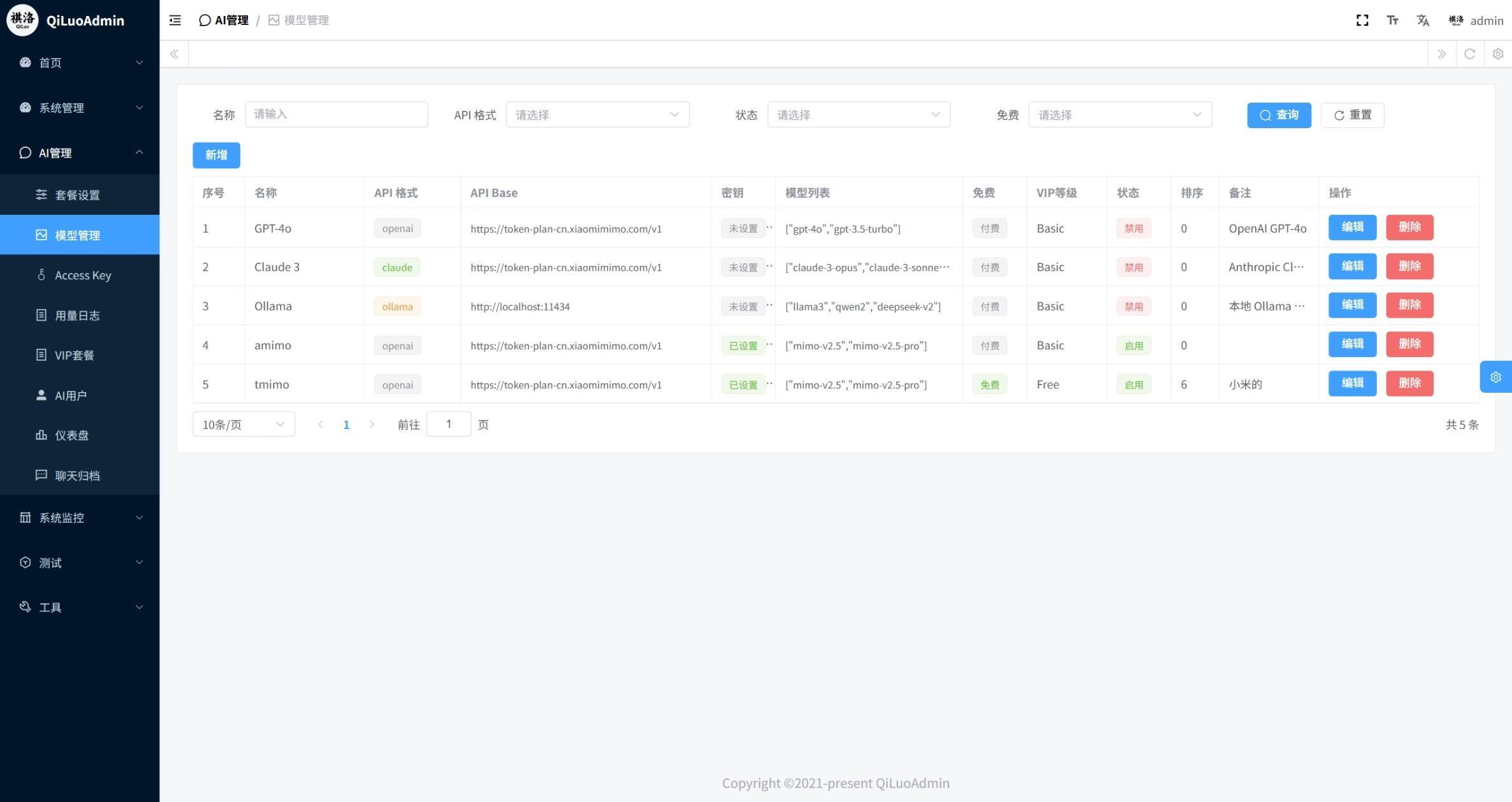 |
| Usage Logs | 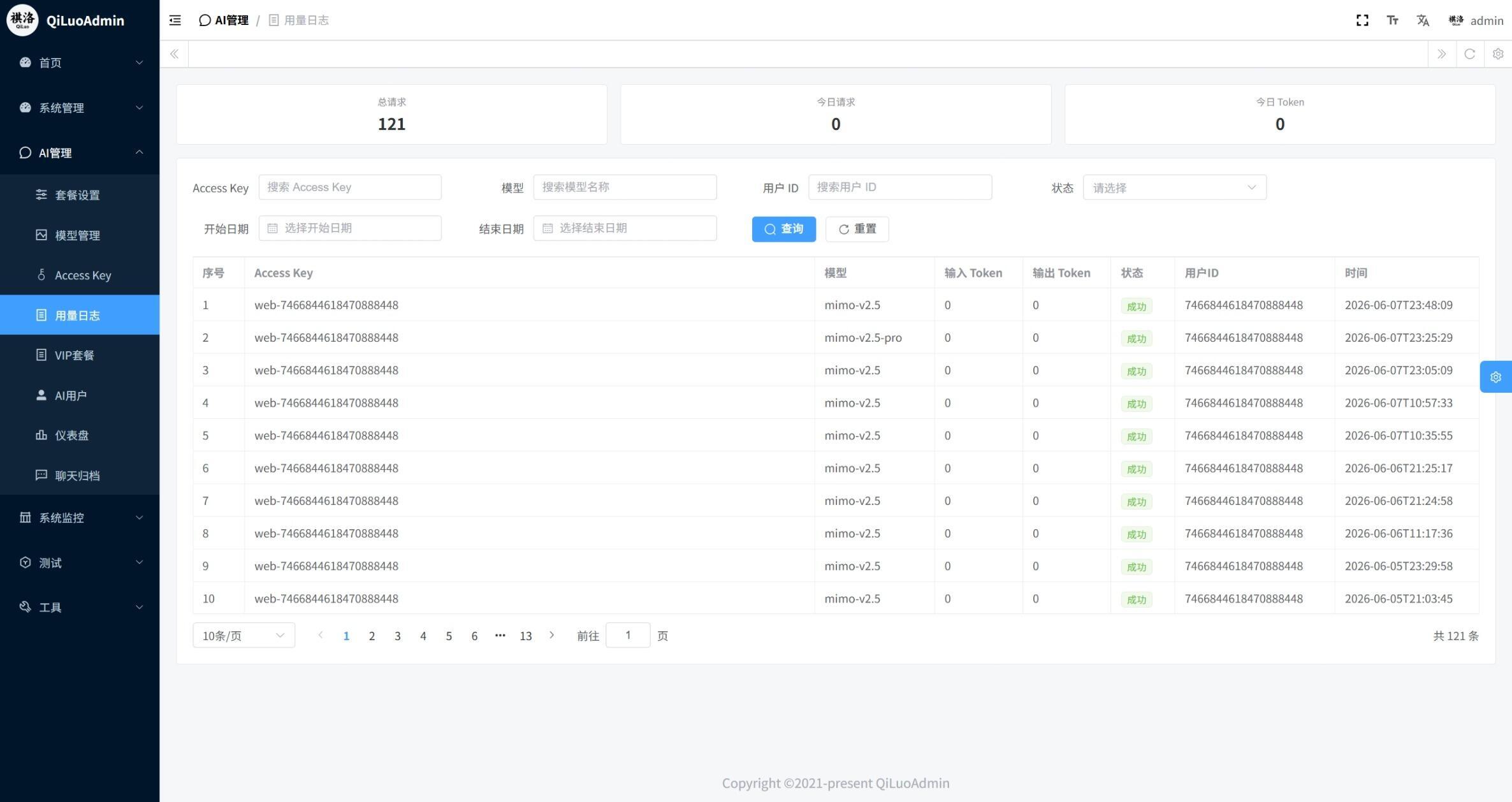 |
- 🧠 Multi-Model Support — Supports GPT-4o, Claude, Gemini, and more LLMs via hot-pluggable Provider adapters
- 🔌 Multi-Provider Adapters — Built-in adapters for OpenAI, Claude, Ollama; standardized interfaces for quick integration
- 💬 Real-time WebSocket Chat — Streaming output with cancel generation, heartbeat keep-alive, and reconnection
- 📜 History Session Management — Auto-save chat history with rename, delete, and paginated review
- 🔗 Session Sharing — One-click share link generation
- 📊 Usage Tracking — Token consumption and request counts by user, model, and time period
- 💎 VIP Plan System — Multi-tier plans with daily/monthly message and token limits
- 🔑 Access Key Management — Self-service create/delete API Keys for OpenAI-compatible API access
- 🔌 OpenAI-Compatible API — Provides
/v1/chat/completions,/v1/models,/v1/audio/transcriptionsendpoints - 🎨 Deep Thinking Mode — Supports reasoning content display
- 📷 Multimodal Input — Image paste/camera/screenshot upload with code highlighting
- 🗣️ Voice Input — Browser-based speech recognition, auto-transcribed to text
- 🌙 Dark/Light Theme — System-follow or manual toggle
- 🌐 Multi-language — Chinese/English/Japanese/Korean UI
- 🦀 Rust Ecosystem — Rust + Axum + Sea-ORM + JWT, performance with memory safety
- 🔐 RBAC Permission Management — Multi-dimensional user, role, menu, and API permission control
- 📱 WeChat Management — Built-in WeChat Official Account management with menu config, message management, auto-reply
- ⚡ High Performance — Async architecture, high concurrency with fast response
- 🌐 Distributed — Supports cluster deployment, multiple data sources, distributed architecture
- 📊 System Monitoring — Real-time server status, online users, operation logs
- ⏰ Scheduled Tasks — Online Cron expression configuration
- 🔀 Read/Write Splitting — Auto-routing for master-slave database architecture
- 🏢 Multi-Tenancy — Logical or physical data isolation by tenant ID
| Technology | Description |
|---|---|
| Rust | System programming language, high performance with memory safety |
| Axum | Web framework based on Tokio async runtime |
| Sea-ORM | ORM framework supporting MySQL/SQLite/PostgreSQL |
| Tokio | Async runtime |
| JWT | Authentication |
| Redis | Cache & queue (optional) |
| Lettre | Email sending |
| Tera | Template engine (code generator) |
| Technology | Description |
|---|---|
| Vue 3 | Frontend framework |
| TypeScript | Type safety |
| Element Plus | UI component library |
| Pinia | State management |
| Vite | Build tool |
| Technology | Description |
|---|---|
| Vue 3 | Frontend framework + Composition API |
| TypeScript | Type safety |
| Tailwind CSS | Utility-first CSS framework |
| Pinia | State management |
| Vite | Build tool |
| marked + highlight.js | Markdown rendering & code highlighting |
| KaTeX | Formula rendering |
| i18next | Internationalization |
| lucide-vue-next | Icon library |
qiluo_ai/
├── qiluo_admin/               # 🦀 Rust backend service (based on QiLuo framework)
│   ├── src/
│   │   ├── api/               # API route definitions
│   │   │   ├── ai_chat.rs     #   AI chat routes (WebSocket + REST)
│   │   │   ├── sys_controll.rs
│   │   │   ├── test.rs
│   │   │   └── web_path.rs
│   │   ├── service/           # Business logic
│   │   │   ├── ai_chat/       #   🤖 AI chat core module
│   │   │   │   ├── adapter/   #     Multi-provider adapters (OpenAI/Claude/Ollama)
│   │   │   │   ├── handler.rs #     WebSocket handler
│   │   │   │   ├── rest_handler.rs # OpenAI-compatible REST API
│   │   │   │   ├── types.rs   #     Message type definitions
│   │   │   │   └── provider_cache.rs # Provider cache
│   │   │   ├── sys/           #     System management business
│   │   │   │   └── ...        #     s_ai_user, s_ai_vip_plan, etc.
│   │   │   └── prelude.rs
│   │   ├── model/             # Data models
│   │   │   └── sys/           #     System table models (including AI-related tables)
│   │   ├── worker/            # Async tasks
│   │   │   ├── ai_chat_worker.rs #  AI message async persistence
│   │   │   └── ...
│   │   ├── midle_ware/        # Middleware (JWT auth, operation logs)
│   │   ├── common/            # Common utilities
│   │   ├── config/            # Configuration
│   │   └── main.rs            # Entry point
│   ├── migration/             # Database migrations
│   ├── config/                # Configuration files
│   │   └── development.yaml   #   Development environment config
│   └── Cargo.toml
│
├── qiluo_vue/                 # 🎨 Admin dashboard frontend (Element Plus)
│   └── src/
│       ├── api/               # API interfaces
│       │   ├── aiuser/        #   AI user management
│       │   ├── aiprovider/    #   AI provider management
│       │   ├── aivipplan/     #   AI VIP plans
│       │   ├── aiaccesskey/   #   AI Access Keys
│       │   ├── aiusagelog/    #   AI usage logs
│       │   ├── aichatarchive/ #   AI chat archives
│       │   └── aidashboard/   #   AI data dashboard
│       ├── views/AI/          # AI management pages
│       │   ├── AiUser.vue     #   User management
│       │   ├── AiProvider.vue #   Provider configuration
│       │   ├── AiVipPlan.vue  #   Plan management
│       │   ├── AiAccessKey.vue#   Access Keys
│       │   ├── AiUsageLog.vue #   Usage logs
│       │   ├── AiChatArchive.vue # Chat archives
│       │   └── AiDashboard.vue#   Data dashboard
│       └── ...
│
├── qiluo_aichat/              # 💬 AI Chat frontend (Tailwind CSS full-screen app)
│   └── src/
│       ├── components/        # Components
│       │   ├── ChatInterface.vue  # Chat interface
│       │   ├── Sidebar.vue        # Sidebar
│       │   ├── MessageBubble.vue  # Message bubble
│       │   ├── SharedView.vue     # Shared view
│       │   └── modals/            # Modal components
│       ├── services/          # Backend service calls
│       │   ├── api.ts         #   HTTP client
│       │   └── chatService.ts #   AI chat service
│       ├── stores/chat.ts     # Pinia state management
│       ├── locales/           # Internationalization
│       └── components/
│           └── modals/
│               ├── AuthModal.vue     # Login/Register
│               ├── SettingsModal.vue  # Settings
│               ├── PricingModal.vue  # VIP plans
│               ├── DashboardModal.vue# Usage dashboard
│               └── ...
│
├── docs/                      # 📚 Documentation
│   ├── guide/                 #   User guides
│   │   ├── quick-start.md     #     Quick start
│   │   ├── deployment.md      #     Deployment guide
│   │   └── wechat-integration.md #   WeChat integration
│   └── marketing/             #   Marketing materials
│       ├── product-intro.md
│       ├── comparison.md
│       └── pricing.md
│
├── ROADMAP.md                 # 🗺️ Project roadmap
├── COMMERCIAL-LICENSE.md      # Commercial license
├── LICENSE                    # Apache 2.0
└── LICENSE-APACHE             # Apache 2.0
| Dependency | Version | Description |
|---|---|---|
| Rust | >= 1.75 | Backend compilation |
| Node.js | >= 18 | Frontend runtime |
| MySQL | >= 8.0 | Database (SQLite also supported) |
| Redis | >= 6.0 | Cache & queue (optional; falls back to in-memory cache) |
# Clone the entire project
git clone https://github.com/chelunfu/qiluo_ai.git
cd qiluo_aiEdit qiluo_admin/config/development.yaml:
databases:
  - name: primary
    uri: "mysql://username:password@127.0.0.1:3306/qiluoai"
    max_connections: 16
    min_connections: 2
    connect_timeout: 3000
    idle_timeout: 300000
    enable_logging: true

# Or use SQLite
# uri: "sqlite:data/qiluo.db?mode=rwc"
Import the database tables:
qiluo_admin/qiluo.sql(MySQL) orqiluo_admin/qiluo_sqlite.sql(SQLite).
cd qiluo_admin

# Run in development mode
cargo run -- --config config/development.yamlcd qiluo_vue
# Install dependencies
npm install
# Start development server
npm run devcd qiluo_aichat
# Configure AI provider
# Edit .env.local, set GEMINI_API_KEY (if using Gemini models)
# Or configure AI Provider directly in the admin dashboard
# Install dependencies
npm install
# Start development server
npm run dev| Application | URL |
|---|---|
| Admin Dashboard | http://localhost:4000 |
| AI Chat Interface | http://localhost:5173 |
| Backend API | http://localhost:5001 |
The root directory provides start.bat for unified management of all three services:
# Start all (default)
start.bat

# Start a single service
start.bat admin    # Backend only  (http://localhost:5001)
start.bat vue      # Admin dashboard only (http://localhost:4000)
start.bat aichat   # AI Chat only (http://localhost:5173)

# Stop all
start.bat stop     # Or double-click stop.bat

# Restart all
start.bat restart
Each service runs in its own window; closing the window stops the corresponding service without affecting others.
In the admin dashboard's AI Provider page, you can configure the following types of AI providers:
| Provider Type | Adapter | Description |
|---|---|---|
openai |
OpenAiAdapter | Services compatible with OpenAI API format (GPT-4o, DeepSeek, Moonshot, etc.) |
claude |
ClaudeAdapter | Anthropic Claude series models |
ollama |
OllamaAdapter | Locally deployed Ollama models |
Configuration fields:
- Name — Provider name
- Type — Adapter type (openai / claude / ollama)
- API URL — Server-side API address
- API Key — Authentication key
- Model List — Model names provided by this provider
- Enabled — Whether to enable
QiLuo AI provides OpenAI-compatible REST APIs, supporting standard OpenAI SDK integration:
# Get model list
curl -H "Authorization: Bearer <access_key>" http://localhost:5001/v1/models

# Chat completion (non-streaming)
curl -X POST http://localhost:5001/v1/chat/completions \
  -H "Authorization: Bearer <access_key>" \
  -H "Content-Type: application/json" \
  -d '{
    "model": "gpt-4o",
    "messages": [{"role": "user", "content": "Hello"}]
  }'

# Chat completion (streaming)
curl -X POST http://localhost:5001/v1/chat/completions \
  -H "Authorization: Bearer <access_key>" \
  -H "Content-Type: application/json" \
  -d '{
    "model": "gpt-4o",
    "messages": [{"role": "user", "content": "Hello"}],
    "stream": true
  }'
In Cherry Studio and other third-party clients, configure the API address as
http://localhost:5001/v1and enter your Access Key.
| Module | Description |
|---|---|
| AI Chat | WebSocket real-time streaming chat with multi-model switching and deep thinking |
| AI User Management | Registration/login/profile management, independent of admin user system |
| AI Provider Management | Dynamic AI provider configuration (OpenAI/Claude/Ollama) with hot-reload |
| AI Plan Management | Multi-tier VIP plans with daily/monthly limits and model access control |
| AI Access Key | Self-service API Key management for secure and controlled usage |
| AI Usage Logs | Detailed records of Token consumption, model, and duration per call |
| AI Data Dashboard | Aggregated platform-wide usage data display |
| Module | Description |
|---|---|
| User Management | System user management |
| Role Management | RBAC roles and permission assignment |
| Menu Management | Dynamic menus and button permissions |
| Department Management | Enterprise organizational structure |
| Dictionary Management | Data dictionary maintenance |
| Operation Logs | User operation audit |
| System Monitoring | Server status, online users |
| Code Generator | Auto-generate CRUD code |
| Scheduled Tasks | Online Cron task configuration |
| Module | Description |
|---|---|
| Official Account Management | Multi-account binding |
| Menu Management | Custom menu configuration |
| Message Management | User message viewing and replies |
| User Management | WeChat follower management |
| Auto Reply | Keyword/follow auto-reply |
| Role | Username | Password |
|---|---|---|
| Super Admin | admin | admin123 |
See ROADMAP.md
Planned highlights:
- WeChat/Alipay auto payment integration
- RAG knowledge base plugin
- Docker Compose one-click deployment
- Plugin system architecture
- OAuth 2.0 social login
- SMS verification code login
Contributions of any kind are welcome! Before submitting a PR, please:
- Fork this repository
- Create your feature branch (
git checkout -b feature/amazing-feature) - Commit your changes (
git commit -m 'feat: add amazing feature') - Push to the branch (
git push origin feature/amazing-feature) - Create a Pull Request
- Backend code follows Rust community coding standards
- Frontend code uses ESLint + Prettier formatting
- Commit messages follow Conventional Commits specification
This project adopts a Apache 2.0 + Commercial License dual-licensing model.
Open Source Edition — Includes all code from the qiluo framework (WeChat management, WeChat Pay, Alipay, etc., all in the codebase), but you need to configure certificates, integrate APIs, handle callbacks, etc. yourself. The code is complete; integration is up to you.
Commercial Edition — Built on the open source edition with all integrations pre-configured. Install it and it works (payment collection, WeChat QR login, Webhook message receiving, etc.), plus dedicated technical support.
The core difference in one sentence: Open Source Edition is "source code" ✅; Commercial Edition is "out-of-the-box solution" 🚀.
| Open Source | Commercial | |
|---|---|---|
| License | Apache 2.0 | Commercial License (EULA) |
| Price | Free | ¥499+ |
| Code | Fully open, all feature code visible | Built on open source + pre-integrated solutions |
| Positioning | Source code open, self-integrate | Out-of-the-box, pre-configured |
| Support | Community (Issues) | Dedicated technical support |
| Feature | Open Source | Commercial |
|---|---|---|
| Multi-Provider Management | ✅ | ✅ |
| Access Key Management | ✅ | ✅ |
| Chat Session Management | ✅ | ✅ |
| Chat History Archive | ✅ | ✅ |
| Conversation Sharing | ✅ | ✅ |
| Usage Statistics & Trend Charts | ✅ | ✅ |
| Model Distribution Analysis | ✅ | ✅ |
| VIP Plan Management | ✅ | ✅ |
| RAG Knowledge Base | ❌ Planned | ❌ Planned |
| Feature | Open Source | Commercial |
|---|---|---|
| VIP Plan Configuration | ✅ | ✅ |
| Manual Payment QR Code Upload | ✅ | ✅ |
| WeChat Pay Auto Integration | ✅ Out-of-the-box | |
| Alipay Auto Integration | ✅ Out-of-the-box | |
| Payment Callback Handling | ✅ Built-in | |
| Auto VIP Activation | ✅ Auto-activate on payment | |
| Order Management/Refund | ✅ Complete order system |
| Feature | Open Source | Commercial |
|---|---|---|
| Official Account Management | ✅ | ✅ |
| Custom Menu Setup | ✅ | ✅ |
| Auto Reply Rules | ✅ | ✅ |
| Message Records | ✅ | ✅ |
| WeChat User Management | ✅ | ✅ |
| WeChat Message (Webhook) | ✅ Built-in server listener | |
| WeChat QR Login | ✅ Pre-integrated | |
| WeChat Template Messages | ✅ Pre-integrated | |
| WeCom Integration | ❌ Not included | ✅ |
| Feature | Open Source | Commercial |
|---|---|---|
| RBAC Permission Management | ✅ | ✅ |
| JWT Authentication | ✅ | ✅ |
| Operation Audit Logs | ✅ | ✅ |
| Login Logs | ✅ | ✅ |
| CAPTCHA | ✅ | ✅ |
| OAuth 2.0 Social Login | ❌ | ✅ |
| SMS Login | ❌ | ✅ |
| IP Whitelist | ❌ | ✅ |
| Multi-Factor Authentication (MFA) | ❌ | ✅ |
| Feature | Open Source | Commercial |
|---|---|---|
| Department Management | ✅ | ✅ |
| Multi-Database Support | ✅ | ✅ |
| SaaS Multi-Tenant Isolation | ❌ | ✅ |
| Tenant Custom Domain | ❌ | ✅ |
| Custom Branding | ❌ | ✅ |
| Feature | Open Source | Commercial |
|---|---|---|
| Scheduled Tasks | ✅ | ✅ |
| Code Generator | ✅ | ✅ |
| Cache Management | ✅ | ✅ |
| Data Dashboard | ✅ Basic | ✅ Advanced |
| Batch Import/Export | ✅ Pre-integrated | |
| Auto Backup | ✅ Built-in solution | |
| One-Click Upgrade | ❌ | ✅ |
Legend: ✅ = Ready to use /
⚠️ = Code included, needs configuration and development / ❌ = Not included
- ✅ Your tech team can handle WeChat/payment integration on their own
- ✅ Budget is limited and you want to validate product feasibility first
- ✅ You need deep UI or business logic customization
- ✅ You want to build your own product based on this project
- ✅ You want an out-of-the-box solution to save integration time
- ✅ You need WeChat Pay/Alipay auto integration
- ✅ You need advanced features like WeChat QR login
- ✅ You want dedicated technical support
- ✅ You're building a customer-facing SaaS platform
| License Type | Price | Suitable For | Benefits |
|---|---|---|---|
| Personal | ¥499 | Individual developers/small projects | Single domain + 1 year updates + community support |
| Enterprise | ¥1,999 | Companies/commercial projects | Single domain + perpetual license + 1 year tech support |
| Flagship | ¥4,999 | High traffic/multi-business | 3 domains + perpetual license + priority tech support |
| Source | ¥19,999 | Custom development/resale | Full source code + brand license + dedicated tech manager |
Open Source users upgrading to Commercial Edition: configurations and data are fully compatible — seamless migration.
For detailed version comparison, see docs/marketing/comparison.md; pricing details at docs/marketing/pricing.md.
This project adopts a Apache 2.0 + Commercial License dual-licensing model:
- Open Source Edition — Apache License 2.0 — Completely free, commercial use allowed, modifiable, distributable (copyright notice must be retained)
- Commercial Edition — See COMMERCIAL-LICENSE.md — Additional advanced features + dedicated technical support
| Project | Description / 说明 |
|---|---|
| QiLuo Admin | The underlying enterprise-grade Rust development framework (RBAC, WeChat management, code generator, etc.). QiLuo AI is built on top of it. / 底层企业级 Rust 开发框架,提供 RBAC、微信管理、代码生成器等功能,QiLuo AI 构建于其上。 |
Thank you to all sponsors and contributors who support this project.
Special thanks to the following open-source projects:
- Rust
- Vue.js
- Axum
- Tokio
- Sea-ORM
- Element Plus
- Tailwind CSS
- QiLuo — The underlying development framework
⭐ If this project helps you, please give it a Star!